Designing Click-to-WhatsApp Ads 2026: Creative, Pre-Filled Message & Flow Trigger
SendSeven Team, Editorial Team
What does a Click-to-WhatsApp ad in the feed actually look like? Which image, which headline, which CTA button, which pre-filled message — and what happens in the first 30 seconds in the WhatsApp chat? A practical guide from Meta Ads Manager to flow trigger.
TL;DR
A Click-to-WhatsApp ad is only half done once the creative is in place. The other 50% of the conversion lift happens after: in the pre-filled message, the first bot reply, and the flow trigger that turns quick replies into qualified leads. This spoke walks through every component in the right order: Meta Ads Manager structure, creative hierarchy, headline patterns, CTA-button logic, the pre-filled message as a bridge, second-one welcome, and three full industry flows from ad to handover.
This spoke complements the setup spoke S1 with the design layer. Where S1 explains which buttons to push, S5 shows what the result has to look like for the click to turn into a real conversation.
Why CTWA creative is different
Classic link ads have to clear two hurdles: the click on the ad and the user's stay on the landing page through to a form submit. CTWA ads only have to clear the first hurdle — everything after happens in WhatsApp. That fundamentally changes the creative logic.
Three consequences:
- The creative hierarchy shifts. The image has to surface the benefit immediately, not build a sales pitch. It is the only "landing page" the user sees.
- The CTA implies a relationship, not a purchase. "Contact us on WhatsApp" sets different expectations than "Buy now". Lower threshold, more personal tone.
- The pre-filled message is part of the creative. It is not a tracking detail; it is the first line of the conversation. Skipping it costs conversion.
In Meta Ads Manager: from objective to ad format
The blueprint for a CTWA ad runs through three levels in Meta Ads Manager: campaign, ad set, ad. Every level has fields that are required and fields that make a measurable difference.
Campaign level
- Objective: Engagement or Leads — both support "WhatsApp" as the conversion location. Engagement is the more robust pick for consultative funnels.
- Campaign name: in practice, use the pattern
CTWA_[Industry]_[Goal]_[YYYYMM], e.g.CTWA_Landscaping_Leadgen_202604. Makes downstream reporting much easier. - Special Ad Categories: leave blank unless your offering falls into the special groups (housing, employment, credit, politics). The wrong choice severely restricts targeting.
Ad set level
- Conversion location: WhatsApp Business with the linked phone number selected.
- Performance goal: maximize number of conversations — not clicks. Otherwise the algorithm optimizes for click volume rather than qualified conversations.
- Daily budget: minimum €10/day for local campaigns, €50/day for national, otherwise the algorithm cannot exit the learning phase.
- Audience: a lookalike on existing contacts is the gold standard once you have 1,000+ contacts. Otherwise interest + geo. More in spoke S1, step 4.
Ad level
This is where the fields the user actually sees are created. Four required fields plus two often forgotten:
- Visual (image or video)
- Primary text (3 lines above the image)
- Headline (one line below the image, bold)
- CTA button (e.g. "Contact us on WhatsApp")
- Pre-filled message (often overlooked)
- Ad description (for visibility of pre-click privacy notices — see GDPR spoke S2)
Image or video — what performs
Both formats work. The question is which fits your business logic better:
| Format | Strength | When to use | Effort |
|---|---|---|---|
| Static image | fast load, immediate message, mobile-friendly with no data loss | local services (contractors, hospitality, pharmacy), SMB consultation, anything with a clear instant benefit | low |
| Carousel (2–5 images) | multiple arguments in sequence, good storytelling | product variants, before/after cases, multi-service providers | medium |
| Video (9:16, 8–15 s) | highest engagement, ideal for a hook in the first second | lifestyle, fashion, B2B demo, anything with motion | high |
| Reels format (9:16, <30 s) | massive organic reach in the algorithm | younger audiences, viral-ready messages | high |
Rule of thumb for SMBs with limited production budget: start with a static image. In practice, it often outperforms a mediocre video — it loads instantly on mobile and demands no attention before delivering.
Headline and primary text
The headline is the bold line below the image. The primary text sits above the image and is cut off after three lines ("see more"). Both decide in the first two seconds whether the thumb scrolls past.
The pattern that works: hook + concrete
| Industry | Headline (max 40 chars) | Primary text (first line) |
|---|---|---|
| Local contractor | Pavers needed? Quote in 24 h. | Free on-site estimate. Message us on WhatsApp. |
| Pharmacy / clinic | Rx ready, no waiting line. | Reserve your medication on WhatsApp — pick it up when it suits you. |
| E-commerce fashion | Leather jacket in S? We'll check now. | Personal styling on WhatsApp — available in S, M, or L. |
| B2B SaaS | 15-minute demo on WhatsApp. | No form: message us — same-day demo. |
Three patterns to avoid:
- Pure marketing language. "Best deal in town" without substance gets downgraded by Meta's algorithm.
- Long, nested headlines. Above 40 characters Meta breaks the line — your hook lands behind the break.
- Generic promises. "Best quality, fair prices" says nothing. Be specific: what, how fast, where.
The CTA button
The CTA button is the only visual accent in the ad — it should give the final push without pressuring. Meta offers several CTA options for CTWA depending on campaign objective:
| CTA option | Recommended for | Tone |
|---|---|---|
| Contact us on WhatsApp | standard for consultation, service, local providers | personal, low-friction |
| Learn more | more complex products, B2B, demo requests | neutral, informative |
| Send Message | short-term campaigns (flash sale, appointment) | activating, direct |
| Request appointment | health, consultation, B2B with a clear next step | concrete, committal |
| Book now | travel, restaurants, events | commitment-oriented |
Picking the right CTA is pragmatic: which word most honestly describes what the user does next? If you want an appointment conversation, write "Request appointment", not "Learn more". Clarity beats creativity.
The pre-filled message
The "Message" field in Meta Ads Manager is optional. Leaving it empty drops the user into a blank WhatsApp chat — and a significant share of clickers type nothing and leave — based on experience from DACH campaigns. A good pre-filled message reduces that drop-off substantially.
Three rules for the pre-filled message:
- Write in the user's voice. "Hi, I saw your ad — I'm interested in ..." matches the tone of a real inquiry.
- Not too long. One or two lines are enough. Longer messages feel scripted and get overwritten.
- Tie back to the ad. If the ad shows "Pavers in 24 h", the message should mention "... about pavers" — that helps the bot qualify.
Examples that work in practice:
Examples of pre-filled messages
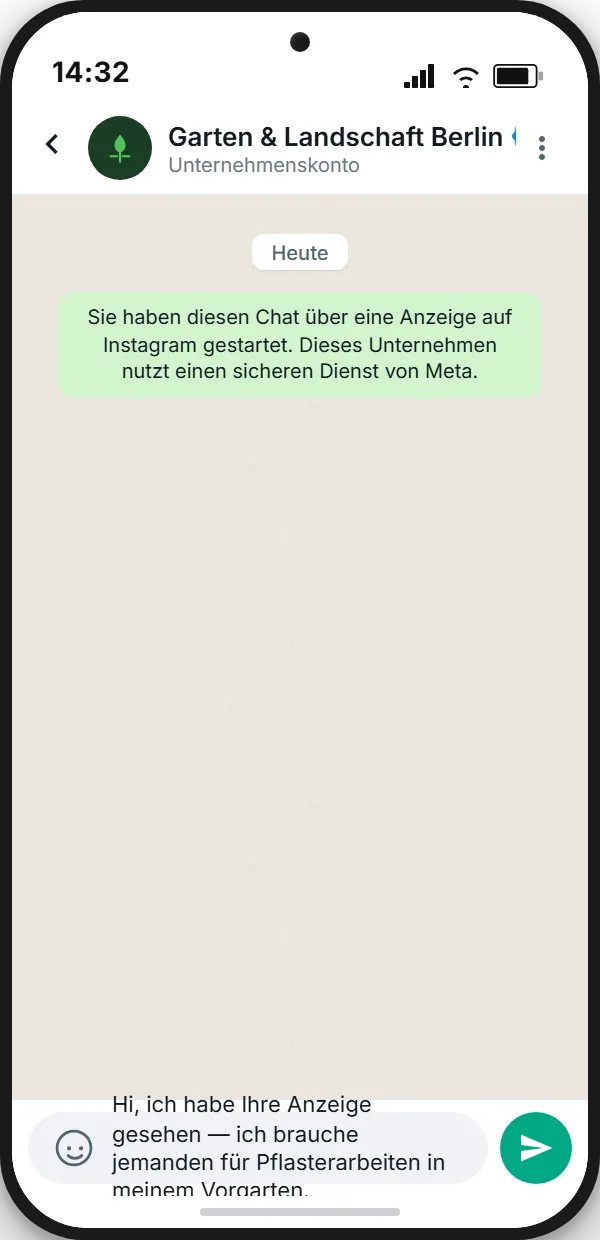
Contractor: "Hi, I saw your ad — I need someone for paving in my front yard."
Pharmacy: "Hi, do you have ibuprofen 600 in stock? I'd like to reserve."
Fashion: "Hi, I just saw the leather jacket from your ad — is it still available in S?"
B2B: "Hi, I'm interested in a quick demo — does a 15-minute slot work this week?"
Second 1 in the WhatsApp chat
As soon as the user taps send, the conversation begins. What they see in the first ten seconds decides whether they enter a real dialog. Three things should land in those first seconds:
- System note from Meta: "This business is using a secure service from Meta". Appears automatically — not under your control, but contextually relevant.
- Confirmation of their message: the user's own message appears on the left as read.
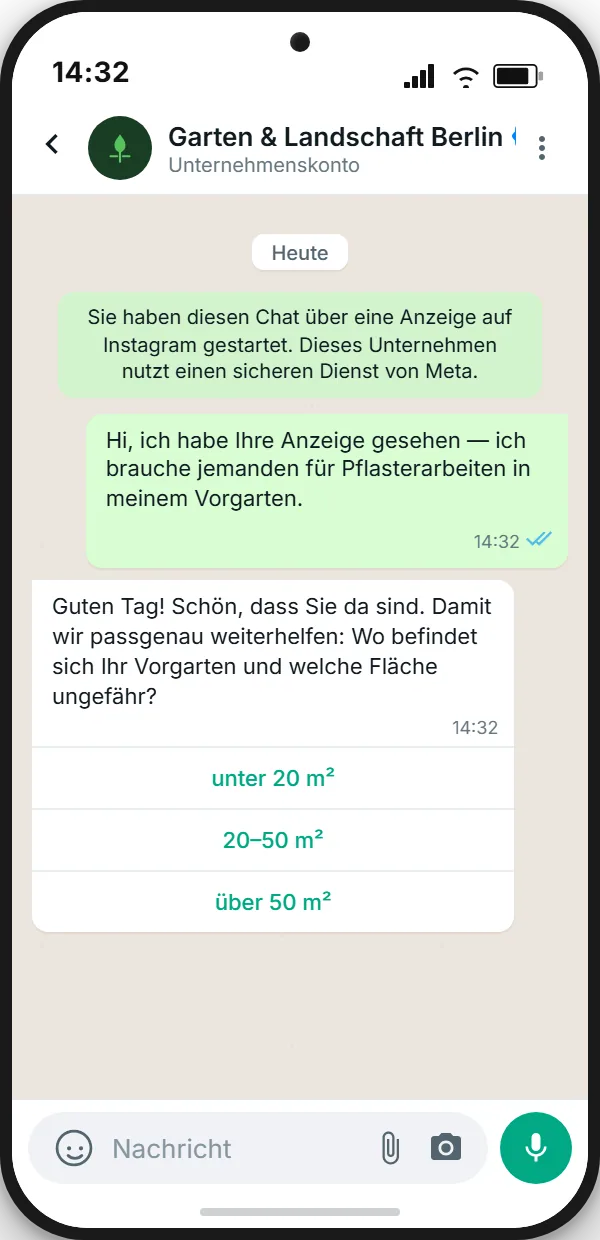
- Welcome reply from the business: within 1–3 seconds — confirming, qualifying, with concrete quick replies.
The welcome is the most important bot message you will ever write. It needs to do three things at once: confirm ("Yes, we're here"), qualify ("What exactly do you need?"), and set tone (no boilerplate bot — helpful and direct).
Flow trigger: from welcome to lead
Quick-reply buttons are the toolbox of bot logic. Every tap on a quick reply fires a flow trigger — a predefined path that walks the user through two to four follow-up questions and ends either in qualified handover or directly in an action (appointment, reservation, order).
Three principles for good flows:
- Maximum four steps to handover. Asking longer loses the user's patience. Two to three quick-reply rounds, then a teammate or a concrete offer.
- Escalation option at every step. Even though internally we call it "handover", the user should always have a visible "talk to a human" option. That dramatically reduces frustration.
- Compose answers dynamically. Tapping "more than 50 m²" gets a different follow-up than "under 20 m²". Branch — don't just list.
Three full industry flows
Local contractor — landscaping and paving
- Ad with a finished front-yard visual, headline "Pavers needed? Quote in 24 h.", CTA "Contact us on WhatsApp"
- Pre-filled: "Hi, I saw your ad — I need someone for paving in my front yard."
- Welcome bot: "Hi! To help you precisely: where is your front yard, and roughly what area are we talking about?" + quick replies
under 20 m²/20–50 m²/over 50 m² - Flow trigger for e.g. "20–50 m²": "Thanks! What's your ZIP?" (open answer)
- Handover to the field team with stored context (area + ZIP) → personal call the same day.
Pharmacy — reservation and consultation
- Ad with a pharmacy interior visual, headline "Rx ready, no waiting line."
- Pre-filled: "Hi, do you have ibuprofen 600 in stock? I'd like to reserve."
- Welcome bot: "Hi! Would you like to reserve, talk to the pharmacist, or arrange home delivery?" + quick replies
Reserve/Consult/Delivery - Flow trigger "Reserve": "Please send a photo of your prescription, or your name + date of birth, and we'll reserve it." (open)
- Handover to the pharmacy team → manual confirmation "Reserved under your name until 6 p.m."
E-commerce fashion — consultation with handover
- Ad with a leather-jacket product photo, headline "Leather jacket in S? We'll check now."
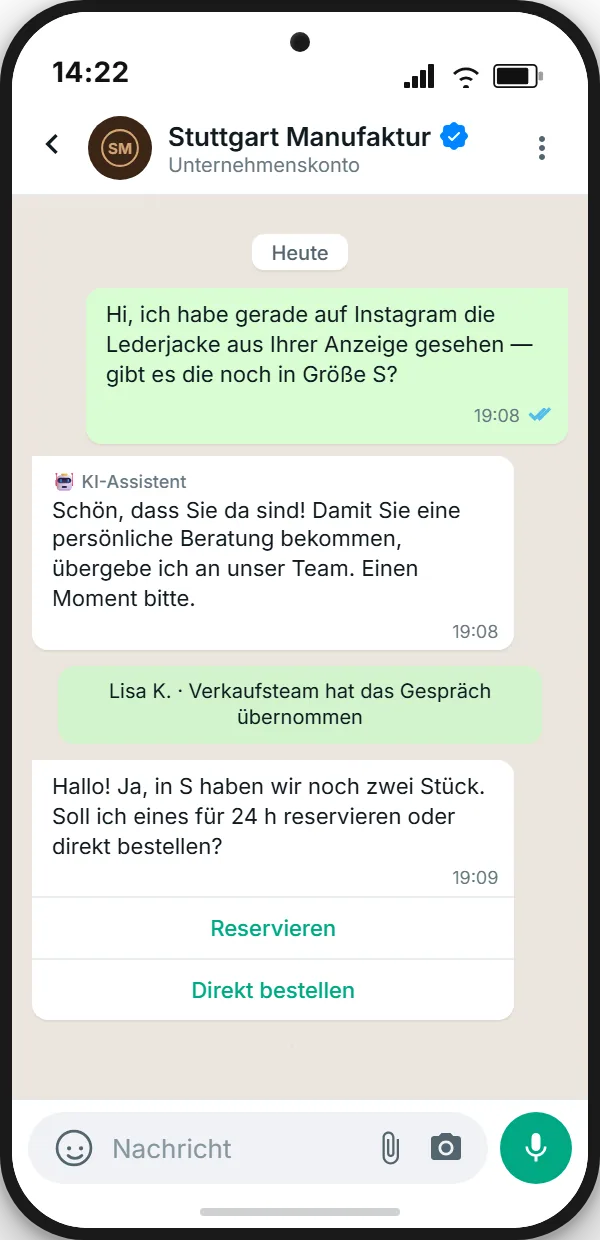
- Pre-filled: "Hi, I just saw the leather jacket from your ad — is it still available in S?"
- Welcome bot: "Glad you're here! For personal styling, I'm handing you over to our team. One moment please."
- Handover trigger: system note "Lisa K. · sales team has joined the conversation"
- Human reply: "Hi! Yes, we still have two in S. Want me to reserve one for 24 hours, or order it directly?" + quick replies
Reserve/Order
CTWA creative + flow with SendSeven
Welcome template, quick-reply logic, handover trigger — configurable via bot automation and REST API.
Common creative mistakes
- Empty pre-filled message. A significant share of users drop off in the first seconds — avoidable with two lines of text.
- Visual without instant benefit. Brand imagery without a product link performs worse than concrete use-case visuals.
- Headline longer than 40 characters. Meta auto-breaks; the hook lands behind the break.
- Generic CTA button. "Learn more" on an appointment ad creates unclear expectations.
- Welcome bot with long boilerplate. "Thank you for reaching out, we will respond as soon as possible" converts at 0%. Qualifying directly converts at 60%+.
- No quick replies in the welcome. Open questions like "How can we help?" yield fewer and messier responses than three quick-reply buttons.
- No handover trigger to a human. Bot-only conversations turn away 30–40% of users. By step 4 at the latest, a human should appear.
- Forgotten pre-click notice. A GDPR / UK GDPR risk, not strictly a creative problem — see spoke S2.
FAQ
Which image format is required for CTWA?
Meta supports several aspect ratios: 1:1 (square) for feed, 4:5 (portrait) for feed, 9:16 (full screen) for Stories and Reels. Recommendation: 4:5 for feed ads — uses maximum mobile screen real estate without looking unusual. Use 9:16 only if you actually run on Stories and Reels.
How long can a pre-filled message be?
Meta allows up to 999 characters, but anything beyond two lines feels scripted. One or two short sentences is the performance sweet spot.
Can I test multiple pre-filled variants at once?
Yes — through Meta's A/B test feature or via parallel ad sets with different ads. Important: keep everything else identical, vary only the pre-filled. Aim for at least 500 clicks per variant for statistical significance.
Which CTA button performs best?
There is no universal answer. In consultative contexts (contractors, health), "Contact us on WhatsApp" usually beats "Learn more" — it's clearer. For B2B demos, "Request appointment" can produce more concrete leads. Testing is always faster than guessing.
Do I need a welcome bot or is a manual first reply enough?
Manual replies only work if your team responds in under 60 seconds — including nights and weekends. Realistically: a welcome bot with quick replies + handover trigger to a human as needed. With SendSeven, both can be set up via bot automation and the REST API — with or without developer support depending on your technical setup.
How many quick-reply buttons make sense?
Maximum three. More confuses more than it helps. If you need more options, the bot can branch into a two-step navigation: the first question filters into a category, the second presents the options.
Further reading: