What is SendSeven's Unified Inbox?
SendSeven's Unified Inbox brings messages from all seven inbound channels into one team workspace, so small teams handle more volume with less effort. AI answers routine questions from your knowledge base. Features include automatic assignment, ticket management, AI reply suggestions, and cross-channel history. Plans from EUR 49/month; AI and knowledge base from EUR 79 (Professional).
All Your Customer Messages,
In One Place
WhatsApp, Email, Live Chat & more, one smart inbox. AI handles the routine. Your team handles the relationships.

Less Busywork, More Business
Your customers message you on WhatsApp, reply via email, and follow up on Instagram. Without a unified inbox, things fall through the cracks. Here's how SendSeven fixes that.
Every Message, One Screen
WhatsApp, Email, Instagram, Telegram, SMS, Live Chat, Messenger: all in one feed. Stop checking 5 apps every morning. Your customers' messages find you, not the other way around.
Small Team, Big Impact
Even with 2-3 people, you need to know who's handling what. Automatic assignment, internal notes, and handoff tools keep your team in sync, without meetings about meetings.
AI Handles the Routine
"Where's my order?" "What are your hours?" "How do I reset my password?" AI answers these automatically. Your team only steps in for the conversations that actually need a human touch.
Built-in live translation.
Type in English, your customers read in their language. 100+ languages with automatic language detection, right in the chat. AI hosted in the EU, included from Professional upward.
One inbox per location, brand, or team.
The North location sees only its own conversations, Sales only theirs. VIP customers land in the VIP inbox automatically. Per inbox: its own channels, automatic sorting, and clear access rights.
Snooze for later.
Not the right moment? Snooze a conversation and it leaves your open list until the time you pick: in an hour, tomorrow, next week. It comes back automatically, and instantly if the customer replies sooner.
Conversations
12 openOne Inbox for Every Channel
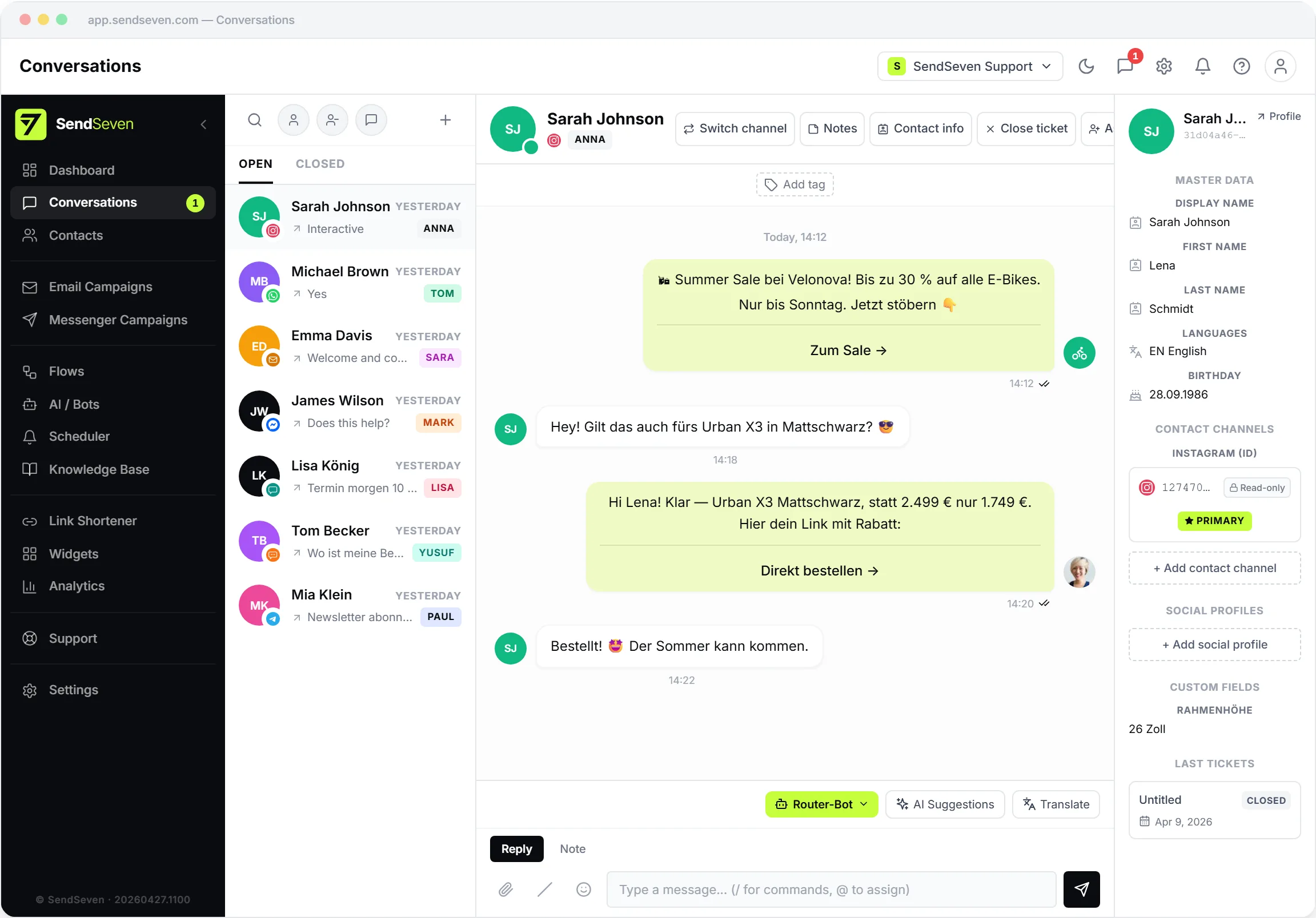
Your customers don't care which channel they use. They just want a fast answer. With SendSeven, every conversation lands in one place with full history, whether it started on WhatsApp, moved to email, or continued on Instagram.
- All channels in one inbox, no more tab-switching
- Full conversation history per contact, across every channel
- Customer switches from WhatsApp to Email? You see the full thread
- Rich media, read receipts, and channel-specific features all preserved
- WhatsApp voice calls and voice messages, answered right in the inbox (Beta)
 Anna
Anna

Nothing Falls Through the Cracks
When a customer has an issue, it becomes a ticket with a priority and a deadline. Your team sees what's urgent, what's waiting, and what's done, at a glance. And when a ticket is closed, SendSeven can automatically archive the whole conversation as a branded PDF or ZIP.
- Messages automatically become trackable tickets
- Priority labels so your team tackles urgent issues first
- See response times and team workload in real time
- Tags and labels for easy filtering and monthly reporting
Team Overview
2 OnlineAuto-Assign to the Right Person
Stop manually assigning every conversation. SendSeven routes messages to the right team member based on skills, availability, or simple round-robin. Nobody's overloaded, nothing waits.
- Round-robin splits the workload evenly across your team
- Skill-based routing sends billing questions to billing, tech to tech
- See who's online, who's busy, and who has capacity
- Hand off conversations with internal notes; the next person has full context
Hi Emily, I can see your order #4521 is delayed. I've escalated this to our logistics team and you'll receive an update within 2 hours.
Thank you for reaching out! Your order is currently in transit. Expected delivery has been updated to tomorrow.
I'm sorry about the delay. Let me check the current status of your shipment and get back to you shortly.
AI Replies in Seconds. Your Team Upsells.
When a customer asks a routine question, AI drafts the perfect answer from your knowledge base. Your team clicks to send and spends the saved time on conversations that drive revenue: upselling, cross-selling, and building relationships.
- AI suggests answers pulled from your FAQ and knowledge base
- One-click to send, or edit first. Your team stays in control
- Conversation summaries so you get context in 5 seconds, not 5 minutes
- More time for the conversations that grow your business
Sofia Navarro
¿Cuándo llegará mi pedido?
Your reply
Your order will be delivered tomorrow between 2 and 4 PM.
Customer receivesEspañol
Tu pedido llegará mañana entre las 14:00 y las 16:00.
Language? Sorted.
One agent handles customers in 100+ languages, without a second tool, without bilingual staff. Any incoming message is translated with one click. Your replies go out in the customer's language. All in one conversation, included from Professional upward.
- Translate any incoming message or email with one click
- Two-language reply box: you write in your language and see what the customer receives
- AI hosted in the EU, no model training on customer data
- Customer language detected automatically, including Arabic with right-to-left layout
Inboxes
By location, brand, or team
Custom Inboxes: Structure for growing teams.
With 5 people a shared inbox works fine. With 15 across three locations or several brands, it gets messy. Custom inboxes split your inbox into clear areas: North location, Sales, VIP, Workshop. You (owner or admin) set them up, and each teammate sees only their area. No extra cost, included from Professional upward.
- Each inbox has its own channels — and a channel can live in more than one inbox.
- Customers land in the right inbox automatically: anyone tagged "VIP" shows up in the VIP inbox.
- Sort by your own fields too — for example, every customer with a postal code starting in 80 goes to the Munich inbox.
- Decide per inbox who has access: the whole team, or just certain people.
- Owners and admins always see everything. Limits apply only to regular team members.
Up and Running In Minutes
No developers needed. No complex setup. Just three steps and you're live.
Connect Your Channels
Pick the channels your customers use. Our setup wizard walks you through each one. Most connect in under 2 minutes.
Invite Your Team
Add your team members with one click. Set up auto-assignment rules so conversations go to the right person automatically.
Turn On AI
Upload your FAQ or product docs. AI starts suggesting answers immediately and handles routine questions 24/7, even when you're offline.
Frequently Asked Questions
What is a unified inbox and why do I need one?
A unified inbox brings messages from all your channels (WhatsApp, Email, Instagram, Telegram, SMS, Messenger, and Live Chat) into one workspace. Without one, your team wastes hours switching between apps, customers repeat themselves, and messages get lost. With a unified inbox, every conversation has full history, your team knows who's handling what, and nothing falls through the cracks.
Which channels does SendSeven support?
SendSeven supports 7 bidirectional channels: WhatsApp Business API, Telegram, Instagram DM, Facebook Messenger, Email, SMS, and Live Chat (a widget you embed on your website). All channels are managed from the same inbox with full feature support including read receipts, media sharing, and interactive messages.
How does AI help my support team?
When a customer sends a message, SendSeven's AI searches your knowledge base and suggests the best answer. Your team can send it with one click or edit it first. For common questions like "What are your hours?" or "Where's my order?", AI can respond automatically, so your team only handles conversations that need a human touch. See our AI response suggestions use case for details.
Is SendSeven right for small teams (2-10 people)?
Absolutely. SendSeven is built for teams of all sizes. With automatic assignment, AI handling routine questions, and no per-user pricing limits, a team of 3 can handle the same message volume that used to require 5-6 people. There are no seat limits on any plan.
How long does setup take?
Most teams are up and running in under 15 minutes. Connecting a channel takes about 2 minutes with our guided wizard. Uploading your FAQ for AI suggestions takes another few minutes. No developers or technical setup needed.
What's the difference between omnichannel and multichannel?
Multichannel means you're present on multiple channels but they're disconnected. Customers have to repeat themselves when they switch. Omnichannel means all channels share context: conversation history, contact info, and notes follow the customer everywhere. SendSeven is omnichannel.
How much does it cost?
Plans start at Basic (€49/month) with a monthly message bundle and one transparent per-message rate after that, unlimited team members, and no per-seat fees at any tier. AI, chatbots, and the Flow Builder are included from Professional (€79/month) upward; Basic covers the shared inbox, contacts, campaigns, and analytics across every channel, without AI. Higher tiers (Scale, Enterprise) add a bigger message bundle and a lower per-message rate. Developers who only need the API can start with API Only from €9/channel/month. See pricing details.
How does live translation work in the chat?
Incoming messages and emails stay in their original language until you click Translate on a message. In chats it translates into your preferred language, in emails you choose the language. That way a customer message only reaches the AI when your team chooses to translate it. When a customer writes in a language you don't speak, the reply box opens a two-language view: you write in your language and see what the customer receives. You can also pick the reply language yourself from 100+ languages or keep automatic detection. Signatures, links and placeholders are never translated, and if a translation fails, nothing is sent. Translation runs on AI hosted in the EU, with no model training on your data. Included from Professional (€79/month) upward.
Can I split the inbox by location, brand, or department?
Yes. Custom Inboxes let admins divide the shared inbox into logical inboxes, e.g. "Augsburg location", "Sales", "VIP customers", or "Service". Per inbox you configure channels, tag rules, and custom-field filters (e.g. "postal code starts with 80" or "tag = VIP"). Plus two-layer access permissions: per inbox (all members or specific users) and per user (all inboxes or restricted). Owner and Admin always bypass restrictions. Custom Inboxes are included from Professional (€79/month) upward, at no extra cost on top of your plan.
Enterprise-Grade Security. No Enterprise Price.
Fully GDPR compliant. Your customer data stays protected under EU law.
All messages encrypted in transit and at rest. No exceptions.
Hosted on European servers. Your data is stored in the EU.
Role-based access control. Decide who sees what.
Your Customers Are Already Messaging You.
The question is: are you answering from one place, or five? Start free today, connect your first channel in 2 minutes. No credit card required.