Reduce No-Shows with SMS Reminders: 30-40% Fewer Missed Appointments
SendSeven Team, Editorial Team
Every missed appointment means lost revenue and a wasted slot. SMS reminders sent 24 hours before reduce no-shows by 30-40%. This guide shows the right timing, message wording, a worked cost calculation for a UK vet practice, and how to stay GDPR-compliant.
TL;DR
A missed appointment is a double loss: the slot goes to waste and the revenue disappears. For service businesses with dense appointment schedules, the financial impact adds up quickly. SMS reminders sent 24 hours before an appointment reduce no-shows by 30-40%, across clinics, garages, hair salons, and law firms. This guide explains the right timing, how to write an effective reminder in under 160 characters, and how to stay GDPR-compliant throughout. Includes a worked cost calculation for a UK veterinary practice.
The no-show problem and what it costs
Missed appointments are a silent revenue drain. A patient does not turn up for their GP appointment. A car stays in the driveway instead of arriving at the garage. A client does not appear for their consultation. The service provider is left with an empty slot that could have been filled, and there is no revenue to show for it.
Across service sectors, no-show rates without reminders typically run at 10-20%. For healthcare in particular, rates can reach 30% in busy urban practices. Every missed slot is a fixed cost with no income attached: the staff were there, the space was available, the time was reserved.
Research consistently shows that a single SMS reminder sent 24 hours before an appointment reduces no-show rates by 30-40%. For a practice with 25 appointments per day, that difference between 15% and 5% no-shows translates directly into recoverable revenue.
When to send: the 24-hour rule
Timing determines the impact of a reminder. Too early and the customer forgets again. Too late and they cannot reschedule even if they want to.
Three timing approaches work in practice, depending on the appointment type:
- 24 hours before. The standard for most appointment types. Long enough to allow rescheduling, short enough to be genuinely useful as a reminder. For a 10 a.m. Monday appointment, send at 10 a.m. Sunday (or Friday afternoon if Sunday sends feel intrusive).
- 2 hours before. Useful as a second reminder for high-value or complex appointments, or for services where preparation is required (vehicle to drop off, fasting before a procedure). On its own, 2 hours is too little time to reschedule, so pair it with the 24-hour reminder if both are relevant.
- Combined approach: 24h + 2h. Maximises the no-show reduction effect. Use for appointments worth more than €100 in revenue, or for services where a missed slot is expensive to fill at short notice.
Avoid sending after 9 p.m. or before 8 a.m. A reminder that wakes a customer at midnight does more harm than good. Platform-level scheduling on SendSeven lets you define the send window, so a reminder that would fall outside acceptable hours is automatically held until the next morning.
Message wording in 160 characters
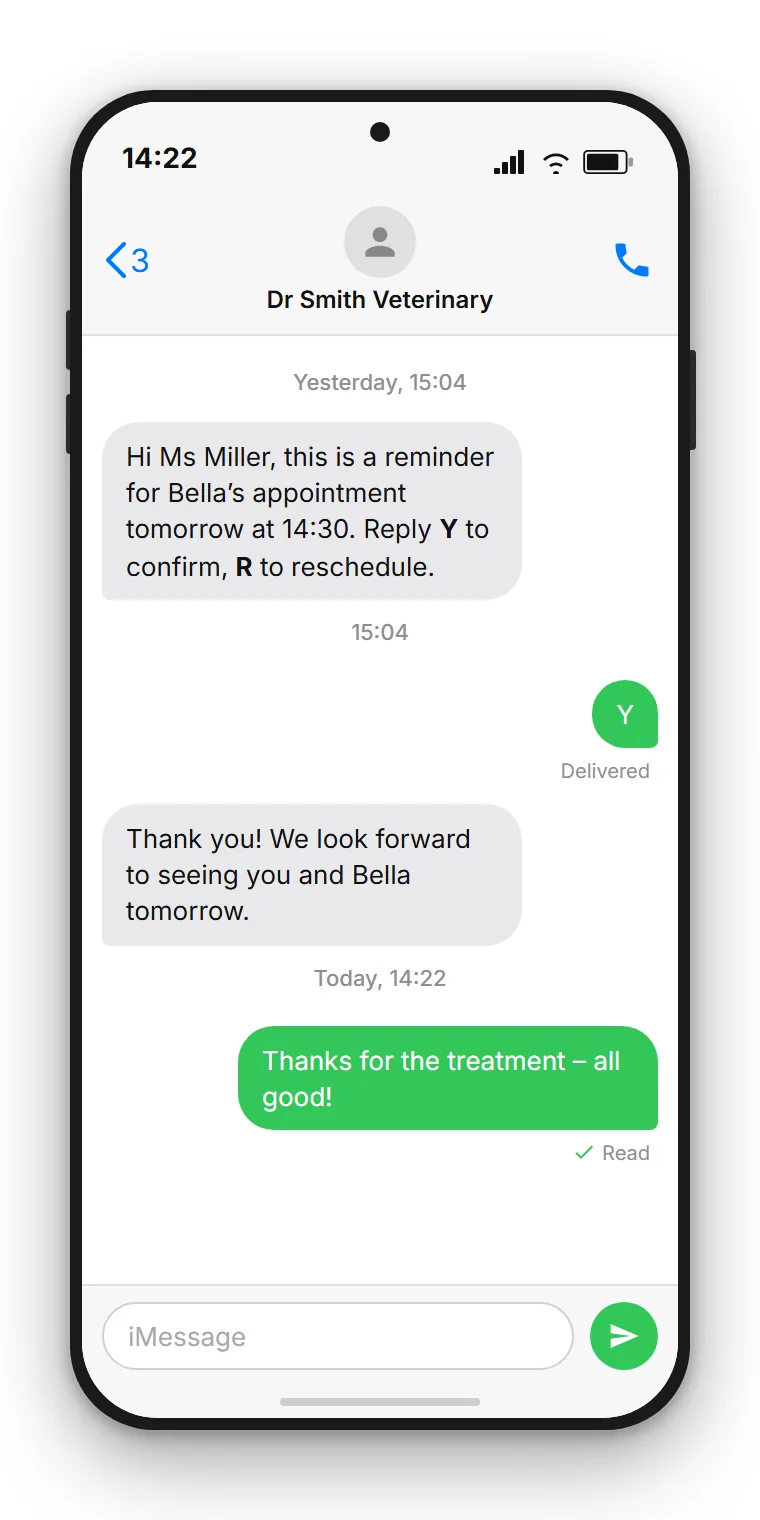
A reminder SMS should answer three questions: who is it from, what is the appointment, and what should the recipient do. Everything else is noise. The 160-character limit imposes clarity.
A template that works across most service businesses:
Reminder: Your appointment at [Practice Name] on [Day], [Date] at [Time]. Reply Y to confirm or R to reschedule. Dr. Smith — 12 High Street.
Key principles to apply when writing your template:
- Lead with the practice or business name. The recipient must instantly know who this is from. If you use a numeric short code rather than an alphanumeric sender ID, the name in the text becomes even more important.
- State the date and time explicitly. Do not rely on the customer having the appointment in their diary. Include both.
- One clear action. If you want confirmation, ask for it. If you want them to call to reschedule, give the number. One instruction, not three.
- Address. For practices or businesses where multiple locations exist, include the address or location name to prevent confusion.
Keep the message personal but efficient. A customer who receives a well-written reminder at a reasonable time will experience it as a service, not an intrusion.
Confirmation replies: Y and R
Adding a confirmation request to your reminder serves two purposes. First, it reduces no-shows further: a customer who actively confirms is significantly less likely to miss the appointment than one who simply receives a reminder. Second, a non-confirmation or a reschedule request creates an opportunity to fill the slot.
Standard reply keywords for English-language reminders:
- Y = confirm / yes, I'll be there
- R = reschedule / please call me
On SendSeven, replies to reminder SMS land in the central inbox alongside all other customer conversations. If a customer replies R, a staff member sees that in the inbox and can follow up immediately to rebook the slot. If a customer asks a question instead of replying Y or R, that also lands in the inbox and can be handled without missing the context.
This two-way capability is what separates a platform-based SMS reminder from a simple one-way notification. A customer who needs to reschedule can do so by reply rather than having to find the practice's phone number and call during business hours.
Cost calculation: vet practice example
An example makes the financial case concrete. Consider a veterinary practice in the UK with a standard appointment schedule:
| Parameter | Value |
|---|---|
| Appointments per day | 25 |
| Working days per month | 22 |
| Appointments per month | 550 |
| No-show rate without reminders | 15% = 83 missed |
| No-show rate with SMS reminders | 5% = 28 missed |
| Appointments saved per month | 55 |
| Average appointment value | €75 |
| Revenue recovered per month | €4,125 |
| SMS send cost (550 messages) | ~€50-75 |
| Net benefit per month | ~€4,050-4,075 |
The SMS cost is a rounding error against the revenue recovery. For any service business with appointment values above roughly €30 per slot, SMS reminders deliver a positive return within the first month.
Current SMS send rates are on the pricing page. SMS is billed per message sent plus the carrier fee for the destination network. No seat charges, no minimum term.
Industry examples
The reminder pattern adapts to virtually any service business. Some practical examples:
- GP and dental practices. Appointment density is high, rescheduling time is short. SMS reminders with Y/R confirmation allow the admin team to refill cancelled slots on the same day.
- Hair salons and beauty clinics. A stylist with one no-show per day loses 20+ hours per month of billable time. SMS reminders with a reply option to reschedule or cancel give enough notice to offer the slot to waiting clients.
- Garages and MOT centres. Vehicle servicing appointments are often booked weeks in advance. A reminder 24 hours before prompts customers to confirm and raises any prep questions (drop-off time, courtesy car).
- Solicitors and financial advisers. Consultation appointments are high-value. A missed initial consultation can mean losing a client entirely. The reminder also serves as a soft prompt to prepare documents.
- Car dealerships. Test drives and service bookings both benefit from reminders. For dealerships managing multiple locations, see the car dealership use case.
GDPR: what applies to reminder SMS
Appointment reminders are transactional messages tied to a service relationship. Under Art. 6(1)(b) GDPR (performance of a contract), sending a reminder to a customer who has booked an appointment is generally permissible without separate marketing consent. The appointment booking creates the legitimate basis for the reminder.
Three requirements still apply:
- Transparency. Your privacy notice and booking confirmation should make clear that an SMS reminder will be sent to the mobile number provided. No surprises.
- Data Processing Agreement. You need a DPA with your SMS provider under Art. 28 GDPR. SendSeven provides this as standard.
- Data minimisation. Include only the appointment details needed for the reminder. Do not include sensitive health or personal information that does not need to be there.
For healthcare providers, additional sector-specific requirements may apply under applicable law. Consult your data protection officer or legal adviser for healthcare-specific guidance.
How SendSeven sends appointment reminders
Appointment reminders on SendSeven are sent by your own booking system or CRM calling the SendSeven REST API at the appropriate time. Your system knows when appointments are scheduled and triggers the API call at the defined lead time, for example 24 hours in advance. There is no inbound-webhook auto-match trigger within SendSeven for SMS: the trigger is always a call from your own system to the Flow Runs API, or a manually started campaign.
The workflow:
- Your booking system or CRM sends a POST request to the SendSeven API with the appointment details and recipient mobile number.
- SendSeven sends the SMS reminder to the customer's phone.
- If the customer replies Y or R, the reply arrives in the SendSeven inbox.
- Your team can see the confirmation or reschedule request in the unified inbox and act on it.
- Optionally, a webhook from SendSeven can notify your booking system of the reply, so the appointment status updates automatically.
For practices using popular booking software, the API integration can often be set up in an afternoon. The webhook setup guide explains how to configure callbacks for reply events.
Frequently asked questions
How much do SMS appointment reminders reduce no-shows?
Research and real-world data consistently show a 30-40% reduction in no-show rates when SMS reminders are sent 24 hours before. Without reminders, no-show rates in service businesses typically run at 10-20%. With reminders, they fall to 5-10%.
What is the best time to send an appointment reminder?
24 hours before the appointment is the most effective timing for most business types. For high-value appointments, combining a 24-hour and a 2-hour reminder maximises the effect. Avoid sending outside normal hours: 8 a.m. to 9 p.m. is the recommended window.
Does the customer need to have a smartphone to receive SMS reminders?
No. SMS works on every mobile phone, including basic feature phones without internet connectivity. This is why SMS reminders reach a broader customer base than WhatsApp or app-based reminders.
Can customers reply to an SMS reminder to confirm or reschedule?
Yes. When you include a prompt like "Reply Y to confirm or R to reschedule," customer replies land in the SendSeven inbox. Staff can see and respond to reschedule requests in real time, without the customer needing to call during office hours.
Do appointment reminder SMS require special consent under GDPR?
Generally no. Reminders tied to a booked appointment fall under Art. 6(1)(b) GDPR (performance of a contract) and do not require separate marketing consent. You do need to inform the customer at booking that a reminder will be sent, and you need a Data Processing Agreement with your SMS provider.
What information should an SMS appointment reminder include?
Include: your practice or business name, the date and time of the appointment, and one clear action (confirm or reschedule). Optionally include the location or address if you have multiple sites. Keep the message to 160 characters.
What does SMS reminder sending cost?
SMS is billed per message sent plus the carrier fee for the destination network. For a practice sending 500 reminders per month, the typical monthly cost is €50-100. This is a fraction of the revenue recovered from reduced no-shows.
Which sectors benefit most from SMS appointment reminders?
Any service business with a dense appointment schedule and a significant per-appointment revenue value: GP and dental practices, veterinary practices, hair salons, garages, solicitors, financial advisers, and physiotherapy clinics all see strong ROI from SMS reminders.
Conclusion
SMS appointment reminders are one of the highest-ROI actions a service business can take. The investment is minimal. The return, in recovered appointment revenue, is immediate and measurable.
The setup is straightforward: define your message template, configure your booking system to call the SendSeven API 24 hours before each appointment, and watch the no-show rate fall. Replies from customers land in the same inbox as all other messages, so the team can handle reschedule requests without switching tools.
Related articles: