Instagram Comment-to-DM for online shops: discount codes, product links and restock alerts
SendSeven Team, Editorial Team
A buying signal lasts about three seconds before the person scrolls on. This article shows how online shops capture that window: discount codes via DM, price enquiries handled privately, restock alert sign-ups collected and outfit links sent directly from a post. All in the visual Flow Builder — no coding and no shop system integration required.
TL;DR
An Instagram comment is the strongest public signal a potential customer can give an online shop. Miss that moment and you lose them. Comment-to-DM closes exactly that gap: the trigger Instagram comment received starts a flow in the Flow Builder that sends a private direct message with a discount code, a product link or a sign-up for restock alerts within seconds. You build this without coding, without a Shopify integration and without any automatic coupon generation — you add the code and the link yourself. This article presents four concrete flows for shops. Meta rules and privacy compliance are touched on briefly here; the full depth is in the pillar article.
Why speed decides for shops
Imagine a customer sees your new autumn outfit on Instagram on a Tuesday evening. She writes "Where can I buy this?" in the comments and scrolls on. Five minutes later she is on another page. The next morning your team replies manually — but the person has moved on.
That window is not a cliche. In a social feed, dozens of posts compete for attention. Anyone who leaves a comment signals genuine interest — in that moment. Not tomorrow, not after lunch. Right now.
For an online shop that means: the manual reply is almost always too late. Comment-to-DM moves the first response from the team into automation. The person receives the DM before they close the app. The conversation, the link and the code arrive where they belong: in a private dialogue you can continue at your own pace.
For context: providers report noticeably higher response rates compared to cold messages, because the person initiated the contact themselves. Independent benchmarks on this are thin. What is solid: the buying signal is real, and an immediate response capitalises on it. What happens after that depends on your offer.
Flow 1: discount code via DM
The most classic Comment-to-DM flow for shops: you post a piece of content that invites people to comment a keyword, and in return you deliver a personal discount code via DM. The code works simultaneously as an opt-in incentive: anyone who wants it actively does something to get it.
A real-world example: a London fashion boutique posts a new dress and writes: "Comment SALE and we'll send you 15% off your next purchase — today until midnight." Anyone who comments SALE automatically receives a DM with the code LONDON15 and a direct link to the product page for the dress.
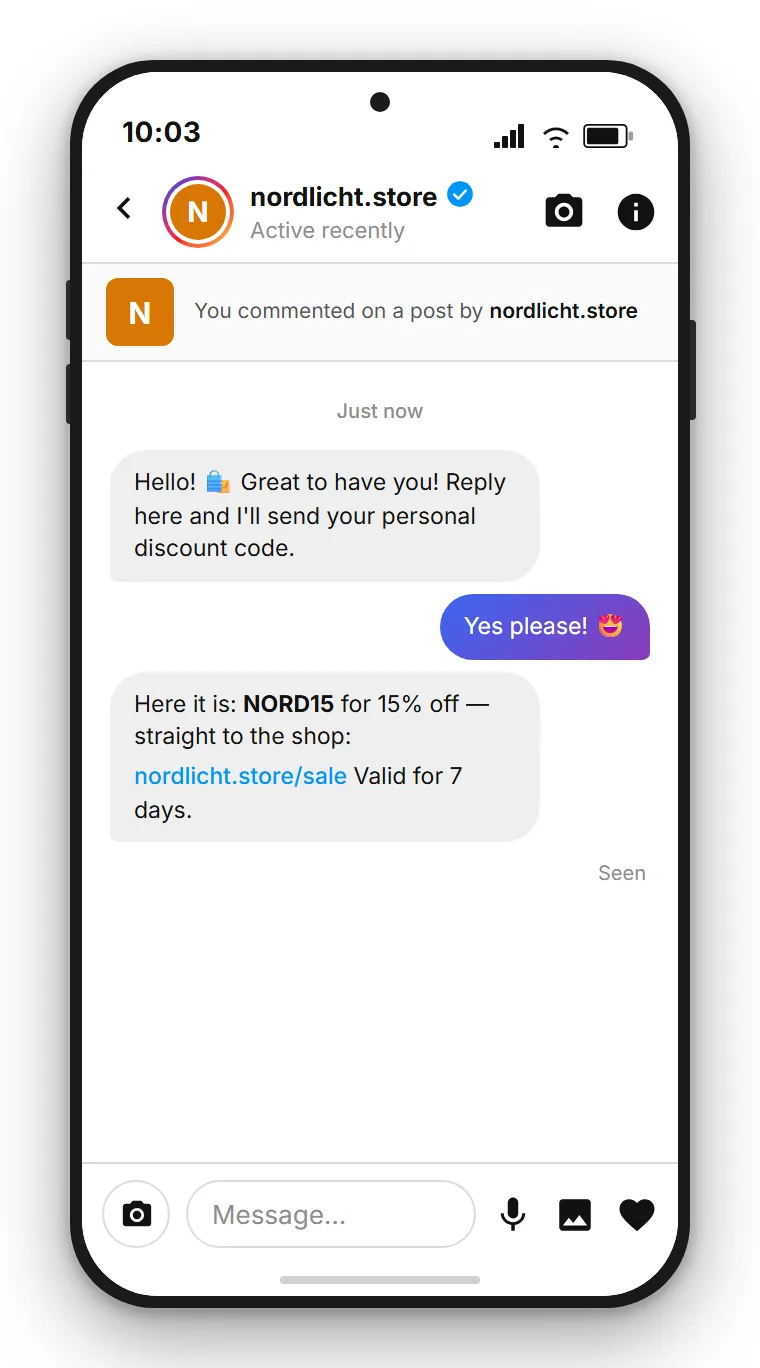
How to build the flow: the trigger is Instagram comment received. A condition checks whether the word SALE appears in the comment. If it matches, the send building block dispatches the first DM as plain text: "Hi, glad you're here. To receive your code, can you quickly reply with Yes?" The person replies. Only then comes the second DM with the code and the product link. This reply-first split is the standard, for two reasons. The first automated DM runs through Meta's private reply endpoint, which rejects attachments, and it is the only automated reply you get per comment. And you only get this one automated reply per comment: the reply is what opens free conversation for everything that follows. A tag building block labels the contact with the campaign name, for example "Sale June". That lets you see later how many contacts each post generated.
One important clarification: SendSeven does not generate coupon codes from your shop system and does not read inventory data. You enter the code LONDON15 yourself into the send building block. That is a single uniform code for all participants — not a dynamically generated individual code per person. If you need individual codes, you would need to create them in advance and distribute them manually.
| Step | Building block | What happens |
|---|---|---|
| 1 | Trigger | Instagram comment received starts the flow |
| 2 | Condition | Checks whether the keyword (e.g. SALE) appears in the comment |
| 3 | Send | First DM is plain text and invites a reply, e.g. "reply Yes" |
| 4 | Send | Second DM after the reply: code as text, product link as a link |
| 5 | Tag | Labels the contact with the campaign name for later reporting |
Flow 2: handling price and product enquiries privately
Not every shop shows the price directly in the post. There are reasons for this: when the price appears publicly in the comment thread, the conversation opener is gone. When it comes privately via DM, a dialogue begins.
The mechanics are simple. You post a product without a price, and the caption reads: "Comment INFO and we'll send you the price and availability directly to your DM." Anyone who comments INFO gets the answer immediately, privately, without the price being visible to everyone in the public comment thread.
That solves a real problem. Public prices in comment threads often attract unwanted comparisons or price discussions. In the DM you can also address the specific situation: which size is the person looking for? Is there a colour variant that suits better? That dialogue would barely be possible under the post.
Build the flow like this: trigger Instagram comment received, condition on the keyword INFO, first DM as plain text asking "Which size are you interested in?" (keep it short: you only get one automated reply per comment). After the reply, the second DM follows with price, availability and the direct product link. A tag labels the contact as a product enquiry.
The same honest note applies here: you enter the price and the link yourself. SendSeven does not read live availability from your inventory system. When an item goes out of stock, you update the flow manually or temporarily pause it.
Flow 3: restock alerts via WhatsApp or email
Sold-out products generate frustration — and they generate comments: "When will this be back?", "Do you still have this?", "Please restock." Exactly those comments can be intercepted.
The flow: you post a piece of content about a sold-out or soon-to-return product and write: "Comment ALERT and we'll let you know as soon as it's back in stock." Anyone who comments ALERT receives an immediate DM with a link button: "Thanks for your interest. Tap the button to get a restock alert on WhatsApp or by email." The button leads to the sign-up, where the person opts in to the alert.
So much for the automation. The second step, the alert when the product is actually back, is started by you. SendSeven has no stock or Shopify sync, so nothing detects automatically that an item is available again. When it is back, you send a WhatsApp campaign (template-based, opt-in required) or an email campaign to everyone who signed up. Anyone who has written to you in the Instagram DM within the last 24 hours can also get a direct reply there.
What customers appreciate: they are not hit with a generic newsletter but receive a message about exactly the item they signed up for. That is direct marketing with context.
For the direct replies inside the 24-hour window you use the unified inbox, and the tags the flow applied automatically show you who asked about which item.
Flow 4: shop-the-look, all items via DM
Instagram is an inspiration channel. An outfit, a home interior, a kitchen, a desk setup: the feed lives on images that immediately make you want to know where everything is from. The problem: Instagram does not allow clicking through to multiple products within a regular post, and links get lost in comment threads.
Comment-to-DM handles this cleanly. You post the outfit photo and write: "Comment LOOK and we'll send you all the links to your DM." Anyone who comments LOOK receives a DM with links to every product visible in the photo: top, trousers, shoes, bag.
A concrete example: a UK fashion boutique posts an autumn look image. Under the image it reads "Comment LOOK for all the links". The automated DM contains four lines — one link per item, with a short product name before each. The person taps the links and lands directly on each product page. No detour through the bio, no "link in bio", no searching through the shop.
Build the flow like this: trigger Instagram comment received, condition on LOOK, first DM as plain text such as "One moment, putting the links together — just reply Send". After the reply comes the second DM with all product links as simple text with embedded links. A tag "Look October" records who was interested in which outfit.
The same honest caveat applies: you enter the links yourself. SendSeven does not read product data from your shop. When the outfit changes, you update the links in the send building block. No technical knowledge required — just the current product URLs.
| Flow | Post call-to-action | Keyword | DM content | Goal |
|---|---|---|---|---|
| Discount code | "Comment SALE for 15% off" | SALE | Code as text, product link | Immediate purchase incentive |
| Price private | "Comment INFO for price and availability" | INFO | Price, variant, product link | Dialogue, no public price pressure |
| Restock alert | "Comment ALERT for a restock notification" | ALERT | Sign-up button for WhatsApp or email alerts | Opt-in list for the restock campaign |
| Shop-the-look | "Comment LOOK for all the links" | LOOK | All product URLs for the outfit | Frictionless purchase without bio link |
Comment-to-DM without any coding
SendSeven brings Instagram into a unified inbox and includes the visual Flow Builder. Incoming messages are always free; pricing starts from €79/month on the Professional plan, which includes the Flow Builder.
View pricingTurning buyers into a reachable list
Every comment that triggers one of these flows is more than a short-term transaction. It is a contact who actively signalled interest. That interest lasts longer than a feed scroll.
With a tag you know later who was interested in which campaign or product. That is the foundation for targeted follow-up: a message when a similar product arrives, a check on whether the code was used, a note about the new autumn drop. Instagram only allows DMs within 24 hours of the person's last message, so later follow-ups go out by WhatsApp or email once the person has opted in there.
A brief look at the privacy angle. For the directly requested reply — code, price or product link — you do not need separate consent. The person initiated contact themselves. If you want to message those contacts again for general marketing purposes, you need a separate legal basis under applicable data protection law. The cleanest approach is to ask actively for consent in the second DM, for example with a quick-reply "Yes, keep me posted". SendSeven processes all data within the EU. The detailed privacy breakdown is in the pillar article.
And for anyone thinking about running a giveaway under the Instagram post — because giveaways naturally generate lots of comments — the specific points to watch out for legally are explained in the spoke article Instagram giveaway with Comment-to-DM.
Common mistakes and how to avoid them
The flows come together quickly. A few mistakes still recur regularly.
Mistake 1: trying to send the code and link in the first DM. The first automated DM is short by design — it runs through Meta's private reply endpoint, which rejects attachments. And even a plain text code sent straight away works against you: you only get this one automated reply per comment, so if the person does not respond, the conversation is over and you cannot follow up. The standard: the first DM is a short text prompt that invites a reply; the code and link come after that. This opens the message window and lets you continue if there are questions or further interest.
Mistake 2: responding to every comment, including emojis. Without a condition on a keyword, even a heart emoji under the post gets a discount code sent to it. That feels intrusive. Better: state the keyword clearly in the post and only respond to that.
Mistake 3: expired codes or dead links. A discount code that has been invalid for a week and a product link pointing to a "Not found" page damage trust more than no automation at all. Check regularly that the content in the flow is still valid.
Mistake 4: not including a tag building block. Leaving out the tag means giving up segmentation later. Without a tag you do not know which contacts came through which post, and you cannot follow up with them specifically.
Mistake 5: expecting a shop integration that is not there. SendSeven does not read live data from Shopify or any other system. Codes and links are entered by you. Knowing this lets you plan flows realistically without surprises.
Follow SendSeven on Instagram
Practical tips on messaging, automation and customer communication for businesses. Follow us at @sendsevenapp.
@sendsevenapp on InstagramTwo ways: send the discount code straight away or after a reply
Since August 2026 the automated Instagram direct message can carry buttons as well as text. The discount code can therefore sit in the first message already, next to a button that leads straight into the shop.
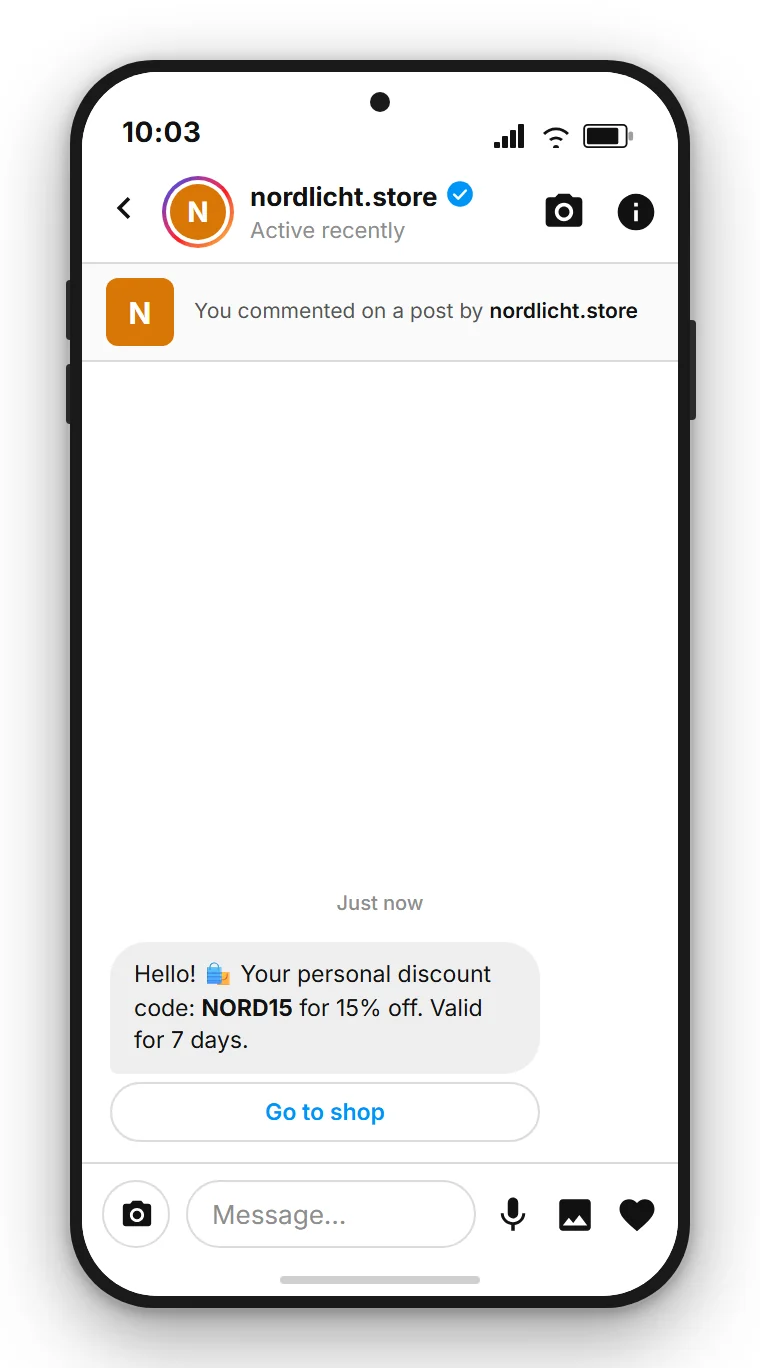
Anyone ready to buy is one step closer to the basket. The price: without a reply the 24-hour window stays shut, so you cannot remind anyone before the code expires, because exactly one automated message is allowed per comment. With time-limited codes that reminder brings in a noticeable share of the orders. For a code with a deadline the route via the reply usually earns more, for an evergreen shop link the button wins.
Further reading
This article presents the four shop flows. For the technical build, Meta rules and the full privacy treatment, continue here:
- Comment-to-DM: the complete guide — use cases, Meta rules and privacy in overview
- Flow Builder step by step: how to build the flow concretely
- Instagram giveaway with Comment-to-DM: reach plus reachable contacts
More about the channel and how to connect it is on the Instagram channel page.
Frequently asked questions
Can I send a discount code via Instagram DM?
Yes. You enter the code as text in the send building block. The person receives it as plain text in the direct message. Important: SendSeven does not generate codes automatically from your shop system. You enter a code you define yourself, and all participants in a campaign receive the same code.
Why does the code come after a reply and not in the first DM?
Because the first automated DM is short by design. It runs through Meta's private reply endpoint, which rejects attachments, so the standard is a short text prompt that invites a reply, with the code in the second message. There is also a practical reason: you only get this one automated reply per comment. If the person does not respond and you have already delivered everything, you cannot send anything further. Inviting a reply first opens the full message window for the continued conversation.
Can SendSeven read my shop inventory and send restock messages automatically?
No. SendSeven has no stock sync and no native connection to shop systems like Shopify or WooCommerce, so nothing detects automatically that an item is back. You start the alert yourself: as a WhatsApp campaign (template-based, opt-in required) or an email campaign to everyone who signed up via the button in the DM. Anyone still inside the 24-hour window can also get a direct reply in the Instagram DM.
Can I send multiple product links in one DM?
Yes. In the send building block you can include as many links as you need as text. For the shop-the-look flow, simply enter all the product URLs for the outfit — one per line or with a short product name before each. Instagram DMs support links as clickable elements.
Do I need a special shop integration in SendSeven?
No. The flow runs entirely through the visual Flow Builder. You connect building blocks, enter texts and links, and activate the flow. No coding knowledge or shop integration required.
Can I use contacts from the Comment-to-DM flow for later marketing messages?
For the directly requested reply — code or product link — you do not need separate consent. For later marketing messages such as a newsletter or a campaign, you need a separate legal basis under applicable data protection law. The cleanest approach is to ask actively for consent in the DM. SendSeven processes all data within the EU.
Which Instagram account do I need for Comment-to-DM?
An Instagram Business or Creator account connected as a channel in SendSeven. A personal profile cannot be connected through the official Meta API.
What does using Instagram in SendSeven cost?
The Instagram channel is included in every plan, starting from €49/month on the Basic plan. The Flow Builder used to build these flows needs the Professional plan, from €79/month. Incoming messages are always free. Full details and other plans are on the pricing page.