Turn Instagram Comments into Direct Messages Automatically with the Flow Builder
SendSeven Team, Editorial Team
A comment under a post is public, but the real conversation is better held in private. This article shows step by step how to build a flow in the visual Flow Builder that turns an Instagram comment into a direct message automatically: trigger, keyword branch, automatic DM, tag and handover to the team.
TL;DR
A public Instagram comment can be turned into a private direct message automatically. In SendSeven you build this in the visual Flow Builder: the trigger Instagram comment received starts a flow that optionally branches on a keyword, replies automatically by direct message, tags the contact and, when needed, hands the conversation to a team member. You connect existing building blocks rather than writing code. A short comment becomes a structured dialogue, without anyone tidying up by hand. The requirement is an Instagram Business or Creator account that is connected as a channel.
What comment-to-DM on Instagram means
Comment-to-DM describes a simple process: someone comments publicly under one of your posts, and you reply privately by direct message. The comment stays visible, but the actual conversation happens where it belongs, in the DM. It is exactly this move from public to private that can be automated.
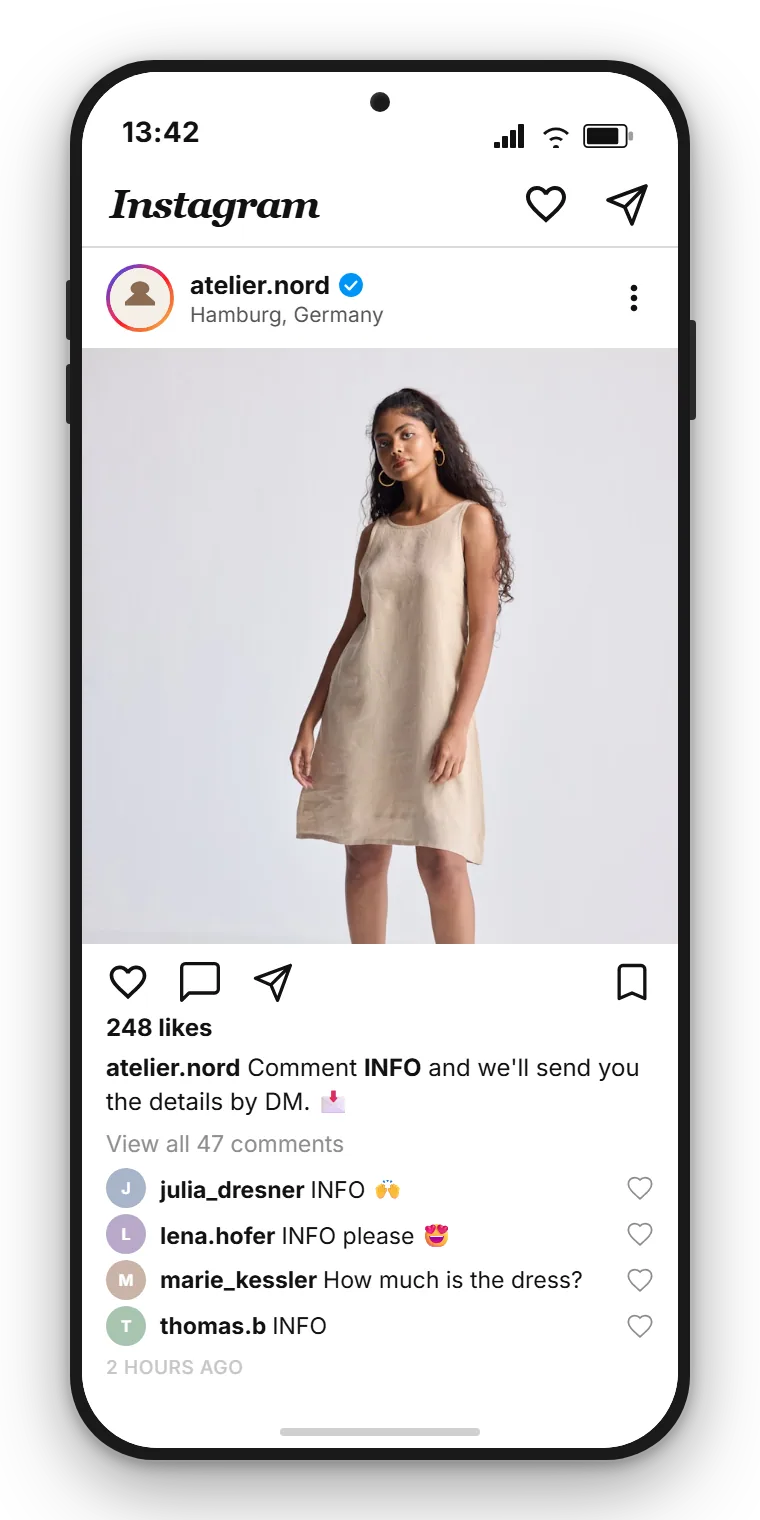
Picture an ordinary Monday. You post a new offer, and comments pile up underneath like "Price?", "Is this still available?" or "More info please". Each of those comments is a buying signal. If you now read every one, click into the profile view and type a direct message by hand, you lose time and often the moment. By the time your answer arrives, the person has long since scrolled on.
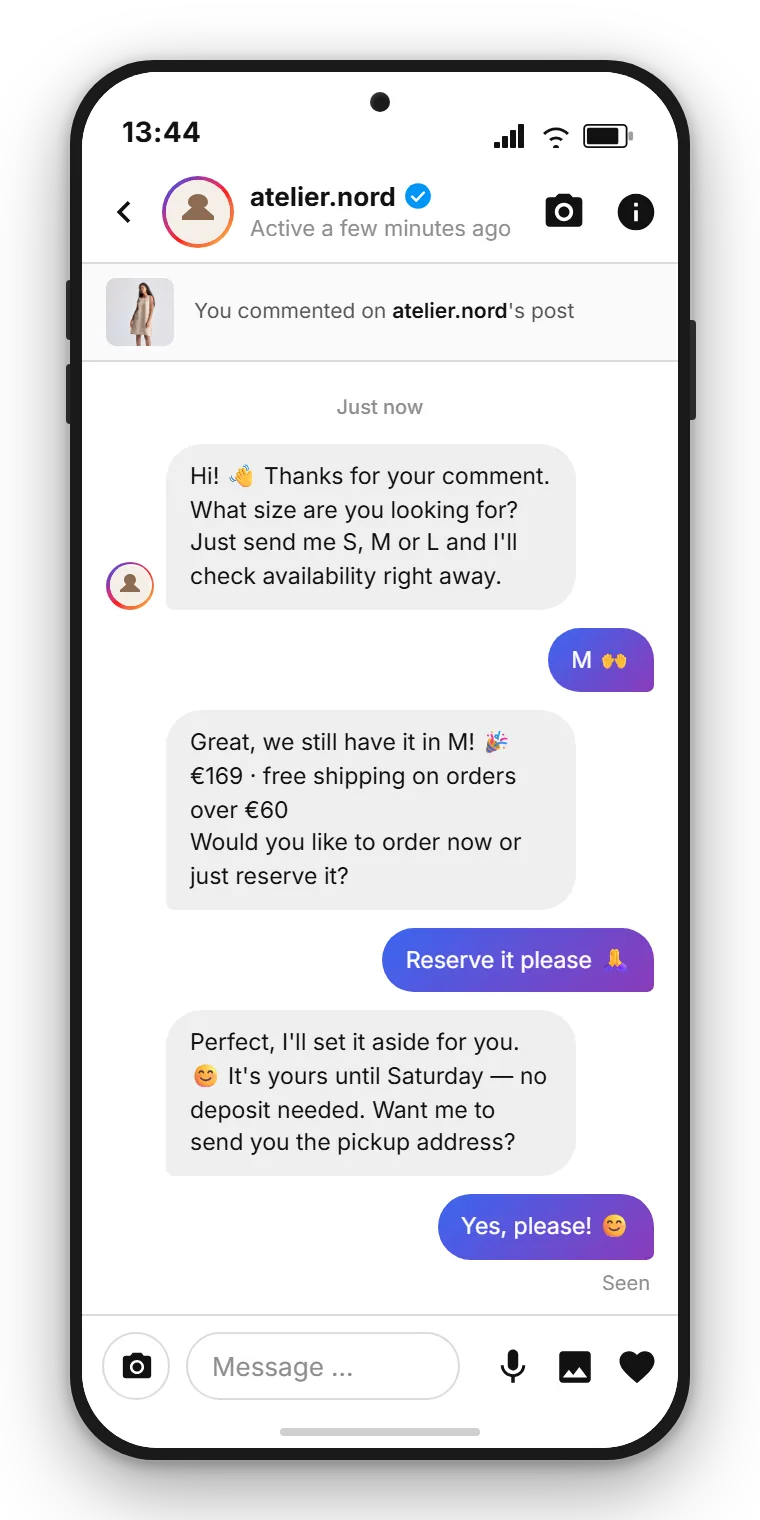
With an automated flow the opposite happens. The comment instantly triggers a prepared direct message. The person gets a personal reaction in their inbox within seconds, and you continue the conversation at your own pace instead of chatting under the post. A fleeting comment becomes a real contact.
To be honest about it: comment-to-DM is no promise that every comment will buy. It is a tool that opens a private door for the right person at the right time. What happens next is decided by your offer and your team.
Why the path from comment to DM pays off
Comments and direct messages serve different jobs. The comment is public and creates visibility, the direct message is private and creates closeness. Connecting the two lets you use the strength of each.
A public comment is social proof. Others see that your post generates reactions. A private conversation, by contrast, is where you get specific: prices, availability, an appointment, an individual question. Those details do not belong in a public comment section where everyone reads along and the next comment pushes your answer down again.
The second advantage is speed. An automatic direct message arrives instantly, regardless of whether someone on your team is online right now. In the evening, at the weekend or during a promotion with many simultaneous reactions, that response time decides whether interest turns into a conversation.
The third advantage is order. As soon as the conversation sits as a direct message in your shared inbox, it has a clear place. You can assign it to a team member, tag it and find it again later. A comment under post number 47 from two weeks ago, by contrast, is practically lost.
| Attribute | Public comment | Private direct message |
|---|---|---|
| Visibility | Visible to all, social proof | Only for the person, personal |
| Fit for details | Poor, prices and appointments are public | Good, specific advice is possible |
| Findable later | Sinks into the comment stream | Stays as a conversation in the inbox |
| Automatic reaction | Trigger for a flow | Prepared reply within seconds |
What the Flow Builder is and how it works
The Flow Builder in SendSeven is a visual editor for automated flows. You write no code. Instead, you work with ready-made building blocks that you select, connect and configure. Each block handles one clearly defined task, and the connections between the blocks determine the order in which everything runs.
A flow always begins with a trigger. The trigger is the event that starts the flow. After it come actions and decisions. For the path from comment to DM, these blocks matter most:
| Building block | Task |
|---|---|
| Trigger: Instagram comment received | Starts the flow as soon as someone comments under your post |
| Branch | Checks a condition, such as whether a keyword appears in the comment, and splits the path |
| Send | Sends the automatic direct message to the person |
| Tag | Tags the contact, for example with the promotion or the interest |
| Handover | Passes the conversation to a team member when a person should take over |
The key point: Instagram comment received is a real trigger type in the Flow Builder. So you do not have to improvise a workaround. You select the trigger, attach the blocks you want and switch the flow live. From then on it runs automatically for every matching comment.
Step by step: building the comment flow
Now let us get specific. Here is how to build the flow that turns a comment into a direct message. The order of the blocks is always the same, the content you adapt to your promotion.
Step 1: Set the trigger. You create a new flow and choose Instagram comment received as the trigger. From now on the flow reacts to comments under your posts. You have set the entry point, everything else attaches to it.
Step 2: Optionally branch on a keyword. If you only want to react to certain comments, attach a branch. It checks whether a keyword appears in the comment, for example "price", "info" or an action word you named in the post. That is how you tell a clear buying signal from a plain emoji. More on this in the next section.
Step 3: Send the automatic direct message. Now add a send block. Here you write the direct message that every matching comment triggers. Keep it short, friendly and with a clear next question. A good example: "Hi, thanks for your comment. Could you tell me which size you are after? Then I'll send you the availability straight away." That opens a conversation instead of just handing over information.
Step 4: Add a tag. With a tag block you automatically tag the contact, for example with the name of the promotion. It sounds minor but it pays off: later you will know exactly which contacts came through which post, and you can follow up with them in a targeted way.
Step 5: Hand over to the team when needed. If a person should take over, attach a handover. The conversation then lands with a team member in the shared inbox, who continues it personally. Whether you hand over immediately or only after the flow has asked a first question is up to you.
That was the complete flow. Five blocks, cleanly connected, and you have turned every matching comment into an automatic entry into a private conversation. You will find an illustrated walkthrough for connecting your account in the Instagram DM setup guide.
Comment-to-DM without coding
SendSeven brings Instagram into a shared inbox and includes the visual Flow Builder. Incoming messages are always free, and you start from EUR 79 per month on the Professional plan, which includes the Flow Builder.
View pricingBranching on a keyword: two paths out of one comment
The branch is the block that makes a simple flow smart. Instead of reacting to every comment the same way, it decides which path a contact takes based on a condition.
The most common example is checking for a keyword. You call in a post for people to comment a specific word, for example "List", to receive an overview. If someone comments exactly that word, the flow sends the matching direct message with the list. If someone comments something else, a second path can take over, for example a friendly general reply or no automatic message at all.
Here is how that looks in practice. A local business posts a new product and writes: "Comment INFO and we'll send you the details by DM." The branch checks for the word "INFO". If it matches, the path runs through the send block with the product details and a tag for the promotion. If it does not match, the comment simply stays a comment, without anyone being bothered with an irrelevant message.
The advantage of this split is cleanliness. You automate exactly the reaction that fits the signal, and you avoid every "Nice!" or heart emoji triggering a sales message. Branch cleanly here and you come across as attentive rather than pushy.
The automation of the direct messages themselves, that is, quick replies and the AI assistant in the running conversation, we cover in the article Automate Instagram DM with an AI assistant and a keyword bot. The comment flow brings people into the DM, and from there the dialogue automation takes over.
When handing over to a team member makes sense
Automation should take routine off your plate, not replace people. That is exactly why a handover belongs in every good flow. The only question is: when do you hand over?
A proven rule: automation handles the opening, the person takes over as soon as it gets individual. The flow greets the person, asks a first question and assigns a tag. If the person replies with a specific enquiry that needs advice, the flow hands over to a team member. They get the conversation with all its context in the shared inbox and continue it personally.
Alternatively, you can also let routine cases run to the end automatically. If the person only wants a list or a standard piece of information, the flow delivers it and needs no handover at all. Only when a follow-up question comes in that the AI assistant cannot answer reliably does it bring in a person. How that AI assistant works is covered on the AI bots page.
What matters is that the handover feels seamless. The customer should not notice where the automation ends and the person begins. That works when the whole conversation lives in one interface and the team member sees the prior history. The shared inbox use case shows what such a cross-channel inbox looks like in practice.
Follow SendSeven on Instagram
Practical tips on messaging, automation and customer communication for small businesses. Follow us at @sendsevenapp.
@sendsevenapp on InstagramCommon mistakes and how to avoid them
The path from comment to DM is quick to set up. A few stumbling blocks still come back regularly. Knowing them lets you build the flow cleanly from the start.
Mistake 1: reacting to every comment the same way. Without a branch, every comment triggers the same message, even a simple emoji. That quickly feels mechanical. Better: branch on a clear keyword and only send the sales message when there is a genuine signal.
Mistake 2: the direct message sounds like a machine. A stiff canned message gives away instantly that a machine is writing. Phrase the message the way your team would answer in person, with a real question at the end that invites a reply.
Mistake 3: not assigning a tag. Leave out the tag and you waste the later analysis. With one tag per promotion you can see which post brought how many contacts, and you can follow up with those contacts in a targeted way.
Mistake 4: no handover planned. If the flow only sends but never hands over to a person, advice-heavy enquiries run into a dead end. Always build in a point where a team member takes over as soon as it gets individual.
Mistake 5: overlooking the account type. The flow only works if your account is an Instagram Business or Creator account connected as a channel. A personal profile cannot be connected through Meta's official interface.
Read on: related articles
This article shows the path from comment to direct message. How to set up Instagram overall, automate the DMs themselves and combine it with WhatsApp, you can read here:
- Instagram for business 2026: the guide to DM, marketing and service
- Automate Instagram DM with an AI assistant and a keyword bot
- Instagram and WhatsApp in one shared inbox
More on the channel itself and how to connect it is on the Instagram channel page.
Frequently asked questions
Can an Instagram comment automatically trigger a direct message?
Yes. Instagram comment received is a real trigger type in the Flow Builder. As soon as someone comments under your post, the flow starts and can send a direct message automatically, branch on a keyword, assign a tag and hand over to a team member.
Do I need to know how to code to use the Flow Builder?
No. The Flow Builder is a visual editor. You select building blocks, connect them and configure their content. No programming knowledge is required.
Does the flow react to every comment or only to certain ones?
Both are possible. Without a branch the flow reacts to every comment. With a branch on a keyword it only reacts when a specific word appears in the comment, such as an action word you named in the post.
What should the automatic direct message say?
A short, friendly message with a clear next question works best. Instead of just handing over information, it should open the conversation, for example a follow-up about size, preferred appointment or request.
How do I hand the conversation over to a team member?
You attach a handover block to the flow. The conversation then lands with a team member in the shared inbox, who sees the prior history and continues it personally. You decide whether the handover happens immediately or only after a first automatic question.
What do I need for comment-to-DM?
You need an Instagram Business or Creator account that is connected as a channel. A personal profile cannot be connected through the official Meta interface.
Can I use the flow for several promotions or posts?
Yes. You can create different flows for different keywords and promotions and keep them cleanly separated with tags. That way you can see later which post brought how many contacts.
What does using Instagram cost at SendSeven?
The Instagram channel is included in every plan, starting at EUR 49 per month on the Basic plan. The Flow Builder used in this guide needs the Professional plan, from EUR 79 per month. Incoming messages are always free. You will find the exact terms and further plans on the pricing page.