Instagram Comment-to-DM: the complete guide for businesses 2026
SendSeven Team, Editorial Team
Comment-to-DM turns a public Instagram comment into an automatic private direct message. This guide covers what businesses use it for, what the automated DM can include, which Meta rules apply and how to set it up in a privacy-compliant way.
TL;DR
Comment-to-DM turns a public Instagram comment into an automatic private direct message. Someone comments a keyword under your post, the Instagram comment received trigger starts a flow, and the person gets a DM in their inbox seconds later. The most common uses are lead generation, appointment bookings, webinar and event registrations, discount campaigns and giveaways. This guide covers the most important use cases, what the automated DM can include, which rules Meta sets and how to keep everything privacy-compliant. For step-by-step build instructions, see the step-by-step Flow Builder guide.
What Instagram Comment-to-DM is
Comment-to-DM describes an automated transition: someone publicly comments on one of your posts, and the system automatically responds with a private direct message. The comment stays visible, but the actual conversation moves to where it belongs — the inbox. A fleeting reaction becomes a direct contact.
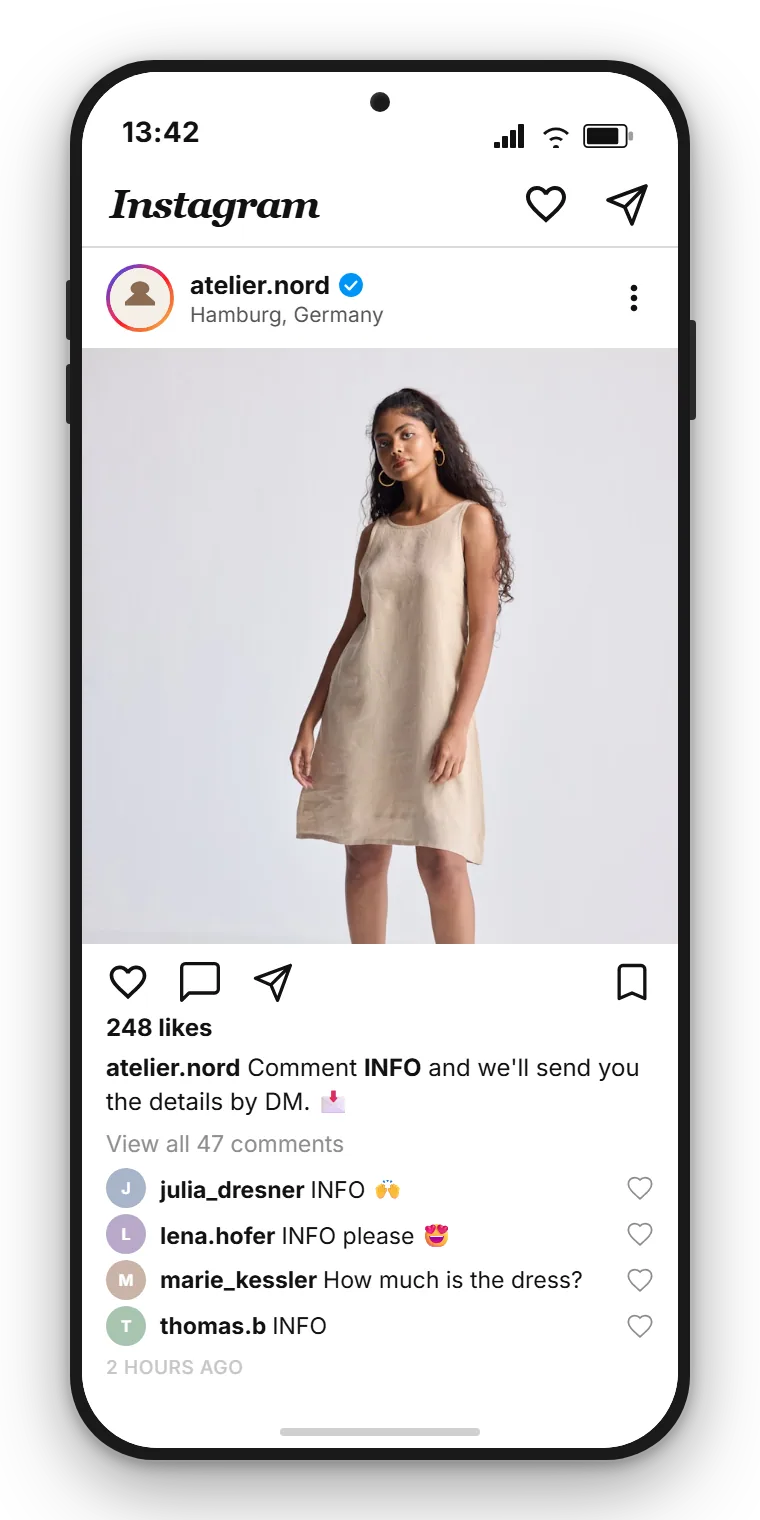
The principle is the same everywhere. You invite followers in a post to comment a specific word. Anyone who does sends a clear signal: I want more. Instead of waiting for a team member to spot the comment, click through to the profile and manually type a reply, the flow handles that first step instantly and automatically.
One honest note upfront: Comment-to-DM is not a sales machine. It is a tool that opens a private door for the right person at the right moment. What happens behind that door depends on your offer and your team. That is exactly why it pays to understand the mechanics, the rules and the sensible use cases before you start.
Why the path from comment to DM works
A comment and a direct message serve two different purposes. The comment is public and generates visibility; the DM is private and builds a personal connection. Comment-to-DM combines both and uses the strength of each.
The public comment is social proof. Others can see that your post is generating reactions, and comments are one of the signals Instagram uses to recognise that a post is sparking a conversation. But actual business does not belong in the comment section. Prices, bookings or a personal question have no place there, and the next comment will push your reply down anyway.
The second lever is speed. An automated DM arrives instantly, regardless of whether anyone on your team is online. In the evenings, at weekends or during a campaign with many simultaneous reactions, that response time determines whether interest turns into a conversation.
The third lever is ownership and structure. Once the conversation lands as a DM in your unified inbox, it belongs to you. You can assign it, label it and find it later. A comment under post number 47 from two weeks ago is effectively lost.
What providers report — and what is verified
Many tool vendors advertise very high open and reply rates for Comment-to-DM, because the person initiated contact themselves. Independent studies on this are thin, so treat those numbers as vendor claims rather than verified benchmarks. What is solid is the mechanism itself: a clear buying signal, an immediate response and a contact that then lives in your inbox.
How businesses use Comment-to-DM
At its core, Comment-to-DM is a lead generation tool. It converts public reach into your own contacts that you can nurture. Beyond that, clear use cases have emerged, all built on the same mechanics. The table below shows the most important ones.
| Use case | Example call-to-action and keyword | What the DM delivers |
|---|---|---|
| Lead magnet | "Comment GUIDE for the checklist" | Download link to the whitepaper or checklist, followed by a request for an email address |
| Appointment booking | "Comment BOOK for a slot" | Booking link — for a trial session, consultation or viewing |
| Webinar and event registration | "Comment LIVE to join us" | Sign-up link, calendar invite and later the recording link |
| Discount and product link | "Comment SALE for your code" | Personal discount code and a direct link to the product |
| Giveaway | "Comment WIN to enter" | Entry confirmation, rules and a note about when the winner will be announced |
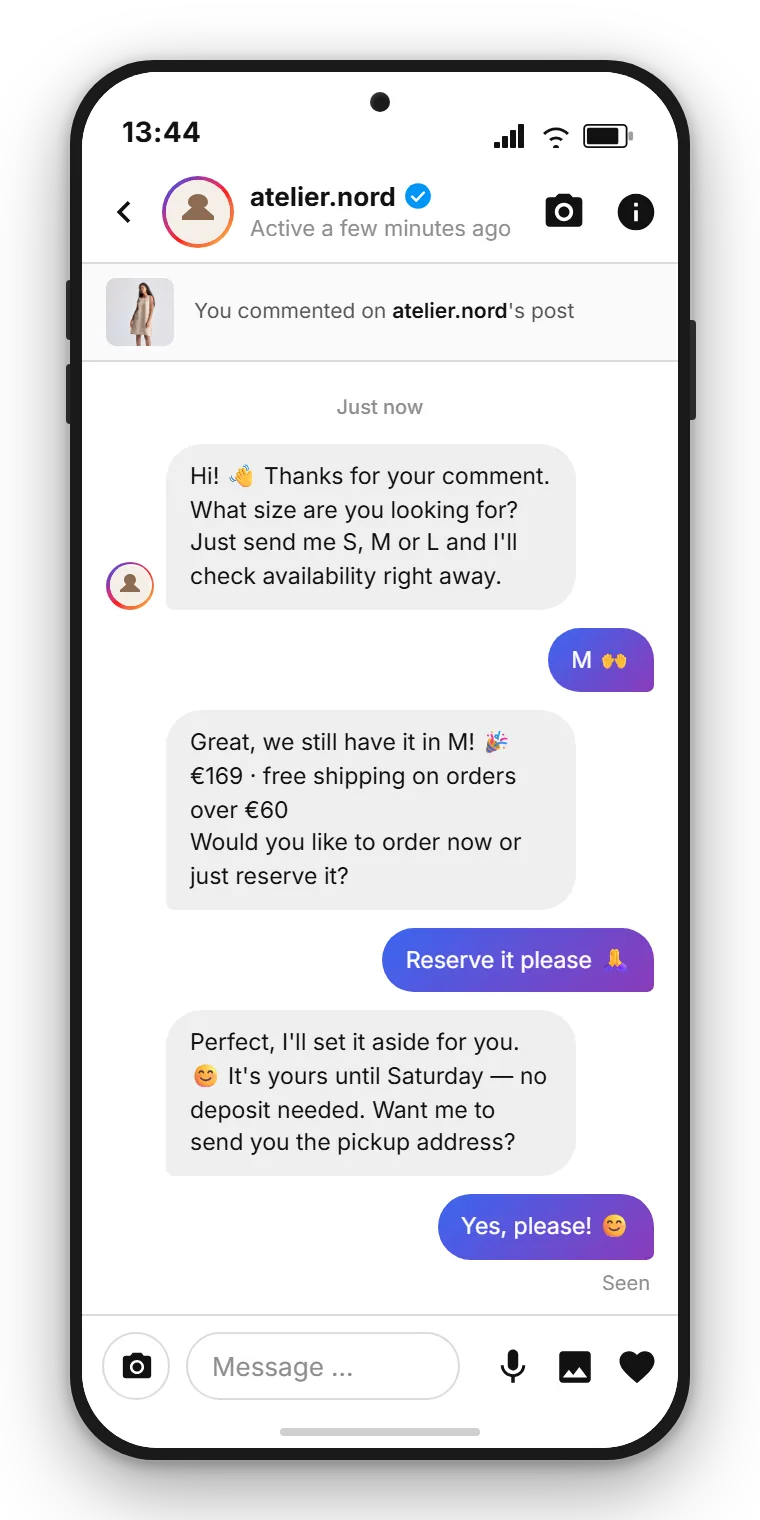
| Price and availability inquiry | "Comment INFO for the details" | Price, availability and a link — privately rather than in the comment thread |
These use cases can be explored in depth by industry. For coaches, creators and influencers, the lead magnet is daily bread: a post with real value, a keyword, and the download arrives via DM. How to turn that into a clean contact list rather than just a file distribution is covered in the spoke article Comment-to-DM for coaches, creators and influencers.
For musicians, producers and DJs, Instagram is the stage before the release. Presave links for a new single, a free sample pack as a download, tickets for the next gig or the merch shop — all of these can be triggered by a comment. More in the spoke article Comment-to-DM for musicians, DJs and producers.
For online shops, timing is everything. A discount code or product link that arrives at the moment of interest catches the buying signal before the person scrolls away. The details are in the spoke article Comment-to-DM for online shops.
Anyone running a giveaway collects not just reach with every comment, but also reachable contacts. What you need to watch out for legally and how to keep those leads is explained in the spoke article Instagram giveaway with Comment-to-DM.
And wherever a booking or registration is the end goal — from a hair salon to a car dealership, from a property viewing to a webinar — Comment-to-DM takes the prospect directly to the booking. The spoke article Comment-to-DM for appointments, bookings and registrations covers this in depth.
What the automated direct message can include
The automated DM is not a rigid form. You can write text, include an image, offer quick-reply buttons and add links. This covers almost every use case listed above: a friendly greeting, a product image, a quick-reply button and the essential link.
One point is important and often misrepresented: a PDF is delivered as a download link, not as a file attachment. Instagram direct messages do not support document attachments. Your whitepaper, ebook or sample pack lives on a web page or in cloud storage, and the DM contains the link to it. For the recipient, the difference is imperceptible — one tap and the download starts. For you it actually has an advantage, because the link lets you track how many times it has been downloaded.
Images and quick replies work on Instagram, and since August 2026 so do link buttons. Only WhatsApp’s list formats are missing here. Plan the DM for Instagram, not as a copy of a WhatsApp flow. The Flow Builder page shows how to put the building blocks together.
The Meta rules behind Comment-to-DM
Automated replies to comments run through Meta's official API, and that API sets one central rule that shapes your flow.
The rule: you may send exactly one automated private message in response to a comment, and only within seven days of that comment. If you want to send anything after that, the person must reply to you first. That reply opens the standard messaging window of roughly 24 hours, during which you can continue freely — and every new reply from the person extends it.
The standard approach is reply-first, and there is a technical reason for it. That first automated message runs through Meta's private reply endpoint, which rejects attachments, and it is the only automated reply you get per comment, so the offer cannot reliably sit in that first message. So the first DM is a short text prompt that invites a reply, and the download link or discount code (and any buttons) follow in the second message, once the person responds. The other reason is just as practical: you have only this one automated reply per comment, so without a reaction you cannot send anything more. The reply opens the window; prompting it first is what keeps the conversation alive.
What Meta does not permit is equally important. Unsolicited cold messages to people who have never engaged are off-limits. Tools that operate outside the official API risk account suspension. Using Comment-to-DM through an official integration keeps you within the permitted framework. SendSeven is a Meta Business Partner and operates exclusively through the official API.
Comment-to-DM and privacy
A public comment is not consent to receive marketing messages. The person reacted to your post — that is all. The one direct reply that was explicitly triggered is straightforward, because the person initiated contact themselves and actively replied to receive the content.
It looks different if you want to message those contacts again later — for a newsletter or a campaign, for example. That requires a separate legal basis under applicable data protection law, typically explicit consent. The clean approach is to ask for that consent actively within the DM flow rather than assuming it silently.
In practice, privacy-compliant Comment-to-DM means: link to your privacy policy, collect only the data you actually need, sign a data processing agreement with your provider and delete data when it is no longer needed. A simple way for users to end the conversation also belongs in the flow.
Where your data is processed is not a minor detail. This is where providers differ. SendSeven is a German company and processes data within the EU. For businesses operating in the UK and US markets, EU data residency is increasingly a selling point with privacy-conscious customers.
Setting up Comment-to-DM with SendSeven
In SendSeven, Comment-to-DM is a flow like any other, built in the visual Flow Builder. No coding required — you connect ready-made building blocks.
The flow starts with the trigger Instagram comment received. A condition checks whether a keyword is present in the comment, so only genuine signals proceed and a simple heart emoji does not trigger a sales message. The send building block dispatches the DM, a tag labels the contact for later reporting, and a handover passes the conversation to a team member as soon as it becomes personal. Everything lands in the unified inbox alongside WhatsApp, email and your other channels.
An illustrated walkthrough with an example flow is available in the article Turn Instagram comments into direct messages automatically. Everything about the channel itself is on the Instagram channel page.
Comment-to-DM without any coding
SendSeven brings Instagram into a unified inbox and includes the visual Flow Builder. Incoming messages are always free; pricing starts from €79/month on the Professional plan, which includes the Flow Builder.
View pricingTwo paths: a button in the first DM, or a reply first
Since August 2026 the automated Instagram direct message can carry buttons, not just text. That leaves two paths, and both of them work: either the first message asks for a short reply and the link follows afterwards, or the link sits in that first message as a button.
The difference is not the effort but what stays possible afterwards. Each comment allows exactly one automated message, and only a reply from the other person opens the 24-hour window. A tap takes someone to your page. A reply brings them into your inbox. As a rule of thumb: for a single click, a booking or a download, the button is the shorter path. For a conversation, a consultation or a follow-up, the reply is worth more.
Further reading: in-depth articles
This guide gives the overview. The following articles go deep for your specific situation:
- Comment-to-DM for coaches, creators and influencers: lead magnets that build your contact list
- Comment-to-DM for musicians, DJs and producers: presaves, sample packs, tickets and merch
- Comment-to-DM for online shops: discount codes, product links and restock alerts
- Instagram giveaway with Comment-to-DM: set it up, confirm entries, keep the leads
- Comment-to-DM for appointments, bookings and registrations: from comment to confirmed booking
For step-by-step build instructions, see the Flow Builder guide. And for automating DMs further after the initial contact, read Automate Instagram DMs.
Follow SendSeven on Instagram
Practical tips on messaging, automation and customer communication for businesses. Follow us at @sendsevenapp.
@sendsevenapp on InstagramFrequently asked questions
What is Instagram Comment-to-DM?
Comment-to-DM is an automation that converts a public comment on an Instagram post into a private direct message. When someone comments a specified keyword, the flow starts and automatically sends a DM. The comment stays visible; the actual conversation happens privately in the inbox.
Is Comment-to-DM allowed by Meta?
Yes, as long as it runs through the official API. Meta permits one private reply to a comment within a defined time window. After that, the person must reply for the conversation to continue. Unsolicited cold messages and tools that work around the official API are not permitted.
Why does the first DM only invite a reply instead of sending the link straight away?
Because that first automated DM is short by design. It runs through Meta's private reply endpoint, which rejects attachments, and it is the only automated reply you get per comment — so the offer link cannot reliably sit there. Reply-first is therefore the standard: the first DM is a short text prompt, and the link follows in the second message after the person replies. There is also a practical reason — you only get this one automated reply per comment, and the reply opens the window for everything that follows.
Can I send a PDF via Comment-to-DM?
You send a PDF as a download link, not as a file attachment. Instagram direct messages do not support document attachments. The whitepaper or ebook lives online and the DM contains the link to it. For the recipient the difference is imperceptible — one tap and the download starts.
Is Comment-to-DM GDPR-compliant?
The directly requested reply is straightforward, because the person initiated contact themselves. If you want to message those contacts again later for marketing purposes, you need a separate legal basis — usually explicit consent. Privacy policy link, a data processing agreement with your provider and data minimisation all form part of a compliant setup. SendSeven processes data within the EU.
Which industries benefit most from Comment-to-DM?
Particularly anyone who acquires contacts through Instagram: coaches and creators with lead magnets, musicians and DJs with presave and ticket links, online shops with discounts, event organisers with webinar registrations, and service businesses with appointment booking such as hair salons, fitness studios, car dealerships and estate agents.
Which account type do I need for Comment-to-DM?
You need an Instagram Business or Creator account connected as a channel in SendSeven. A personal profile cannot be connected through the official Meta API.
What does Instagram cost in SendSeven?
The Instagram channel is included in every plan, starting from €49/month on the Basic plan. The Flow Builder used to build Comment-to-DM needs the Professional plan, from €79/month. Incoming messages are always free. Full details and other plans are on the pricing page.