Instagram Comment-to-DM for coaches, creators and influencers: turning comments into real contacts
SendSeven Team, Editorial Team
Comment-to-DM is the most powerful lead generation tool on Instagram, and most coaches and creators only use it halfway. They deliver the lead magnet and then stop. This article shows how to build your own contact list from a comment flow — from the first download link to a legally sound email consent.
TL;DR
For coaches, creators and influencers, Comment-to-DM is the most effective lead tool on Instagram. Someone comments a keyword like GUIDE, PLAN or LIVE under your post, and the flow automatically sends a direct message with the download link to your freebie. The critical step most people skip: inside the DM you actively ask for an email address and consent — only then does the contact genuinely belong to you. This article walks through the complete flow, from the first DM to a legally sound list, with concrete examples for webinar sign-ups, waitlists and affiliate links. The technical fundamentals and Meta rules are covered in the Comment-to-DM pillar article.
Why Comment-to-DM is the strongest lead channel for creators
Imagine a typical week. You publish a post with a tip from your coaching niche, add "Comment GUIDE and I'll send you the free 7-day plan" in the caption, and within two hours 80 comments land underneath. If you reply to each one manually, you are at your desk until the next morning. If you do nothing, the buying intent is gone before the person scrolls away.
Comment-to-DM solves exactly this problem. Every relevant comment triggers an automatic direct message immediately. The person receives a personal reply in their inbox within seconds — whether you are asleep, running a webinar or on a call with a client.
For creators there is a second reason this channel is especially valuable. Instagram reach belongs to Instagram. Followers, posts, the algorithm — all of that sits on someone else's land. Anyone who builds only reach but no list of their own loses everything with an algorithm update. Comment-to-DM is the bridge. A public comment becomes a contact in your unified inbox, and with the right next step that contact can become a subscriber on your email list. That one you truly own.
That is the core of this article — not just freebie delivery, but the complete journey from comment to owned contact.
The lead magnet flow from start to finish
A lead magnet flow in SendSeven's Flow Builder always follows the same pattern: trigger, invitation to reply, deliver the content, initiate the next step. Four steps, clearly separated, no coding.
Step 1: The trigger. You select Instagram comment received as the trigger. You then attach a condition that checks whether the keyword appears in the comment, so a simple emoji does not start the flow — only a genuine signal like "GUIDE", "PLAN" or "CHECKLIST".
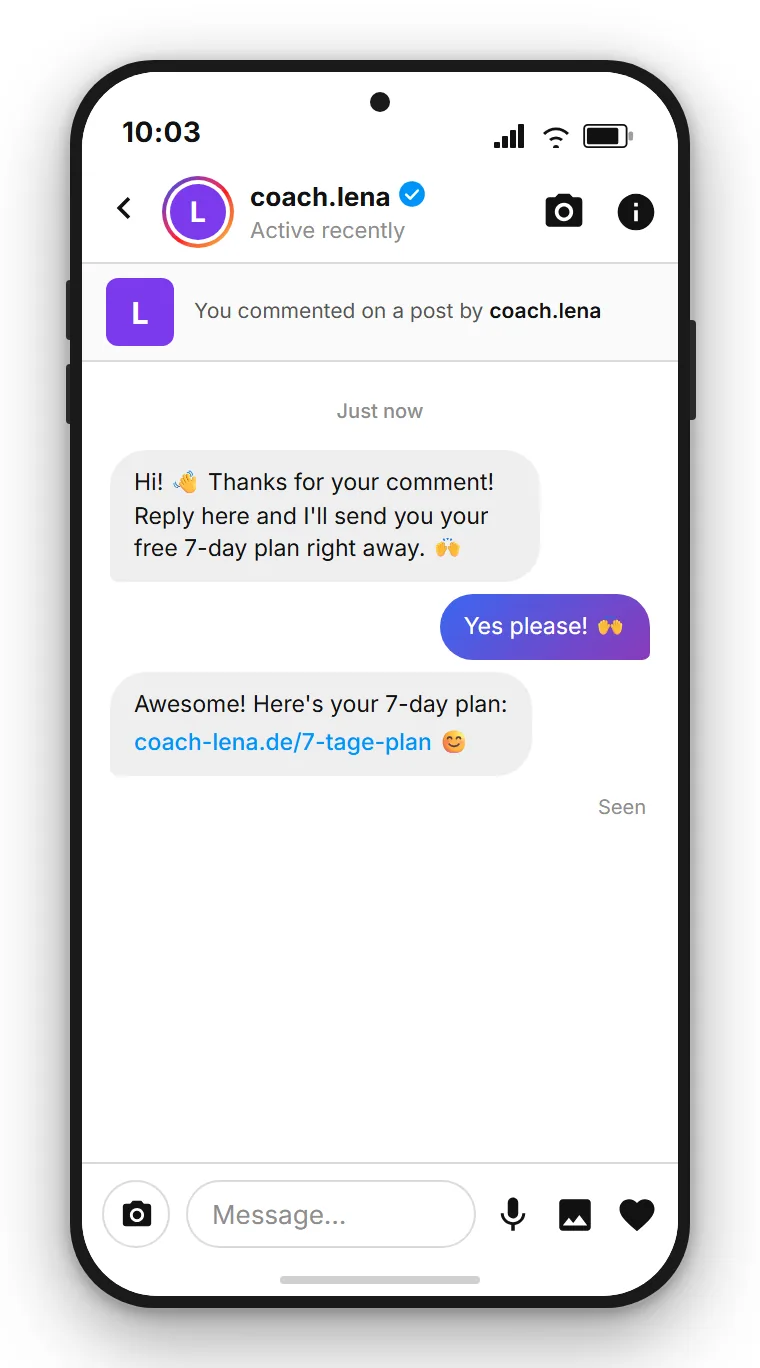
Step 2: The first DM. This first automated DM is short by design: it runs through Meta's private reply endpoint, which rejects attachments — so the standard is a short text prompt that invites a reply. Something like: "Hey, glad you're here! Reply and tell me which topic interests you most — nutrition or training?" The quick-reply buttons come later, in the follow-up after the person responds. There is also a practical reason this is the standard: you only get this one automated reply per comment, and the window for further exchange only opens once the person responds. Inviting a reply first keeps that conversation open. The pillar article explains why this works in detail.
Step 3: Send the download link. Once the person has replied, the second message goes out with the link. Your checklist, ebook or mini-course lives on a web page or in cloud storage, and the DM contains the link to it. A direct attachment is not possible — Instagram DMs do not support file attachments. The link is all you need: one tap and the download starts.
Step 4: Apply a tag. A tag building block automatically labels the contact — for example with the name of the lead magnet. Later you will know which post brought which contacts and can target them specifically.
A concrete example: Sarah is a business coach who posts time-management tips regularly. Under a carousel post she writes: "Comment PLAN and I'll send you my free 7-day structured week plan." Within two hours, 60 people have commented. Each one receives a DM immediately: "Hey! Quick question first — are you self-employed or in employment? I'll tailor the plan for you." After the reply, the link to the PDF download on her website follows. Sarah has opened 60 conversations without typing a single message manually.
The overlooked step: capturing an email address and consent
This is the step most people stop at — and the biggest mistake. You send the download link, and the flow ends there. The person has your freebie, you have a closed DM conversation in your inbox. That is enough for delivery, but not yet a contact list.
The person has left a public comment and thereby triggered a direct reply. That is not a free pass for future marketing. If you want to message this person again later — for your newsletter, your next webinar or a campaign — you need a separate legal basis under applicable privacy law, and in practice that means explicit consent.
The good news: you can ask for exactly that inside the DM, right after the download link. The question could read: "May I also email you when I publish new content on this topic? If so, just reply with your email address and I'll also send you the privacy policy." Simple, direct and transparent.
| Step | Flow without consent | Flow with consent |
|---|---|---|
| 1st DM | Invitation to reply | Invitation to reply |
| 2nd DM | Download link | Download link |
| 3rd DM | Flow ends | Request for email address and consent, with a link to the privacy policy |
| Result | A delivered file, no owned contact | A real contact on your list that you are legally allowed to continue reaching |
The wording matters: you ask, you explain, you wait for the reply. That is not a trick — it is transparent and clear to the user. Anyone who does not share an email address still received the freebie and remains as a DM contact in your inbox, tagged with the relevant label.
One detail often overlooked: SendSeven processes data within the EU. For coaches and creators who serve a UK or European audience and need to stay privacy-compliant, that is not a minor point. Signing a data processing agreement with your provider and collecting only the data you genuinely need are also part of a compliant setup. The technical and legal fundamentals — including what a comment means from a data protection perspective — are explained in detail in the pillar article.
Build a Comment-to-DM flow and your own contact list
SendSeven brings Instagram into a unified inbox and includes the visual Flow Builder. Incoming messages are always free; pricing starts from €79/month on the Professional plan, which includes the Flow Builder.
View pricingWebinar sign-ups and waitlists via comment
Another strong use case for creators and coaches: webinar registrations. Instead of hiding a sign-up link in the post or pointing to "link in bio", the comment acts as a trigger — more direct and without the extra step.
In practice it looks like this. A photography creator posts a Reel about golden hour shooting and writes underneath: "Comment LIVE and I'll send you the link to my free webinar on Thursday." The flow immediately sends the first DM inviting a reply. After the reply, the registration link follows — for example to an external sign-up form or a booking page. A tag like "Webinar-June" marks everyone who registered.
The same mechanics work for waitlists. You announce a new coaching round, a course or a product that is not yet available. Anyone who comments lands in a DM conversation and is first asked for an email address, so you can notify them as soon as registration opens. That is not a trick — it is a transparent exchange: exclusive early access in return for an email address.
A business coach relaunching a mastermind group can build a waitlist of 50 to 100 people within a few days, without running a single ad. The content attracts the right people; the comment trigger collects them.
How to structure contacts in the inbox after that is explained on the Instagram channel page in SendSeven. The technical walkthrough for building the flow is in the Flow Builder step-by-step guide.
Influencers and affiliates: links via DM instead of link in bio
"Link in bio" is the most widely used and at the same time the weakest tool for influencer links. Someone sees the post, reads "link in bio", scrolls on, forgets it. The journey from the post to the browser is a moment of friction, and friction costs clicks.
Comment-to-DM works differently. Anyone who comments the product name or a keyword receives the link directly in their inbox. No switching between apps, no searching a link page. The discount code or affiliate link arrives where the person already is.
An example: a fitness creator tests sports equipment and posts a Reel about it. The caption reads: "Comment KIT and I'll send you the link with my 15% discount code directly to your DM." The flow first sends a short reply message; after the person's response, the link follows. The creator can see in the inbox who clicked and who has a question, and can respond personally or hand off to a manager.
For affiliate partnerships there is another advantage. Some programmes deliver individual tracking links per channel. The Instagram-specific link can be built directly into the DM flow instead of pointing to a generic link page. That gives you clean attribution for how many sales came from the Comment-to-DM flow.
Anyone managing multiple channels and partnerships at the same time particularly appreciates the unified inbox. All DM conversations from Instagram — including those from different flows — are in one place, filterable and forwardable. How musicians and artists use the same mechanism for presave links and merch is covered in the article Comment-to-DM for musicians, DJs and producers.
Common mistakes that halve the lead value
The technical setup of Comment-to-DM can be done in half an hour. The mistakes do not happen in the build — they happen in the decisions around it.
Mistake 1: trying to put the lead magnet in the first DM. That first automated DM is short by design — attachments are rejected there, and it is the only automated reply you get per comment. And even as plain text, a link sent straight away backfires: if the person does not reply, the conversation is over before it has begun, the window for further exchange never opens, and you have no way to ask for the email address. The standard: the first DM is a short text prompt with a simple question; the download link (and any quick-reply buttons) follow after the person replies.
Mistake 2: not using a keyword filter. Without a condition on the keyword, every comment triggers the same flow. A heart emoji under your post then generates the same sales message as a genuine "GUIDE". That feels intrusive and damages the relationship with your community.
Mistake 3: forgetting the email question. Stopping after the download link wastes the most valuable part. The person has signalled they are interested in your topic. That is the ideal moment to bring them onto your own list. Skipping this step means starting from zero every time.
Mistake 4: trying to send a PDF as an attachment. Instagram DMs do not support document attachments. Anyone who tries to send a PDF directly hits a technical wall. The solution is simple and works better anyway: the download link points to your website or a cloud storage service; the download starts with one tap. You can also see how often the link was opened, and the person lands on your own page.
Mistake 5: not applying a tag. Without a tag you will not remember in three months which people came through which post and which lead magnet. With a clear tag per campaign you have a cleanly segmented contact list you can target specifically.
Mistake 6: overloading the flow with too many steps. More than three or four messages in an automated flow feels like a script nobody reads. Keep the flow short: invitation, content, email question. Everything after that is handled by a person from the inbox.
Follow SendSeven on Instagram
Practical tips on messaging, automation and customer communication for businesses. Follow us at @sendsevenapp.
@sendsevenapp on InstagramTwo ways: deliver the lead magnet at once or open the conversation
Since August 2026 the automated Instagram direct message can carry buttons as well as text. You can put the free plan behind a button in the very first message instead of asking for a reply first. One tap and the file is open.
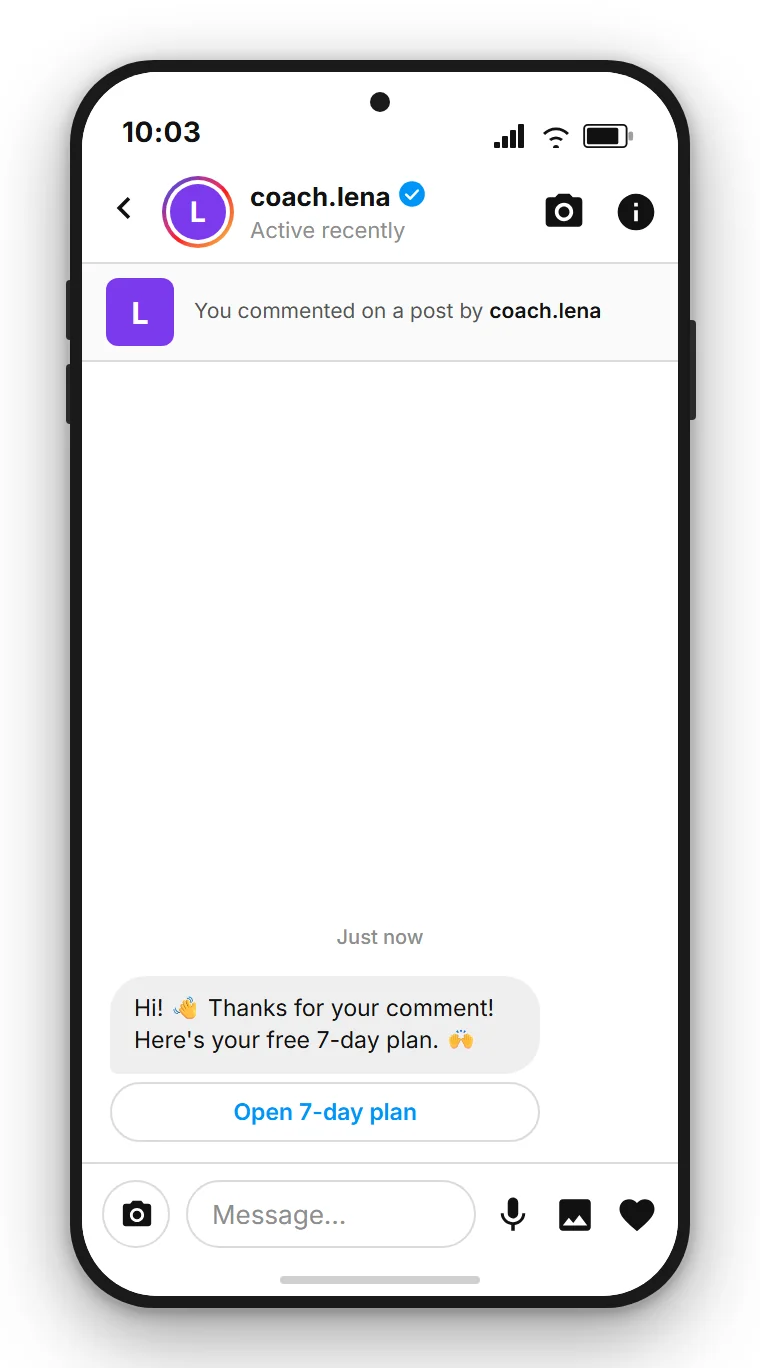
For coaches and creators the choice matters more than elsewhere, because the plan is rarely the goal, the conversation after it is. Only a reply opens the 24-hour window, and only then can you ask what the person is working on or offer a first call. The button delivers faster and drops the thread, because exactly one automated message is allowed per comment. If you want the lead magnet to produce clients, the reply is worth the extra step.
Further reading
This article covers the path from comment to owned contact list. For technical implementation, other industries and an overview of all use cases, continue here:
- Instagram Comment-to-DM: the complete guide with Meta rules, privacy and all use cases
- Step by step: building the comment flow in the Flow Builder
- Comment-to-DM for musicians, DJs and producers: presaves, sample packs and tickets via DM
More about the channel and how to connect it is on the Instagram channel page. How the Flow Builder in SendSeven works is explained on the Flow Builder features page.
Frequently asked questions
Can I build an email list with Comment-to-DM?
Yes, and that is the most important next step after delivering the freebie. After the download link you actively ask in the DM for an email address and consent. Anyone who consents can be added to your email list. Anyone who declines has still received the freebie and remains as a tagged contact in the inbox.
Why does the download link come after a reply instead of in the first DM?
Because the first automated DM is short by design. It runs through Meta's private reply endpoint, which rejects attachments, so the standard is a short text prompt that invites a reply. There is also a practical reason: you only get this one automated reply per comment, and the window for further exchange only opens after the person responds. Sending a short reply-prompting message first keeps the option open to continue the conversation and ask for the email address.
How do I send an ebook or checklist via Instagram DM?
As a download link, not as a file attachment. Instagram DMs do not support document attachments. Your PDF lives on your website or in cloud storage, and the DM contains the link to it. For the recipient: one tap and the download starts. You can also see how often the link was opened.
Do I need consent to message someone again after a comment?
Yes. A public comment is not a free pass for later marketing. The directly requested reply with the freebie is straightforward because the person initiated the contact themselves. For any further contact — a newsletter or a campaign — you need a separate legal basis under applicable privacy law, in practice explicit consent.
How do I use Comment-to-DM for webinar sign-ups?
Invite people in the post to comment a keyword like LIVE. The flow first sends a short DM; after the reply comes the webinar sign-up link. A tag marks all registrations. Anyone who has not yet shared an email address can be asked for it after the link, so you can send reminders and the recording.
Can I send affiliate links via Comment-to-DM as an influencer?
Yes. Anyone who comments a specific keyword receives the affiliate link or discount code directly in their DM, without the detour of "link in bio". That shortens the path between interest and click, and enables clean tracking per channel if your affiliate programme provides individual links.
How many people can the flow serve simultaneously?
The flow responds to every matching comment independently and automatically. If 200 people comment the keyword under one post, 200 DMs go out without any manual intervention. That is the real advantage over manual replies.
What does Instagram cost in SendSeven?
The Instagram channel is included in every plan, starting from €49/month on the Basic plan. The Flow Builder used to build these lead flows needs the Professional plan, from €79/month. Incoming messages are always free. Full details and other plans are on the pricing page.