Browser Push Notifications 2026: The Underrated Re-engagement Channel for SMBs
SendSeven Team, Editorial Team
Browser push reaches visitors who never left their contact details. No newsletter opt-in, no phone number — just one click on Allow. This guide shows how SMBs use browser push to win back lapsed visitors, when the channel pays off, and where its honest limits lie.
TL;DR
Most website visitors arrive once, look around, and leave — without an email address, without a phone number, and without coming back. Browser push notifications close exactly that gap: a single click on Allow is all it takes, and from that moment on you can reach the visitor directly in their browser, even when your site is not open. No contact details needed. In SendSeven, push is a full outbound channel with segmentation, scheduled sending, and analytics. This guide explains what the channel is good for, what a push strategy looks like for SMBs, and where the honest limits lie.
What are browser push notifications?
A browser push notification is a short message that appears directly on a visitor's device — even when your website is not open. You have probably seen the format yourself: a small window in the top-right corner of the desktop, or an alert on an Android lock screen, showing a title, a short line of text, and a link.
The decisive difference from every other marketing channel: you need no contact information whatsoever. No name, no email address, no phone number. The visitor clicks Allow once, and from that moment you can reach them. That is what makes browser push a genuine outbound channel rather than an inbox. Communication flows in one direction: from you to the visitor.
In SendSeven, push is not a side feature but a full channel alongside email and SMS. You plan push campaigns through the same campaigns area, segment recipients, and measure delivery and list growth. Click rates are measurable as soon as click-tracking is active (via SendSeven short URLs or your own UTM parameters).
The re-engagement gap: why email and SMS are not enough
Picture your website visitors from last week. Some bought or enquired. A small share signed up to your newsletter. And the vast majority left without a trace — no way for you to ever reach them again.
That is exactly the problem. Email marketing requires an email address. SMS requires a phone number. Both channels work brilliantly once you have those details. But the barrier to collecting them is high. A newsletter sign-up demands trust, a form, and often a confirmation email. Most first-time visitors never take that route.
Browser push reverses the order. Instead of collecting data first and communicating later, the visitor grants notification permission with one click — and you can win them back later. The psychological barrier is far lower than a form. Push does not replace email or SMS. It fills the gap that comes before them: the large group of still-anonymous visitors who would otherwise be lost for ever.
How browser push works technically
The flow is straightforward for the visitor and quick to set up for you. Three steps:
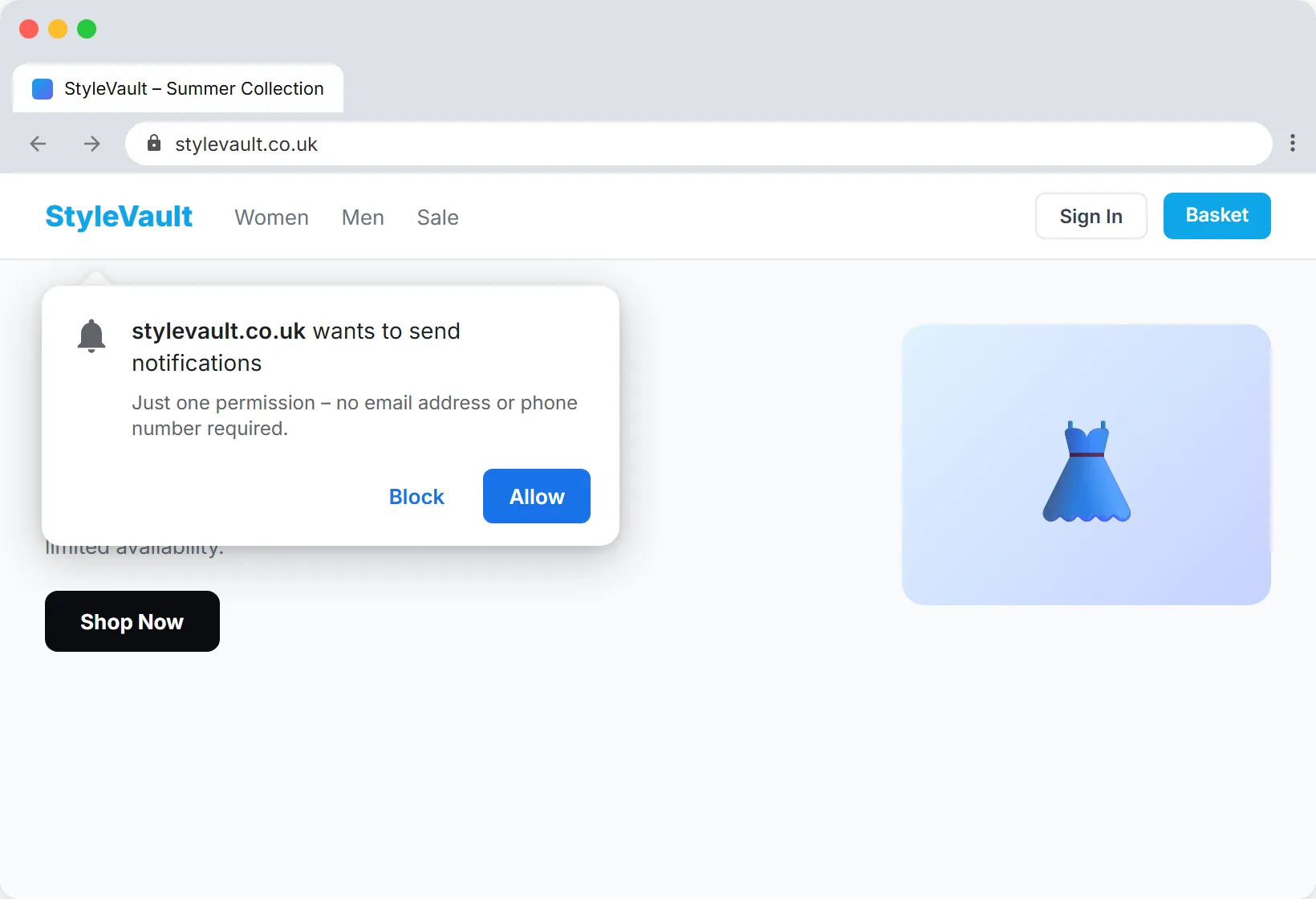
- The opt-in prompt appears. The visitor sees a permission-based browser request: This website wants to send notifications. They decide with Allow or Block. No contact details are requested or transferred.
- The permission is saved. If the visitor says Yes, their browser registers a subscription. From this point they are part of your push audience — anonymous, but addressable.
- You send a push message. Through the campaigns area in SendSeven you send a notification, immediately or scheduled. It appears on the recipient's device; if they click it, they land directly on the page you specified.
Browser push is supported by all major desktop browsers and by Chrome and Firefox on Android. One important point for honest expectations: this is browser push, not native app push. On iOS the channel works only if the user has installed your site as a web app via Add to Home Screen. Mobile or native app push, as offered by a dedicated smartphone app, is not covered.
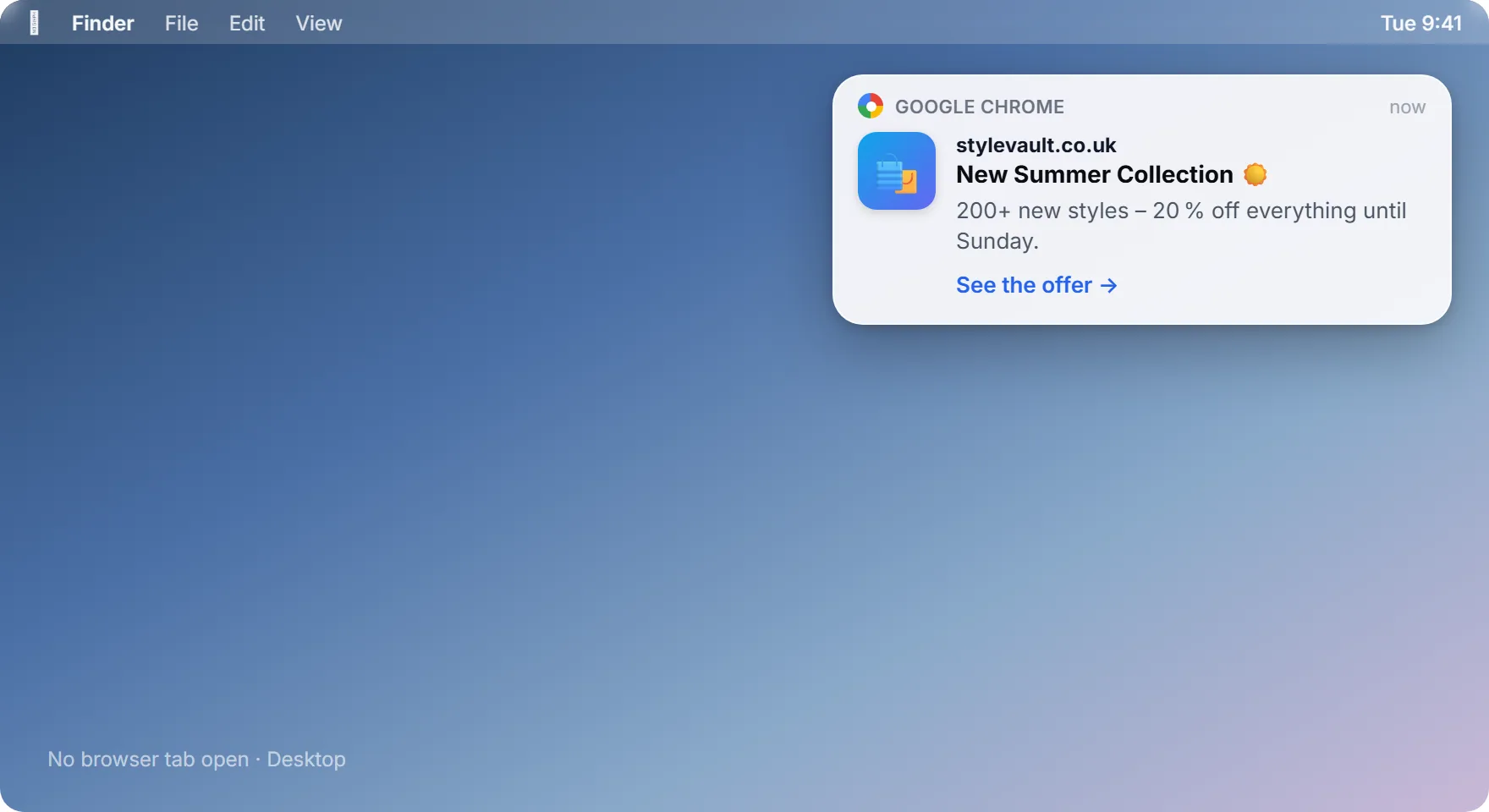
Push, email, and SMS compared directly
No single channel wins across the board. Each has its place in the mix. The table below shows where browser push plays to its strengths and where email or SMS remain the better choice.
| Criterion | Browser Push | SMS | |
|---|---|---|---|
| Requirement | One click on Allow, no contact details | Email address + opt-in | Phone number + opt-in |
| Open rate | Displayed directly on device | 20–25 % | 95 % (when used) |
| Content | Short title, text, one link | Long, formatted, attachments | 160-character text |
| Cost model | No carrier / telco fee like SMS — only a small usage-based cost per push | Very low per message | Fee per SMS |
| Typical use case | Re-engage anonymous visitors, trigger actions | Newsletters, offers, receipts | Time-critical, personal messages |
The rule of thumb: browser push is the channel for people whose contact details you do not yet have. Email is home to detailed content, receipts, and documents. Reserve SMS for truly time-critical and personal messages, because every message carries a fee. Ideally all three channels interlock, managed from a single platform.
Anyone who brings all channels together in a unified inbox can see every customer's history in one place, regardless of which channel the communication came through.
The opt-in: the one click that decides everything
As low as the barrier for browser push is, one point determines success or failure for the entire channel: the moment you ask for permission. Ambushing every first-time visitor with the prompt in the first second will generate many rejections. And a rejection in the browser is very hard to reverse.
Three principles for a good opt-in:
- Choose the right moment. Do not ask the moment someone arrives on the page — ask after they have shown interest, for example after reading an article or viewing a product.
- State the benefit. A brief custom message before the browser prompt works wonders: Be the first to hear about new offers. The visitor understands what they are getting before they decide.
- Send sparingly. Once you have the permission, do not squander it with daily messages. Relevance beats frequency.
5 use cases for SMBs
Browser push delivers its value through two building blocks that SendSeven provides: segmentation and scheduled sending. You do not address all subscribers the same way — you target them precisely by page visited, tags applied, or contact attributes. From this combination the following use cases emerge.
Use case 1: Re-engage lapsed visitors
The classic. A visitor browsed your site and left without taking action. A push message scheduled for later brings them back: Good to see you — our spring sale is still running until Sunday. Because no contact form was needed, you reach a group that no other channel could address.
Use case 2: Reach cart abandoners
In e-commerce a large share of customers abandon their purchase just before checkout. Through segmentation by page visited you can target subscribers who were in the basket with a scheduled push campaign. An honest caveat: SendSeven does not offer a dedicated one-click automation feature for cart abandonment. The use case is built from the deliberate combination of segmentation and scheduled sending that you configure yourself. The dedicated e-commerce article below covers how to do this in practice.
Use case 3: Trigger time-limited promotions
Flash sale, open day, promotional week. When something only lasts a short time, speed matters. A push notification appears instantly on the device and is therefore particularly suited to time-sensitive occasions. Schedule the send in advance to match your promotion's start.
Use case 4: Announce new content and products
A new blog post, a freshly arrived product, an updated guide. Rather than hoping visitors return on their own, actively nudge them back. Especially for sites with regular content, this gentle return incentive pays off.
Use case 5: Address audience segments separately
A trade business with residential and commercial customers, or a retailer with multiple product lines: via tags and attributes you divide your push subscribers into meaningful segments and send each only what is relevant to them. Every message stays relevant, and the unsubscribe rate stays low.
Use browser push with SendSeven
Push as a full channel with segmentation, scheduled sending, and analytics — bundled with your other channels in one platform, from 49 € per month.
View pricingWorked example: what push re-engagement delivers
Numbers speak louder than promises. Let us look at a typical SMB using browser push for re-engagement. The assumptions are deliberately conservative.
Starting point: a website with 8,000 visitors per month. Of these, 5 % allow push notifications — 400 new subscribers per month. After three months there are around 1,200 subscribers in the push audience.
A scheduled re-engagement campaign to these 1,200 subscribers:
1,200 push subscribers × 8 % click rate = 96 returnees to the website × 3 % conversion × €60 average order value = €173 per campaign
With two such campaigns per month that is roughly €346 in additional revenue — entirely from visitors you would otherwise never have reached again. The push audience grows every month, and with it the leverage. Platform costs for the channel are a fraction of that: browser push carries no carrier or telco fee like SMS, only a small usage-based fee per push covered by your plan's included message bundle, and plans start at 49 € per month.
The key point of this calculation: it is additional revenue from a group that was previously unused. The channel does not cannibalise your newsletter or SMS campaigns — it opens up reach that comes before them.
The honest limits of browser push
To set expectations correctly, here are the clear limits of the channel. Knowing them means using push correctly and avoiding disappointment.
- No inbox — outbound only. Push is a purely outbound channel. The recipient cannot reply to a push message. For dialogue you need WhatsApp, live chat, or email.
- No native iOS or Android app push. This is browser push. On iOS the channel only works via a site installed as a web app. A dedicated smartphone app is not a substitute.
- No behavioural triggers. SendSeven does not send push automatically in real time based on an individual user action. Use cases are built from segmentation and scheduled sending that you control — not from an automatic trigger that fires on every action.
- No A/B testing built in. An integrated A/B test function for push variants is not available. Optimisation comes from reviewing analytics and adjusting subsequent campaigns.
- A rejection is final. Once a visitor blocks the prompt it is very hard to reverse. That is why the timing of the opt-in request matters so much.
These limits do not weaken push — they define its place. It is a quiet, cost-effective re-engagement channel, not a substitute for personal dialogue.
GDPR and data protection
Browser push has a pleasant starting point from a data-protection perspective: no contact details are collected. No name, no email, no phone number enters a database. The subscription record is anonymous. Rules still apply, though, and you should know them.
The opt-in is the foundation. The visitor must actively click Allow — there is no pre-ticked consent option technically. The consent is therefore documented and reversible at any time: the user simply turns off notifications in the browser. Anyone using tags or attributes for segmentation should make this transparent in their privacy policy.
SendSeven is a platform built for the European market and headquartered in Augsburg, Germany. EU hosting, German-based development, and a Data Processing Agreement are included. As a Meta Business Partner, SendSeven works via official APIs. Anyone who sets push up cleanly communicates in a GDPR-compliant manner. The technical setup is covered step by step in the browser push guide.
Conclusion: a channel that replaces nothing but wins back many
Browser push is not a loud channel. It replaces neither the newsletter, nor the personal WhatsApp conversation, nor the time-critical SMS. Its value lies elsewhere: it reaches exactly the visitors who would otherwise vanish without a trace — the large anonymous majority who visit once and leave without filling in a single field.
For SMBs that means additional reach that carries no carrier or telco fee like SMS, incurs only a small usage-based cost per push, and grows every month. Provided the opt-in lands at the right moment, messages stay relevant, and the channel's limits are clear. Anyone who uses push for what it is — a quiet re-engagement channel in a broader multichannel mix — wins back visitors who would otherwise be lost.
Next steps:
- Learn about browser push as a channel
- View SendSeven plans (from 49 € per month)
- Set up browser push technically
Browser push in depth: further reading
- Browser push for re-engagement — win back inactive users with three to four times the ROI of email.
- Browser push or email newsletter? Which channel for what — an honest comparison of the two reach channels for SMBs.
- Browser push for e-commerce — cart abandonment, price alerts, back-in-stock, and re-engagement with real data.
Frequently asked questions
What are browser push notifications?
Browser push notifications are short messages that appear directly on a visitor's device — even when your website is closed. The visitor needs to click Allow once. No contact details such as an email or phone number are required. Push is a purely outbound channel; the recipient cannot reply.
Do I need the visitor's email address or phone number for browser push?
No. That is precisely the difference from email and SMS. Browser push only requires a single click on Allow in the browser's permission prompt. The visitor remains anonymous but is addressable through their browser subscription. This lets you reach visitors who would never fill in a form.
Does browser push work on iPhone?
Only in limited circumstances. This is browser push, not native app push. On iOS the channel only works if the user has installed your website as a web app via Add to Home Screen. On all major desktop browsers and on Android in Chrome and Firefox, browser push works directly.
Is browser push GDPR-compliant?
Yes, provided the opt-in is implemented correctly. The visitor actively clicks Allow — pre-ticked consent is technically impossible. No contact details are collected, and consent can be withdrawn at any time. SendSeven operates EU hosting from Augsburg and provides a Data Processing Agreement.
Can I segment push recipients?
Yes. In SendSeven you segment your push audience by page visited, tags applied, and contact attributes. This lets you send each segment only the messages that are relevant to them. Sends can be triggered immediately or scheduled in advance.
Can SendSeven automatically send a push when someone abandons their cart?
SendSeven does not offer a dedicated one-click automation feature for cart abandonment, and there are no behavioural triggers that fire automatically on an individual user action. You implement the use case yourself by segmenting subscribers by page visited and sending a scheduled push campaign to that segment.
What does browser push cost at SendSeven?
Push is included with every Full Suite plan, starting at 49 € per month for all 8 channels. There is also a small usage-based fee per push sent, covered by your plan's included message bundle. The advantage over SMS: there is no carrier or telco fee — the per-push rate is very low. Current rates are on the pricing page.
Does browser push replace my email newsletter?
No. Push and email serve different purposes. Email reaches your opted-in contacts with a 20–25 % open rate, detailed content, and attachments. Browser push fills the gap that comes before it, winning back anonymous visitors whose contact details you do not yet have. Both channels are strongest together, managed from a single platform.