Comment-to-DM for appointments, bookings and registrations: from comment to confirmed slot
SendSeven Team, Editorial Team
A comment under an Instagram post is often the clearest buying signal a prospect can send. This article shows how service businesses, local venues and event organisers capture that signal with an automatic direct message delivering the booking link, registration link or appointment confirmation before the interest fades.
TL;DR
When someone comments "BOOK" or "LIVE" under an Instagram post they are sending a clear signal: I want a slot. With Comment-to-DM in the visual Flow Builder you turn that signal into a private direct message with a booking link or registration link within seconds. No manual follow-up, no prospect who scrolls away in the meantime. Two main cases are covered here: appointment booking for local service businesses and high-ticket enquiries, and webinar and event registration including replay links for latecomers. What SendSeven does: detect the comment, branch on the keyword, send your link at the right moment. You bring the booking link or registration link; SendSeven delivers it to the right person at the right time. The general mechanics, Meta rules and privacy basics are in the pillar guide.
Why speed decides whether you get the booking
Imagine you post a video about a new service or an upcoming webinar. Comments start to collect: "When do you have availability?", "Comment BOOK", "LIVE". Every one of those comments is a buying signal. Respond manually and you are fighting the attention span of the feed.
Research on speed-to-lead shows a consistent pattern: the faster the response to a signal of interest, the higher the chance of converting. For appointments this is even sharper than for information requests. Someone who comments "BOOK" on Instagram has a specific intent. That intent lives for minutes, not hours. An automatic direct message that delivers the booking link straight away captures the right moment. A manual reply the next morning usually reaches nobody.
Comment-to-DM is built for exactly this situation. You define the keyword, add the link and activate the flow. From that point, the system responds to every matching comment immediately, whether your team is online or not. How the two-step mechanic works in detail and which Meta rules apply is in the Comment-to-DM pillar guide.
Appointment booking for local businesses and service providers
For local businesses that depend on booked appointments, Comment-to-DM is one of the most direct levers available on Instagram. Hair salons, beauty studios, nail studios, fitness studios and similar providers live and breathe appointments. Comments under a post are not a pleasant side effect for them — they are potential bookings.
A concrete picture: a hair salon posts a video of a fresh colour transformation. Caption: "Want a result like this? Comment BOOK and we'll send you our booking calendar straight to your DM." Within the first hour fifteen people comment the word. Each receives an immediate direct message which, after a short confirmation, sends the link to the booking tool. The tool — whether Calendly, SimplyBook, Booksy or another system — is yours. SendSeven sends the link at the right time to the right person.
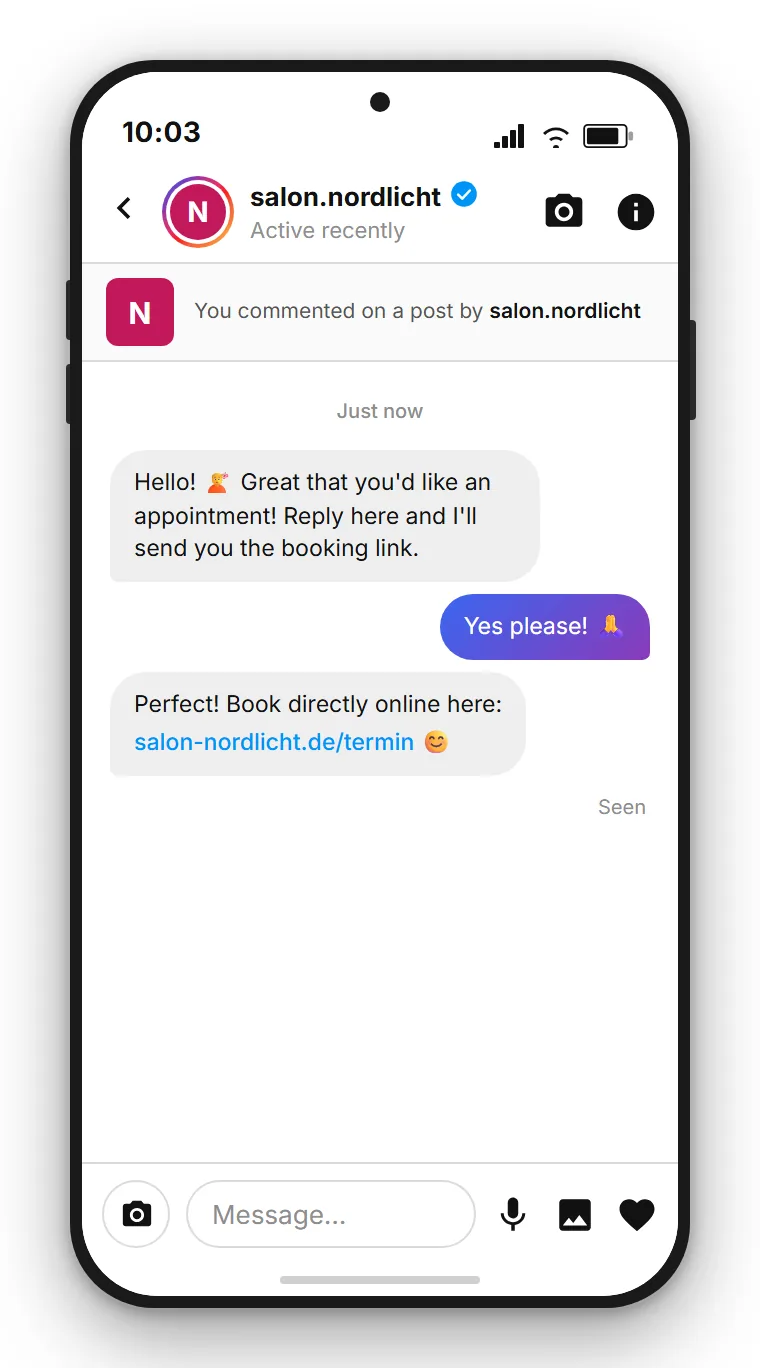
The same works for a free trial class at a fitness studio. The post shows a new class series or newly renovated space. Caption: "Comment TRIAL and get your free trial class link straight to your DM." The person who comments receives the booking link for a specific time slot that the studio has made available in its booking system. No back-and-forth in the comments, no follow-up DM asking when there is space. The person lands on the page and books themselves.
Beauty studios with rotating offers work similarly. A new treatment launch can be paired directly with a keyword and booking link. The prospect comments, gets the link, books. That is the complete journey, and once set up it needs no further manual intervention.
| Business type | Example keyword | What arrives via DM |
|---|---|---|
| Hair salon | BOOK | Link to the salon's online booking calendar |
| Fitness studio | TRIAL | Link to the free trial class booking for available slots |
| Beauty studio | OFFER | Link to appointment booking for the advertised treatment |
| Yoga studio | TASTER | Link to the taster session registration |
| Dental practice | APPOINTMENT | Link to the online appointment form or Calendly |
One important point to set expectations correctly: SendSeven does not have a built-in booking calendar. It sends the link to your existing booking tool. This means you need an external tool for managing appointments. What SendSeven handles is the automated contact that sends the right link at the right moment and keeps the conversation afterwards in the unified inbox.
High-value bookings: car dealerships, real estate, consulting
For advisory-intensive offers with longer decision cycles, Comment-to-DM works a little differently — but no less effectively. Here the goal is not filling a calendar in minutes. It is securing the first conversation before the prospect moves to the next tab.
A car dealership posts about a newly arrived model. Caption: "Comment TEST DRIVE and our team will reach out to arrange a time that works for you." The person who comments receives a DM immediately which, after a short reply, sends a suggested time or a link to a booking form. The dealership now has a concrete prospect with a name, an Instagram profile and a direct thread. Everything lands in the SendSeven inbox, visible to the sales team. More on messaging in automotive retail is on the car dealerships page.
Estate agents work the same way. A post shows a new property or a neighbourhood. Caption: "Comment VIEWING for a viewing appointment." The automated DM asks for contact details or sends a link to the appointment form directly. In a competitive market, the agent who makes the first concrete offer often wins the conversation.
Consulting businesses, coaches with high-value individual programmes and agencies use the same route: a post addressing a common problem of their audience, a keyword for the discovery call, a DM with the Calendly link for a free 30-minute conversation. The difference from a bio link: the keyword signals active intent, and the DM arrives exactly when that intent is strongest.
Two steps, no detour
The first automated DM is short by design: it runs through Meta's private reply endpoint, which rejects attachments, so the standard is a short text question first, with the booking link delivered after the reply. There is also a practical reason: you only get this one automated reply per comment, so if the person does not respond, you cannot send anything further. The reply opens the conversation window. The pillar guide explains the mechanic in detail.
Webinar and event registration with Comment-to-DM
Webinars and events live and die by registration rates. When you announce an upcoming webinar on Instagram, you want as many interested people as possible to actually register. The difference between "link in bio" and Comment-to-DM is the moment: the booking link arrives in the DM precisely when attention for the topic is at its peak.
How a webinar announcement flow works in practice: you post content showing the webinar topic, date and time. Caption: "Comment LIVE and we'll send you the registration link straight to your DM." The flow branches on the keyword LIVE, sends a first DM with a short confirmation — for example "Great, the webinar is on 18 June at 7pm UK time. Ready to secure your spot?" — and after the reply follows the direct registration link to your webinar tool, whether Zoom, StreamYard, WebinarJam or another system. SendSeven sends this link; the webinar itself runs on your own tool.
Something many people miss: the flow has a second valuable use after the webinar. Registered attendees who did not show up are often still interested in the topic. Anyone maintaining a clean list of registered contacts can send those people the replay link via direct message. That is a service offer, not a cold message, because the person registered and thereby showed interest. Keep the privacy note in the next section in mind here.
| Phase | Timing | What arrives via DM |
|---|---|---|
| Registration | Immediately after the comment | Short confirmation + registration link to the webinar tool |
| Reminder | The day before the event | Date reminder, time and joining link |
| Replay link | After the webinar | Link to the recording, optionally a follow-up offer |
For events, workshops and courses with limited places the flow can be extended: once all slots are taken, an updated flow branch responds with a waitlist DM. Someone who comments too late gets "Unfortunately we're fully booked, but we've added you to the waitlist" instead of a dead registration link. This prevents frustration and keeps the conversation open.
Coaches and business creators who run regular webinars or workshops report (provider claims) noticeably higher registration rates through Comment-to-DM compared to a simple bio link. The reasoning is plausible: someone who comments has performed an active action, which creates a stronger commitment than passively reading a bio link. Independent robust studies on this are scarce, so treat such claims as indicative rather than guaranteed.
Reminders and reducing no-shows
A booked appointment is not the same as an attended one. No-shows cost local businesses real money: an empty chair at the salon, an unoccupied consulting slot, an unfilled webinar window. Reminders reduce no-shows, and reminders via DM land where the person is already active.
The approach: the flow has tagged the contact, for example "appointment-june-18". A separate campaign sends a direct message the day before: "Good morning, your appointment with us is tomorrow at 10:30am. We're looking forward to seeing you. If something comes up, just message us here." No phone call, no email that ends up in spam — a short DM in the Instagram inbox.
This reminder message is a service message. It relates directly to the booked appointment and was triggered by the booking action. This makes it legally distinct from a marketing message. More on this in the next section.
For webinar organisers reminders are especially valuable. People often register for a webinar weeks in advance. Without a reminder, attendance rates drop noticeably. A DM the day before and another one hour before are small efforts with a measurable effect.
Privacy note: service message versus marketing
Anyone handling appointments and registrations through Instagram should understand the difference between two message types. It is practically relevant and legally important.
The booking confirmation and the appointment reminder are service messages. They relate directly to an action the person themselves took: booking an appointment, registering for a webinar. For these messages there is generally a legitimate interest on both sides — the booked appointment should take place. Still, include a link to your privacy policy in the first DM and give the person a way to end the conversation.
It is different if you want to use those same contacts later for a marketing newsletter or a new campaign. That requires a different legal basis. A public comment and an appointment booking are not consent to receive advertising. If you want to use these contacts for marketing, ask actively in the DM flow with a clear opt-in.
On data processing: SendSeven is a German company and processes data within the EU. This addresses the most common question about data transfers to third countries. You conclude a data processing agreement with SendSeven. More on the privacy basics of Comment-to-DM is in the pillar guide, which covers the topic in depth.
Comment-to-DM without coding
SendSeven brings Instagram into a unified inbox and includes the visual Flow Builder. Incoming messages are always free; pricing starts from €79/month on the Professional plan, which includes the Flow Builder.
View pricingCommon mistakes and how to avoid them
Booking flows via Comment-to-DM come together quickly. But a few mistakes keep coming up.
Mistake 1: trying to send the booking link in the first DM. The first automated DM is short by design — it runs through Meta's private reply endpoint, which rejects attachments. And even a plain text link sent straight away backfires: you only get this one automated reply per comment, so if the person does not respond, the conversation is over and you cannot follow up. The standard: the first DM is a short text prompt that invites a reply; the link follows afterwards. This opens the message window so you can continue — answer a question, send a reminder, or handle a rebook.
Mistake 2: the external booking tool is not aligned with the flow. If the post says "Comment BOOK" but the booking page shows only generic slots with no context, you lose the prospect at the final hurdle. Create dedicated booking pages or links for Comment-to-DM campaigns that point directly to the advertised service.
Mistake 3: no tag applied. Without a tag you do not know later which contacts came through which post. One tag per campaign costs nothing but provides valuable data for follow-up.
Mistake 4: no reminder planned. The registration is only the first step. Anyone who skips a reminder gives away a significant part of the value. Plan at least one reminder DM before the appointment or webinar.
Mistake 5: no flow for fully booked slots. Popular businesses or those with rare slots will sometimes have to disappoint people. Plan a waitlist DM for when all places are taken. This keeps the conversation open and shows respect for the person's interest.
Mistake 6: overlooking the account type. Comment-to-DM requires an Instagram Business or Creator account connected as a channel in SendSeven. A personal profile cannot be connected through the official Meta API.
Two ways: send the booking link straight away or after a reply
Since August 2026 the automated Instagram direct message can carry buttons, not just text. That gives you a choice: the first message either asks for a short reply and sends the booking link afterwards, or it carries the link as a button right away and one tap opens the calendar.
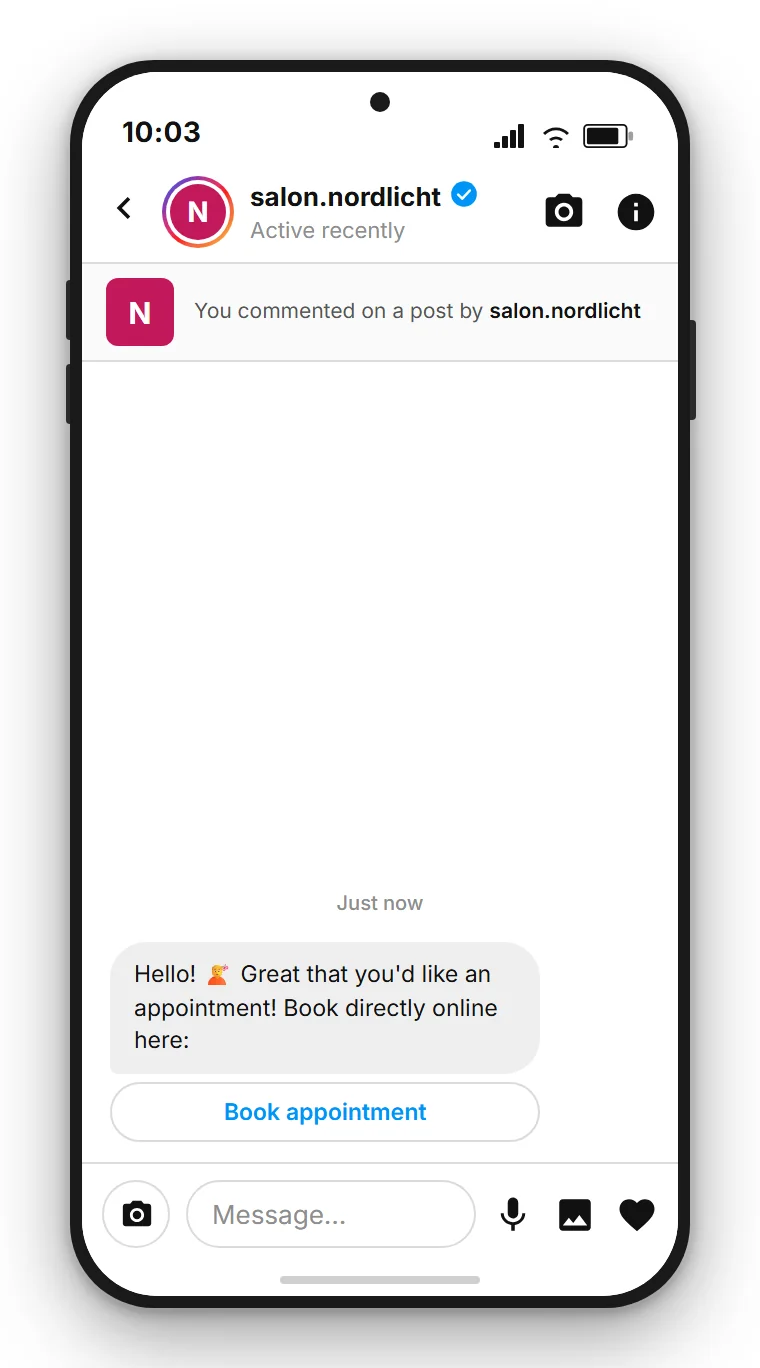
The difference is less about effort than about what stays possible afterwards. A reply opens the 24-hour window: you can follow up, send a reminder and answer questions. A tap takes the person into your booking tool but not into your inbox, because exactly one automated message is allowed per comment. If you already run a booking system, the button is often the shorter route. As soon as you want to advise, remind or reschedule, the reply is worth more than the click.
Further reading
This article covers appointments, bookings and registrations as one use case for Comment-to-DM. For a complete overview of the mechanics and all use cases:
- Instagram Comment-to-DM: the complete guide 2026 — mechanics, Meta rules, privacy and all use cases in overview
- Converting Instagram comments into DMs automatically: step-by-step in the Flow Builder
- Comment-to-DM for coaches, creators and influencers: lead magnets that become a contact list
- Comment-to-DM for online shops: discount codes, product links and restock alerts
Everything about the channel is on the Instagram channel page. How all channels come together in a unified inbox is explained in the glossary.
Follow SendSeven on Instagram
Practical tips on messaging, automation and customer communication for businesses. Follow us at @sendsevenapp.
@sendsevenapp on InstagramFrequently asked questions
Why does the booking link come after a reply rather than in the first DM?
Because the first automated DM is short by design. It runs through Meta's private reply endpoint, which rejects attachments, so the standard is a short text prompt that invites a reply, with the booking link in the second message. There is also a practical reason: you only get this one automated reply per comment, and if the person does not respond you cannot follow up. The actual booking calendar is your external link — for example from Calendly, SimplyBook or your own booking system.
Do I need my own booking tool, or does SendSeven have a calendar?
You need your own booking tool. SendSeven does not have a built-in booking calendar. What SendSeven does: send the link to your booking tool at the right time to the right person, and keep the conversation afterwards in the unified inbox.
How does Comment-to-DM work for webinar registrations?
You post a webinar announcement and name a keyword, for example LIVE. Anyone who comments it automatically receives a DM with a short confirmation. After their reply, the registration link to your webinar tool follows. After that you can send a reminder via direct message to registrants, and after the webinar the replay link to those who did not attend.
Can I send appointment reminders via DM?
Yes. Anyone who has booked an appointment through Comment-to-DM can receive a separate reminder DM, for example the day before. These messages are service messages that relate directly to the booked appointment. You do not need an additional marketing consent for them, but you do need a clear way to end the conversation and a linked privacy policy.
What happens when all places for my webinar or appointment are taken?
You can set up a second flow path that responds to fully booked slots and sends a waitlist DM. This keeps the conversation open rather than leading to a dead end. Anyone on the waitlist can be the first to be notified when the next slot or session opens.
Can I message people who registered via Comment-to-DM for marketing later?
Not by default. An appointment booking or webinar registration is not consent for marketing messages. Anyone wanting to use these contacts for campaigns needs a separate legal basis — typically an explicit consent. The cleanest approach is to ask actively in the DM flow.
Which industries benefit most from Comment-to-DM for bookings?
Particularly all businesses that depend on booked appointments: hair salons, beauty and nail studios, fitness studios, yoga studios, medical practices, car dealerships, estate agents, consulting businesses and coaches, as well as organisers of webinars, workshops and events.
What does Instagram cost in SendSeven?
The Instagram channel is included in every plan, starting from €49/month on the Basic plan. The Flow Builder used to build these booking flows needs the Professional plan, from €79/month. Incoming messages are always free. Full details and other plans are on the pricing page.