Live Chat for Websites 2026: Turn Visitors into Customers
SendSeven Team, Editorial Team
98 out of every 100 website visitors leave without saying a word. A live chat widget catches them at the exact moment their intent is highest, answers questions instantly, and keeps working round the clock thanks to an AI assistant. This guide shows how to get live chat right in 2026, what the platform delivers, and how a small business actually does the maths.
TL;DR
Most website visitors leave without making contact. A live chat catches them at exactly the moment their purchase intent is highest. With SendSeven you embed the chat widget with a single line of script. An AI assistant answers questions from your knowledge base round the clock, even when your team is offline. Complex cases go to a team member, and every conversation lands in the unified inbox. This guide explains what live chat actually delivers in 2026 and works through the numbers for a small business in euros.
What is live chat for websites?
A live chat is a chat window sitting directly on your website. Visitors click a speech bubble, ask a question, and get an answer in real time. No contact form disappearing into the void. No phone call that nobody answers. Just a conversation, right where the visitor already is.
Under the hood it is an embedded widget: a small module loaded into your page with a single line of script, running independently of the rest of your code. To the visitor it looks like any ordinary chat window. Behind the scenes a platform captures every conversation, routes it to the right team member, and stores the complete customer history.
The decisive difference from email or phone is speed. The visitor does not have to postpone their question, type out an address, or sit in a queue. They ask, they get an answer, they stay. That frictionlessness is exactly what raises the chance that a visit becomes an order.
See SendSeven live chat
One widget, one unified inbox, one AI assistant. Incoming messages are always free.
Explore Live Chat →Why 2026: the silent leak on your website
Imagine a hundred people walking into your shop every day, looking around, and 98 of them walking out without a single member of staff ever speaking to them. That is exactly what happens on most business websites every day.
The typical visitor has a specific question: does this product fit my use case? Do you deliver to Scotland? What does this cost at my scale? If they cannot find the answer within seconds, they click away. Often straight to a competitor whose page is already open in another tab.
There is a harder reality in B2B: most buying decisions are made outside business hours. On the sofa in the evening, at the weekend, over lunch. If someone has a question then and cannot reach anyone, they do not wait until Monday. They keep looking.
A live chat closes this leak. It brings the first response time down from hours to seconds and remains reachable even when your team has long since finished for the day. A silent visit becomes a conversation, and a conversation often becomes a customer.
Speed is not a soft factor here. Someone who gets an immediate answer stays in buying mode and builds trust. Someone who has to wait cools off. In practice that means: the same enquiry that today gets a brief standard reply the next working day via a form can be taken all the way to a booking or an order in real time through live chat.
How SendSeven live chat works
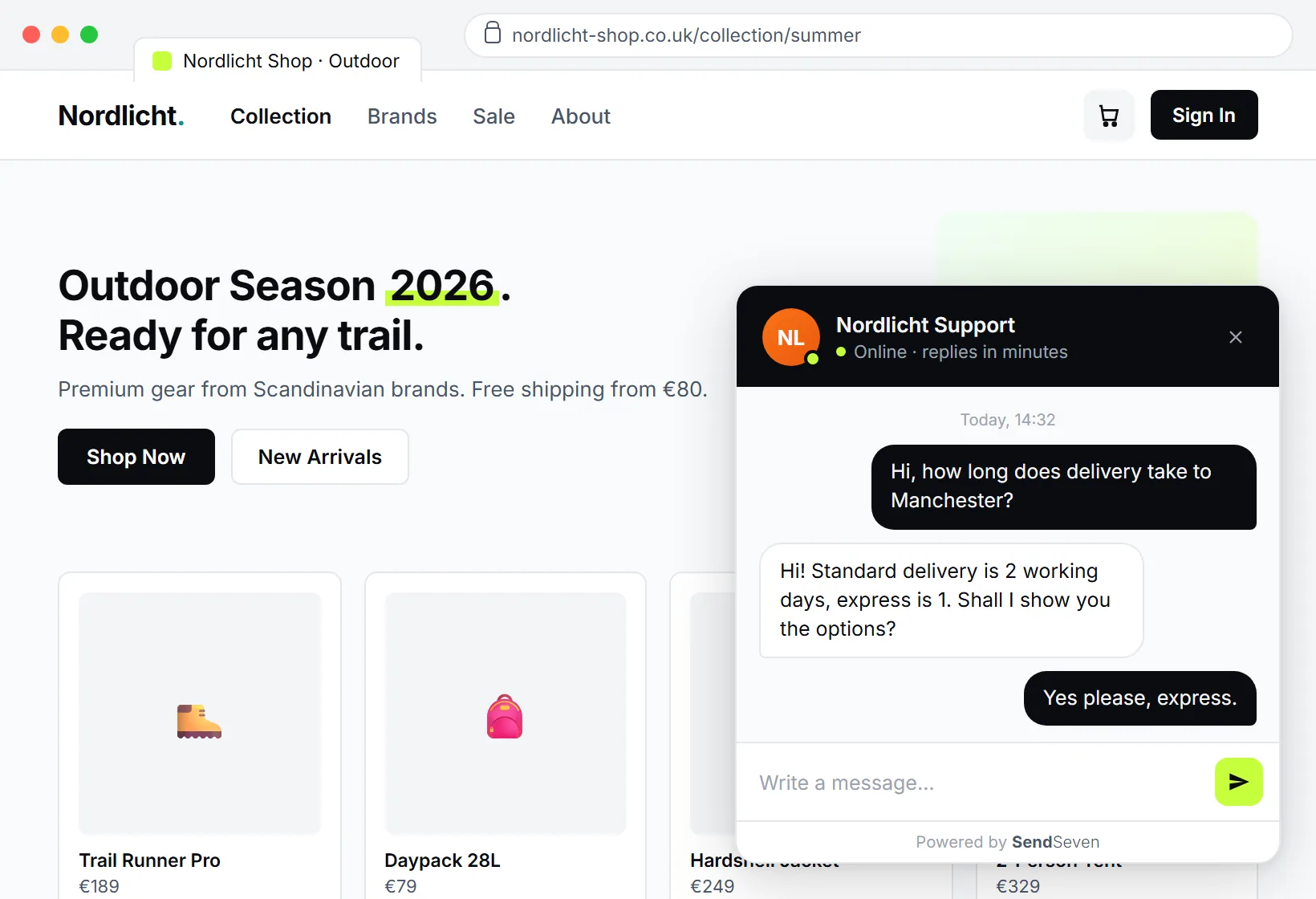
The core idea is simple: one widget on the page, all conversations in one place. Here is how it looks in practice.
1. One line to embed. You copy a short script into your website and you are done. The chat widget appears without a developer spending days on it. Colours, greeting text, and position can all be adjusted to match your brand.
2. Everything in the unified inbox. Every live chat conversation lands in the same central inbox as WhatsApp, email, or SMS. Your team does not switch between five tabs; they work from one interface. The complete history of any customer is visible immediately, regardless of which channel they used before.
3. Clear ownership. Conversations can be assigned to individual team members or teams. The sales enquiry goes to sales, the support question goes to support. The pattern of “nobody feels responsible so nobody follows up” belongs to the past.
4. Business hours control. Via a bot's activation rules you define when the live chat is staffed by people and when the AI assistant takes over. The widget stays active round the clock without anyone needing to sit at a screen overnight.
5. Clean on mobile too. On a smartphone the chat opens full-screen or can be popped out to a new tab. The visitor types on a full screen, not in a tiny window.
AI assistant and knowledge base: help around the clock
A live chat is only as good as the answers it gives. That is where the AI assistant comes in. It draws on your knowledge base and answers questions inside the widget independently, even when no team member is online.
You fill the knowledge base with what you already have: product information, delivery terms, opening hours, FAQs, guides. The AI assistant pulls its answers from there. Instead of a call at 9:30 in the evening, the visitor gets a correct and friendly reply in seconds.
The clean handover to a human matters here. The moment a question becomes too complex or the customer explicitly asks for a person, the AI assistant passes the conversation on without the customer having to explain everything again. Routine runs automatically; the personal stays personal.
Anyone who wants to go deeper on automation will find the detail on the AI bots page.
When your team is offline: contact form instead of dead end
Not every question can be resolved automatically, and not every time of day is someone available. For exactly this situation SendSeven live chat has an away mode. When the team is offline, the chat window converts into an offline contact form.
The visitor leaves their question and contact details, and here is where it differs from a standard form: the message does not land in some inbox but goes directly into the unified inbox. The next morning your team sees immediately who is waiting and can follow up with purpose.
A late-night enquiry becomes a qualified lead rather than a missed opportunity. The visitor feels taken seriously because they get a response, and your team no longer loses a single enquiry in the daily flow.
More than support: capturing and qualifying leads
Live chat is often reduced to customer service. In practice it is a strong sales tool. Every visitor who asks a question is signalling interest. That is the ideal moment to turn an anonymous click into a contact.
With pre-chat forms you ask upfront exactly what you need for qualification: name, company, topic. Your sales team immediately knows who they are dealing with, and the conversation does not start from scratch.
Alongside this you can use a newsletter or lead-capture widget that encourages visitors to sign up without being intrusive. Someone who does not have time for a conversation right now at least leaves their email address and stays reachable. The newsletter widget guide covers the setup.
A real-world example: a visitor browsing your services in the evening is interested but not ready to call. In the live chat they ask a quick question, the AI assistant replies, and at the end the visitor leaves their details via the pre-chat form for a quote. The next morning your sales team has a pre-qualified lead complete with the conversation history, rather than an anonymous number in a statistic. That gap between interest and first contact is exactly what live chat closes reliably.
For a deeper look at lead capture in B2B, read the companion article below.
Live chat vs other channels: when to use what
Live chat does not replace every other channel; it complements them. What matters is that all channels flow into the same inbox. The table below shows where live chat excels and where other channels have their strengths.
| Channel | Response time | Best use case | 24/7? |
|---|---|---|---|
| Live Chat | Instant | Catching visitors on the website, pre-purchase questions, lead capture | Yes, with AI assistant |
| Minutes | Personal consultations, follow-ups, campaigns to existing customers | Partially | |
| Hours | Quotes with attachments, invoices, detailed correspondence | Async | |
| Phone | Instant, if answered | Urgent or complex cases needing explanation | Business hours only |
The rule of thumb: Keeping a visitor on your website? Live chat. Nurturing a personal relationship over time? WhatsApp. Document-heavy exchanges? Email. The biggest lever comes when everything runs in one unified inbox and no channel stands alone.
Worked example: what live chat is worth to a small business
Theory is useful; numbers in euros are better. Take a small or medium-sized business with a moderately busy website.
Assumptions: 3,000 visitors per month. Currently around 1.5% use the contact form, giving 45 enquiries. One won order brings an average contribution margin of €400.
3,000 visitors × 3% chat usage = 90 conversations/month. Of those, 20% are qualified enquiries × 30% close rate × €400 contribution margin = €2,160/month additional contribution margin
A well-placed live chat often doubles the number of first contacts in practice, because the barrier is lower than a form. In our calculation conversations rise from 45 to 90 per month. If 20% of those are qualified sales enquiries and 30% of those close, that is just over five additional orders.
At €400 contribution margin per order that is €2,160 additional contribution margin per month, around €25,900 a year. Not included: the phone lines freed up, the overnight enquiries the AI assistant handles, and the newsletter contacts gained.
Against that, the platform costs. The live chat widget is included from the Basic plan at €49/month, and the AI assistant for round-the-clock automation from the Professional plan at €79/month. Incoming messages are always free. See the full rates on the pricing page. The lever is clear: even a single additional order per month pays back the costs many times over.
View transparent pricing
From €49/month on the Basic plan, AI assistant from the Professional plan (€79/month). Unlimited team members, incoming messages free.
View pricing →GDPR and data protection: live chat without the risk
For European businesses data protection is part of the decision. A live chat processes personal data, so it needs to be set up properly. Three points that will satisfy your data protection officer.
- EU hosting. SendSeven is a SendSeven GmbH based in Augsburg, Germany. Data stays on EU servers. No uncontrolled transfers to third countries.
- GDPR-compliant basis. A data processing agreement and transparent handling of consent come as standard. More detail in the glossary under GDPR-compliant messaging.
- Official interfaces. SendSeven is a Meta Business Partner and works exclusively through official channels. Whatever you connect to third-party systems, such as a CRM, runs in a controlled way via Webhook and REST API.
To set expectations correctly: SendSeven does not offer read receipts in live chat or co-browsing. The focus is on clean, GDPR-compliant communication that a small business can use without any legal anxiety.
Up and running in 5 steps
The path from decision to a live chat in production is shorter than most people think.
- Embed the widget. Copy the script into your website, adjust colours and greeting text. Step-by-step instructions are in the live chat widget guide.
- Fill the knowledge base. Add product information, delivery terms, and FAQs so the AI assistant can answer correctly.
- Set business hours and handover rules. Define when the team is chatting and when the AI assistant takes over, and at what point a handover to a team member is triggered.
- Set up routing. Define which conversations go to sales, support, or individual team members.
- Go live and measure. Activate the chat and watch the first few weeks: how many conversations, how many leads, how high is customer satisfaction.
You do not need to perfect everything at once. Start with the widget and the knowledge base; the rest grows with experience.
Frequently asked questions
How much does live chat cost with SendSeven?
The live chat widget is included from the Basic plan at €49/month. The AI assistant for round-the-clock automation described here is included from the Professional plan at €79/month. Incoming messages are always free and the number of team members is not capped. Current rates are on the pricing page.
How do I embed live chat on my website?
You copy one line of script into your website and the widget appears. Colours, greeting text, and position can be adjusted. The live chat widget guide has step-by-step instructions.
Does live chat work when my team is offline?
Yes. The AI assistant answers questions round the clock from your knowledge base. If nobody is available and a human is needed, the chat window converts to a contact form whose messages land directly in the unified inbox.
Is live chat GDPR-compliant?
Yes. SendSeven is a SendSeven GmbH based in Augsburg, hosts in the EU, and provides a data processing agreement. As a Meta Business Partner, SendSeven works exclusively through official interfaces.
Can I capture leads with live chat?
Yes. With pre-chat forms you ask for name, company, and topic before the conversation starts. You can also use a newsletter or lead-capture widget. Every enquiry lands as a contact in the unified inbox.
Do I need a developer to set it up?
No. The widget is embedded with one line of script, which anyone who can manage a website can handle. A developer can help if you want to connect a CRM via Webhook and REST API, but that is not needed to get started.
How is live chat different from WhatsApp?
Live chat catches visitors directly on your website at the moment of highest interest. WhatsApp suits ongoing personal relationships, such as follow-ups and campaigns. With SendSeven both channels run in the same inbox so no history is ever lost.
Does live chat work on smartphones?
Yes. On mobile devices the chat opens full-screen or can be popped out to a new tab, so visitors have the full screen available rather than a small window.
Conclusion: the simplest lever on your website
Most websites lose customers every day without noticing. Visitors arrive, do not find their answer fast enough, and leave. A live chat is the simplest lever to close this gap: it answers instantly, is available round the clock thanks to the AI assistant, and turns silent visits into conversations.
For a small business the return on investment comes quickly. Just a handful of additional orders per month exceeds the platform costs many times over. And because all conversations flow into the unified inbox, live chat grows seamlessly alongside your other channels.
Next steps:
- Explore SendSeven live chat
- Set up the live chat widget (one line of script)
- View pricing (from €49/month, Basic plan)
Want to go deeper? These two articles follow on directly: Live chat or chatbot: combining people and AI the right way and Live chat in B2B: capturing qualified leads.