Live Chat or Chatbot? Getting the Human and AI Mix Right
SendSeven Team, Editorial Team
Live chat with a real team member or an AI assistant? The honest answer: both. This guide shows when a person should reply, when the AI assistant drawing on your knowledge base is enough, and how the clean handover between the two works so your widget keeps winning customers around the clock.
TL;DR
Human or AI in live chat? The right answer is both. An AI assistant answers routine questions from your knowledge base immediately and round the clock, even when your team is offline. The moment things become personal, sensitive, or complex the conversation is handed over cleanly to a team member. Outside business hours the chat window becomes a contact form whose messages land directly in the unified inbox. This guide shows when to use a person, when to use AI, and what the mix looks like in practice.
The wrong question: human or machine?
You have decided to put a live chat on your website. Now the next question is in the room: should a team member reply or a chatbot? Most guides act as if you have to pick a side. That is the wrong question.
In practice the two do not exclude each other; they complement each other. A person is unbeatable when it comes to advice, empathy, and tricky one-off situations. An AI assistant is unbeatable when the same simple question comes in for the hundredth time, including at 10 pm.
The interesting question is therefore not “person or AI?” but “which enquiry belongs to which?” Getting that split right means winning twice: routine runs automatically, the personal stays personal. That is exactly the mix described here, using the example of SendSeven live chat.
If you are completely new to live chat, the live chat guide 2026 covers the foundations. This article goes one level further: the right division between people and AI.
When a person should reply
There are moments when a visitor wants to feel a human being at the other end. Automate these moments and you lose trust. Three typical cases where a team member should take the wheel.
Consultation with real flexibility. Which plan suits a business with twelve staff? Can the delivery date still be moved? Questions like these need someone who thinks it through, weighs things up, and is willing to make an exception. A good conversation sells more here than any scripted reply.
Emotional or sensitive situations. A complaint, a return, an upset customer. Empathy counts here. A friendly person who listens and offers a solution saves the relationship. An automated reply can pour fuel on the fire.
The close. When a prospect is close to a decision, personal contact is often the tipping point. A team member recognises the buying signals, addresses objections, and brings the conversation to a close.
The good news: your team does not have to sit in the chat window all day for this. They step in precisely when it counts. The AI handles the rest.
When the AI assistant takes over
Now the other side. A very large share of enquiries is not consultation; it is simply repetition. Do you ship to Scotland? How long does delivery take? Are you open on Saturdays? These questions cost your team time without requiring any real judgement.
That is exactly where the AI assistant shines. It draws on your knowledge base and answers these questions in seconds, in a friendly and accurate way. And the decisive advantage: it does this even when nobody from your team is online.
Imagine: Friday evening, 9:30 pm, your team finished hours ago. A prospect is on the sofa looking through your services and asks whether you offer maintenance contracts. Instead of being told to wait until Monday, they get a clear answer from the knowledge base right away. Over the weekend, without anyone at a screen. An open question becomes a warm contact rather than a cooled-off opportunity.
The AI assistant is therefore not a replacement for your team but its night shift and first point of contact. It handles the volume of simple questions so your team members can focus on the conversations that genuinely need a person.
See live chat with AI assistant
One widget, an AI assistant drawing on the knowledge base, a clean handover to your team. Incoming messages are always free.
Explore Live Chat →Human, AI, or hybrid: a direct comparison
Placing the pure approaches side by side quickly shows why the mix wins. A live chat staffed only by people is blind at night. A chat with only AI loses out when things get sensitive. The table below shows where the strengths and limits lie.
| Criterion | Human-staffed live chat | AI assistant | Hybrid (recommended) |
|---|---|---|---|
| Availability | Business hours only | Round the clock | Round the clock, with people during business hours |
| Response time | Seconds to minutes if available | Instant | Instant, person when needed |
| Complex cases | Very strong | Limited | Very strong through handover |
| Empathy | High | Matter-of-fact, friendly | Person handles sensitive cases |
| Team workload | High, every question reaches a person | Very low | Low, only relevant cases |
| Scalability | Limited by headcount | High | High, people only for what matters |
The rule of thumb: The AI assistant is the front line and the night shift. The person handles everything that needs consultation, empathy, or a close. Both work in the same unified inbox, so the transition stays fluid.
The knowledge base: the brain of the AI assistant
An AI assistant is only as good as the knowledge it draws on. With SendSeven that is your knowledge base. You fill it with what you already have: product information, delivery terms, opening hours, FAQs, guides.
The AI assistant pulls its answers exclusively from this content. That has a practical side-effect: it does not make things up but stays within what you have approved. The cleaner and more complete your knowledge base, the more reliable the answers in the chat.
The best part: you maintain the knowledge in one place but use it everywhere. The same knowledge base feeds not only the chat widget but also the AI assistant on other channels such as WhatsApp. Maintained once, used many times. For deeper detail see the AI bots page.
Managing business hours and offline mode
The human-AI mix stands or falls on the right controls. When should the AI assistant reply, when should a team member, and what happens in the middle of the night? In SendSeven you manage this through a bot's activation rules.
During business hours the team can monitor and step in while the AI assistant provides the first reply and resolves simple questions immediately. Team members jump in as soon as it is relevant.
Outside business hours the widget stays active. The AI assistant continues to answer from the knowledge base, so nobody is left at a closed door. Nobody from your team needs to be awake for this.
When a person is genuinely needed and nobody is available: this is where away mode kicks in. The chat window converts to a contact form. The visitor leaves their question and contact details, and the message does not land in some inbox but goes directly into the unified inbox. The next morning your team sees immediately who is waiting and can follow up with purpose. A late-night enquiry becomes a qualified contact rather than a missed opportunity.
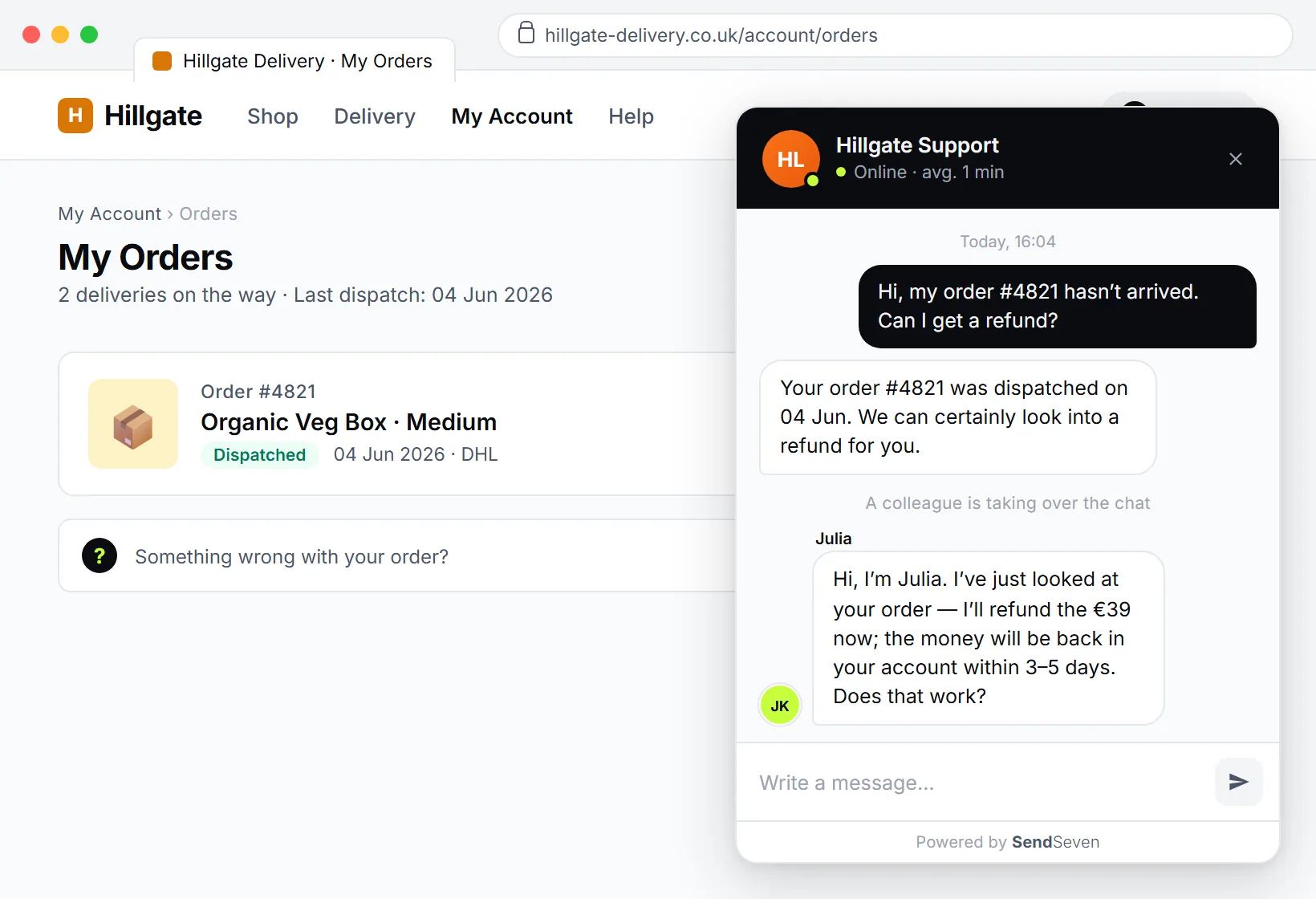
The clean handover to a human
The most important moment in the mix is the handover. It determines whether the customer feels well looked after or frustrated and leaves. Done badly it means the customer has to repeat everything. Done well it means the team member steps in seamlessly.
In SendSeven the AI assistant passes the conversation to a team member the moment a question becomes too complex or the customer explicitly asks for a person. What matters is that the entire conversation history is preserved. The team member sees what has already been discussed and does not have to start from scratch.
Because everything flows through the central inbox, the handover is not a break but a smooth transition. In the ideal case the customer only notices that the replies suddenly feel more personal. That is exactly how it should work: the AI handles the routine, the person takes over when it counts.
A practical note for mobile: on a smartphone the chat opens full-screen or can be popped out to a new tab. Your team can therefore also take over cleanly on mobile, without typing in a tiny window.
How to set up the mix
The theory is clear; now to practice. Here is how to bring people and AI together in your live chat without it becoming complicated.
- Embed the widget. Copy one line of script into the website. Instructions are in the live chat widget guide.
- Fill the knowledge base. Add product information, delivery terms, and FAQs so the AI assistant answers correctly.
- Set business hours. Use the bot's activation rules to define when the team is chatting and when the AI assistant handles things alone.
- Define handover rules. Decide which situations trigger a handover to a team member and which team receives which enquiries.
- Activate offline mode. Make sure the contact form kicks in outside your hours and that messages land in the unified inbox.
You do not need to perfect everything at once. Start with the widget and the knowledge base, then refine the handover rules after the first few weeks. The mix grows with your experience.
Incidentally: anything you want to connect to third-party systems, such as a CRM, runs in a controlled way via Webhook and REST API. SendSeven is a SendSeven GmbH based in Augsburg, Germany, hosts in the EU, and is a Meta Business Partner, so the GDPR side stays clean without you having to worry about uncontrolled data transfers.
View transparent pricing
From €49/month on the Basic plan, AI assistant from the Professional plan (€79/month). Unlimited team members, incoming messages free.
View pricing →Frequently asked questions
Is it better to have a person or a chatbot in live chat?
Best to have both. The AI assistant answers routine questions immediately and round the clock; the team member takes over for consultation, complaints, and closes. This combination pairs the constant availability of AI with the empathy and flexibility of a person.
Does the AI assistant reply when my team is offline?
Yes. The AI assistant answers questions round the clock from your knowledge base, including overnight and at weekends. If an enquiry genuinely needs a person and nobody is available, the chat window converts to a contact form whose messages land directly in the unified inbox.
Where does the AI assistant get its answers?
From your knowledge base. You add product information, delivery terms, opening hours, and FAQs there. The AI assistant draws its answers exclusively from this content, so it stays within what you have approved.
How does the handover from the AI assistant to a team member work?
As soon as a question becomes too complex or the customer explicitly asks for a person, the AI assistant passes the conversation to a team member. The full conversation history is preserved so the customer does not have to repeat themselves and the team member steps in seamlessly.
How do I control business hours in live chat?
Via the bot's activation rules you define when the team is chatting and when the AI assistant handles things alone. The widget stays active round the clock without anyone needing to sit at a screen overnight.
Does the AI assistant replace my team?
No. It handles the volume of simple, repetitive questions so your team can focus on the conversations that genuinely need a person, such as consultations and closes. The AI is a relief, not a replacement.
Is the combination of live chat and AI GDPR-compliant?
Yes. SendSeven is a SendSeven GmbH based in Augsburg, Germany, hosts in the EU, and provides a data processing agreement. As a Meta Business Partner, SendSeven works exclusively through official interfaces. Connections to third-party systems such as a CRM run in a controlled way via Webhook and REST API.
How much does live chat with an AI assistant cost at SendSeven?
The live chat widget is included from the Basic plan at €49/month. The AI assistant described in this article is included from the Professional plan at €79/month. Incoming messages are always free and the number of team members is not capped. Current rates are on the pricing page.
Conclusion: routine to AI, what matters to people
The question “person or chatbot?” has a simple answer: both, in the right place. The AI assistant handles the volume of simple questions, replies instantly, and is available round the clock, even when your team has long since finished for the day. The person takes over precisely when consultation, empathy, or a close is needed.
For a small business this is the best of both worlds: constant availability without a night shift, personal consultation without drowning in routine. And because all conversations flow into the unified inbox, the handover is a smooth transition rather than a break.
Next steps:
- Explore SendSeven live chat
- Set up the live chat widget (one line of script)
- View pricing (from €49/month, Basic plan)
Want to go deeper? These two articles follow on directly: the live chat guide 2026 with the foundations, and live chat in B2B: capturing qualified leads.