WhatsApp Flows and GDPR: consent and data protection
SendSeven Team, Editorial Team
What data a WhatsApp Flow collects, who processes it, when you need consent and what belongs in your privacy notice and DPA. Covers the EU and UK GDPR, with a checklist for your first flow.
TL;DR
A WhatsApp Flow collects details in a structured way, so the same rules apply as for any form: decide the purpose, ask only what you need, tell people what happens to their data and get separate consent for marketing. This post covers the EU GDPR and the UK GDPR. SendSeven is hosted in the EU (Frankfurt), the answers appear in the chat and on the contact, and they travel through WhatsApp (Meta). You'll see what data a flow collects, when you need consent, how to minimize data and what belongs in your privacy notice and DPA, with a checklist for your first flow.
Not legal advice
This post gives a general overview and doesn't replace legal advice. It looks at the EU GDPR and the UK GDPR. Other jurisdictions, for example US state privacy laws, have their own rules that this post doesn't cover. Where both say the same, we simply write “the GDPR”. How you may collect data with a WhatsApp Flow depends on your business, your customers and your purposes. For individual questions, ask your data protection officer, adviser or a law firm.
What data does a WhatsApp Flow collect, and who processes it?
A WhatsApp Flow collects exactly the details you ask for. WhatsApp also passes along the customer's phone number and profile name in every chat. The data is processed in up to three places: at WhatsApp (Meta), which carries the answers, at SendSeven, where they're stored in the chat and on the contact, and in your CRM if you connect one.
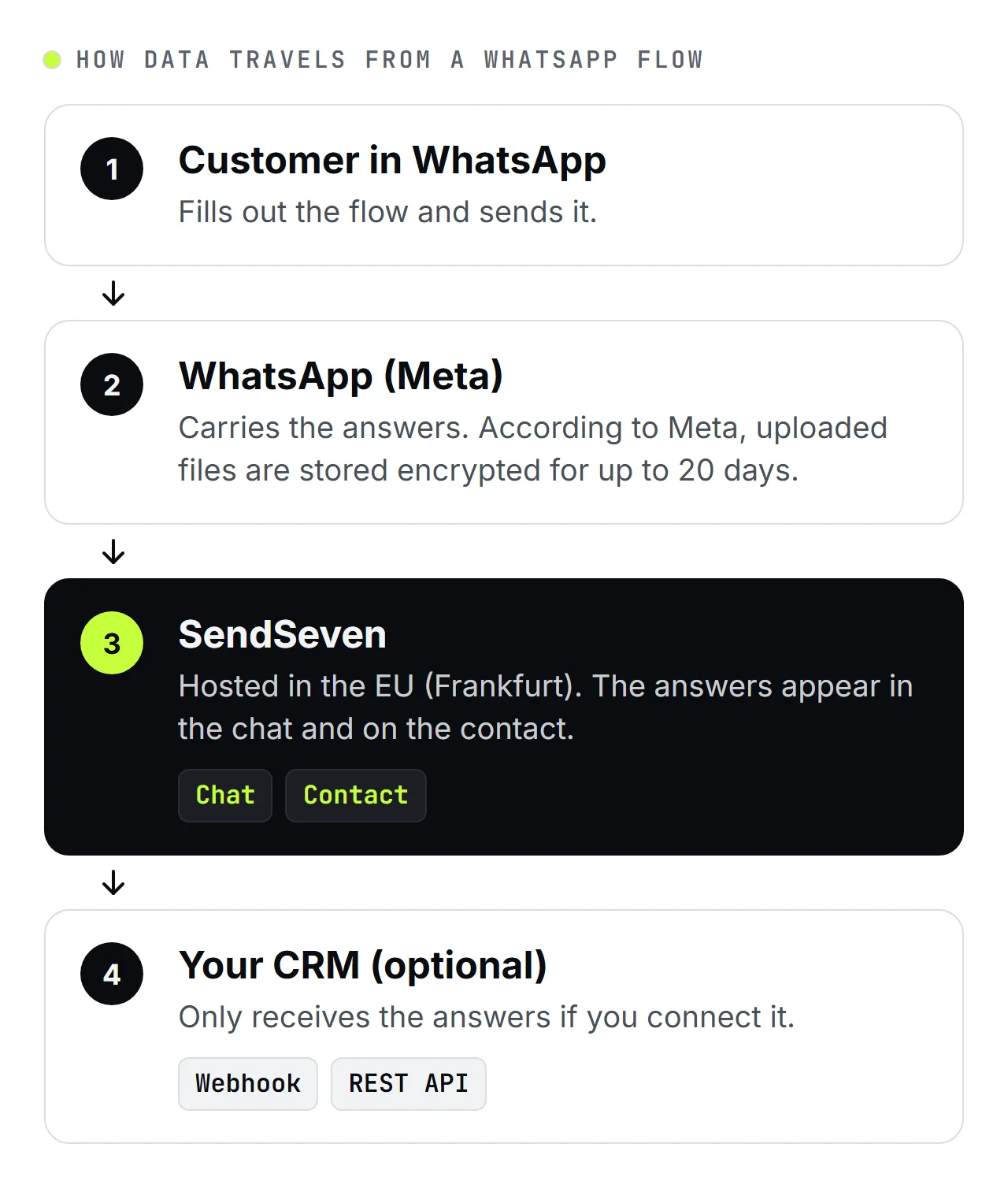
- WhatsApp (Meta): Messages run through WhatsApp (Meta), and Meta may transfer data to the US. For this, Meta relies on the EU-US Data Privacy Framework and standard contractual clauses. According to Meta, WhatsApp keeps uploaded photos and documents encrypted for up to 20 days (Meta's documentation).
- SendSeven: The platform is hosted in the EU (Frankfurt) and connected directly to WhatsApp as a Meta Business Partner. The answers appear in the chat in the inbox. Answers you've mapped to a field are also on the contact, and photos and documents are attached to the chat and the contact.
- Your CRM: You pass the answers on with a webhook or the REST API if you set that up. Without a connection, they stay in SendSeven. The webhook setup guide shows how.
In most cases you are the controller for your customers' data, because you decide what you ask for and why. SendSeven processes the data on your behalf, as a processor. For how a WhatsApp Flow works technically, see WhatsApp Flows explained. Our comparison of WhatsApp Flows, reply buttons and chatbots shows when a flow fits better than buttons.
When do you need consent, and when don't you?
For the inquiry itself you usually don't need separate consent, but for marketing and newsletters you do. Someone who writes to you and requests a quote in a flow wants you to use their details for that. The legal basis is then usually Art. 6(1)(b) GDPR (steps taken at the person's request before entering into a contract), the same article in the UK GDPR. If you later want to send the same person promotions, discounts or a newsletter, you need their consent for that. Separately, Meta requires an opt-in before you message someone first with a template.
A flow is a good place to ask for this consent, because your customer is active right now and you control the exact text. Watch for four things:
- A field of its own: Ask for consent with a separate opt-in field, apart from the inquiry. A pre-ticked box isn't valid consent under the GDPR, as the EU Court of Justice confirmed in its Planet49 ruling (C-673/17, 1 October 2019).
- Freely given: Someone who only wants a quote must be able to send the inquiry without signing up for the newsletter. So don't make the opt-in a required field.
- Clear wording: Say what you'll send, over which channel and how to unsubscribe. A “Read more” link on the opt-in field takes people to your privacy notice.
- Keep the wording: SendSeven stores the consent text with every opt-in. If someone asks later, you can see which wording the person agreed to.
On Professional and up, an automation in the Flow Builder handles the list sign-up: the WhatsApp Flow completed trigger starts it, a condition checks the opt-in field, and a further step adds the contact to your newsletter list. What double opt-in involves, and why WhatsApp needs its own consent, is covered in the double opt-in use case, and WhatsApp Opt-in: 7 Strategies to Grow Subscribers shows how to win subscribers fairly.
How do you minimize data in a WhatsApp Flow?
Data minimization in a flow means asking only what you need for the purpose, and keeping every answer only where your team works with it. A flow makes that easier than an open chat, because you set the questions in advance and can use choices instead of free text.
- Justify every question: For each question, write one sentence on why you need the answer. If you can't think of one, delete the question. A decorating firm pricing a job needs the rooms, the size and a postal code, not a date of birth. Our post on qualifying leads with a WhatsApp Flow shows which details usually suffice for a quote.
- Choices instead of free text: People often write more in a free-text field than you want to know, up to health or financial details. A choice limits the answer to what you need. If you still want a free-text field, for example for notes, say what belongs in it and what doesn't, such as “Please don't include any health information.”
- Few required fields: Whatever isn't strictly necessary stays optional.
- Save with a purpose: With the Save the answer setting on each field you decide whether the answer goes into a contact field, a custom field or a tag on the contact, or stays only in the flow's responses. What you need for just this one inquiry can stay in the responses instead of sitting on the contact for good.
- Mark sensitive fields: Fields you mark as sensitive are masked in the analytics table, the API and outgoing webhooks. Your team still sees the answer in the chat, so it can handle the inquiry.
- Photos only where they help: A photo often shows more than intended, such as people or license plates. Only ask for one if the inquiry really needs it, and say what should be in it.
Also decide how long you keep inquiries, and note it in your record of processing activities. If you want to ask for special category data, for example about health, clarify it with your data protection officer or adviser first. For processing on a larger scale, a data protection impact assessment (DPIA) may also be needed.
What belongs in your privacy notice and DPA?
Your privacy notice tells your customers what happens to their details, and the data processing agreement (DPA) sets out how SendSeven processes the data on your behalf. Both should be in place before your first flow goes live. A privacy notice for WhatsApp Flows usually covers:
- the purpose of the questions and the legal basis, separately for the inquiry and for marketing,
- WhatsApp (Meta) as the channel the data travels through, with a note on a possible transfer to the US,
- SendSeven as a service provider that processes the data on your behalf,
- a connected CRM and any other recipients,
- how long you keep the details,
- your customers' rights and how they withdraw consent.
Link the notice where you collect the data: through “Read more” on the opt-in field or in the message that delivers the flow.
We provide the DPA on request. How SendSeven itself handles data, and how to contact us about it, is in our privacy policy. Meta's WhatsApp terms also apply. If prospects reach you through an ad, Click-to-WhatsApp ads and GDPR walks through the data chain.
Checklist before your first flow
- Every question has a purpose you can state in one sentence.
- Required fields only where you really need the answer.
- Consent for marketing or newsletters as its own, optional field.
- Consent text matched to your privacy notice and reviewed.
- Privacy notice linked, with WhatsApp (Meta) and SendSeven named as recipients.
- Sensitive fields marked, photos only where they help.
- Retention period for inquiries set.
- DPA signed with SendSeven.
What should you check with templates and the AI builder?
Templates and the AI builder save work when you build, but the responsibility for the questions and texts stays with you. Check every flow before you publish it the way you'd check a new form on your website.
- Templates: SendSeven comes with ready-made flow templates, including lead capture and qualification, quote requests and callback requests. Their consent texts are only examples: adapt them to your privacy notice and have them reviewed before you use them.
- AI builder: On Professional and up, the AI builder creates a static flow from your description. It uses AI Credits, only for successful runs, and the AI processing takes place in the EU. The builder only needs your use case, so don't put real customer data into the description.
- Before you publish: Do the questions, required fields and the place each answer is saved fit? Is the opt-in optional and the text adapted? If your privacy notice changes later, edit the flow and publish it again. If you send it through a template with a Flow button, resubmit the template to Meta afterwards; otherwise it keeps opening the old version.
The short version: A WhatsApp Flow is a form like any other, so ask only what you need, get separate consent for marketing, link your privacy notice and sign the DPA.
For all the features at a glance, see the WhatsApp Flows page, and the WhatsApp Flows guide walks you through building and publishing a flow step by step. The subscriber compliance use case shows how teams keep track of consent per contact and per channel, and the glossary entries on messaging under GDPR and WhatsApp Flows explain the basics.
Further reading:
- WhatsApp Flows explained: forms inside the chat for small businesses
- Qualify leads with a WhatsApp Flow: all the details at once
- Click-to-WhatsApp Ads GDPR 2026: data chain, DPA, cookie banner
- WhatsApp Opt-in: 7 Strategies to Grow Subscribers in 2026
Frequently asked questions
Where are the answers from a WhatsApp Flow stored?
In SendSeven, which is hosted in the EU (Frankfurt). The answers appear in the chat in the inbox, mapped answers and tags appear on the contact, and photos and documents as attachments. They travel through WhatsApp (Meta), which according to Meta keeps uploaded files encrypted for up to 20 days. Nothing reaches your CRM unless you set up a webhook or the REST API yourself.
Does a WhatsApp Flow involve a data transfer to the US?
It can, through WhatsApp itself: Meta may transfer WhatsApp data to the US and relies on the EU-US Data Privacy Framework and standard contractual clauses for this. SendSeven itself is hosted in the EU (Frankfurt). Name WhatsApp (Meta) and the possible transfer to the US in your privacy notice.
Can I collect health data with a WhatsApp Flow?
Only with care: health data is special category data under Art. 9 GDPR and needs its own legal basis, often explicit consent. So ask only what you need for the appointment and discuss symptoms or findings in person. A physiotherapy clinic, for example, can ask which day suits a patient and whether it's a first visit, and leave the description of the injury for the appointment itself. If you still want to collect such details over WhatsApp, clarify it with your data protection officer or adviser first.
How long can I keep inquiries from a WhatsApp Flow?
Only as long as you need them for their purpose. You can usually delete an inquiry that doesn't lead to an order sooner than the records of a paying customer, for whom statutory retention periods can apply. State the period in your privacy notice as well.
Can customers withdraw their consent?
Yes, at any time, and withdrawing must be as easy as giving consent. So say how in the consent text, for example with a short message saying “Stop”. If someone sends “Stop”, SendSeven processes the unsubscribe automatically, with nothing for you to set up. What valid consent needs is explained in the glossary entry on opt-in and consent.