WhatsApp Flow, buttons or chatbot: which fits which question?
SendSeven Team, Editorial Team
Reply buttons, a list, a chatbot, a web form or a WhatsApp Flow: which one fits depends on how many questions you ask and what kind. This post shows when each format is right, how a chatbot and a flow work together and when a web form is still the better choice.
TL;DR
Use reply buttons (up to three) or a list (up to ten rows) when your customer only has to make one choice. Use a WhatsApp Flow when you need three or more details, or a photo, a date or a consent checkbox. Leave open-ended questions that need advice to an AI bot or your team, and keep payments, very long forms and customers who aren't on WhatsApp on your website. What decides it is how many questions you ask and what kind, not the technology. The table at the end helps you sort your most common inquiries.
Which answer formats does WhatsApp offer?
WhatsApp gives you six ways to ask a customer for an answer: a typed reply, reply buttons, a list, a link button, a carousel or a WhatsApp Flow. Everything except the typed reply is an interactive message: your customer taps instead of typing.
- Typed reply: You ask a question and your customer answers in their own words. That is flexible, but the answers arrive unsorted and often incomplete.
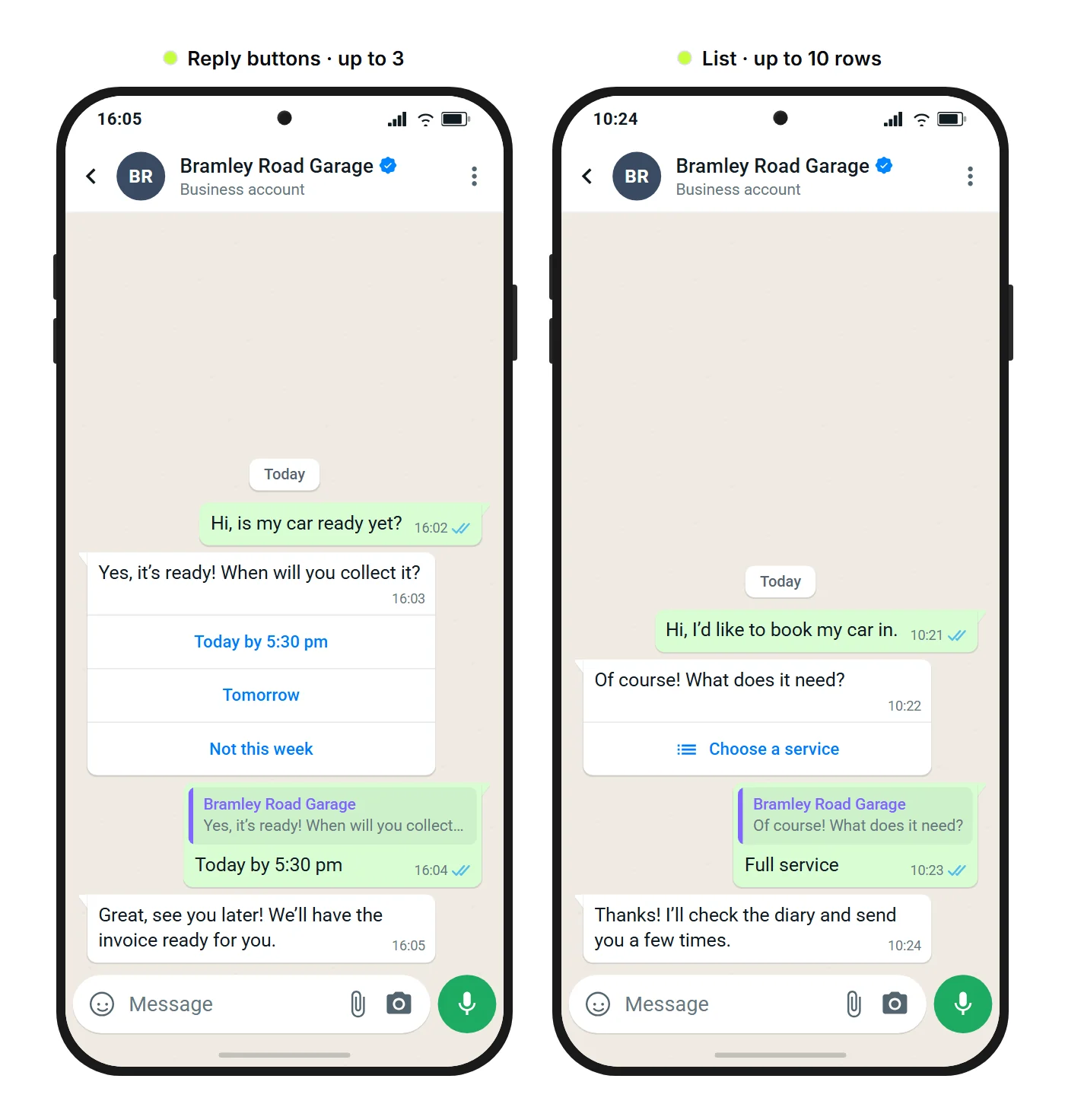
- Reply buttons: up to three buttons under a message, each up to 20 characters. One tap and the answer is in the chat.
- List: one button opens a menu of up to ten rows, split into sections. Each row has a title of up to 24 characters and, if you like, a description of up to 72 characters.
- Link button: a button that opens a web page, such as order tracking or a product page.
- Carousel: two to ten cards to swipe through, each with an image, text and buttons, for example to show several products. You send carousels as an approved template, and the guide to carousel messages has the details.
- WhatsApp Flow: a form that opens inside the chat, with one or more screens. What's behind it is covered in WhatsApp Flows explained.
You can send reply buttons, lists and link buttons as a regular message only inside the 24-hour window, meaning the customer has written to you in the last 24 hours. Inside the window they count as a normal session message. Outside it you need an approved message template, and your customer must have opted in first. A template can carry reply buttons or a Flow button, but not a list. So lists, and WhatsApp Flows without a template, only go out inside the window.
When are reply buttons or a list enough?
Reply buttons or a list are enough when you ask one question and the answer is a choice from fixed options. Up to three options fit on buttons and up to ten in a list (Meta's documentation on reply buttons and lists).
Typical cases: A car repair garage in Leeds asks when a customer will collect their repaired car and offers “Today by 5:30 pm”, “Tomorrow” and “Not this week”. A dental practice lets a patient confirm or reschedule an appointment. A retailer with several stores asks which one a customer wants to pick up an online order from. Your customer doesn't have to type anything, and your team doesn't have to interpret anything.
You don't need a chatbot for any of this. In SendSeven, you can send reply buttons and lists straight from the inbox while the 24-hour window is open. The guide to interactive WhatsApp messages shows how.
Buttons and lists really pay off in automations. On Professional and up, an automation in the Flow Builder can send them and take a different path depending on the button your customer taps: for “Tomorrow” it sets a reminder, for “Not this week” it alerts your team. An approved template with up to three reply buttons can branch the same way, and you can send it outside the 24-hour window too.
Buttons are at their best when one tap settles the question. Once a second and a third question follow the first, every extra round is another message and another chance for your customer to put the phone down. If you need to know three or more things one after another, a flow serves you better.
When is a WhatsApp Flow the better choice?
A WhatsApp Flow is the better choice when you need three or more details, or when a photo, a document, a date or a consent checkbox is part of the answer. Your customer fills out everything on one or a few screens and sends it with one tap, and the answers land in fixed fields instead of being scattered through the thread.
Take the same garage. For a repair quote, the mechanics need the registration number, what the customer has noticed, when they can drop the car off and a photo of the warning light. With reply buttons that takes several rounds, plus a separate request for the photo. With a flow, Dan, one of the garage's customers, taps “Get a repair quote”, enters his registration, taps “Warning light”, picks when he'd like to drop the car off, adds a photo and sends it all together.
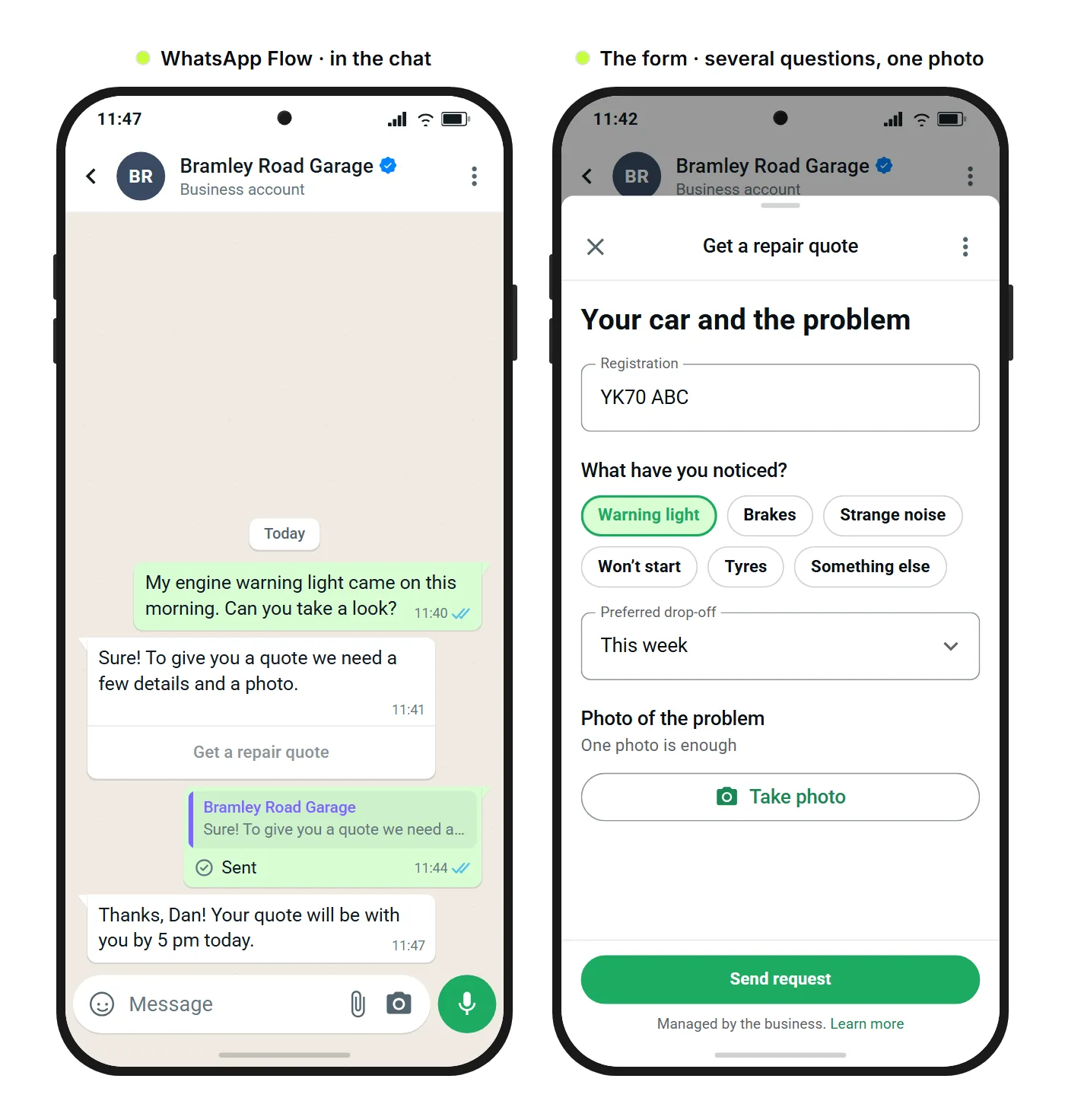
Fewer messages are only part of the benefit. Tapping is quicker than typing, nobody has to switch to a browser, the first screen can be prefilled with details you already know, such as a name or an email address, and the answers stay in the chat your customer is already using.
In the WhatsApp Flow editor you decide for each field where the answer goes, for example into a contact field, a custom field or as a tag on the contact. Starter templates for common cases such as appointment requests, quote requests and callback requests give you a head start. Static flows are available on Basic and up, and a published flow isn't final: you can edit it and publish the changes again.
On Professional and up, the WhatsApp Flow completed trigger in the Flow Builder starts an automation as soon as a customer completes the flow. That automation can, for example, assign the inquiry to a team member or notify your team by email. How to use a flow to qualify inquiries is the subject of our post on qualifying leads with a WhatsApp Flow.
Open appointment slots in real time need a dynamic flow, available on Scale and up. On numbers in Coexistence mode, only static flows work. The glossary entry on static and dynamic WhatsApp Flows explains the difference.
A flow pays off once your team regularly asks for the same three or more details one by one. If most of your WhatsApp requests are open questions or a plain yes or no, an AI bot, your team or reply buttons will do the job. If the form asks for consent, our post on WhatsApp Flows and GDPR covers what to look out for.
When is a chatbot better than a WhatsApp Flow?
A chatbot or your team is better than a WhatsApp Flow when the request is open-ended: your customer describes a problem in their own words, needs advice, is upset, or the next question depends on what the last answer said. A form can't listen. It can only ask what you decided in advance.
“The car has been struggling to start since the cold snap. Is a new battery worth it?” is that kind of question. An AI bot can answer recurring questions like this around the clock, based on information you've given it. When things get tricky, for example with a complaint or a big purchase decision, your team takes over. For the basics, see our explainer on AI chatbots and AI agents, and the AI chatbot use case shows examples.
How do a chatbot and a WhatsApp Flow work together?
An AI bot answers the open questions, an automation sends the right WhatsApp Flow once you need fixed details, and your team takes over with every detail in hand. The AI bot doesn't send the flow itself. An automation in the Flow Builder does. That way the conversation stays open where it needs to be and turns into a form where fixed details are needed.
On Professional and up, the Send WhatsApp Flow step in the Flow Builder sends a form from a running automation. The step waits for the answers and has three outcomes: completed, timeout and fallback. The automation can use the answers afterwards. When the flow is completed, it can assign the inquiry to a team member. If no answer comes, it can follow up or hand the conversation over to your team.
For the garage that looks like this: Dan writes, “My engine warning light came on this morning.” An automation in the Flow Builder recognizes keywords such as “warning light” or “won't start” and sends the “Get a repair quote” flow. Once the registration, the symptoms and the photo are in, the inquiry lands with the mechanics, and all they have to do is write the quote.
When is a web form still the right choice?
A web form is still the right choice when your customer doesn't write to you on WhatsApp, when they need to pay, when the form goes beyond what WhatsApp allows, or when the details belong on your website anyway, such as setting up a customer account.
- Other channels: WhatsApp Flows exist only on WhatsApp. Customers who reach you by SMS, email, Instagram or in Live Chat need another route. In the Live Chat on your website, a pre-chat form and the offline form do that job, as our post on capturing leads with live chat explains.
- Payment: A WhatsApp Flow doesn't take payments. For a deposit or an order, send a link button to your checkout.
- Very large forms: Meta allows up to 50 components per screen and one photo or document picker per screen. A response can contain up to 10 files totaling up to 100 MB, and a single file can be up to 25 MB. If you need more, such as many documents for an application, an upload on your website serves you better.
- Details for your own system: If your customer has to choose a password or create an account, that belongs on your website.
For everything in between, a flow usually beats a link, because your customer stays in the chat.
Which format fits which kind of request?
The kind of request decides the format. Match your five most common WhatsApp inquiries to a row. Where several rows fit, go with the simplest format that still gets you every detail you need.
| Kind of request | Example | Format that fits |
|---|---|---|
| One decision from up to three options | Collection time, confirming an appointment | Reply buttons |
| A choice from four to ten options | Type of service, store, appointment type | List |
| Sending someone to a web page | Order tracking, product page | Link button |
| Showcasing several products | New arrivals, offers of the week | Carousel (as a template) |
| Three or more details, a photo, a date or consent | Repair, quote or appointment request | WhatsApp Flow |
| Open-ended request, advice, a complaint | “Is a new battery worth it?” | AI bot, then your team |
| Payment, customer account, customers not on WhatsApp | Deposit, sign-up | Your website |
Often the answer is a chain rather than a single format: the bot takes in the request, the flow collects the details, reply buttons confirm the appointment and your team handles the rest.
The short version: For one decision, reply buttons or a list are enough. For three or more fixed details, a WhatsApp Flow pays off. Everything open-ended stays with an AI bot or your team.
For all the features at a glance, see the WhatsApp Flows page. The WhatsApp Flows guide walks you through building a flow step by step.
Further reading:
- WhatsApp Flows explained: forms inside the chat for small businesses
- Qualify leads with a WhatsApp Flow: all the details at once
- WhatsApp Flows and GDPR: consent and data protection
- What is an AI chatbot? AI agents explained
- Live Chat in B2B 2026: capture leads instead of losing visitors
Frequently asked questions
Does a WhatsApp Flow count as one message or several?
One, however many screens it has. Every flow you send counts as one message from your plan's message allowance, just like any other WhatsApp message, and Meta's fees apply as usual. What applies during the beta and what changes afterwards is covered in the cost section of WhatsApp Flows explained.
Can I use reply buttons and a WhatsApp Flow in the same conversation?
Yes, and they often work best as a chain. A flow collects the details, and a message with reply buttons afterwards confirms the appointment or offers a few appointment times. On Professional and up, an automation in the Flow Builder can run this sequence for you.
Why not just send a link to a web form?
Because every switch to the browser is a chance for your customer to drop off. They leave the chat, wait for a page to load, type their name and phone number again and then have to find their way back. A WhatsApp Flow opens inside the chat, can prefill details you already know and matches every answer to the right contact. For long forms, payments or customers who aren't on WhatsApp, the link is still the right choice.
What happens if a customer doesn't finish the form?
You can plan for that in advance. If you send the flow from an automation on Professional and up, the Send WhatsApp Flow step waits for the answers, and when none arrive in time, the timeout outcome takes over: a follow-up message or a handover to your team. When the customer does complete the flow, the answers appear on a card in the chat, and the automation can use them right away.
Does a WhatsApp Flow work for customers who write on Instagram, by SMS or by email?
No. WhatsApp Flows exist only on WhatsApp. On other channels you still ask your questions in the conversation or send a link to a web form.
Which of my WhatsApp inquiries should I turn into a WhatsApp Flow first?
Start with the inquiry that costs your team the most back-and-forth. Write down how many details your team asks for one by one. If it's three or more, or if a photo, a date or consent is involved, build the flow for that one first. For a single decision, reply buttons are enough.