WhatsApp Flows explained: forms inside the chat for small businesses
SendSeven Team, Editorial Team
A WhatsApp Flow takes the questions your team asks one by one in the chat today and puts them in a form that opens right inside WhatsApp. This post explains how it works for your customers, which questions a flow can ask, what it costs and where the limits are.
TL;DR
A WhatsApp Flow is a form that opens right inside WhatsApp. Instead of your team asking question after question (about seven messages in our example), your customer sends all the details in one go, saved straight to their contact record. In SendSeven you build these forms in the WhatsApp Flow editor, from templates or, on Professional and up, with the AI builder, and you can keep editing them after you publish. Static flows are available on Basic and up, flows with live data on Scale and up. Completed flows are free during the beta, and every flow you send counts as one message from your plan.
What is a WhatsApp Flow?
A WhatsApp Flow is a form that opens inside WhatsApp. Meta provides the feature for businesses that use the WhatsApp Business API. Your customer taps a button in a message, one or more screens with questions appear, and after submitting they are back in the chat. They don't leave WhatsApp, load a web page or install anything.
Compared with sending a link to a web form, your customer stays where they're already typing, and you know which contact every answer came from. Compared with asking in the chat, all the answers arrive at once, complete and in fixed fields, instead of scattered across a long thread.
Technically, Meta describes every flow as Flow JSON, a file that defines screens, fields and buttons. You don't have to write it yourself. Flows come in two kinds, static and dynamic: a static flow always shows the same screens and options, while a dynamic flow pulls in data from your system as the customer goes, such as open appointment slots. For most inquiries a small or midsize business receives, a static flow is enough.
Typical uses are quote requests, appointment requests, callback requests, returns, event sign-ups and short surveys. Quote requests are a good place to start. Our post on qualifying leads with a WhatsApp Flow goes into that case in detail. The details your customers volunteer this way are zero-party data: they come straight from the person, not from guesswork.
What is the difference between WhatsApp Flows and the Flow Builder?
A WhatsApp Flow is a form your customer fills out. An automation in the Flow Builder is a sequence that runs in the background: it starts from a trigger, such as a keyword or a new inquiry, and carries out steps across channels. You'll find both side by side in the Flows menu: the automations from the Flow Builder under SendSeven Flows, the forms under WhatsApp Flows.
The two work together. On Professional and up, an automation in the Flow Builder can send a form with the Send WhatsApp Flow step, wait for the answers and carry on afterwards. A WhatsApp Flow on its own doesn't send messages or set reminders. It collects details and puts them where you need them.
How does a WhatsApp Flow work for your customers?
Your customer taps a button in a WhatsApp message, fills out two or three screens and sends their answers with one tap. Afterwards the button is grayed out, the chat shows that the response was sent, and your customer can look up their answers later.
Here is an example. Priya asks Northside Decorating, a painting and decorating firm in Manchester, for a quote over WhatsApp. Without a flow, the office asks every question separately: which rooms, how big, walls only or ceilings too, when to start, photos, postcode. Hours can pass between a question and its answer, and in the end it's about seven messages from the business, spread over a whole day. With a WhatsApp Flow it's about two in this example: the message with the button and the thank-you.
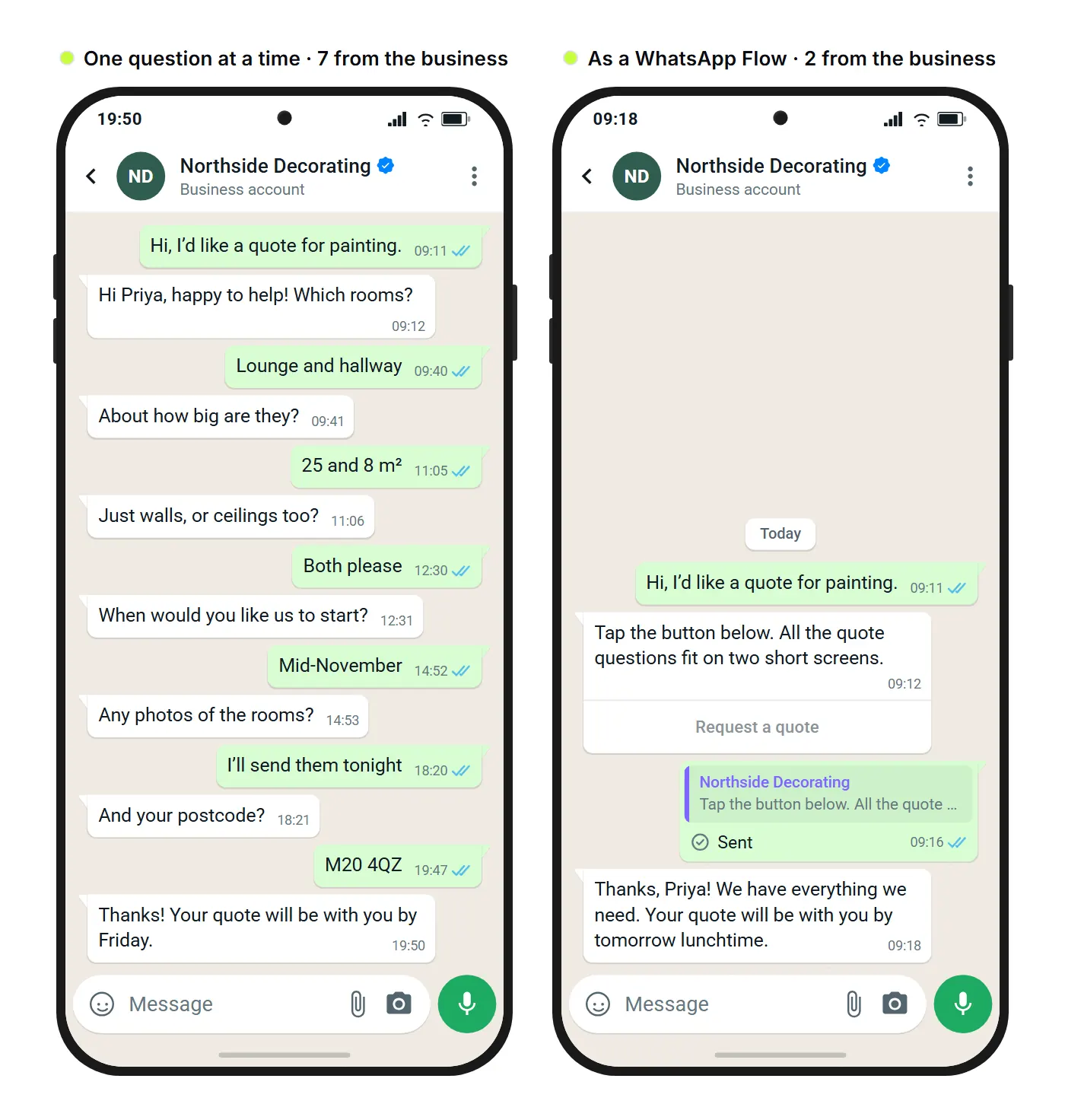
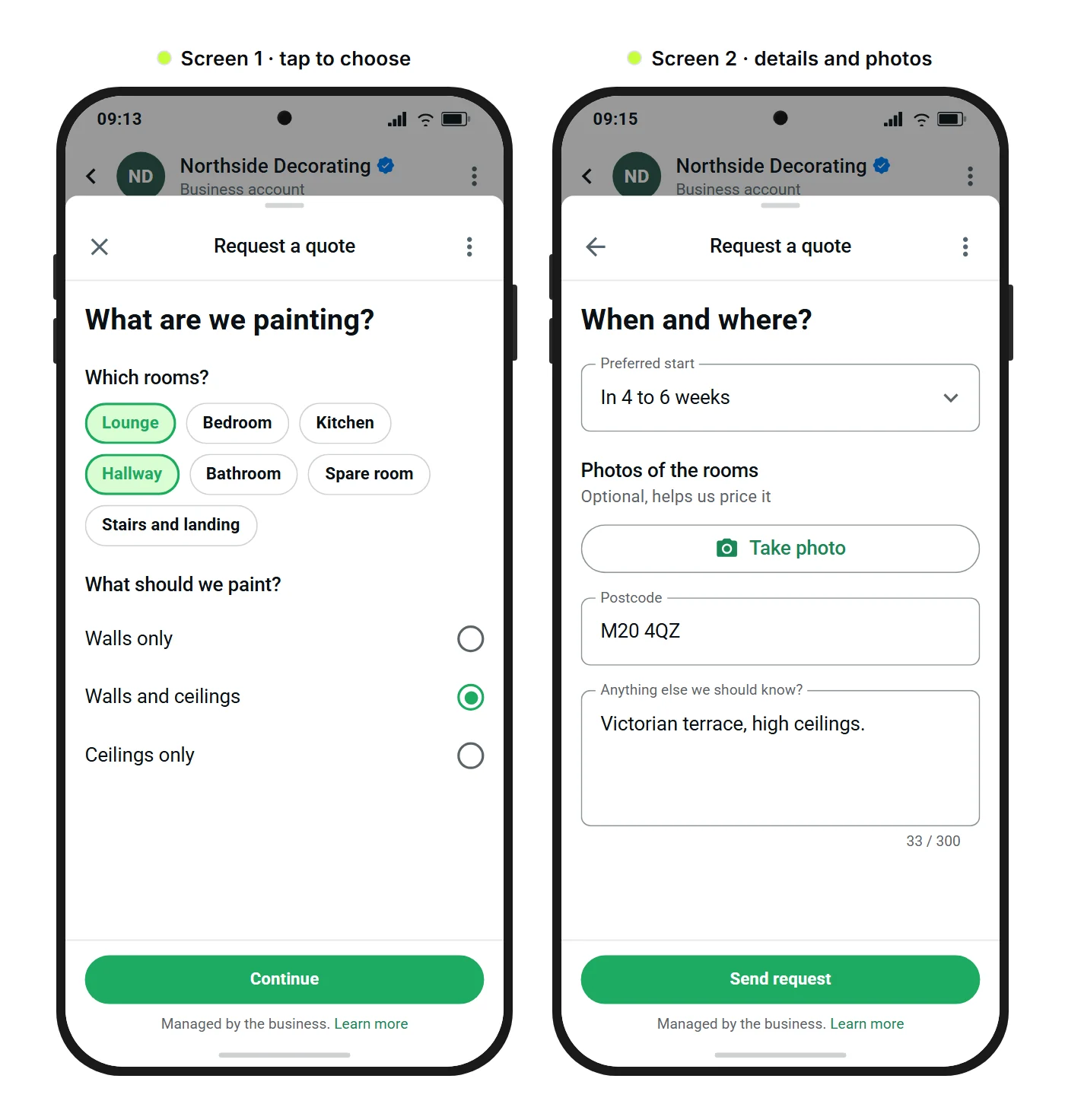
Here's what your customer sees after tapping the button. The first screen asks about the rooms and the scope of the job, the second about a preferred start date, photos, the postcode and any notes. One tap on Send request and the business has everything.
What does your team see?
In the SendSeven inbox, the answer appears as a card with all questions and answers right in the conversation. In the WhatsApp Flow editor, the Save the answer setting on each field decides where the answer goes: into a contact field, into a custom field, as a tag on the contact, or only into the flow's responses. With Tag contact on completion you mark everyone who has submitted the flow. If an answer doesn't fit the field, it doesn't overwrite contact data, and for an opt-in checkbox SendSeven saves the consent text too. What the form means for consent and data protection is the subject of our post on WhatsApp Flows and GDPR. How your team keeps working with these details on the contact is shown in the contact management use case.
If you already know the customer, the flow can prefill fields on the first screen with details from the contact, such as a name or an email address. That's a snapshot at the moment of sending: if the contact changes afterwards, the flow you sent stays as it was.
How do you send a WhatsApp Flow?
You can send a WhatsApp Flow in four ways:
- From the inbox: straight from the chat while the 24-hour window is open. Inside the window, the flow is a normal session message.
- As a template: a Meta-approved message template with a Flow button, to start a conversation outside the window. The link behind the button stays valid for 72 hours.
- From an automation in the Flow Builder with the Send WhatsApp Flow step, on Professional and up. The automation waits for the answer and can use it afterwards.
- Through the API, if you want your own system to trigger the flow.
Which questions can a WhatsApp Flow ask?
Almost any question your team asks one by one in the chat today: short and long written answers, dates, choices from lists, multiple choice, consents, and photos and documents. On top of that come text blocks for explanations and simple logic that shows a question only for a certain answer.
| Type of question | Fields in the editor | Example |
|---|---|---|
| Written answers | Short answer, Long answer | Postcode or ZIP code, notes on the job |
| Dates | Date picker, Calendar | Preferred appointment, date of birth |
| Choices | Dropdown, Single choice, Multiple choice, Chips | Which rooms, which model, which service |
| Consent | Opt-in checkbox | Agreeing to receive offers on WhatsApp |
| Photos and files | Photo upload, Document upload | Photo of the damage, CV or resume as a PDF |
| Images and text | Image, Image carousel, Heading, Subheading, Body text, Caption, Rich text | Product image, explanation between questions |
| Navigation | Footer button, Link, Navigation list | “Continue”, “Send request”, link to your privacy policy |
| Logic | If / Else, Switch | Follow-up question only if someone picks “Bathroom” |
You build flows in SendSeven's WhatsApp Flow editor. SendSeven is a Meta Business Partner and connects to WhatsApp directly through Meta's own API. The editor shows the list of screens, the components of the current screen, its settings and an approximate preview of the flow in WhatsApp, all side by side. It checks the flow against many of Meta's rules as you go and shows counters, for example how many components a screen already has.
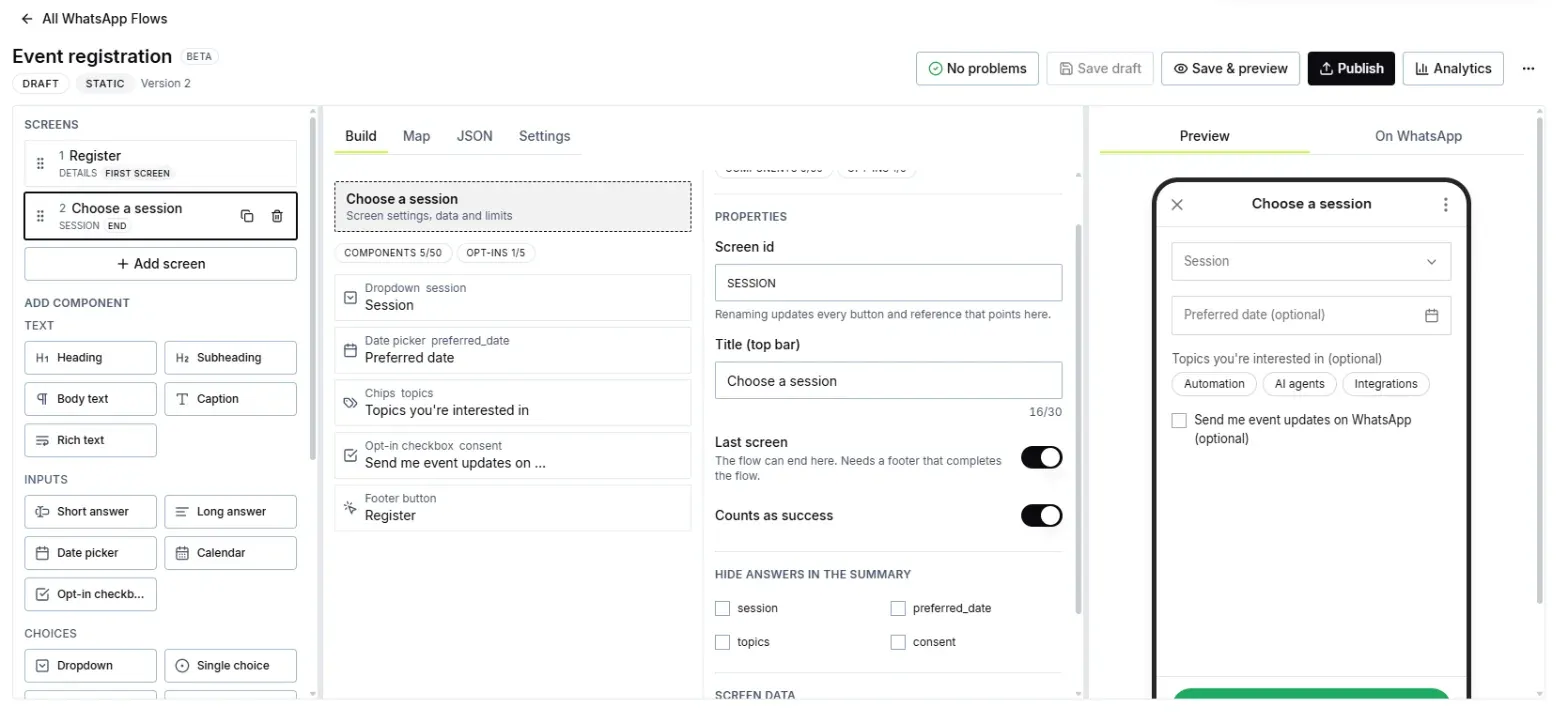
You don't have to start from scratch. SendSeven comes with starter templates, including appointment requests, quote and estimate requests, callback requests, returns and exchanges, and event and webinar registration. On Professional and up, the AI builder creates a flow from your description. You describe in your own words what you want to ask, and it builds the screens with your own contact fields, lists and tags, checks them against WhatsApp's rules and opens the result in the editor. It builds static flows and uses AI Credits, only for successful runs. You can also import flows you've already built in Meta's WhatsApp Manager.
Can I still change a WhatsApp Flow after publishing it?
Yes. You test a draft on test numbers first, and your customers only get the flow once you publish it. That doesn't make it final: you can keep editing it at any time and publish the changes again, and SendSeven creates a new version behind the scenes. Automations and sending through the API keep working without any rewiring. An approved template with a Flow button opens the new version once you resubmit the template to Meta. The publish dialog shows which templates this affects.
Each flow also has its own analytics with a response table that you can export as a CSV file. For dynamic flows you also see which screen customers drop off at.
If you want to go deeper, the guide WhatsApp Flows walks through everything step by step. Not sure whether you need a flow at all? Our comparison of WhatsApp Flows, reply buttons and chatbots helps you choose. How to send buttons and lists is covered in the guide to interactive WhatsApp messages, and the glossary entry on interactive messages gives an overview of all the formats.
What does a WhatsApp Flow cost?
WhatsApp Flows is in beta. Completed flows are free during the beta. Every flow you send counts as one message from your plan's message allowance, just like any other WhatsApp message, and Meta's fees apply as usual. Once WhatsApp Flows is generally available, an additional charge per completed flow will apply. We'll let you know well in advance.
What Meta charges for WhatsApp messages depends on how the flow reaches your customer. If you send it inside the 24-hour window, it's a service message. If you start the conversation with a template with a Flow button, Meta charges by the template's category, such as marketing or utility. The overall cost of the WhatsApp Business API is covered in WhatsApp Business API pricing in 2026.
Which features you can use depends on your plan:
- Static flows are included in every plan with WhatsApp, on Basic and up.
- The AI builder and sending from an automation in the Flow Builder are available on Professional and up.
- Dynamic flows with live data are available on Scale and up.
Either way, don't judge the value by the message count alone. The flow collects all the details in one go instead of over several rounds, and your team has less to chase.
What are the limits of WhatsApp Flows?
The limits are manageable: flows only work on WhatsApp, live data needs a dynamic flow, and Meta decides how much fits on a screen.
- WhatsApp only: The form in the chat is a WhatsApp feature. On other channels you still ask your questions in the conversation, and on Live Chat you can also use a pre-chat form.
- Live data needs dynamic flows: A static flow shows the choices you set when you build it, such as services, rooms or time slots. Real-time availability needs a dynamic flow, on Scale and up. On numbers in Coexistence mode, where the WhatsApp Business app and the API run side by side, only static flows work.
- Room on each screen: Meta allows up to 50 components per screen and one photo or document picker per screen, and a file can be up to 25 MB (Meta's documentation on components and file uploads). For a screen title, the editor shows a counter up to 30 characters.
- Data: SendSeven is hosted in the EU (Frankfurt). The flow itself runs through Meta like any WhatsApp message, and uploaded files are stored, encrypted, on WhatsApp's servers for up to 20 days.
For how a flow fits into your wider WhatsApp strategy, from setup to templates, see the complete guide to the WhatsApp Business API.
The short version: A WhatsApp Flow replaces asking across many separate messages with a form in the chat, and your team gets complete details in fixed fields instead of a long thread.
For all the features at a glance, see the WhatsApp Flows page.
Further reading:
- WhatsApp Flow, buttons or chatbot: which fits which question?
- Qualify leads with a WhatsApp Flow: all the details at once
- WhatsApp Flows and GDPR: consent and data protection
- WhatsApp pricing in 2026: what Meta changed
- WhatsApp Business API: the complete guide
Frequently asked questions
Who is a WhatsApp Flow for?
For any business that regularly needs three or more details from customers over WhatsApp: a decorator or plumber pricing a job, a salon or auto repair shop taking appointment requests, a shop handling returns, or a recruiter taking a short application over WhatsApp. If it only comes down to a single decision, such as yes or no, reply buttons are enough.
When can I send a WhatsApp Flow?
Straight from the chat any time the 24-hour window is open, meaning the customer has messaged you in the last 24 hours. Outside the window you need a Meta-approved message template with a Flow button, and as with any template, the customer must have opted in first. The link behind the button stays valid for 72 hours.
Do my customers have to install anything?
No. The flow opens inside WhatsApp, and your customer needs nothing except the app they already use. According to Meta, flows run on smartphones, on Android 6.0 and later, and since early December 2025 also in WhatsApp Web (Meta changelog). For the WhatsApp desktop apps, Meta doesn't say.
Do I need coding skills to build a WhatsApp Flow?
No. In SendSeven's WhatsApp Flow editor you add fields from a list and see a preview next to them. The Flow JSON that Meta requires for every flow is created in the background. You can look at it in the JSON tab but not change it. Only SendSeven's own builder JSON can be edited there.
Can the answers go into my CRM?
Yes, with a webhook or the API. The answers land on the contact in SendSeven first, and uploaded photos and documents go to the contact profile. From there you pass them on to your CRM.
Can I use a WhatsApp Flow I've already built in Meta's WhatsApp Manager?
Yes. Flows from Meta's WhatsApp Manager appear in SendSeven in the Imported from Meta list and can be sent from there. Since October 2026 you can also convert such a flow and keep editing it in SendSeven's WhatsApp Flow editor.
Can I use one WhatsApp Flow with more than one number?
Yes. When you publish a flow, you choose which of your numbers are allowed to send it. Numbers in the same WhatsApp Business Account share one flow.