AI Chatbot in Recruiting: Answer Candidate FAQs Around the Clock
SendSeven Team, Editorial Team
Recruiters spend 40% of their time on routine questions: salary, remote policy, application status. An AI chatbot answers these 24/7 and hands off complex enquiries seamlessly to the team.
TL;DR
Recruiters spend 40% of their time on routine questions: salary, remote policy, application status. An AI chatbot answers these 24/7 and hands off complex enquiries seamlessly to the team. This article shows the top 10 candidate questions, how to build a chatbot with SendSeven's knowledge base, and how the hybrid model (bot for FAQ, human for complex conversations) works in practice. Back to the overview: Recruiting Messaging Guide 2026.
Why routine questions cost so much time
In a typical recruiting team, a recruiter handling 50 active applications per month receives 5–8 messages per candidate over the course of the process. Around 60–70% of these messages are routine questions that have the same answer for every applicant:
- "What is the salary range for this role?"
- "Is remote work possible?"
- "What does the application process look like?"
- "How long does the process usually take?"
- "What should I prepare for the interview?"
These questions are important for the candidate — they affect their decision. But answering them individually takes recruiter time that could be better spent on interviews, relationship building, and strategic sourcing.
A well-configured AI chatbot answers all of these questions instantly, at any time of day — consistently, accurately, and without recruiter involvement. For a team of 3 recruiters handling 50 applications each, this saves 20–30 hours per month in admin time.
Top 10 candidate questions and model answers
These are the questions that belong in every recruiting chatbot knowledge base:
| # | Question | Answer type |
|---|---|---|
| 1 | What is the salary range? | Role-specific or general range |
| 2 | Is remote/hybrid work possible? | Company policy |
| 3 | What does the application process look like? | Standard steps + timeline |
| 4 | How long does the process take? | Typical timeline |
| 5 | What documents do I need to submit? | CV, cover letter, certificates |
| 6 | What is the status of my application? | ATS integration or manual update |
| 7 | Who are my interviewers? | Names + LinkedIn profiles |
| 8 | What should I prepare for the interview? | Preparation guide |
| 9 | What benefits does the company offer? | Benefits overview |
| 10 | Is there a dress code? | Office culture description |
Each of these answers can be stored in SendSeven's knowledge base as a structured article. The AI assistant uses this content to provide accurate, brand-consistent answers — automatically, and in the language the candidate uses.
Building a recruiting chatbot with SendSeven
Step 1: Create the knowledge base
In SendSeven, navigate to Knowledge Base and create a new category "Recruiting FAQ". Add an article for each of the top 10 questions (see above), plus role-specific articles for your most frequently posted positions. Include: clear headings, concise answers, links to further information (e.g., benefits page, careers page, job description). The AI reads these articles and uses them to answer candidate questions.
Step 2: Configure the AI assistant
In SendSeven's AI settings, set the knowledge base as the primary source for candidate enquiries. Define the bot's tone (professional, warm, helpful), set the fallback rule ("If I cannot answer, I hand off to the recruiting team"), and configure the handoff trigger (after 2 unanswered questions, or on specific keywords like "complaint", "urgent", "disappointed").
Step 3: Connect the channels
The AI assistant works across all channels in your Unified Inbox: Live Chat on the careers page, WhatsApp (for candidates who have opted in), and Messenger. One knowledge base, consistent answers across all touchpoints.
Step 4: Test and refine
Before going live: test with 20 realistic candidate questions. Review answers for accuracy and tone. Add missing articles to the knowledge base. Set up escalation triggers for edge cases. Plan for a 2-week refinement phase after launch — this is when you catch the long-tail questions your initial setup missed.
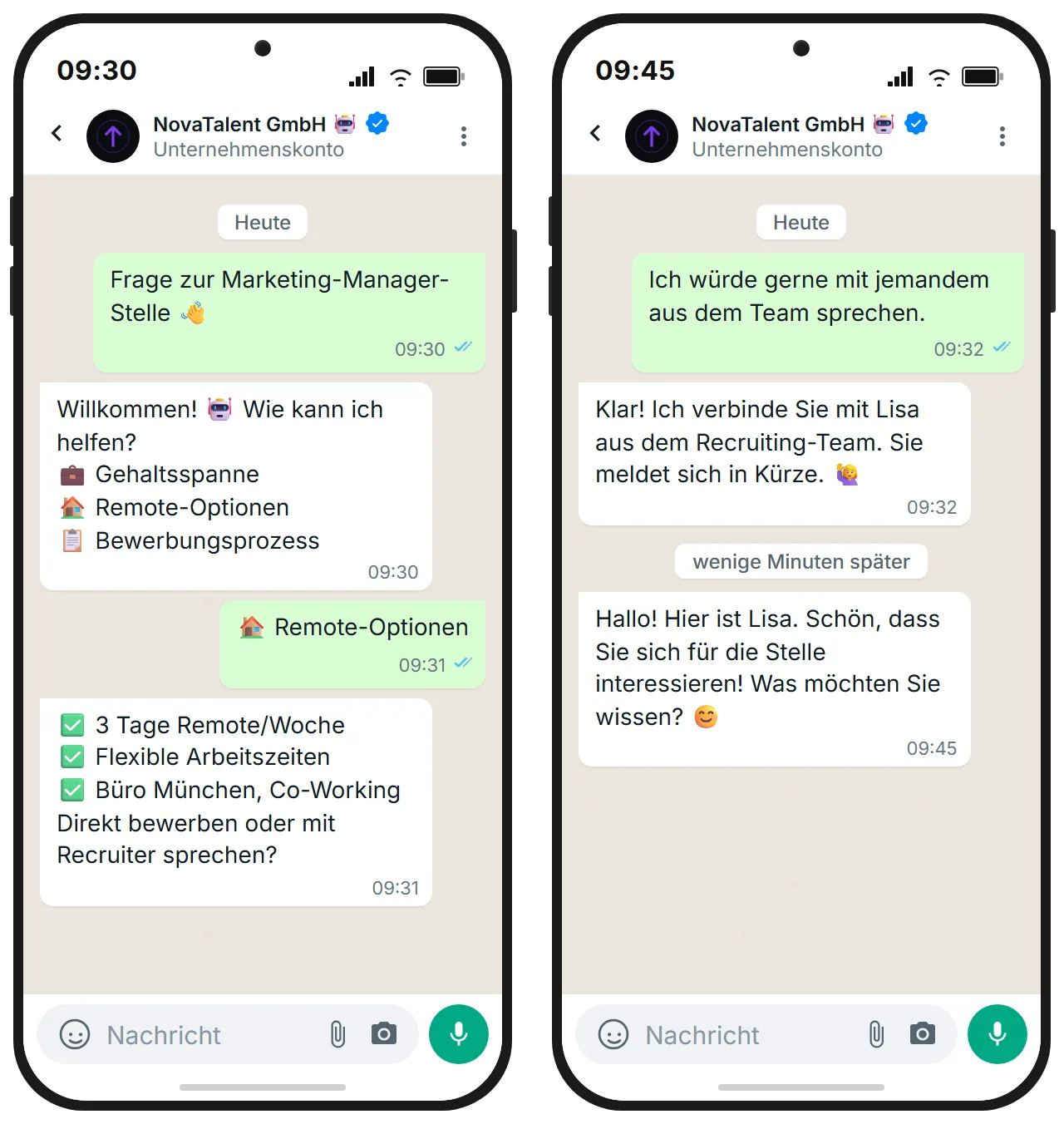
The hybrid model: bot + human
The key to a successful recruiting chatbot is knowing when the bot should step back. A pure-bot approach frustrates candidates with complex or sensitive queries. A pure-human approach fails on volume and availability.
The hybrid model works as follows:
- Bot handles: All FAQ questions (top 10 + role-specific), appointment confirmation, document requests, status update notifications (if ATS integration is active).
- Human handles: Salary negotiation, complex process questions, candidate complaints, any conversation the bot flags as uncertain, and all conversations after the first interview stage.
- Handoff trigger: "I am not able to answer this question directly. Let me connect you with a member of our recruiting team." The recruiter receives a notification with the complete conversation history. The candidate receives a response time estimate.
In SendSeven, handoffs appear as priority tickets in the team inbox — visible to all team members, assignable, with full context.
Live chat on the careers page
The most underutilised touchpoint in recruiting: your careers page. Candidates visit, read about the company and roles, and then leave — because there was no easy way to ask a quick question. Live chat changes this.
The SendSeven live chat widget embeds in minutes on any careers page. Visitors can ask questions directly, get instant AI-powered answers, and — if needed — connect with a recruiter in real time. This captures:
- Passive candidates who would not have applied but had a question answered
- Active candidates who were about to drop off due to an unanswered concern
- High-intent candidates who want to connect before formally applying
Companies that add live chat to their careers page report a 15–25% increase in completed applications from visitors who engage with the chat.
Metrics: how to measure chatbot success
Track these KPIs to assess and improve your recruiting chatbot:
1. Containment rate
Percentage of conversations fully resolved by the bot without human handoff. Target: 60–75% after the first month. A containment rate below 50% suggests your knowledge base needs more content.
2. CSAT (candidate satisfaction)
Send a 1-question survey after each chat: "Was your question answered? Yes / No." Target: 80%+ yes. Low CSAT usually indicates answer quality issues, not missing articles.
3. First response time
With a bot: should be under 5 seconds. Without a bot: typically 4–8 hours during business hours, and 0 outside hours. The bot's most powerful contribution is 24/7 availability.
4. Handoff rate by topic
Which questions are most frequently escalated? This tells you exactly which knowledge base articles need to be improved or added. Review weekly in the first month.
Conclusion
A recruiting AI chatbot is not a replacement for recruiters — it is a force multiplier. By automating the 60–70% of candidate communication that is routine and repetitive, it frees recruiters to focus on what only humans can do: building relationships, assessing culture fit, and making judgment calls. The setup in SendSeven takes less than a working day. The time savings begin on day one.
Further reading:
- Recruiting Messaging Guide 2026
- Stop Candidate Ghosting with Multichannel Messaging
- SendSeven for Recruiting: Overview
- Guide: AI features in SendSeven
- Guide: Set up knowledge base
- Guide: Add live chat widget
FAQ
Can an AI chatbot automatically provide application status updates?
Yes, if your ATS offers an API or webhook integration. SendSeven can retrieve status updates from the ATS via n8n or Zapier and automatically relay them to candidates. Without ATS integration, a manual status page in the knowledge base is possible, updated by recruiters regularly.
Does the chatbot understand questions in English even if the careers page is in another language?
Yes. SendSeven's AI assistant is multilingual and understands requests in the candidate's language. Responses are formulated from the knowledge base in the language of the request, provided relevant articles exist in that language.
What happens when the bot cannot answer a question?
The bot responds: "I'm not able to answer this question directly. Let me connect you with a member of our team." The recruiter receives a notification with the full conversation history. The candidate gets a response time estimate and knows a human is taking over.
How long does it take to build a recruiting chatbot?
With a prepared FAQ list, you can fill the knowledge base in 2–4 hours. The technical setup of the live chat widget and WhatsApp channel each take under 30 minutes. Realistically, a first functional bot can be live within a working day.
Is the chatbot worthwhile even for small HR teams (1–3 people)?
Especially then. A small team benefits most from relief on routine questions, because every saved hour flows directly into higher-value work. A solo recruiter handling 50 applications per month can easily save 5–10 hours of admin time per week with a well-configured chatbot.