Automate Instagram DM: Using an AI Assistant and a Keyword Bot the Right Way
SendSeven Team, Editorial Team
Answer routine questions around the clock without losing the personal touch: here is how businesses automate their Instagram direct messages with an AI assistant powered by a knowledge base, a keyword bot and clear business-hours rules. Including the decisive step that is often missing: a clean handover to people.
TL;DR
Instagram direct messages can be automated sensibly without becoming impersonal. Three building blocks work together: an AI assistant that answers recurring questions in natural language from your knowledge base, a keyword bot that reacts to fixed keywords, and business-hours rules for clear expectations outside reachable hours. The most important step is the clean handover to a person as soon as it gets individual. Rule of thumb: automate what repeats, keep the personal personal. All DMs flow into a shared inbox where the team and AI work side by side.
What Instagram DM automation means
Instagram DM automation means having recurring enquiries via Instagram direct messages answered without anyone typing every message by hand. It is not about handing every customer over to a machine. It is about catching the same routine questions over and over, so your team has time for the conversations where a person really matters.
Picture an ordinary Tuesday morning. Three people ask by Instagram DM about your opening hours, two about delivery time, one wants to know whether a specific product is in stock. That is six answers that look essentially the same every time. Answer them by hand and you quickly lose an hour a day that would be better spent elsewhere.
Sensible automation answers exactly these standard questions instantly and around the clock, but recognises when it reaches its limit and passes the conversation to a team member. For that to work, every Instagram direct message has to flow into one place: a shared inbox where automation and the team work hand in hand.
The three building blocks: AI assistant, keyword bot, business hours
Good automation rarely consists of a single tool. Three building blocks play together, and each has a clear task.
The AI assistant understands freely worded questions and answers in natural language. To do that it draws on your knowledge base. This is the right block when customers phrase their questions in different ways and you still want to give a fitting, written answer.
The keyword bot reacts to fixed keywords. When someone writes a defined keyword, it triggers a prepared reply. That is fast, predictable and ideal when you call for a keyword in a post or a story.
The business-hours rule creates honest expectations. Outside your reachable hours, the customer gets an immediate reply about when to expect a personal answer, instead of waiting in the dark.
| Building block | Reacts to | Suited for |
|---|---|---|
| AI assistant | Freely worded questions | Varying phrasings, advice-adjacent topics, FAQ from the knowledge base |
| Keyword bot | Fixed keywords | Promotions, giveaways, targeted story and post calls-to-action |
| Business-hours rule | Time of day and weekday | Clear expectations outside reachable hours |
In practice you combine all three. The AI assistant catches the bulk of freely worded questions, the keyword bot serves targeted promotions, and the business-hours rule keeps communication clean at night and on weekends too.
Setting up the AI assistant with a knowledge base correctly
The AI assistant is only as good as the knowledge it draws on. Its answers come from your knowledge base, the content you maintain yourself. That is exactly what makes it reliable for day-to-day business.
Fill the knowledge base with the information people ask about most: opening hours, delivery times, availability, shipping costs, return rules, locations. You can add content as text and FAQs or let it read in your website. The better the foundation, the more accurately the assistant answers, in natural language rather than as a rigid canned text.
The decisive mechanism is a check before every reply: prices, dates, times and links are checked against your sources before the answer goes out. Clear rules decide when a person takes over, for instance when the customer asks for one or the assistant repeatedly finds no answer. You set those rules yourself. So automation stays where it is strong, and your team comes into play exactly when it is needed.
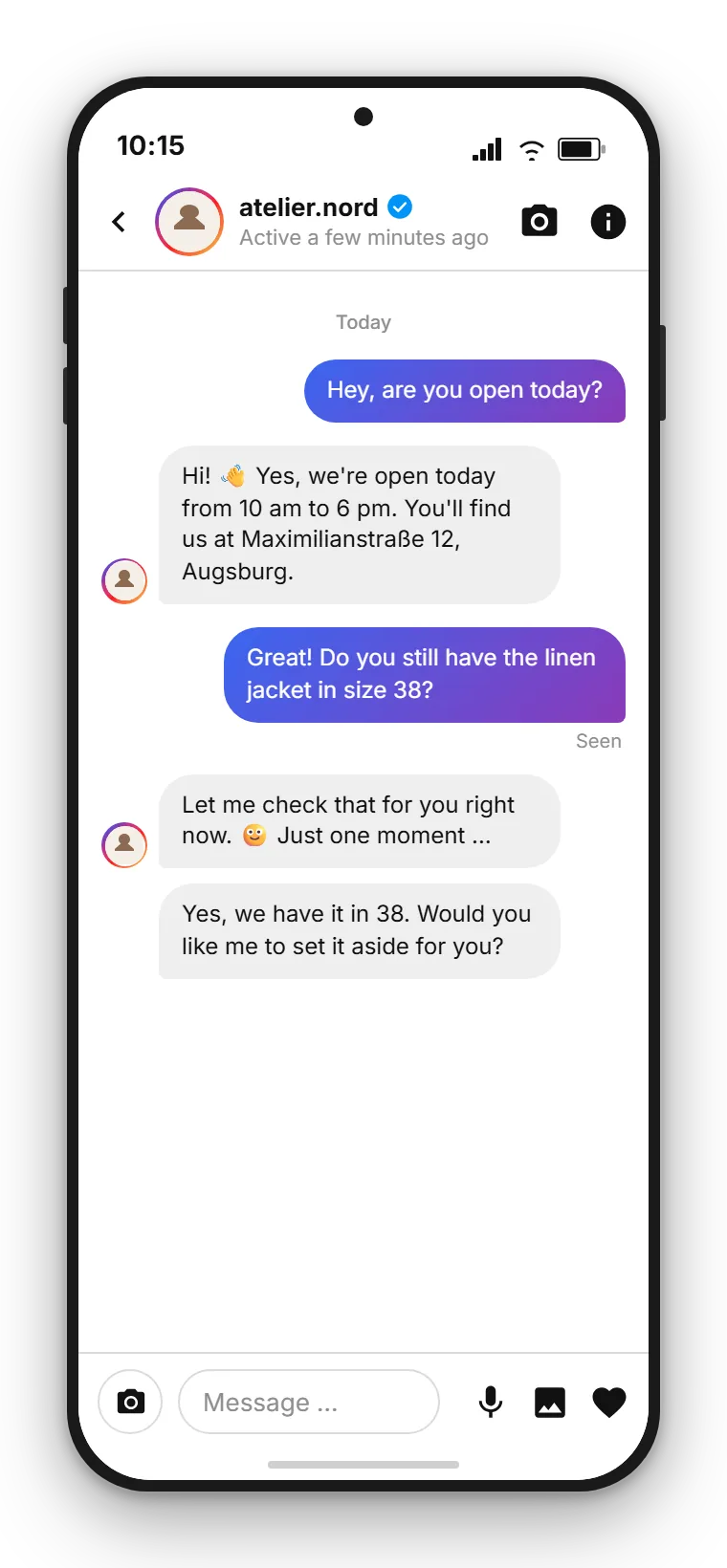
Keyword bot: when fixed keywords are the better choice
Not every situation needs artificial intelligence. Sometimes a fixed, predictable reaction is exactly right, and that is what the keyword bot is for.
The keyword bot listens for specific keywords in the direct message. When one of them arrives, it sends the stored reply. That is especially useful when you call in a story or a post for people to send a specific word. Whoever writes the keyword gets the matching information instantly, without the detour through an open question.
A simple example: you promote your current event in a story and ask people to send the word INFO. The keyword bot replies automatically with the date, location and a sign-up link. The rule of thumb: use the keyword bot where the question comes from you and the answer is fixed. For anything customers phrase freely, the AI assistant is the better choice.
Solving the handover to people cleanly
The most common mistake in automation is not too little technology, it is a missing emergency brake. When a customer with a real concern gets stuck in a loop of canned answers, they lose trust faster than any quick answer could build it. That is why the handover to a person is the most important part of the setup.
A clean handover kicks in in three cases. First, when the AI assistant cannot find an answer several times in a row. Second, when the customer explicitly asks for a team member. Third, when the topic needs advice from the outset, such as a complaint or an individual enquiry. In all of these cases the conversation moves to the right person in the shared inbox, without the thread breaking.
What matters is that the transition is noticeable but unobtrusive. The customer senses that a person is now taking over, but does not have to repeat anything, because the whole history including the prior automatic answers is visible. It is exactly this seamless switch between automation and team that separates a good solution from a bot that sends customers in circles.
By the way, it is not only the direct message itself that can be automated. A comment under a post can also trigger a flow that moves the conversation into a private one. How that path from comment to direct message is built is covered in the article on Instagram comments and flows. Here the focus stays on the DM itself.
Have Instagram DMs answered centrally
SendSeven pulls Instagram direct messages into one inbox where the AI assistant, the keyword bot and your team work together. Incoming messages are always free, and you start from EUR 79 per month on the Professional plan, which includes the AI assistant.
View pricingHow much automation makes sense
There is no fixed percentage that is right for every business. But there is a reliable rule of thumb: automate what repeats, keep the personal personal.
Routine questions are the ideal candidate for automation. Opening hours, delivery times, availability, location queries: such answers rarely change and can be stored safely. At many small businesses they make up the bulk of the message volume and tie up a disproportionate amount of time.
Advice, complaints and anything emotional, by contrast, belong with people. Automate here and you save time in the short term but lose customers in the long run. A good test is the question: would I give this answer myself in two sentences off the top of my head? If yes, the AI assistant can take it. If no, it belongs with the team.
After you launch, watch which questions frequently lead to a handover. If the same topics keep coming up, add them to the knowledge base. That way the line shifts in your favour over time, without quality suffering.
Setting up a greeting and FAQ
Two small things make a big difference to the first impression: a friendly greeting and well-maintained standard answers.
The greeting is the first message a customer receives when they write to you. It should be short, hit the tone of your brand and make clear that the message has arrived. One sentence is often enough, for instance a note that simple questions are answered instantly and a team member takes over when needed.
The FAQs feed the AI assistant and are available to the team as quick replies. Quick replies are prepared text snippets that your team inserts in chat via a keyboard shortcut. That keeps response times low even when a person is answering. Maintain these snippets regularly, because outdated opening hours or wrong prices undermine trust faster than a slow response pace.
A practical sequence to get started: first fill the knowledge base with the ten most common questions, then write a greeting, next set your business hours, and finally define the rules for the handover. After that, let the setup run for a week and fine-tune it based on the real enquiries.
Privacy and data protection
Anyone answering Instagram direct messages automatically is processing personal data. Data protection is therefore not an add-on, it is part of a clean setup.
The connection runs through Meta's official interface, not through the regular Instagram app on a personal phone. No private contacts are uploaded, and every conversation runs through the intended route. The AI assistant works within this framework too.
As a privacy-compliant foundation, SendSeven relies on EU hosting and provides the data processing agreement you need. As SendSeven GmbH, headquartered in Augsburg, Germany, and as a Meta Business Partner, we work exclusively through official interfaces. For your data protection officer that means a documented, compliant connection instead of grey areas. On top of that, observe the usual obligations in any dialogue, namely a transparent privacy notice and a clear legal basis.
Read on: deeper-dive articles
This article put the automation of Instagram DM at the centre. The following pieces go deeper into adjacent topics, from getting started to interlocking with WhatsApp.
- Instagram for business 2026: setting up DM, marketing and service the right way
- Turn Instagram comments into direct messages automatically
- Instagram and WhatsApp in one shared inbox
Concrete steps to connect your account are in the Instagram DM setup guide, and the shared inbox use case shows what the cross-channel inbox looks like in practice. We introduce the Instagram channel itself on the Instagram channel page.
Frequently asked questions
What is the difference between an AI assistant and a keyword bot?
The AI assistant understands freely worded questions and answers in natural language by drawing on your knowledge base. The keyword bot reacts to fixed keywords with a prepared reply. Use the AI assistant for varying phrasings, the keyword bot for targeted promotions with a clear keyword.
Does the AI assistant answer at night and on weekends too?
Yes. The AI assistant is active around the clock and answers routine questions instantly, even outside your business hours. For matters that need a person, a business-hours rule provides an honest reply about when a team member will answer.
Where does the AI assistant get its answers from?
The AI assistant draws its answers from your knowledge base. You add content there as text and FAQs or let it read in your website. Before a reply goes out, facts such as prices, dates and links are checked against these sources, and if the assistant repeatedly finds no answer, it hands over to a person.
How does the handover to a team member work?
As soon as the AI assistant cannot find an answer several times in a row, the customer explicitly asks for a team member, or the topic needs advice, the conversation moves to the right person in the shared inbox. The whole history stays visible, so the customer does not have to repeat anything.
How much of my Instagram DMs should I automate?
Automate what repeats and keep the personal personal. Routine questions like opening hours, delivery times and availability are well suited to the AI assistant. Advice, complaints and emotional matters belong with people.
Can an Instagram comment also trigger an automatic direct message?
Yes. An incoming Instagram comment can trigger an automated flow that moves the conversation into a private direct message. The focus of this article is the automation of the direct message itself; the path from comment is described in a dedicated article.
Do I need a specific type of Instagram account for automation?
Yes. You need an Instagram Business or Creator account with message access enabled in the Instagram app. The connection runs through Meta's official interface, not through the regular app on a personal smartphone.
What does Instagram DM automation cost at SendSeven?
The AI assistant and keyword bot require the Professional plan, which starts at EUR 79 per month. Incoming messages are always free. You will find the exact terms and further plans on the pricing page.