Instagram for Business 2026: Setting Up DM, Marketing and Service the Right Way
SendSeven Team, Editorial Team
For many small and mid-sized businesses, Instagram is the first touchpoint with a customer. This guide shows how to pull Instagram DMs, story replies and comments into one shared inbox, automate them sensibly, and run the whole thing in a privacy-compliant way.
TL;DR
For many small and mid-sized businesses, Instagram is the first point of contact with a prospect. To answer professionally, you pull every Instagram direct message into a shared inbox where your team and an AI assistant work side by side. Story replies land there as direct messages too, and a comment under a post can automatically trigger a direct message. With quick replies, an AI assistant and clear business-hours rules, you answer routine questions automatically and hand complex cases to a person. The one requirement is an Instagram Business or Creator account with message access enabled in the Instagram app.
What Instagram for business means in 2026
Instagram has long been more than a photo platform. For many businesses, it is the first touchpoint with a potential customer, often before anyone visits the website. People discover a product in the feed, watch a story and fire off a quick question by direct message. That moment decides whether interest turns into a conversation.
The problem: most businesses treat Instagram separately from the rest of their customer dialogue. Someone in marketing runs the profile and answers messages on the side through the regular Instagram app on a phone. Enquiries slip through, replies come late, and nobody can see whether the same customer already reached out by WhatsApp or email.
Instagram only becomes professional once it is part of the whole customer conversation. Instead of an app on a single phone, every direct message flows into one shared interface where the team and AI work together. That is exactly what this guide is about: how to set up Instagram so it works reliably as a service and marketing channel.
What you need to run Instagram DM in a business
Before you can manage Instagram direct messages centrally, a few technical basics need to be in place. They take half a morning, but they have to be done in the right order.
You need an Instagram Business or Creator account with message access enabled in the Instagram app. A personal Instagram profile is not enough, because only Business and Creator accounts can be connected through Meta's official interface. Connecting it as an Instagram channel in SendSeven happens through that Meta interface, not through your password or the app.
Worth knowing: you can connect multiple Instagram accounts, for example for different locations or brands. Each account runs as its own channel in SendSeven, so enquiries stay cleanly separated. You will find a step-by-step walkthrough in the Instagram DM setup guide.
| Requirement | Why it is needed | Status |
|---|---|---|
| Business or Creator account | Only these account types can connect through the Meta interface | Required |
| Message access enabled | Set in the Instagram app so SendSeven can receive your direct messages | Required |
| Connection through Meta | Official interface instead of an app on a personal phone | Required |
| Multiple accounts (optional) | One dedicated channel per location or brand | Optional |
The three ways customers reach you: DM, story reply, comment
Instagram communication does not run only through the classic direct message. There are three ways customers get in touch, and each one wants to be handled a little differently.
Direct message (DM): the classic. A prospect sends you a private message directly, such as a product question or a request for an appointment. In SendSeven that DM lands in the shared inbox, where your team and the AI assistant can respond.
Story reply: when someone reacts to one of your own stories, that reaction also comes in as a direct message. Story replies are often the warmest contacts you will get, because the person is actively engaging with your content right now. Answer fast and personally, and you turn that attention into a real conversation.
Comment: a comment under a post is public, but the conversation around it is better held in private. That is exactly what you can model: an incoming Instagram comment can trigger an automated flow in SendSeven. The triggered flow can branch on a keyword in the comment, reply automatically by direct message, tag the contact or hand the conversation to a team member. A short comment becomes a structured dialogue, without anyone tidying up by hand.
| Contact route | What happens | How to handle it |
|---|---|---|
| Direct message | Customer writes privately | Answer in the shared inbox, automate routine questions |
| Story reply | Reaction to your own story arrives as a DM | Answer fast and personally, high buying intent |
| Comment | Public comment under a post | Trigger an automated flow, move into a private conversation |
One thing to be clear about: comment-to-DM, the path from a public comment into a private message, can be built with the Instagram-comment trigger. We show how to build such a flow step by step in a dedicated, deeper-dive article further down.
Why Instagram belongs in a shared inbox
The biggest lever is not a single trick, it is structure. As soon as Instagram direct messages arrive in a shared inbox, the way you work changes fundamentally: several team members see the same conversations, nobody replies twice, and no enquiry sits unread on a single personal phone.
The decisive part is the cross-channel view. If a customer asked by WhatsApp yesterday and writes by Instagram today, you spot the connection immediately because both conversations live in the same interface. That makes your advice more personal and spares you the awkward question of what was discussed before. The shared inbox use case shows what such a cross-channel inbox looks like in practice.
The inbox also gives you the tools that make fast replies possible in the first place: quick replies for recurring questions, rich media such as images and carousels for product introductions, and a seamless handover from the AI assistant to a team member. Story replies appear here as direct messages, just like any other conversation.
Bundle Instagram in one inbox
SendSeven pulls Instagram DMs, story replies and other channels into one interface. Incoming messages are always free, and you start from EUR 49 per month on the Basic plan, with all 8 channels included.
View pricing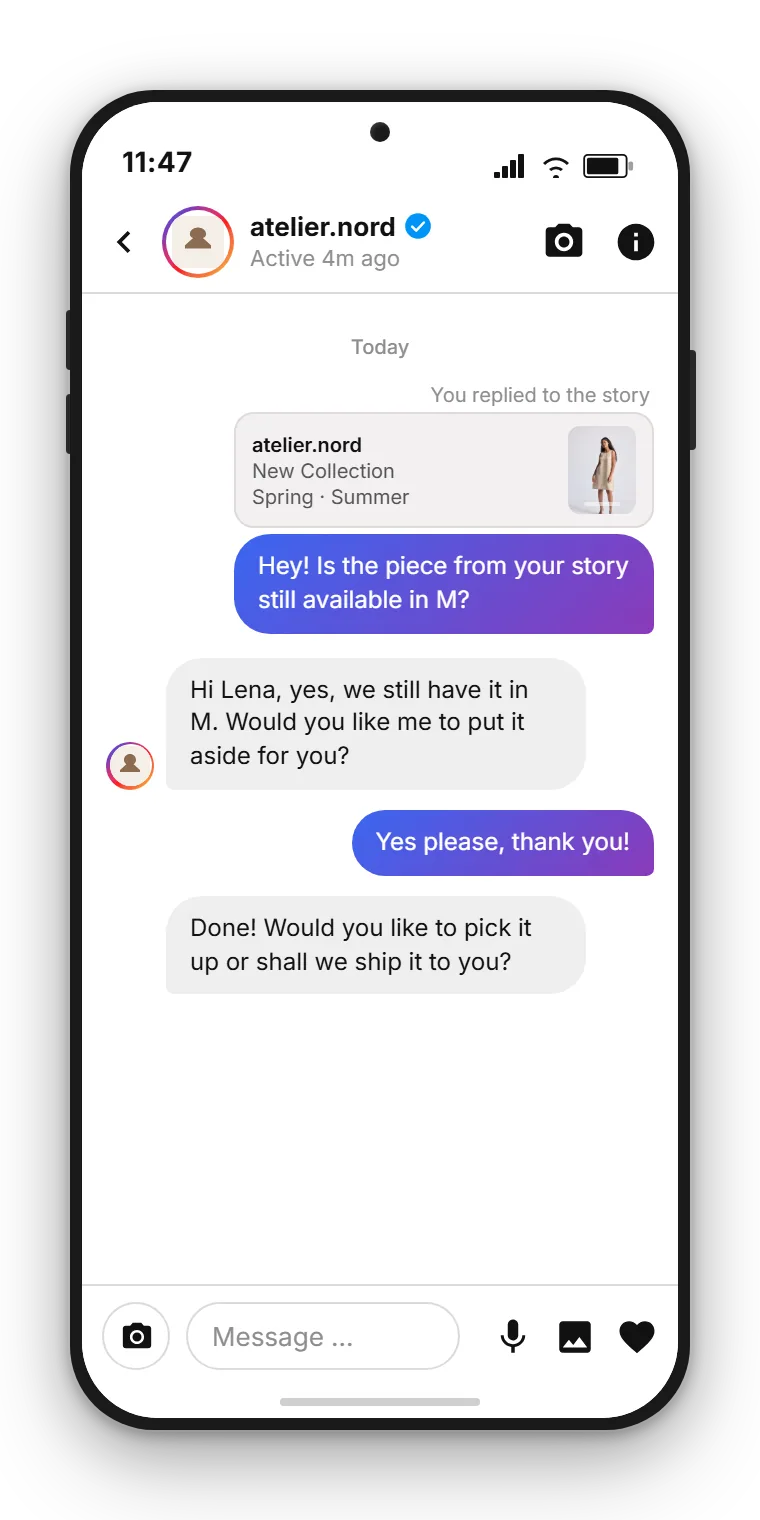
How much automation makes sense
Automation on Instagram is not an end in itself. The goal is not to process every customer with a machine, but to take routine off your plate so your team has time for the conversations that matter. Three building blocks work together here.
AI assistant with a knowledge base: the AI assistant draws on your knowledge base and answers recurring questions in natural language. Opening hours, delivery times, availability: it gives those answers instantly and around the clock. When it cannot find a reliable answer, it hands over to a person instead of guessing.
Keyword bot: on top of that, a keyword bot reacts to specific words. When someone writes a defined keyword, it triggers a matching, prepared reply. That is especially useful when you call for an action in a post or a story.
Business-hours rules and handover: outside your business hours, a clear rule makes sure nobody is left waiting in the dark. The customer gets an honest reply about when to expect a personal answer, and the conversation is handed cleanly to the team as soon as it is reachable again.
The path from comment to direct message is part of automation too. Because an incoming Instagram comment can trigger a flow, you can attach actions like an automatic reply, a branch on a keyword, a tag or a handover to the team directly. The rule of thumb stays the same: automate what repeats, keep the personal personal.
Using Instagram for service and marketing
Instagram is both: a service channel and a marketing instrument. The art is in serving both roles cleanly in the same interface.
In service it is all about speed and reliability. A product question, a complaint, a request for an appointment: answer quickly and you leave a professional impression. Quick replies keep response times low, the AI assistant catches the standard questions, and complex cases reach the right person on the team. Rich media helps too: instead of describing a feature, you send an image or a carousel.
In marketing Instagram is where attention is created. A story about a new promotion, a post with a question, an invitation to an event: all of it generates reactions that come back as direct messages or comments. When those reactions are automatically moved into a structured dialogue, the attention does not fizzle out. Story replies are especially valuable here, because they come out of an active moment.
Be honest about what the channel is for: Instagram DM thrives on personal dialogue. If you also plan high-reach campaigns to many recipients, WhatsApp is the better fit, since marketing campaigns there regularly reach open rates around 98 percent. The two channels play to different strengths, and that is exactly why they complement each other well when both run in the same inbox.
Follow SendSeven on Instagram
Practical tips on messaging, automation and customer communication for small businesses. Follow us at @sendsevenapp.
@sendsevenapp on InstagramCommon mistakes when getting started with Instagram
Many businesses start with Instagram and trip over the same points. Knowing them saves you the detour.
Mistake 1: everything on a personal phone. The most common mistake is answering customer messages through the regular app on a personal smartphone. It works for a while, but it falls apart the moment that person is on holiday, leaves the company or two team members need to answer in parallel. The clean solution is the official connection into a shared inbox.
Mistake 2: ignoring story replies. At first glance, story replies look like casual reactions. In reality they are a clear signal that someone is actively engaging with your content. Leave them sitting and you waste the warmest contacts you have. Treat a story reply like an incoming enquiry and respond promptly.
Mistake 3: too much or too little automation. Some businesses automate nothing and drown in routine questions. Others overdo it and send customers into an endless loop of canned answers. The balance sits in between: AI assistant and quick replies for what repeats, a person for anything that needs advice.
Mistake 4: no plan for comments. Comments under posts often go unanswered because nobody is responsible. Yet this is exactly where a lot can be automated, by letting an incoming comment trigger a flow that moves the conversation into a private format. Without that plan, many prospects trickle away right under your own post.
Worked example: what bundling saves
What does bundling actually deliver? A simplified example for a mid-sized business with an active Instagram presence.
Starting point: around 30 Instagram enquiries come in per day, about two thirds of them routine questions (opening hours, availability, price checks). So far a team member answers them manually through the app, roughly 4 minutes each including searching and typing.
30 enquiries a day, 20 of them routine × 4 min = 80 min a day. Over 20 working days that is around 27 hours a month on Instagram routine alone.
When the AI assistant, together with quick replies, takes over the bulk of the routine questions, the manual workload drops noticeably. Even at a cautiously assumed 60 percent relief, around 16 hours a month are freed up for the team to spend on advice and sales.
Set against that are the platform costs: the AI assistant requires the Professional plan, which starts at EUR 79 per month, and incoming messages are always free. So you pay a small, predictable amount for the Instagram channel and win back the time that was tied up by hand. You will find the exact terms on the pricing page.
Privacy and data protection for Instagram DM
Anyone using Instagram direct messages commercially is processing personal data. Data protection is therefore not a side note, it is a precondition for a clean operation. Three points are decisive.
Official connection instead of a personal phone: the connection runs through Meta's official interface. Nobody has to use the regular Instagram app on a personal smartphone, and no private contacts are uploaded. Every conversation runs through the interface intended for it.
EU hosting and data processing: SendSeven is the privacy-compliant foundation for your Instagram communication. As SendSeven GmbH, headquartered in Augsburg, Germany, we rely on EU hosting and provide the data processing agreement you need. Your customers' data stays within the European framework.
Meta Business Partner: SendSeven is a Meta Business Partner and works exclusively through official interfaces. For your data protection officer that means no grey areas, no unofficial tools, but a documented, compliant connection.
On top of that, observe the usual obligations in any dialogue: a transparent privacy notice, a clear legal basis and clean handling of consent where it is required. That puts your Instagram channel on a solid footing.
Read on: deeper-dive articles
This guide is the entry point. In the following articles we go deeper into the individual topics, from comment automation to the question of whether Instagram DM or WhatsApp Business fits your business better.
- Turn Instagram comments into direct messages automatically with the Flow Builder
- Automate Instagram DM with an AI assistant and a keyword bot
- Instagram and WhatsApp in one shared inbox
- Instagram DM or WhatsApp Business compared head to head
Frequently asked questions
Do I need a specific type of Instagram account to manage DMs centrally?
Yes. You need an Instagram Business or Creator account with message access enabled in the Instagram app. A personal profile cannot be connected through the official Meta interface. The connection to SendSeven then runs through that interface.
Do replies to my Instagram stories also arrive in the inbox?
Yes. When someone reacts to one of your own stories, that story reply comes in as a direct message and appears in the shared inbox like any other conversation. Your team or the AI assistant can answer it there.
Can an Instagram comment automatically trigger a direct message?
Yes. An incoming Instagram comment is a real trigger type in the Flow Builder. The triggered flow can reply automatically by direct message, branch on a keyword, tag the contact or hand the conversation to the team.
Can I connect multiple Instagram accounts?
Yes. You can connect multiple Instagram accounts, for example for different locations or brands. Each account runs as its own channel in SendSeven so the enquiries stay cleanly separated.
How much can be automated on Instagram?
Routine questions can be automated well. An AI assistant with a knowledge base answers recurring questions, a keyword bot reacts to keywords, and business-hours rules set clear expectations outside reachable hours. Complex matters are handed to a person.
Is Instagram DM suitable for marketing mass sends?
Instagram DM is a dialogue channel, not a classic broadcast channel for mass sends. Its strength lies in personal conversation. For high-reach campaigns with a high open rate, WhatsApp is the better fit.
Is using Instagram DM through SendSeven privacy-compliant?
The connection runs through Meta's official interface, without uploading private contacts from a personal phone. SendSeven relies on EU hosting, provides a data processing agreement and is a Meta Business Partner. On top of that, the usual obligations apply, such as a transparent privacy notice and a clear legal basis.
What does an Instagram channel cost at SendSeven?
The Instagram channel is included in every plan, starting at EUR 49 per month on the Basic plan. Incoming messages are always free. You will find the exact terms and further plans on the pricing page.