Bringing Instagram, WhatsApp and More Together in One Shared Inbox
SendSeven Team, Editorial Team
The same customer writes by WhatsApp yesterday and by Instagram today. Serve both channels separately and you lose the thread. This guide shows how businesses pull Instagram, WhatsApp and every other channel into one shared inbox, with team assignment, a cross-channel customer view and dedicated inboxes per location or brand.
TL;DR
Instagram, WhatsApp and every other channel belong in a shared inbox. There, several team members see the same conversations, nobody replies twice, and a customer who writes by WhatsApp yesterday and by Instagram today shows up with one continuous history. Through assignment you control who takes which conversation. With dedicated inboxes per location, department or brand, everything stays cleanly separated even with multiple Instagram accounts. Incoming messages are always free, and you start from EUR 79 per month on the Professional plan, which includes Custom Inboxes.
What a shared inbox is
A shared inbox is one common interface where all incoming messages from all channels come together. Whether someone writes by Instagram, by WhatsApp, by email or through live chat: the conversation lands in one place, visible to the whole team. In the jargon this is called a Unified Inbox, in everyday terms it is simply the place where nothing gets lost anymore.
The difference from how many businesses work is large. The usual setup gives each channel its own app. Instagram runs on one phone, WhatsApp on another, emails in the inbox at the desk. Each of these islands knows only its own slice. Nobody sees the whole picture.
This is exactly where the shared inbox comes in. It does not replace the channels, it brings them together. You still message customers where they reached out, just from a single platform. That sounds unspectacular, but it noticeably changes daily work.
Why separate channel apps become a problem
As long as only one person handles customer messages and the volume is small, the island problem is barely noticeable. It becomes a burden exactly when a business grows: more enquiries, more channels, more colleagues who should read along and answer.
Picture an ordinary Tuesday morning. One team member sits at the Instagram phone, a colleague handles WhatsApp, a third person checks the email inbox. A customer has asked her question by accident across two channels. Two people answer in parallel, slightly differently. The customer is confused, the business looks uncoordinated.
Three weak points keep showing up here. First, the missing visibility: nobody knows whether a message has already been handled. Second, coverage: if the person who owns the Instagram phone is on holiday or leaves the company, nobody can reach the running conversations. Third, the blind spot between channels, which we look at more closely next.
A shared inbox clears up all three. Every conversation is visible to the authorised colleagues, the processing status is clear, and access no longer hangs on a single personal device.
Cross-channel customer view: WhatsApp yesterday, Instagram today
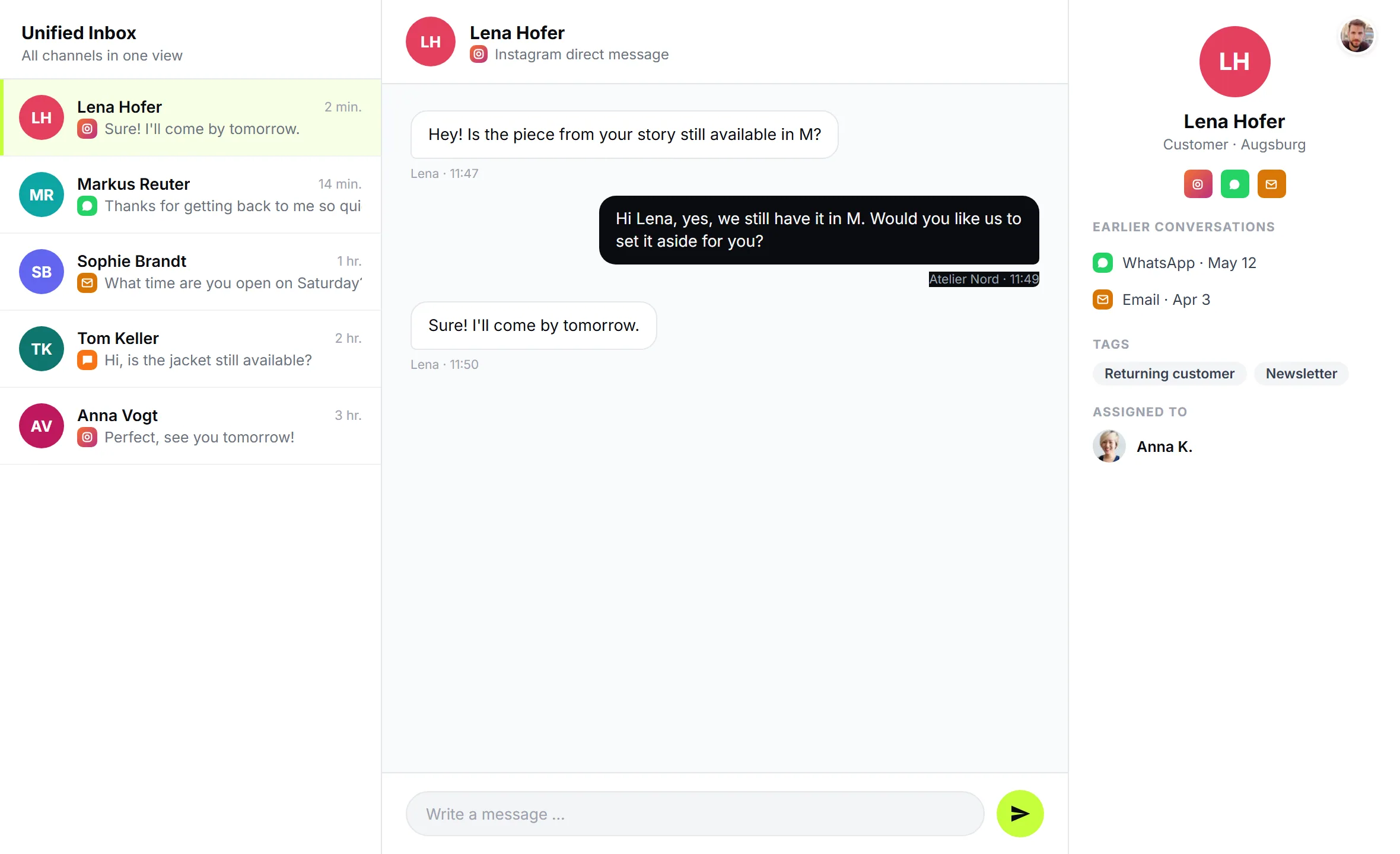
The most important advantage is the continuous view of the customer. People switch channels without thinking about it. Yesterday the question about availability came by WhatsApp, today a short follow-up follows by Instagram because the phone happened to be open in the app. For the customer it is a single conversation. For separate apps it is two strangers.
In the shared inbox both conversations live in the same interface. You see immediately that it is the same person, and you see what has already been discussed. The awkward question of what it was about again is gone. The advice becomes more personal, faster and more pleasant for the customer.
This cross-channel history is not just convenience, it is real money. Being able to pick up immediately on the second contact lets you close faster and come across as competent. The shared inbox use case shows what such a cross-channel inbox looks like in practice.
Team assignment: who takes which conversation
As soon as several people work in the same inbox, there needs to be a clear rule about who takes what. Otherwise you get either chaos or the opposite, namely everyone staring at one message and nobody picking it up.
The solution is assignment. A conversation is assigned to a team member, and that makes it clear who is responsible. An Instagram product enquiry goes to sales, a complaint by WhatsApp to service. The others still see the conversation but know it is in good hands.
If one person's own knowledge is not enough for a case, the handover kicks in. The AI assistant catches routine questions and hands over to a person as soon as it gets complex. In the same way, a team member hands a conversation to a colleague who fits better. The whole history stays intact, nothing has to be explained again.
That creates clear responsibility per conversation without losing the shared view. Everyone knows where they stand, and the customer notices nothing of the internal routing.
Multiple Instagram accounts and dedicated inboxes per location
Many businesses have more than one Instagram profile. A restaurant chain keeps one account per location, a retailer runs multiple brands, an agency manages profiles for different clients. Without structure everything lands in one big pot, and nobody knows which enquiry belongs to which location.
In the shared inbox this is solved. Each Instagram account runs as its own channel. You connect as many accounts as you need, and the enquiries stay cleanly separated. A message to the North branch profile is clearly distinguishable from a message to the South branch.
If you want it even tidier, use dedicated inboxes. With the Custom Inboxes, available on the Professional plan and up, you split the shared inbox into logical areas, for example by location, department or brand. Each team member then sees exactly their slice, without being distracted by conversations that are not theirs.
A few examples of how businesses use this:
| Split by | Typical business | Dedicated inboxes |
|---|---|---|
| By location | Restaurant chain, retail, pharmacies | North branch, South branch, Central branch |
| By department | Car dealership, B2B wholesale | Sales, Service, Accounting |
| By brand | Retailer with several shops, agency | Brand A, Brand B, Client C |
Important: dedicated inboxes are purely a view and change nothing about the channels themselves. A single channel can even appear in several inboxes if that makes sense for your business. And unlimited team members stay free, because SendSeven does not bill per user.
How to set up the shared inbox
The path to a shared inbox is manageable. In a few steps you have Instagram, WhatsApp and your other channels bundled.
Step 1: Connect channels. Connect your channels as individual channels in SendSeven. Instagram runs through Meta's official interface and requires a Business or Creator account with message access enabled in the Instagram app. WhatsApp, email, live chat and the other channels you connect the same way.
Step 2: Invite the team. Bring your colleagues into the platform. Since there are no per-user costs, everyone who should handle or read customer messages can be on board.
Step 3: Clarify responsibilities. Define who takes which conversations. Through assignment you control this case by case, and the AI assistant catches the routine questions in advance.
Step 4: Create dedicated inboxes if needed. If you have multiple locations, departments or brands, split the inbox into dedicated inboxes. That way everyone sees exactly their area.
After that the operation runs as usual, just bundled. Incoming messages are always free, and you pay a small, predictable amount per active channel. You will find the exact terms on the pricing page.
Every channel in one inbox
SendSeven brings Instagram, WhatsApp, email and more channels into one interface. Incoming messages are always free, and you start from EUR 49 per month on the Basic plan, with all 8 channels included.
View pricingWorked example: what bundling saves
What does working in a bundled way actually deliver? A simplified example for a mid-sized business with an active Instagram and WhatsApp presence.
Starting point: around 40 enquiries come in per day across several channels, spread over three team members with separate apps. Through constant switching between devices and inboxes, searching for the prior history and occasional duplicate replies, an estimated 30 minutes a day are lost per person.
3 team members × 30 min a day = 90 min a day. Over 20 working days that is around 30 hours a month, lost purely to the back and forth between separate apps.
In the shared inbox this switching disappears. The prior history is instantly at hand, the assignment prevents duplicate work, and nobody hunts for the right app anymore. Even at a cautiously assumed 60 percent relief, around 18 hours a month are freed up for the team to spend on advice and sales instead of admin.
Set against that is a small, predictable platform contribution: you start from EUR 49 per month on the Basic plan, and incoming messages are always free. In almost every business the time won back is worth many times that. You will find the exact terms on the pricing page.
Privacy and EU hosting
Anyone bundling customer messages commercially is processing personal data in one central place. From a data protection standpoint that is actually an advantage, because access and responsibilities are clearly regulated instead of scattered across personal devices.
Official connection: all channels run through official interfaces. For Instagram and WhatsApp that is Meta's interface. Nobody has to use an app on a personal smartphone, and no private contacts are uploaded.
EU hosting and data processing: SendSeven is the privacy-compliant foundation for your bundled inbox. As SendSeven GmbH, headquartered in Augsburg, Germany, we rely on EU hosting and provide the data processing agreement you need. Your customers' data stays within the European framework.
Made in Germany and Meta Business Partner: SendSeven is a Meta Business Partner and works exclusively through official interfaces. For your data protection officer that means a documented, compliant connection instead of grey areas. If you want to control access even more finely, dedicated inboxes let you limit per team member which conversations they see.
Read on: deeper-dive articles
This article is the product-focused entry into the topic of the inbox. In the following pieces we go deeper into the Instagram topics around it, from automation to the question of which channel fits your business.
- Instagram for business 2026: setting up DM, marketing and service the right way (the overview article)
- Automate Instagram DM with an AI assistant and a keyword bot
- Instagram DM or WhatsApp Business compared head to head
Frequently asked questions
What is a shared inbox?
A shared inbox is one common interface where all incoming messages from all channels come together, such as Instagram, WhatsApp, email and live chat. Several team members see the same conversations, and no enquiry sits unread on a single device. In the jargon it is called a Unified Inbox.
Can I see Instagram and WhatsApp in the same inbox?
Yes. Instagram, WhatsApp and your other channels come together in one interface in SendSeven. If a customer writes by WhatsApp yesterday and by Instagram today, you see both conversations with a continuous history and recognise immediately that it is the same person.
How is it decided who takes a conversation?
Through assignment. A conversation is assigned to a team member so it is clear who is responsible. The other colleagues still see the conversation. The AI assistant catches routine questions in advance and hands over to a person as soon as it gets complex.
Can I connect multiple Instagram accounts?
Yes. You can connect multiple Instagram accounts, for example per location or brand. Each account runs as its own channel in SendSeven so the enquiries stay cleanly separated.
How do I separate conversations by location or department?
With dedicated inboxes. On the Professional plan and up, the Custom Inboxes split the shared inbox into logical areas by location, department or brand. Each team member then sees exactly their slice. Dedicated inboxes are purely a view and change nothing about the channels themselves.
Does each additional team member in the inbox cost extra?
No. SendSeven does not bill per user. You can bring in all the team members who should handle or read customer messages, with no additional user fees.
Is a shared inbox privacy-compliant?
The connection runs through official interfaces, for Instagram and WhatsApp through Meta's interface, without uploading private contacts from a personal phone. SendSeven relies on EU hosting, provides a data processing agreement and is a Meta Business Partner. Dedicated inboxes let you control access per team member even more finely.
What does bundling several channels cost at SendSeven?
The shared inbox is included in every plan, starting at EUR 49 per month on the Basic plan. Custom Inboxes for splitting by location, department or brand need the Professional plan, from EUR 79 per month. Incoming messages are always free. You will find the exact terms and further plans on the pricing page.