WhatsApp Button for Website: Code, Plugin or Widget
SendSeven Team, Editorial Team
Add a WhatsApp button to your website: copy-paste HTML code, the right wa.me link with accented characters, options for WordPress, Shopify and Wix, how it behaves on a computer, GDPR, measurement and what happens after the click. With live demo.
TL;DR
A WhatsApp button for your website is a link in the pattern https://wa.me/4982178988853, optionally with a prefilled message. You add it as HTML code, with a plugin or through a chat widget. What matters is what happens after the click: on a computer, visitors need a QR code, WhatsApp Web or the desktop app, you can usually only measure clicks after consent, and as soon as several colleagues reply, the chat belongs in a team inbox. Right below the first answer you can try all the variants live.
Many customers would rather message than call, and they already have WhatsApp on their smartphone. A WhatsApp button on your website turns that habit into a contact channel: one click, and the chat with your company is open. Adding the button takes a few minutes. This article shows the code to copy, the steps for WordPress, Shopify and Wix, and the places where a button fails in practice: on the computer, with data protection, with measurement and in the inbox.
What is a WhatsApp button for a website?
A WhatsApp button is a button or link on your website that opens a WhatsApp chat with your business number directly. Technically it is WhatsApp's Click to Chat: a link to wa.me with your number and, if you like, a text that is already waiting in the input field. On a smartphone the link opens the WhatsApp app, on a computer WhatsApp Web or the desktop app.
Visitors neither have to type nor save your number. They see the prefilled text, add to it or send it as is, and you get an inquiry with a phone number in your inbox. Whether the button appears in green, in your brand color or as a round button at the edge of the screen is purely a matter of design. The link underneath is always the same.
Live demo
Try it out: these buttons open a real chat
Every button here is an ordinary wa.me link to our support. On a smartphone the WhatsApp app opens, on a computer WhatsApp Web or the desktop app.
2. In your brand color
Start a chat on WhatsAppThe button carries your color, the WhatsApp logo stays unchanged.

4. QR code for the computer
Sitting at a computer? Scan the code with your smartphone camera and the chat opens directly in your WhatsApp app.
All variants prefill the same message: Hi SendSeven, I have a few more questions about WhatsApp buttons for my website.
Nothing is sent until you tap Send. Only then do we see your number, and our support team replies to you in the chat.
How do I build the wa.me link correctly?
The link consists of https://wa.me/, your full international number without a plus sign, without a leading zero and without spaces or special characters, and optionally ?text= with the URL-encoded message. This is how WhatsApp describes it in the official Click to Chat help.
+49 (0) 821 7898-8853 becomes 4982178988853: country code 49, the zero of the area code is dropped, and so are the brackets, hyphens and spaces. The finished link is https://wa.me/4982178988853.
The prefilled message must be URL-encoded. Letters, digits, hyphen, period, underscore and tilde stay as they are, everything else becomes a percent code. Accented letters and umlauts easily go wrong, because in UTF-8 they consist of two bytes:
| Character | Encoded | Character | Encoded |
|---|---|---|---|
| Space | %20 | é | %C3%A9 |
| Comma | %2C | ñ | %C3%B1 |
| Question mark | %3F | ü | %C3%BC |
| & | %26 | ß | %C3%9F |
| Line break | %0A | € | %E2%82%AC |
| Hash (#) | %23 | Plus sign (+) | %2B |
An example: "café" becomes caf%C3%A9. The complete link to our support looks like this:
https://wa.me/4982178988853?text=Hi%20SendSeven%2C%20I%20have%20a%20few%20more%20questions%20about%20WhatsApp%20buttons%20for%20my%20website.The most common mistakes are a plus sign or a zero after the country code (wa.me/+49… or wa.me/490170…), unencoded spaces, and an ampersand or a hash sign in the text that cut off the rest of the message. If the number is missing entirely, WhatsApp only opens the contact picker. If you would rather not encode anything by hand, our free WhatsApp link generator creates the link including a QR code.
What options are there for adding a WhatsApp button?
There are three ways: the wa.me link as your own HTML code, a ready-made plugin for your website system, or a chat widget that connects WhatsApp with other channels and an inbox. The code is leanest, the plugin works without coding knowledge, and the widget pays off as soon as more than one person replies.
| HTML code (wa.me link) | Plugin or app | Chat widget with inbox | |
|---|---|---|---|
| Setup | Copy and paste the code | Install, enter your number | One code snippet, added once |
| Loads third-party code | No | Often yes | Yes, one script |
| On a computer | WhatsApp Web or desktop app | Depends on the plugin | Depends on the widget, with new SendSeven widgets a QR code or WhatsApp Web |
| More channels | No | Partly | Yes, such as live chat, email, Telegram |
| Who replies | Whoever operates the number | Whoever operates the number | Your team in one inbox, with an AI agent if you like |
| Measuring clicks | Via Google Tag Manager | Partly built in | Clicks per channel, views and interactions in the widget statistics |
| Cost | Free | Free to paid | Included in the package price |
For a single button on the contact page, the HTML code is enough. A plugin pays off if you want to show the button on all pages without any coding knowledge. A widget is the right way if inquiries from several channels should end up with one team.
What does the HTML code for a WhatsApp button look like?
The simplest WhatsApp button is a normal HTML link to wa.me with target="_blank", so your page stays open in the browser. The example shows our support number. Replace it with your own and adjust the text:
<a href="https://wa.me/4982178988853?text=Hi%2C%20I%20have%20a%20question%20about%20your%20offer."
   target="_blank" rel="noopener">
  Ask us on WhatsApp
</a>
For a floating button that sits at the bottom right of every page, you need a bit of CSS as well. The code goes once before the closing </body> tag of your template:
<a href="https://wa.me/4982178988853?text=Hi%2C%20I%20have%20a%20question."
   class="wa-float" target="_blank" rel="noopener"
   aria-label="Start a chat on WhatsApp">
  <img src="/images/whatsapp-icon.svg" alt="" width="28" height="28">
</a>

<style>
  .wa-float {
    position: fixed;
    right: 20px;
    bottom: 20px;
    z-index: 999;
    display: flex;
    align-items: center;
    justify-content: center;
    width: 56px;
    height: 56px;
    border-radius: 50%;
    background: #25D366;
    box-shadow: 0 4px 12px rgba(0, 0, 0, .2);
  }
</style>
Three details matter. The aria-label: a button that only shows a logo needs a name for screen readers. The size: 56 pixels is easy to hit on a smartphone, below 44 pixels it gets tight. That is also the minimum size Apple and the WCAG recommend for touch targets. The icon: download the WhatsApp logo from the official WhatsApp brand resources, do not alter it, not even its color, and put it on your own server. An icon from a third-party server transmits your visitors' IP address on every page view.
How do I add the WhatsApp button in WordPress, Shopify or Wix?
The same principle applies in all common systems: a single button goes into the page as an HTML block, a floating button goes once into the footer before </body>. Only the menus have different names.
WordPress
- Button on a page: In the block editor, add the "Custom HTML" block and paste the link code into it.
- Floating button on all pages: The safest way is a plugin for header and footer code such as WPCode. There you paste the code into the footer section. If you edit
footer.phpdirectly in a classic theme, use a child theme, otherwise the code is gone after the next theme update. Block themes have nofooter.php, so WPCode is the easier route there. - Ready-made WhatsApp plugins: The plugin directory has many. Before installing, check whether the plugin loads files from third-party servers, when it was last updated and whether it works with your cookie banner.
Shopify
- Floating button across the whole store: Under Online Store > Themes, click the three-dot menu on your current theme, then "Edit code". Open the file
layout/theme.liquidand paste the code directly before</body>. Duplicate the theme first through the same menu. - Button on a page or product page: In Online Store 2.0 themes such as Dawn, add a "Custom Liquid" section in the theme editor and put the link code in it.
Wix and Webflow
- Wix: For a button on one page, use the element for embedding HTML code in the editor. Wix shows embedded code in its own frame. A floating button across the whole website therefore belongs under Settings > Development & integrations > Custom code. You can only use that area with a published site, a connected domain and therefore a Premium plan.
- Webflow: For the whole site, enter the code in the site settings under "Custom code", in the "Footer code" field. That requires a paid site plan. For a single button, use the "Code Embed" element.
Adding a chat widget with WhatsApp
A widget like the one from SendSeven is added the same way: you paste a script snippet once before </body>. In WordPress this works through the footer or WPCode, in Shopify through theme.liquid, in Wix and Webflow through the custom code area, as described above. Our website widget guide describes all the settings in detail.
What happens when someone clicks the button on a computer?
On a computer, a wa.me link first opens a WhatsApp page, from which it continues to the desktop app or to WhatsApp Web. If the visitor is not logged in there, they first have to link their smartphone, and that is exactly where many drop off.
On a smartphone the path is short: click, the app opens, the message is ready. On a computer, everything depends on whether WhatsApp is already set up there. In B2B especially, where many visitors research at their workplace, that is often not the case.
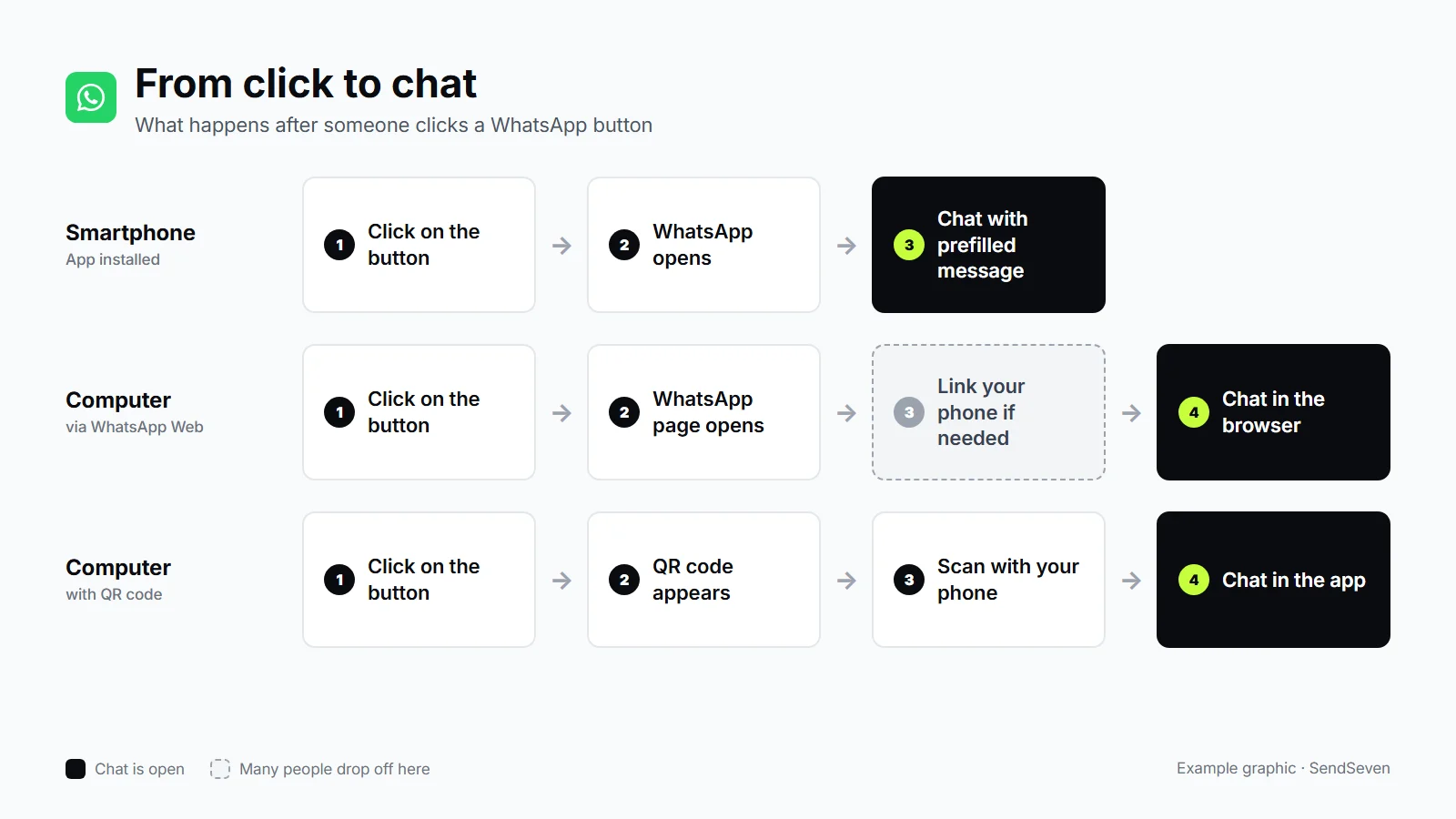
The solution is a QR code: the visitor scans it with their smartphone and lands directly in the chat in their app. In the live demo above you can see this on a computer as the fourth variant. With plain HTML you build it with a CSS rule that shows the QR code only on large screens. The SendSeven widget handles the switch itself: if someone clicks WhatsApp on a computer, the widget shows a QR code and offers WhatsApp Web as a second route. On a smartphone, the app opens directly. The feature is switched on for new widgets, existing widgets keep their previous behavior. It also applies to Telegram, Messenger, Instagram and SMS. Where you can use QR codes beyond the website is covered in our article on six places for the WhatsApp QR code.
Is a WhatsApp button on a website GDPR compliant?
Yes, a self-hosted wa.me link can be used in a GDPR-compliant way: it does not transmit any data to WhatsApp when your page loads, only the visitor's click leads there. You need to look more closely at plugins and widgets that load scripts, fonts or icons from third-party servers, and at where the chat is processed afterwards.
- Before the click: A self-hosted button with its own icon loads nothing from third parties. Plugins that fetch files from third-party servers transmit the IP address in the process, so they belong in your review and, where necessary, in the cookie banner.
- Privacy policy: It usually contains a note on WhatsApp as a contact channel and on the data you receive in the chat. The best way to settle the exact wording is with your data protection officer.
- After the click: If the chat runs through the WhatsApp Business app on a company phone, the app can access the address book if you grant it permission, and with that also numbers of contacts who never consented. Through the WhatsApp Business Platform and a provider with a data processing agreement (DPA), the address book stays out of it, and your team works in one interface with roles and permissions.
This section is not legal advice. You will find the details on consent, retention periods and choosing a provider in the guide to WhatsApp Business and GDPR.
How do I measure clicks on the WhatsApp button?
You measure clicks on the button in Google Analytics 4 most easily through Google Tag Manager: a trigger reacts to links whose address contains wa.me and sends a custom event. In the EU, this kind of measurement usually requires consent in the cookie banner, so the tag only fires after agreement.
- In Tag Manager, enable the built-in click variables, including Click URL.
- Create a trigger of the type "Click - Just Links" that fires when Click URL contains
wa.me. - Connect it to a GA4 event tag, for example named
whatsapp_click, and pass the page as a parameter. - Tie the tag to the consent from your cookie banner so that it does not fire without agreement.
In Wix, you add Tag Manager through the marketing integrations, not through custom code. What happens in the chat afterwards is invisible to Google Analytics. WhatsApp passes on neither UTM parameters nor the referring page. A simple trick creates clarity: give every button its own prefilled message, for example "I have a question about pricing" on the pricing page. Then you can see in the chat where the inquiry comes from. In the SendSeven widget, the widget statistics also show the clicks per channel, for example how often visitors chose WhatsApp, plus views and interactions. How to track WhatsApp conversations through to revenue when ads come into play is covered in the guide to Click-to-WhatsApp ads and wa.me.
What happens after the click in your company?
After the click, the message lands with the number behind the button. With the WhatsApp Business app, that is a smartphone. As soon as several colleagues reply or many chats come in, a team inbox where your team works together pays off. This is where it is decided whether the button brings you customers or just messages that nobody reads in time.
One inbox for your team
In SendSeven's team inbox, WhatsApp chats land next to email, SMS, Instagram, Messenger, live chat and Telegram. Your team assigns chats, sees who is replying right now, and writes internal notes the customer does not see. What this looks like day to day is described in our article on WhatsApp Business with multiple users.
Answers in the evening and at weekends
Some of the inquiries through the button arrive after closing time. An AI agent answers recurring questions about opening hours, delivery or prices immediately from your knowledge base and hands everything else over to your team. The next morning, the handover with the full history is waiting in the inbox.
One widget for WhatsApp and other channels
Not every visitor wants to use WhatsApp. In the SendSeven widget you decide which channels appear: WhatsApp only, or WhatsApp alongside live chat, email, Telegram and other channels. If you switch off live chat, a new widget shows the channels as a list with logos. With the quick-select that is available for bubble widgets, the round bubble fans the channels out on click. WhatsApp is then two clicks away. 15 icons are available for the bubble, including the WhatsApp logo.
If you only need individual buttons, for example for a blog post, a landing page or the email signature, you will find ready-made links and QR codes as PNG or SVG in the Widgets section under "Promotion", plus HTML snippets for channel buttons, badges and email signatures. You set the prefilled message there yourself. That way you build a WhatsApp button from a snippet without encoding the link yourself. You can find more about the channel on our page about WhatsApp for business.
How much does a WhatsApp button cost?
The button itself costs nothing: a wa.me link is free, whether you use the WhatsApp Business app or the API. Costs only arise from replies through the WhatsApp Business Platform and from the software your team works with.
- Incoming messages are always free.
- If the customer writes first, a 24-hour window opens for your replies.
- Since October 1, 2026, Meta also charges service messages, meaning your replies inside the 24-hour window. The first 1,000 per phone number and month stay free, from the 1,001st the utility rate applies, €0.0456 per delivered message in Germany. The details are in our overview of WhatsApp pricing in 2026 and in Meta's pricing overview.
- With the WhatsApp Business app, there are no message costs. In return, only whoever operates the smartphone and the devices linked to it can reply.
At SendSeven, website widgets are included from the Basic plan at €49 per month, AI agents and the Flow Builder from the Professional plan at €79 per month. AI usage is billed in AI credits. All prices are net, plus VAT, and the overview is on the pricing page. You can try SendSeven free for 14 days, with 100 test messages and without a credit card.
Still have a question about your button? Use the live demo above and it lands directly with our support.
Frequently asked questions
Does the WhatsApp button also work with the regular WhatsApp Business app?
Yes. A wa.me link works with any number registered with WhatsApp, whether the free WhatsApp Business app or the WhatsApp Business Platform (API) is behind it. The button only decides where the chat goes. Who replies and how many colleagues can read along depends on the number and the system behind it.
What is the difference between wa.me and api.whatsapp.com?
Both addresses open WhatsApp's Click to Chat. wa.me is the short form that WhatsApp describes in its own help (wa.me/4982178988853), api.whatsapp.com the long form with a parameter (api.whatsapp.com/send?phone=4982178988853). For new buttons, use wa.me: the link is shorter, easier to check and fits better on business cards and flyers.
Where should the WhatsApp button be placed on the website?
As a floating button at the bottom right on all pages, plus as a fixed button where questions arise: on the contact page, on products, next to prices and in the shipping or appointments area. On a smartphone it must cover neither the shopping cart nor the cookie banner. Plan for an area of at least 44 × 44 pixels so that a thumb can hit it reliably.
Can I show the WhatsApp button only during business hours?
A plain link cannot do that, you need additional JavaScript for it. Usually it is better to always show the button and to reply properly in the evening: with an away message in the Business app or with an AI agent that answers simple questions immediately and hands the rest over to your team. Why this matters is shown in our article on customer service outside business hours.
Can I offer several WhatsApp numbers behind one button?
No, a wa.me link always leads to exactly one number. For several departments, you either use several buttons, such as "Sales" and "Service", or you use one number with a team inbox in which your team assigns the chats to the right colleagues.
Why does the prefilled message not appear in the chat?
Almost always it is the encoding. An ampersand (&) or a hash sign (#) in the text cuts the message off at that point, and a plus sign often turns into a space. Many browsers fix unencoded spaces and accented letters themselves, but in emails, PDFs or QR codes they lead to broken links. Also check that the parameter is named exactly ?text= and appears only once.
Do I need an opt-in for the WhatsApp button?
Not for the chat your customer starts themselves: they write to you, and you reply. If you later want to send them offers or newsletters over WhatsApp on your own initiative, Meta's WhatsApp Business Messaging Policy requires a separate, provable consent (opt-in) for that. The first message through the button does not replace it.