Automate Facebook Messenger: Bot + AI Assistant for 24/7 Service
SendSeven Team, Editorial Team
Let recurring Facebook Messenger enquiries be answered around the clock without becoming impersonal: how SMBs combine a keyword bot, an AI assistant drawing on a knowledge base, and a business-hours rule. With the one step that is most often missed: a clean handoff to the team.
TL;DR
Facebook Messenger can be automated sensibly without becoming impersonal. Three building blocks work together: an AI assistant that answers recurring questions in natural language from your knowledge base, a keyword bot that reacts to fixed trigger words, and a business-hours rule for clear expectations outside office hours. The most important step is the clean handoff to a human once things become individual. The rule of thumb: automate the repeatable, keep the personal personal. All messages flow into a central inbox where the team and the AI work together. Incoming messages are always free, and inside the 24-hour service window, replies to active customers through Messenger are also free.
What Messenger automation means
Messenger automation means: letting recurring enquiries on Facebook Messenger be answered without someone typing every message by hand. The goal is not to hand every customer over to a machine. It is to intercept the same routine questions over and over, so your team has time for the conversations where a human really makes a difference.
Picture a normal Thursday evening. Three people write to your Page just before end of business: one asks about weekend opening hours, another wants to reschedule an appointment, a third wants to know whether the boutique is open on Sunday. These answers look essentially the same every time, and answering them by hand after closing time means an evening that is not really an evening off.
Sensible automation answers exactly these standard questions immediately and around the clock, but recognises when it hits its limits and passes the conversation to a team member. For this to work, all Messenger messages must land in one place: a central inbox where automation and team work hand in hand. Technically, the connection runs through the official Messenger Platform Send API, the exact path Meta has designed for businesses.
A useful side note: as long as your customer has written to you within the past 24 hours, replies through Messenger are free. Only outside this service window do special rules and message tags apply. Responding to routine questions immediately means you almost always stay in the most economical range.
The three building blocks: keyword bot, AI assistant, business hours
Good automation rarely comes from a single tool. Three building blocks work together, each with a clear role.
The keyword bot reacts to fixed trigger words. When someone sends a defined keyword, it fires a prepared reply. Fast, predictable, and ideal when you are directing people to a specific word through a post or an advert.
The AI assistant understands freely phrased questions and replies in natural language. It draws on your knowledge base to do so. This is the right building block when customers phrase their questions differently but you still want a fitting, articulate answer.
The business-hours rule sets honest expectations. Outside your availability, the customer receives an immediate message telling them when to expect a personal reply, rather than waiting in silence.
| Building block | Reacts to | Best for |
|---|---|---|
| Keyword bot | Fixed trigger words | Promotions, competitions, targeted calls to action in posts and ads |
| AI assistant | Freely phrased questions | Varying formulations, advisory-style FAQ from the knowledge base |
| Business-hours rule | Time of day and day of week | Clear expectation outside office hours, honest response rather than silence |
In practice you combine all three. The keyword bot serves targeted actions, for instance when you run a Click-to-Messenger ad with a fixed trigger word. The AI assistant catches the bulk of freely phrased questions. And the business-hours rule keeps communication clean at night and on weekends.
Setting up the AI assistant with a knowledge base
The AI assistant is only as good as the knowledge it draws on. Its answers come from your knowledge base, the content you maintain yourself. That is precisely what makes it reliable for day-to-day business.
Fill the knowledge base with the information that gets asked about most often: opening hours, delivery times, availability, shipping costs, return policies, locations, and how to book an appointment. You can add content as text and FAQs or let it scan your website. The better the foundation, the more accurately the assistant answers, and it does so in natural language, not as a rigid text template.
The decisive mechanism is a check before every reply: prices, dates, times and links are checked against your sources before the answer goes out. Clear rules decide when a human takes over, for instance when the customer asks for one or the assistant repeatedly finds no answer. You set those rules yourself. This keeps the automation where it is strong, and your team steps in exactly when they are needed.
Keyword bot: when fixed trigger words work better
Not every situation calls for artificial intelligence. Sometimes a fixed, predictable reaction is exactly right, and that is what the keyword bot is for.
The keyword bot listens for specific words in the incoming message. When one matches, it sends the prepared reply. This is especially useful when you are directing people in a post or an advert to send a particular word. Whoever types the trigger word immediately gets the relevant information, without the roundabout route of an open question.
A simple example: you run a Click-to-Messenger ad for your new advisory offer and ask people to send the word ADVICE. The keyword bot automatically replies with a short overview, available slots, and a sign-up link. The rule of thumb: use the keyword bot where the question originates from you and the answer is fixed. For everything customers phrase freely, the AI assistant is the better choice.
Business-hours rule and honest expectations
Outside office hours there are two ways to handle an incoming enquiry. The bad way: do nothing and hope the customer will wait patiently until next morning. The good way: send a short, honest response.
A business-hours rule automatically detects whether a message arrives within or outside your availability. Outside your hours, the system immediately sends a friendly note that your team will reply personally from, say, 8 a.m. onwards. The AI assistant can still resolve routine questions immediately, so many requests are handled before anyone needs to write back.
This combination of clear expectations and immediate help for standard topics works surprisingly well. Customers see that the brand is reachable without anyone sitting at a desk overnight. And your team starts the morning not with a pile of unopened messages but with the cases that genuinely need a human.
A clean handoff to the team
The most common mistake in automation is not too little technology but a missing safety valve. If a customer with a genuine concern gets stuck in a loop of standard replies, they lose trust faster than any quick response can rebuild it. The handoff to a human is therefore the most important part of the setup.
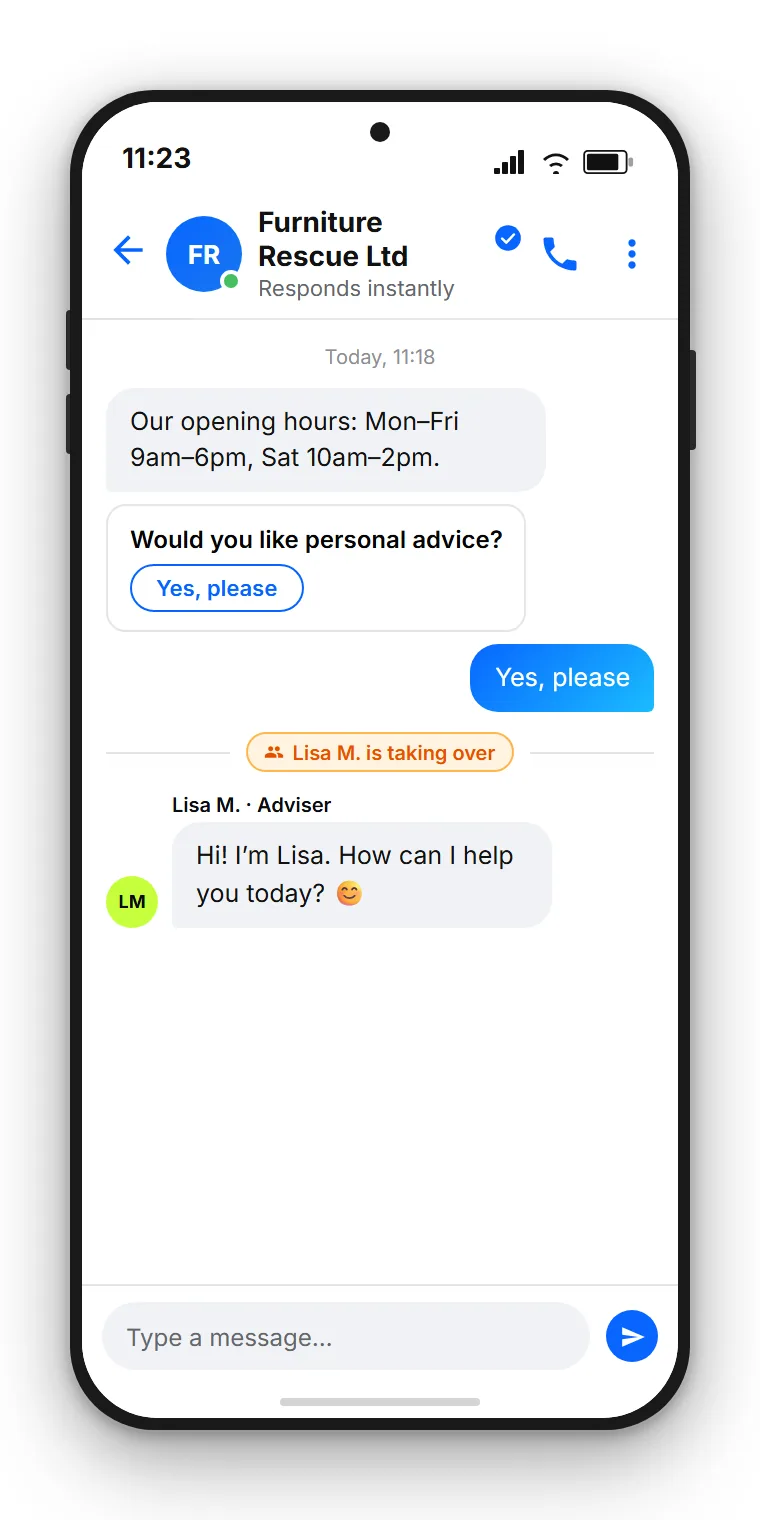
A clean handoff triggers in three cases. First, when the AI assistant cannot find an answer several times in a row. Second, when the customer explicitly asks for a team member. Third, when the topic requires advice from the outset, such as a complaint or an individual request. In all three cases, the conversation moves in the central inbox to the right person without the thread breaking.
The important thing is that the transition is noticeable but unobtrusive. The customer can see that a human has taken over, but they do not have to repeat themselves because the entire conversation history, including the previous automatic replies, is visible. That seamless switch between automation and team is what distinguishes a good solution from a bot that sends customers in circles.
Making smart use of Messenger's own features
Facebook Messenger comes with several built-in features that make an automation noticeably better from the outset. Knowing them means building smooth flows rather than clunky bot dialogues.
The persistent menu is a small button in the chat that always remains visible. Here you add the most important entry points: opening hours, location, book an appointment, speak to the team. Tapping a menu item takes the user straight into the right flow.
The Get Started button is the first contact when someone writes to your Page for the very first time. It fires a greeting and gives the AI assistant the right starting point. A friendly, brief first message noticeably increases willingness to respond.
Quick replies are suggested buttons beneath a bot reply, such as Today, Tomorrow, Reschedule appointment. The customer taps rather than types, and the flow stays clear. Cards let you additionally present products, slots, or locations as visual tiles, each with an image, title, and an action.
Combining these building blocks sensibly produces automation that does not sound like a bot but feels like a well-run self-service area.
Worked example: hair salon with 50 enquiries per day
To make the numbers concrete, here is a realistic example from an SMB setting.
A local hair salon receives around 50 messages a day through Facebook Messenger. About 60% are routine questions: rescheduling an appointment, opening hours, prices for a classic haircut, location and parking. The remaining 40% require advice: which colour suits me, what does a highlights treatment cost in detail, is there a slot with the senior stylist.
Without automation, the team answers all 50 messages. At a realistic handling time of around 3 minutes per enquiry, that is 2.5 hours a day going into a phone screen, often squeezed between customer appointments.
With the AI assistant, a keyword bot, and the business-hours rule, the picture shifts considerably. The 30 routine questions are answered immediately and around the clock without anyone picking up their phone. That leaves the 20 advisory questions for a human to handle, who can now concentrate without the constant back-and-forth between in-salon customers and display notifications.
The saving is roughly 1.5 hours a day. Scaled over a month that is about 30 hours the team can put back into the salon, into regulars, and into new walk-in enquiries. That is not a magic result but simply: routine questions automated, advisory conversations personal.
Answer Facebook Messenger centrally and automatically
SendSeven brings Messenger messages into a single inbox where the AI assistant, keyword bot, and your team work together. Incoming messages are always free; the entry point starts at €79 per month on the Professional plan, which includes the AI assistant.
View pricingSetup with SendSeven
For the three building blocks to run smoothly in daily business you need exactly three things: a platform for the automation, a place for the knowledge base, and a central inbox for team and AI.
With SendSeven all of this is in the same platform. Through AI Bots you build the AI assistant and connect it to the knowledge base. In the Flow Builder you define triggers, such as a Messenger message arriving, a keyword being recognised, or a time outside business hours, and specify what happens next. And in the unified inbox the bot and team work hand in hand on the same thread, with full handoff and visible history.
A practical starting sequence: first fill the knowledge base with the ten most common questions, then add a greeting through the Get Started button, then set up one to three keywords for targeted actions, next configure business hours, and finally set the handoff rules. Let the setup run for a week and adjust based on the real enquiries that come in.
GDPR and data protection
Automating responses to Messenger messages means processing personal data. Data protection is therefore not an afterthought but part of a clean setup.
The connection runs through Meta's official Messenger Platform Send API, the interface Meta has designed for businesses. Incoming and outgoing messages are processed here, not through a private Facebook app. The AI assistant likewise operates exclusively within this framework and only accesses content you have explicitly provided in the knowledge base.
As a GDPR-compliant foundation, SendSeven uses EU hosting and provides the required data processing agreement. As SendSeven GmbH based in Augsburg and as a Meta Business Partner, we work exclusively through official interfaces. For your data protection officer this means: a documented, policy-compliant connection rather than grey-area workarounds. Note also the standard obligations in any dialogue: a transparent privacy notice, a clear legal basis, and where necessary a clean consent for proactive messages outside the service window.
Further reading
This article has focused on automation inside Facebook Messenger. The following pieces deepen adjacent topics, from the strategic overview to the shared inbox with other channels.
- Facebook Messenger for Business 2026: the strategic guide on the pillar topic
- Click-to-Messenger ads for more qualified enquiries
- Organising Messenger cleanly in a team inbox
- Messenger versus WhatsApp Business: a direct comparison
The Messenger channel itself is presented on the Messenger channel page.
Frequently asked questions
What is the difference between a keyword bot and an AI assistant on Messenger?
The keyword bot reacts to fixed trigger words with a prepared reply. The AI assistant understands freely phrased questions and answers in natural language by drawing on your knowledge base. Use the keyword bot for targeted actions with a clear trigger word, and the AI assistant for varying formulations around standard topics.
Does the Messenger bot also respond at night and on weekends?
Yes. The AI assistant is active around the clock and answers routine questions immediately, even outside business hours. For requests that need a human, the business-hours rule provides an honest message about when a team member will reply.
Does every reply through Messenger cost something?
Incoming messages are always free. Replies within the 24-hour service window, meaning when the customer has written to you within the past 24 hours, are also free through Messenger. Only outside this window do special rules and message tags apply. In practice, most service replies therefore stay in the most economical range.
Where does the AI assistant get its answers from?
The AI assistant draws its answers from your knowledge base. You add content there as text and FAQs or let it scan your website. Before a reply goes out, facts such as prices, dates and links are checked against these sources, and if the assistant repeatedly finds no answer, it passes to a human.
When should the automation hand off to a team member?
In three cases. First, when the AI assistant cannot find an answer several times in a row. Second, when the customer explicitly asks for a team member. Third, when the topic requires advice, such as a complaint or an individual request. The entire conversation history remains visible in the inbox so the customer never has to repeat themselves.
How many of my Messenger enquiries should I automate?
Automate the repeatable and keep the personal personal. Routine questions such as opening hours, delivery times, and availability are a good fit for the AI assistant. Advisory conversations, complaints, and emotionally charged requests belong to humans.
Do I need a specific Facebook Page for automation?
Yes. You need a standard Facebook business page. The connection runs through Meta's official Messenger Platform, not through the standard app on a personal smartphone. That is exactly the path Meta has designed for businesses.
What does Messenger automation cost at SendSeven?
The starting point is €79 per month on the Professional plan, which includes the AI assistant and knowledge base. Incoming messages are always free. Exact pricing and further plans are on the pricing page.