Facebook Messenger for Business 2026: The Complete Customer Service Guide
SendSeven Team, Editorial Team
Messages arrive through your Facebook Page every day, but no one feels responsible. This guide shows how SMBs set up Facebook Messenger professionally: a central inbox, an AI assistant with handoff to humans, quick replies, and GDPR-compliant operation from the EU.
TL;DR
Messages arrive through your Facebook Page every day. In most small and medium-sized businesses they land in an inbox nobody opens regularly. The result: enquiries sit unanswered for hours or days while the customer has already moved on to a competitor. The answer is not another tool but a central inbox that brings Facebook Messenger messages together with every other channel. An AI assistant handles routine questions around the clock and passes complex cases to a team member. This guide shows how SMBs set up Messenger properly in 2026, automate it, and run it in a GDPR-compliant way.
What is Facebook Messenger for Business?
Facebook Messenger for Business is the messaging channel through which customers write directly to a Facebook Page. When a user taps the "Send Message" button on a business page, they arrive in exactly this channel. Unlike private use between friends, business communication runs through the Meta Business Platform and can be connected to a professional platform.
An important note: Messenger is one of three major Meta channels. Alongside it there is Instagram Direct Messages for direct messages on an Instagram profile and WhatsApp as a standalone channel with its own logic. All three can be brought into a single inbox so your team no longer has to jump between apps and tabs.
The appeal for an SMB lies in the low barrier for the customer: no phone number to dial, no email to type, no contact form to fill in. One click on the page, one message sent, done. That very low barrier is why Messenger tends to attract the quick, uncomplicated questions. Provided someone answers them.
Why Messenger still matters for SMBs
Some business owners wave off the mention of Facebook. Yet for many audience segments, the platform is far from dead. Messenger is the clear number two behind WhatsApp globally and remains relevant across a wide base of users. The important point here: it is not a young channel. Messenger reaches an older, Facebook-native core audience concentrated in the 25-to-54 age bracket, while those under 25 have largely migrated to WhatsApp, Instagram, and TikTok. That loyal older audience, the kind that frequents local businesses, trades, clinics, restaurants, and community groups, is already on the platform through the Facebook Page and the Marketplace every day.
Realistically, Messenger is a secondary channel for most users. WhatsApp is the primary channel; Messenger runs alongside it and is kept alive not least by buyer-seller chats in Facebook Marketplace. It is explicitly not the channel for reaching customers under 25, but it is a reliable route to a working-age audience with often stable purchasing power.
The key question is not whether Facebook is still trendy, but where your customers expect to find you. Running an active Facebook Page signals availability. A page with short response times feels like an open shop. A page that takes days to reply to messages feels like a shuttered storefront.
There is a bigger picture too. Taking Messenger seriously is the first step towards genuine multi-channel communication. The channel costs no extra phone line, no postage, and no separate inbox, as long as you connect it properly.
Two modes of communication: reactive and proactive
Facebook Messenger carries two fundamentally different types of conversation. Understanding the difference avoids the most common mistakes.
Reactive means: the customer writes first. They have a question about availability, opening hours, or a product and type it into Messenger. Your business replies. This is by far the most common case and the most straightforward, because the customer has actively sought contact.
Proactive means: the business writes first within an existing conversation, for instance to follow up on a pending question or deliver information you promised. Here Meta's platform rules apply, in particular the 24-hour window explained below.
A comparison table helps to keep the two modes and their typical use cases distinct.
| Characteristic | Reactive | Proactive |
|---|---|---|
| Who starts? | The customer | The business |
| Typical occasion | Question about product, appointment, opening hours | Follow-up, delivering promised information |
| Platform rule | Free reply within the window | Governed by the 24-hour window |
| Frequency for SMBs | Very high | Occasional |
For most SMBs the reactive case is the entire story: respond quickly and helpfully to enquiries. That is exactly what a clean process is worth building for.
From scattered inbox to central inbox
The real problem is rarely the channel itself but the organisation behind it. In typical businesses it looks like this: one team member has the Facebook app on their personal phone, a colleague checks it occasionally in a browser, and on some days nobody looks at all. Messages get answered twice or not at all. When the team member goes on holiday, the channel stops.
Once the Facebook Page is connected to a professional platform, the picture changes completely. All Page messages flow into a central inbox where the whole team works. Every conversation is visible, every responsibility is clear, and nothing disappears just because one person is away.
Specifically, connecting through SendSeven brings three things that the personal-phone setup lacks:
- A continuous conversation history. You see every previous conversation with a contact instead of starting from scratch every time.
- Rich media. Images, PDFs, or short videos can be sent directly in the chat, for example a photo of the available item or directions to your location.
- One channel alongside all others. Messenger sits alongside Instagram, WhatsApp, Email, and Live Chat on equal footing. Your team works in one interface, not five apps. More on this in the multi-channel inbox use case.
Automation: AI assistant, keyword bot, and quick replies
Nobody sits in front of a screen around the clock. That is exactly where automation comes in, without making communication feel cold or robotic.
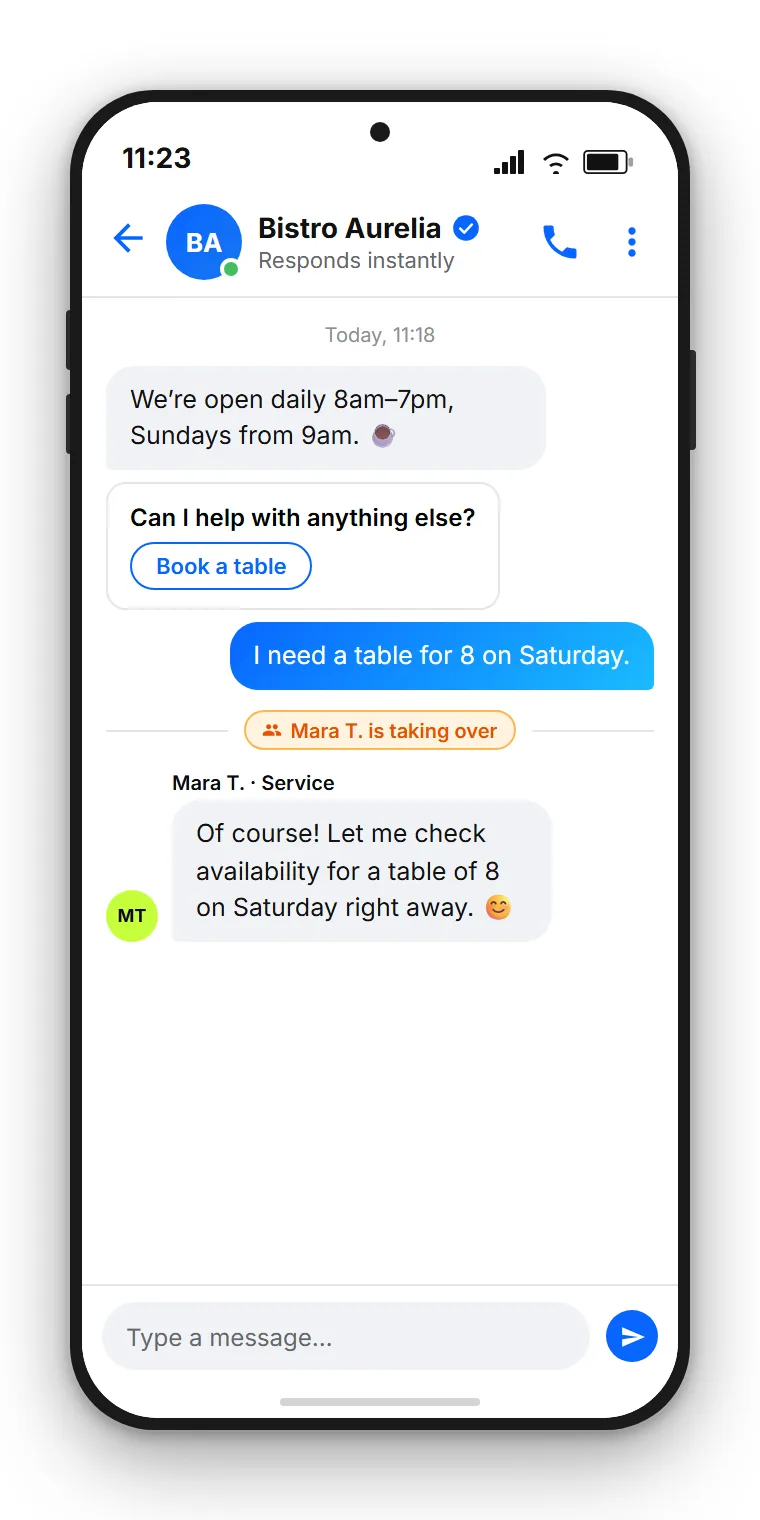
SendSeven's AI assistant answers recurring questions in natural language. It draws on a knowledge base you fill with your own content: opening hours, services, directions, and common questions. If a customer asks on a Sunday evening about holiday opening times, they get a correct answer immediately instead of waiting until Monday.
Alongside this there is the keyword bot for clearly defined triggers. If someone writes "appointment," the bot can deliver the relevant information or options. Both bots draw on the same knowledge base and deliver consistent responses.
The most important point for SMBs: it does not end with the bot. As soon as a request becomes too complex or the customer wants to speak to a person, there is a seamless handoff to a team member. The entire previous conversation is passed along so nobody has to ask the customer to repeat themselves. Automated where it helps, personal where it matters.
In day-to-day work, quick replies also help: pre-written text snippets for the same questions that come up repeatedly, available via keyboard shortcut in the chat. Interactive buttons let the customer tap to choose rather than type freely. This noticeably speeds up handling and keeps response quality consistent even when multiple team members are working.
Connect and automate Messenger
Connect your Facebook Page to SendSeven, bring all Page messages into a central inbox, and let the AI assistant handle routine questions. From €79 per month on the Professional plan, which includes the AI assistant.
View pricingThe 24-hour window: the most important platform rule
One technical rule applies across all Meta channels and is worth knowing: the 24-hour window. It is not a restriction from SendSeven but a requirement of the Meta platform.
The rule is straightforward. After a customer has written to you, you may reply freely for 24 hours. Within this window there are no restrictions on the form or content of your reply. This period covers the vast majority of real customer communication, because most enquiries are handled within minutes or hours anyway.
Only when this window has expired and the customer has not written again do the platform rules for re-engagement apply. For an SMB that replies to enquiries promptly, this rarely matters in practice. Responding quickly means you automatically stay within the window. The window is therefore less a hurdle than a good reason not to leave enquiries waiting.
Worked example: what a neglected Messenger channel costs
Numbers make the problem tangible. Consider a local service business with an active Facebook Page.
Assumptions: 40 Messenger enquiries per month. One in four is a genuine purchase intent, giving 10 potential orders. The average order value is €180. Currently half the enquiries go unanswered for too long because nobody feels responsible.
40 enquiries/month × 50% unanswered × 25% purchase intent × €180 order value = €900/month = €10,800/year in lost revenue
The calculation is deliberately conservative. It does not account for repeat customers who do not bother getting in touch again after a poor experience, or for the reputational damage of a page that visibly does not respond.
Against this, consider the platform costs. The Messenger channel is included in every plan, starting at €49 per month on the Basic plan. Incoming messages are free. Even if you recover only a fraction of the previously lost enquiries, the benefit far outweighs the cost. Current pricing is on the pricing page.
GDPR, EU hosting, and Meta Business Partner
Once business communication runs through a team member's personal phone, data protection becomes legally precarious. Customer data sits uncontrolled on a private device, with no clear accountability and no documented deletion policy. When a team member leaves, the conversations are often simply gone.
Connecting through a professional platform resolves this. SendSeven is a company based in Germany, SendSeven GmbH headquartered in Augsburg, and operates the platform with EU hosting. Our platform, database and AI run in European data centres. Delivery itself goes through Meta, which also processes messages in the US. Communication runs in a GDPR-compliant manner through controlled interfaces rather than through the contacts list of a private device.
SendSeven is also a Meta Business Partner and connects Facebook Messenger through the official interfaces of the Meta Business Platform. For you this means: a clean, policy-compliant connection, no cobbled-together unofficial workarounds, and a provider that knows the platform requirements.
Ready to go in a few steps
The journey from chaos to a clean channel is shorter than most expect. At its core there are three steps.
- Connect your Facebook Page. You authorise SendSeven for your business page. From that moment, Page messages flow into the central inbox.
- Build the knowledge base and quick replies. Enter your opening hours, services, and the most common questions. The AI assistant and quick replies draw on this content.
- Set up the team and handoff. Define who handles which conversations and when the bot passes to a human.
A step-by-step walkthrough is available in the Messenger setup guide. If you want to run multiple Meta channels in parallel, think about Messenger together with Instagram and WhatsApp from the start, rather than maintaining each channel separately.
Frequently asked questions
What is Facebook Messenger for Business?
It is the messaging channel through which customers write directly to a Facebook Page. Through a professional platform such as SendSeven, these Page messages flow into a central inbox where the whole team works, rather than being scattered across the Facebook app on someone's personal phone.
Do I need a personal Facebook profile for this?
A Facebook business page is used for the connection. Business communication runs through the official interfaces of the Meta Business Platform, not through a private chat profile. That is exactly the difference from using the standard Facebook app on a personal device.
Can I message customers first?
Within an existing conversation you can write proactively, for instance to deliver information you promised. The 24-hour window from Meta applies. For an SMB that replies to enquiries promptly, this rarely comes up in practice.
What does the 24-hour window mean?
After a customer has written to you, you may reply freely for 24 hours. This is a platform rule from Meta, not a limit imposed by SendSeven. Responding to enquiries quickly means you automatically stay within the window.
Can a bot answer the enquiries?
Yes. The AI assistant answers recurring questions based on your knowledge base, and a keyword bot responds to defined triggers. Complex cases are handed to a team member along with the full conversation history so the customer never has to repeat themselves.
Can Facebook Messenger be used in a GDPR-compliant way?
Through SendSeven, yes. SendSeven GmbH is based in Augsburg and operates the platform with EU hosting. Communication runs through controlled interfaces rather than through the contacts list on a private device, which makes using a personal phone for customer service unnecessary.
What does the Messenger channel cost?
The Messenger channel is included in every plan, starting at €49 per month on the Basic plan (all 8 channels included). Incoming messages are free. Current pricing is on the pricing page, as rates may change.
Is Messenger still worth it alongside WhatsApp and Instagram?
For many local audience segments, yes. Messenger reaches an older, Facebook-native audience that is already active on Facebook Pages and the Marketplace. It is not the channel for reaching under-25s, but it is a reliable secondary channel for a working-age audience with often stable purchasing power. The biggest leverage comes from running all three Meta channels together in a central inbox rather than neglecting any of them.
Conclusion: Messenger belongs in the central inbox
For many SMBs, Facebook Messenger is not a side note but a quiet first-contact channel. The problem is rarely the channel itself but the missing organisation behind it. Scattered across an app on a personal phone it wastes revenue and creates data protection risks.
Bring it into a central inbox, let the AI assistant handle routine requests, and pass the important cases to a human. That turns a forgotten inbox into a reliable channel, GDPR-compliant from the EU.
Next steps:
- Explore the Messenger channel
- Connect your Facebook Page to SendSeven
- View SendSeven plans (from €49/month, Basic plan)
Want to control all Meta channels from one place? Read next about Messenger in a team inbox without a personal phone. If you are thinking beyond Facebook, our guide on automating Facebook Messenger with a bot and AI assistant shows you how to run 24/7 service.
Messenger in depth: further reading
- Click-to-Messenger Ads: turning adverts into conversations, ads that start a conversation directly instead of opening a landing page.
- Automate Facebook Messenger with a bot and AI assistant, let recurring questions be answered around the clock.
- Messenger in a team inbox: customer service without a personal phone, how SMBs let multiple team members work without the Pages Manager app.
- Messenger or WhatsApp Business? Which channel for what, an honest comparison of the two Meta channels.