Messenger in the Team Inbox: Customer Service Without Personal Phones
SendSeven Team, Editorial Team
If one staff member's holiday brings Facebook Messenger to a standstill, this article is for you. It shows how small and medium businesses bring Page messages into a central team inbox, give multiple people access simultaneously, and take personal smartphones out of customer service altogether — with Custom Inboxes for branches, automatic routing, quick replies, and a clean audit trail.
TL;DR
When a business's Facebook Messenger runs through a single employee's personal login, the channel stalls every time that person takes holiday, falls ill, or moves on. The fix is not another work phone but a central team inbox where all Page messages arrive and every team member works with their own account. Connected through Meta's official interface, enquiries can be automatically routed, quick replies shared, multiple branches separated via Custom Inboxes, and the entire conversation history kept clean. A fragile personal-phone channel becomes a reliable service channel, GDPR-compliant, hosted in the EU, and with no login drama when the next staff change comes.
The personal-phone problem
In many small businesses, customer service on the Facebook Page works like this: one staff member is the Page admin. She has the Pages Manager app on her personal smartphone, is logged in under her private Facebook account, and answers customer enquiries between the commute and the lunch break. As long as she is around, the channel works. The moment she is not, it stops.
This is not a fringe problem. In day-to-day business it creates three very concrete breaking points.
Holiday. When the staff member goes on holiday, she faces a choice: keep checking the personal phone throughout her break, or leave Page messages sitting unanswered for days. Neither option is a real solution. One comes at the cost of her rest; the other comes at the cost of the customer.
Illness. When someone falls ill, the entire service channel disappears overnight. Nobody else has access. A cover would need to log in using the sick colleague's private Facebook credentials — a legal and technical grey area that, in practice, simply does not happen.
Staff changes. When the team member leaves, the handover becomes a drama. The personal login leaves with her. The Page admin role needs to be laboriously transferred to someone else. Previous conversations and the entire thread history often remain on the old personal device — data the business can no longer access, but the former employee still can.
From a data protection perspective, this set-up is almost impossible to document cleanly. Customer data sits on a private device, without a data processing agreement, without a deletion concept, without controlled access. What sounds like a temporary workaround becomes a permanent state in many SMBs. And the longer it runs, the harder it is to exit.
How a team inbox solves it
The clean solution is not another work handset but a central team inbox. The idea is simple: the Facebook Page is connected once through Meta's official Send API to a professional platform. From that point on, all Page messages flow into a shared inbox that every team member accesses with their own login.
Instead of a private Facebook login, there are team accounts with different roles. Instead of a smartphone that is always running low on battery, the work happens in a browser or a dedicated app. Instead of one person who knows everything and blocks the channel during holiday, everyone sees the same state. The Page admin login remains a technical requirement but is no longer the daily tool for service.
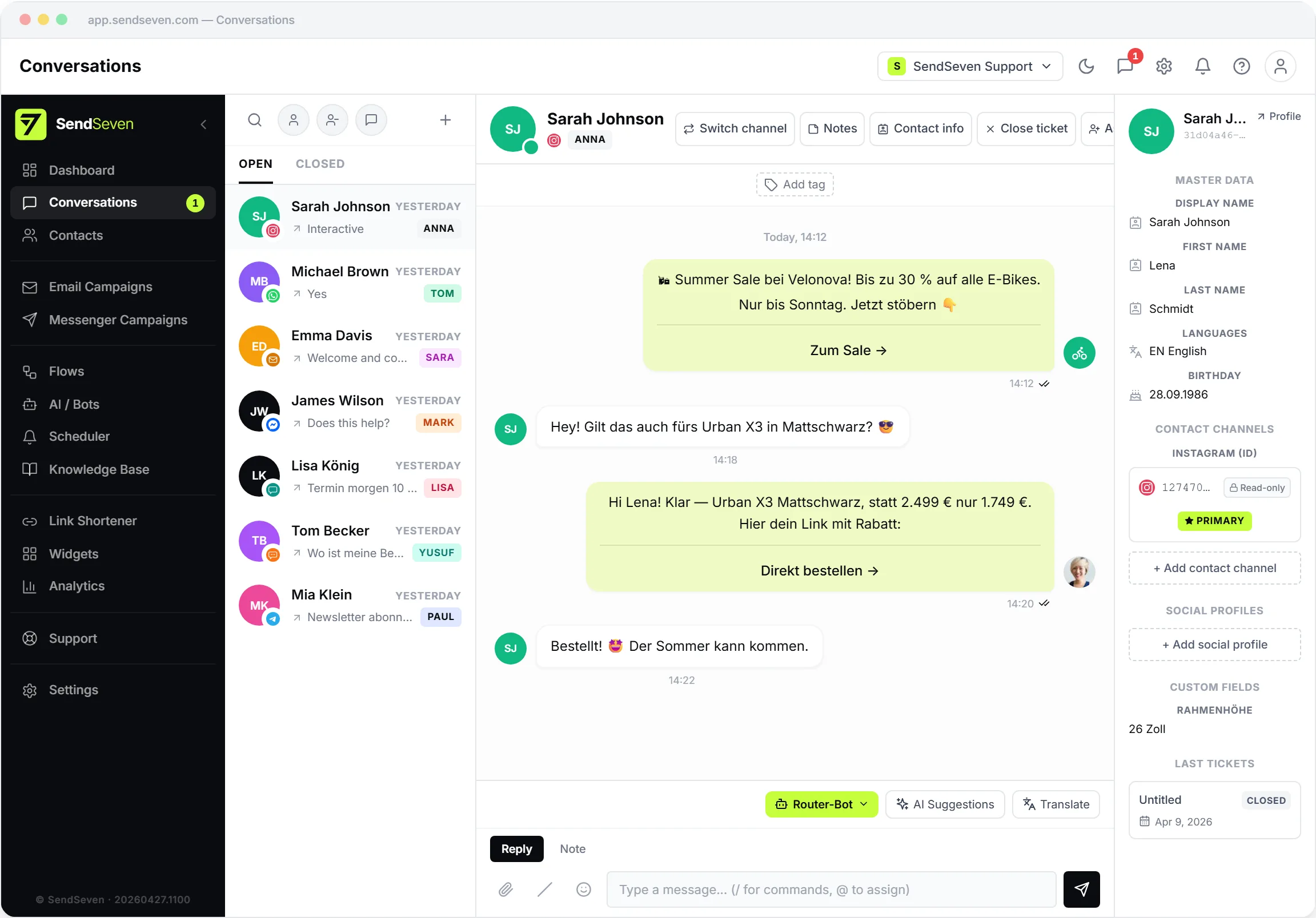
Concretely, this creates four advantages that are simply not possible on a personal phone.
- Multiple staff working simultaneously. Three people can work in the inbox in parallel without getting in each other's way. An open conversation is locked once a team member picks it up.
- Individual login per person. Everyone has their own account with a name, role, and permissions. Who replied when is visible in the thread history. Accountability no longer depends on one person's memory.
- No personal Facebook account in customer service. The staff member's personal login stays personal. The Page admin role is only a technical switch, not a daily tool.
- Clean exit when staff change. When someone leaves, their account is deactivated. Conversations stay in the inbox, the full thread remains visible, and nobody has to organise a Page admin handover.
The elegant thing about this approach is that it invents nothing new. It simply uses the interface Meta designed for exactly this purpose and places an organised workspace on top of it.
Custom Inboxes for branches and brands
So far we have talked about one inbox where everything arrives. In practice, a business with several locations or brands often needs more structure. That is precisely what Custom Inboxes are for: filtered views of the central inbox that show only the conversations relevant to a specific area.
A few typical setups from SMB daily life:
- Branch. A hair salon with three locations sets up London, Manchester, and Bristol as separate inboxes. The separation can be done via contact tags or via Facebook Page, if each branch runs its own page.
- Brand. A retailer with two own-label brands gives each brand its own inbox so that each team only sees its own enquiries.
- Topic area. A larger business separates advisory requests, complaints, and appointments. Anyone in the complaints team only sees complaints.
Behind the scenes, everything stays in the same system so cross-cutting reporting remains possible and a customer who contacts one branch today and another tomorrow is still one contact in the inbox. More background is in the unified inbox glossary entry.
Assignment and routing in everyday use
Once more than two people work in the inbox, the question is who gets which enquiry. Three approaches have proven themselves in practice, and they are not mutually exclusive.
Automatic distribution. Enquiries are assigned by availability or shift plan. When a team member's online status is active, they receive the next free enquiry. Anyone who has clocked off drops out of the rotation. This works especially well in teams with evenly distributed workloads.
Topic-based routing. Tags on the contact or in the thread decide which inbox an enquiry moves to. Someone asking about an appointment goes to appointment coordination. Someone raising a complaint goes to the complaints team. This saves the manual handover step and ensures the right person looks at it first.
Bot-based pre-qualification. With higher enquiry volumes, a bot that asks the first two or three questions, categorises the request, and only then hands to a human becomes worthwhile. How exactly such a bot is built is described in the article on Messenger automation. Importantly: even here the human remains the endpoint; the bot is only the pre-sort.
In smaller teams, manual pickup often suffices: whoever has capacity grabs the next open enquiry. This does not scale indefinitely, but for many SMBs with three to five people it is the most honest solution.
| Feature | Personal phone | Pages Manager app | Team inbox |
|---|---|---|---|
| Effort during holiday | High — channel blocked | High — login must be shared | Low — others step in |
| Data protection | Personal device, unresolved | Via personal Facebook login | Individual accounts, EU hosting possible |
| Multiple branches | Not practicable | One login per Page | Custom Inboxes per location |
| Reporting | None | Very limited | First-response time, volume, tags |
| Staff change | Thread history lost | Handover difficult | Deactivate account, done |
Quick replies and templates
A significant advantage of a central inbox that is easy to underestimate is that knowledge is shared. On a personal phone, quick replies are personal. In a team inbox, they belong to everyone.
Quick replies are prepared text snippets for the same questions that come up again and again: opening hours, directions, delivery costs, returns, appointments. Inserted via a keyboard shortcut in the chat, personalised with the customer's name and perhaps two sentences specific to the situation, they are out in seconds. This keeps reply quality consistent even when three different people are answering in rotation.
Three small disciplines are worth building in from the start:
- Review regularly. Outdated opening times or wrong prices in quick replies do more damage than a slightly slower manual reply. Going through them once a quarter is usually enough.
- Agree on tone of voice. When everyone uses the same building blocks, the brand sounds consistent. It is worth deciding once how warm the tone should be and whether you address customers by first name.
- Spot gaps from the real inbox. Which questions keep coming in that are not covered yet? That is the simplest list of new quick replies, and it writes itself.
Additionally, you can feed recurring answers into the knowledge base so that an AI assistant can use them independently. That takes routine questions off your team's plate, while quick replies remain available for cases where a human answers personally.
Reporting and first-response time
What is not measured cannot be managed. On a personal phone there is no reporting. In a team inbox, reporting is not an extra; it falls out as a by-product.
Three metrics carry their weight in daily use.
First-response time. How long does it take on average for a customer to receive a first reply after their opening message? This is the most important lever. A Page that visibly responds within minutes feels like an open business. If the figure is several hours, you know where to adjust.
Message volume per team member. Who handles how many enquiries? This is not a competition but the basis for shift planning. If one person consistently carries significantly more load than others, the routing is not working.
Conversion through the thread. How many enquiries turn into appointments, orders, or purchases? This is clearly visible with a little discipline around tags. It shows not only service quality but also proves that the channel contributes to revenue.
Tracking these three numbers honestly for a month usually shows exactly where the lever lies. In most SMBs it is first-response time, followed by routing that is too vague.
Messenger alongside WhatsApp, Instagram, and Live Chat
Messenger rarely stands alone. In most SMBs, WhatsApp, Instagram Direct Messages, and a Live Chat widget run in parallel. If each of these channels gets its own tool, the team spends the day switching between apps and tabs.
The same team inbox that tames Messenger accommodates the other channels too. From the team member's perspective, everything stays in one interface. A customer writes through Instagram in the morning, opens the Live Chat at noon, and sends a Facebook message in the afternoon? In the inbox, that is one contact with three connected threads — not a stress puzzle across three apps.
Anyone who is connecting Messenger now should think about the other channels at the same time. The effort per additional channel is small; the gain in clarity is large. More on how the three Meta channels work together is in the comparison of Messenger and WhatsApp Business.
Answer Messenger as a team, without personal phones
SendSeven connects your Facebook Page through the official interface to a central team inbox. Every team member has their own login, incoming messages are always free, and the starting point is €49 per month on the Basic plan (all 8 channels included).
View pricingSetup in a few steps
Connecting Messenger to a team inbox is no longer a day's work. Through Meta's Embedded Signup, the whole process takes one to two hours — no server of your own, no deep technical knowledge required.
- Connect the Facebook Page. Log in to SendSeven, start the Messenger connection, and authorise the platform for your business page. The familiar Meta dialogue guides you through the permissions.
- Set up Custom Inboxes. If you have multiple branches or brands, define the appropriate views. Tags and filters are configured so that each inbox shows only the conversations relevant to it.
- Invite team members. Each staff member gets their own login with a role. A sales person sees something different from accounts, without you needing to set up a separate Page admin account for each person.
- Define routing rules. Who gets which enquiries, automatically or by topic? Three or four rules at the start are usually enough; the rest emerges from real-world use.
- Create quick replies. Ten to fifteen snippets for the most common questions is a solid start. They grow naturally over the first weeks of live operation.
From a data protection standpoint, you are on solid ground from the first step. The connection runs through Meta's official interface, SendSeven operates the platform on EU hosting, and the required data processing agreement is provided. SendSeven GmbH is based in Augsburg and is a Meta Business Partner — a reliable anchor for your data protection officer.
If you want to drive traffic to Messenger from advertising, the article on Click-to-Messenger Ads is the right next read. The glossary entry for Click-to-Messenger Ads gives a short definition of the ad format. The lead flow described there ends up in the same team inbox.
Anyone looking for the strategic overview will find the broader picture in the guide to Facebook Messenger for Business. Technical details on the Messenger connection and the 24-hour service window are on the Messenger channel page.
Frequently asked questions
How do SMBs handle Facebook Messenger messages as a team without personal phones?
They connect their Facebook Page through Meta's official interface to a central team inbox. All Page messages arrive there, every team member works with their own login, and the Page admin's personal phone is taken out of service. When staff take holiday, fall ill, or leave, others step in without any login drama.
Do all team members need a Page admin role on Facebook?
No. The Page admin role remains a technical requirement for the connection but is no longer the daily tool. In the team inbox, each team member gets their own login with an appropriate role. A personal Facebook account is not needed to work in the inbox.
What happens when a staff member leaves?
Their account is deactivated. Access ends immediately, conversations stay in the team inbox, and the entire thread history remains visible. A laborious Page admin handover or worry about customer data on a personal device is no longer an issue.
How do Custom Inboxes work for multiple branches?
Custom Inboxes are filtered views of the central inbox. They can be set up by branch, brand, or topic area. The separation works via contact tags or via the associated Facebook Page. Cross-cutting reporting remains possible in the same system.
Can Messenger enquiries be distributed automatically?
Yes. Enquiries can be automatically assigned by availability or shift plan, topic-based routing can be set up via tags, or a bot can be placed upstream to handle pre-qualification. In small teams, manual pickup from the open list often works well enough.
Which metrics should an SMB track in Messenger customer service?
Three metrics are enough to start: first-response time, message volume per team member, and conversion through the thread — for example from enquiry to booked appointment. These three figures show service quality and the channel's contribution to revenue at a glance.
How long does setup via Embedded Signup take?
Typically one to two hours. You connect your Facebook Page through the guided Meta dialogue, set up Custom Inboxes, invite team members, and define a few routing rules and quick replies. No server of your own is required.
What does Messenger in a team inbox cost at SendSeven?
The Messenger channel is included in every plan, starting at €49 per month on the Basic plan. Incoming messages are always free. Current pricing is on the pricing page.