Click-to-Messenger Ads: Turn Ad Clicks into Conversations (2026)
SendSeven Team, Editorial Team
An ad that opens a Messenger conversation instead of a landing page: Click-to-Messenger Ads turn a single click into a live dialogue. When this format genuinely pays off, when Click-to-WhatsApp is the smarter choice, and how the ad, bot flow, and team handoff work together — with a worked example and a setup walkthrough.
TL;DR
Click-to-Messenger Ads are Meta ads that open a Facebook Messenger conversation on click instead of a landing page. The sweet spots are an older, Facebook-native audience (~25–54), local businesses with an active Facebook Page, and brands with a strong US or LATAM connection. A well-built ad delivers qualified conversations free of charge inside the first 24 hours, a bot handles initial qualification, and the team steps in when advice is needed. All conversations land in a central inbox alongside WhatsApp and Instagram.
What Click-to-Messenger Ads are
Click-to-Messenger Ads are Facebook and Instagram ads where a click opens a conversation in Facebook Messenger rather than a landing page. Instead of a form, the prospect lands in an open chat where a bot or a team member replies. A fleeting ad contact becomes a dialogue in seconds.
Technically, they use the Meta campaign objective 'Engagement' with the result type 'Message' and conversation location 'Messenger'. The ad itself runs in the usual placements: Facebook Feed, Reels and Stories, Instagram Feed, Reels and Stories, Marketplace, and Audience Network. Instead of a 'Learn more' button, it carries a 'Send message' call to action.
The key difference from a standard performance ad lies in the service window. As soon as someone writes to you, you may send them any messages free of charge for 24 hours. You only pay the ad cost; the conversation itself is free within the service window. After that, Meta's message-tag logic applies or a paid re-engagement ad is needed. Businesses that use this window systematically qualify leads at precisely the point where a landing page and a form would otherwise sit.
When Click-to-Messenger pays off, and when it doesn't
An honest note up front: in many markets — including the UK — WhatsApp is a dominant messaging channel, and Click-to-WhatsApp Ads will outperform Click-to-Messenger for most broad audiences. Click-to-Messenger is not the wrong format, but it has clear sweet spots.
Click-to-Messenger makes sense in three situations. First, when your audience is Facebook-native and tends to be 35 or older. Unlike what is often assumed, Facebook Messenger is not a young channel: the demographic skews significantly towards 25–54-year-olds and is slightly female-leaning (ARD/ZDF Media Study 2025). Younger users have largely moved to WhatsApp, Instagram, and TikTok. Second, when a local business already has an active Facebook Page that receives enquiries, and the ad simply extends a familiar channel rather than introducing a new one. Third, when the brand has a strong US or LATAM connection where Messenger retains higher share.
In all other cases, it is worth consulting the direct channel comparison. A second option is Click-to-Instagram for visually driven brands with a large Instagram following; a third is running both ad types simultaneously and letting Meta auto-optimise to whichever delivers the cheapest conversation.
| Format | Best for | Audience reach | Service window |
|---|---|---|---|
| Click-to-Messenger | Facebook-native, older audiences (25–54), local businesses, Marketplace | Medium — strongest for Facebook-loyal 35+ users | 24 h from first customer message |
| Click-to-WhatsApp | Broad audiences, SMB default in many markets, service and advisory | High — dominant messaging app in many regions | 24 h from first customer message |
| Click-to-Instagram | Visual brands, younger audiences, beauty and fashion | Medium — strong in specific verticals | 24 h from first customer message |
The decision is not a matter of faith. It comes down to where your audience already messages and which channel carries the opening conversation most naturally. Running both in parallel does not double results; it usually dilutes the budget.
Anatomy of a good ad
A Click-to-Messenger ad looks like a standard ad in the feed, but it has to deliver a different promise. Rather than vague value, it must make concrete what happens on the next click: a real conversation.
The image or video carries most of the attention. Reduce it to a single visual idea — one face, one product in context, one before-and-after. Tests consistently show that short, vertically optimised videos in Reels and Stories outperform static landscape formats by a significant margin.
The headline names the outcome, not the path. Instead of 'Book an appointment online', something like 'Your consultation secured in 60 seconds' works better because it front-loads the result. The body text should make the promise concrete in one sentence and tell the reader what happens in chat: 'Drop us a short message with your need and we'll come back with the best slots.'
The 'Send message' button replaces the usual conversion button. Behind the scenes, Meta converts the click into an open Messenger thread with your welcome message already waiting. That is precisely why the next second decides whether the click becomes a conversation or not.
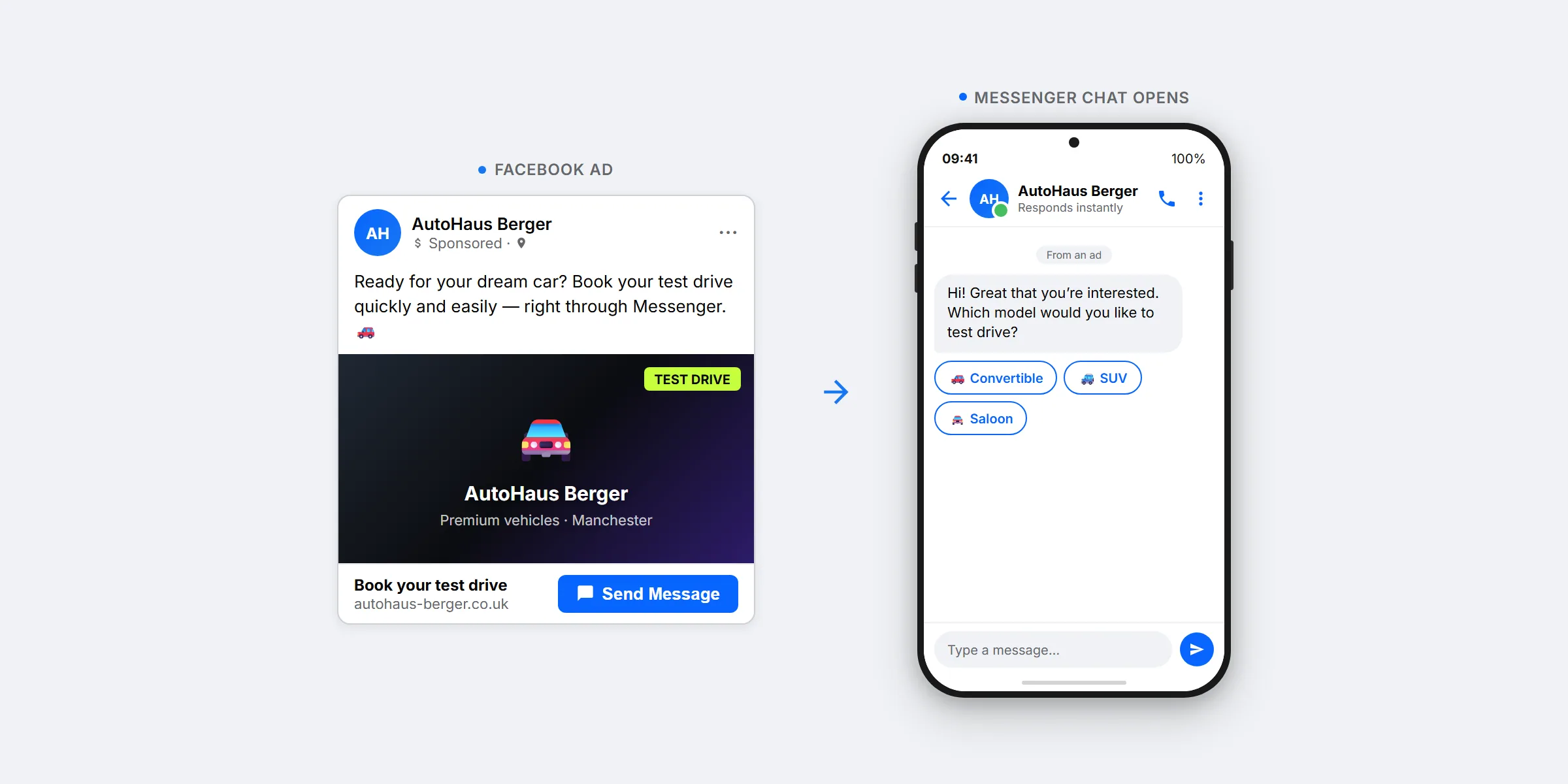
Welcome message and initial qualification
The first message in the Messenger thread is not the customer's — it is yours. A good welcome message does three things at once: it greets by name, explains what happens next, and gives the prospect a small, clear set of options.
Rather than an open-ended question, one to three multiple-choice buttons typically work far better. Each button maps to a clear intent: 'Book an appointment', 'Find out about pricing', 'Another question'. Tapping one is not an extra step but an answer the bot can process immediately. This lowers the barrier compared to a free-text field, especially on a smartphone.
Routing cleanly at this stage delivers two things: speed and data quality. Speed, because the prospect receives a relevant reply in seconds. Data quality, because every button tapped sets a label in the background that feeds into analysis and handoff later. Someone who taps 'Book an appointment' belongs in a different flow from someone who selects 'Another question', and you know that from the very first interaction.
Bot flow for lead qualification
Behind the welcome message lies the real value: a bot flow that asks a handful of targeted questions and ends by either booking an appointment or passing the conversation cleanly to the team. Which questions apply depends on the business model. Four short examples from everyday SMB use show the pattern.
Clinic or practice: The flow first asks about the desired treatment, then preferred timing and insurance type. Patients on private insurance see different available slots from those on standard cover. At the end, the bot proposes two concrete times; one is confirmed, all in the same Messenger thread, without switching to an external booking page.
Hair salon: A quick-reply sequence covers service, hair length, and preferred day. The bot knows pricing ranges from your knowledge base and states them openly. Only then comes the date, because that is the most common drop-off point: people who know the price are far less likely to abandon in the final step.
Car repair garage: Make, model, and year are gathered through three buttons, then the problem in brief keywords. The bot assigns the issue to a category and proposes a workshop slot or a short phone consultation. Photos of damage can be uploaded directly in the chat, saving an in-person estimate later.
B2B SaaS demo: Three questions about company size, current tool, and main pain point are usually enough to distinguish 'straight to demo' from 'prefer materials by email first'. Anyone routed to the demo path immediately sees open slots in the sales team's calendar.
In all four cases, a Flow Builder runs in the background, visually linking questions, answers, conditions, and actions. The same flow structure can later be repurposed for WhatsApp and Instagram — the build effort pays off well beyond a single ad campaign.
Handing off to the team
No bot is smart enough for every case, nor should that be the goal. The most important part of a well-built flow is the point where it stops and a human takes over. This handoff has to meet two requirements: it must fire reliably, and it must not feel like a break in service to the customer.
Three triggers work in practice. First, the bot recognises a complex question not covered in the knowledge base and escalates. Second, the prospect explicitly asks for a team member — this too is a tap, not a free-text entry. Third, the topic requires advisory input from the outset: a complaint, a special request, or a high-value sale.
When the handoff fires, the conversation moves to the central inbox, routed to the right role or team. The team member sees the full thread including bot replies and every quick-reply button tapped. The customer does not have to repeat anything. That seamlessness is the difference between a bot that saves effort and one that costs trust.
Tracking and a worked example
Click-to-Messenger Ads can be tracked on two levels. In Meta Ads Manager you see the standard advertising metrics: CPM, CPC, click-through rate, and cost per conversation. That is the ad side. On the service side, the backend metrics matter: how many conversations were qualified, how many ended in a booked appointment, how many in a completed order. A webhook passes these backend events back to the ad ID, so Meta receives the right signals for campaign optimisation.
A simple worked example puts the scale in perspective. Suppose a hair salon runs a Click-to-Messenger campaign with a budget of €1,000:
- €1,000 budget at €5 cost per conversation yields approximately 200 conversations.
- Of these, 80 are recognised as qualified leads because they name a specific service, preferred timing, or similar intent.
- From the 80 leads, 30 appointments are booked at an average order value of €250.
- That produces €7,500 in revenue, giving a ROAS of 7.5.
These figures are model assumptions, not a guaranteed outcome. The range is wide: a well-tuned setup can significantly exceed this; a poorly maintained bot quickly burns half the budget on empty conversations. What matters most is measuring the full chain from click to conversation to booking end-to-end, otherwise it is impossible to see where the money stalls.
Note: any pixel-based conversion tracking or Conversions API (CAPI) setup connecting your backend data to Meta sits on your side — or is handled by your marketing agency. SendSeven delivers the conversation and the handoff; the attribution infrastructure between your business systems and Meta is your team's responsibility.
GDPR and data protection
Click-to-Messenger Ads process personal data in a dual setup. First, the conversation itself sits on Meta's servers, because it takes place inside Facebook Messenger. Second, backend logging runs through the provider that handles the inbox. Both need to be properly documented.
On the Meta side, a data processing agreement with Meta goes into the records. On the SendSeven side, we provide the equivalent agreement. As a GDPR-compliant foundation, SendSeven operates backend logs on EU hosting. As SendSeven GmbH based in Augsburg and as a Meta Business Partner, we work exclusively through official interfaces.
Content obligations are the standard ones for any conversational channel: a transparent privacy notice, a clear legal basis, and the right to object or request deletion. In practice this means your privacy policy explicitly names the Messenger channel, and the bot includes a data-protection notice before requesting sensitive information. For your data protection officer, this means a documented, policy-compliant integration rather than grey-area workarounds.
Setup with SendSeven
In SendSeven, a Click-to-Messenger ad becomes a working lead machine in four steps. A one-time build that can later be repurposed for WhatsApp and Instagram.
1. Connect the Messenger channel. Linking the Facebook Page to the Messenger channel happens through the official Meta interface. Incoming messages land in the central inbox from that point on.
2. Build the welcome message and bot flow. In the Flow Builder you create the quick replies, branching logic, and connection to the knowledge base. For more complex answers, attach an AI bot that understands freely phrased questions.
3. Launch the ad in Meta. Campaign objective 'Engagement', result type 'Message', conversation location 'Messenger': the link to the Page and therefore to the inbox is automatic after step 1.
4. Configure handoff and reporting. In SendSeven you define when the bot passes to a human and to whom; response times and conversation volume are visible in the central inbox. If you want the ad to learn from actual bookings rather than just clicks, your team or agency sets up the conversion signal via Meta's Conversions API — that runs directly between your systems and Meta, outside of SendSeven.
The same setup carries a parallel WhatsApp Click-to-ad campaign later. Once Messenger is cleanly configured, translating the flow to WhatsApp typically takes half a day; the building blocks are identical, only the channel specifics change.
Bring your Click-to-Messenger conversations into one inbox
SendSeven routes the conversations from your Meta ads directly into an inbox where the AI bot, Flow Builder, and your team work together. Incoming messages are always free; the entry point starts at €79 per month on the Professional plan, which includes the AI bot and Flow Builder.
View pricingFurther reading
This article focused on the ad format. The following pieces go deeper into what happens inside the inbox once the first conversations arrive.
- Facebook Messenger for Business 2026: the foundational guide for customer service and setup
- Automating Messenger with a bot and AI assistant
- Facebook Messenger in a team inbox
- Messenger vs. WhatsApp Business: a direct comparison
What the cross-channel inbox looks like in practice is covered on the unified inbox page. Background on the ad format itself is in the glossary under Click-to-Messenger Ads.
Frequently asked questions
When do Click-to-Messenger Ads pay off, and when is Click-to-WhatsApp the better choice?
Click-to-Messenger Ads pay off when your audience is Facebook-native and tends to be older, when a local business already has an active Facebook Page, or when the brand has strong US or LATAM ties. For broadly mixed audiences in markets where WhatsApp dominates, Click-to-WhatsApp is typically the more natural fit. Both formats can be tested in parallel, but they should receive clearly separate budgets.
How much does each conversation cost with Click-to-Messenger Ads?
Cost per conversation depends heavily on industry, competition, and ad quality. In practice, it ranges roughly between €2 and €10 per opened conversation depending on the vertical. What matters economically is not the click cost but the rate of qualified leads and booked appointments that follow.
How does the 24-hour service window work in Messenger?
As soon as a prospect sends a message, you may reply with any message free of charge for 24 hours. During this window you pay only the ad cost. After 24 hours, Meta's message-tag rules apply, or a paid re-engagement ad is needed. If the customer replies again, the window resets from that point.
Do I need a bot to run Click-to-Messenger Ads?
A bot is not strictly required; you can manage the welcome message and follow-up conversations manually. Once volume grows, a bot flow for initial qualification makes sense, because response times and workload add up quickly otherwise. A practical division: bot qualifies, human advises.
Which ad placements are available for Click-to-Messenger Ads?
Click-to-Messenger Ads run in the Facebook Feed, Facebook Reels and Stories, the Instagram Feed, Instagram Reels and Stories, the Marketplace, and the Audience Network. In practice, Feed and Reels placements deliver the most consistent results because the format is consumed most naturally there.
Can I run Click-to-Messenger and Click-to-WhatsApp campaigns at the same time?
Yes — and in certain setups that is sensible. The condition is that each campaign has its own budget and that all conversations land in the same inbox so the team can work across channels. Mixing both arbitrarily dilutes optimisation; keeping them cleanly separated shows in reporting which format actually delivers for each audience segment.
Are Click-to-Messenger Ads GDPR-compliant?
Yes, with the right setup. That means a data processing agreement with Meta and with the inbox provider, a privacy policy that explicitly names the Messenger channel, and a data-protection notice in the bot before sensitive information is collected. SendSeven runs backend logs on EU hosting and provides the required data processing agreement.
What does connecting the Messenger channel cost at SendSeven?
Connecting the Messenger channel is included in every plan, starting at €49 per month on the Basic plan. The AI bot and Flow Builder described above need the Professional plan, from €79 per month. Incoming messages are always free, including conversations arriving from Click-to-Messenger Ads. Ad costs are billed directly by Meta. Full pricing is on the pricing page.