WhatsApp Business Account 2026: One Number, Several Providers
SendSeven Team, Editorial Team
Meta is splitting the WhatsApp Business Account into a WhatsApp account for the number and one Messaging Account per provider. What changes, what stays the same and how to bring your existing number to SendSeven while your current provider is still running, so you can test first and switch when you are ready.
TL;DR
Meta is splitting the WhatsApp Business Account (WABA) in two. The WhatsApp account holds your phone number, your profile and the number's quality rating. A Messaging Account holds templates and the payment method, and every provider you work with gets its own. That means you can use the same number with several providers at once: switching providers no longer means migrating the number. You connect it to the new provider as well, test at your own pace and end the old contract once everything runs. Meta converts existing accounts automatically in the second half of 2026, with nothing for you to do. You create your templates again with the new provider, and Meta bills each Messaging Account separately.
Since October 2026, the first Meta Business Suite accounts have been showing a notice titled "Updates to your account", and it has already turned up for us too. Behind it is the biggest change to the WhatsApp Business Account in years: Meta is separating the phone number from templates and billing. For businesses, this is mostly good news, because moving to a different provider gets a lot easier. This article explains what changes, what stays the same and how you bring your existing number to SendSeven while your current provider is still running, so you can test first and switch when you are ready.
What is Meta changing about the WhatsApp Business Account?
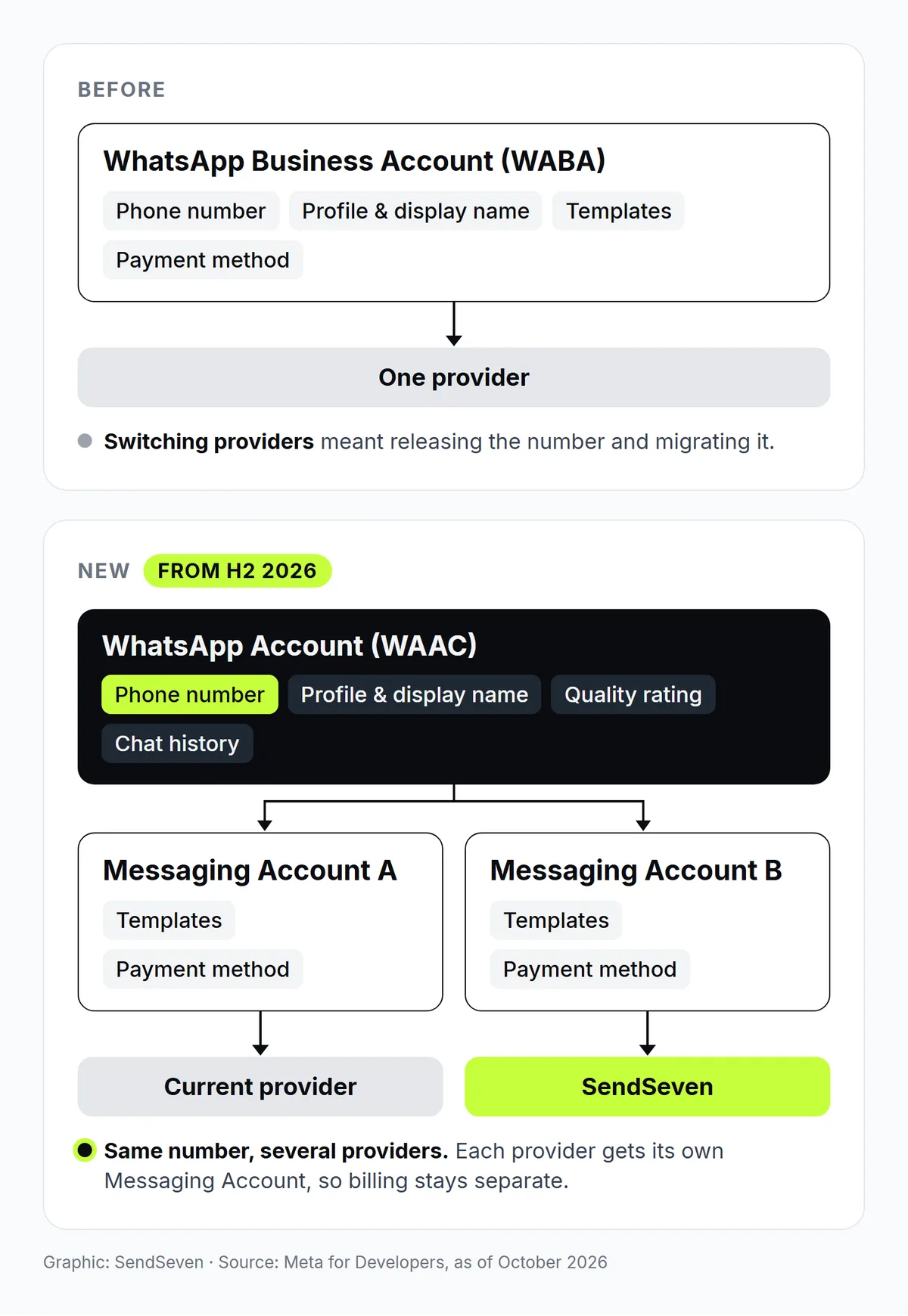
Meta is dividing the WhatsApp Business Account into two accounts. Until now, everything sat in one place, the WABA: phone number, profile, templates and payment method. From now on, the number and profile belong to the WhatsApp account, while templates and billing belong to the Messaging Account. Meta has documented the new model since May 2026 in its developer documentation under Account model evolution, where it is labelled as a beta. Details may still change. Our guide explains how to set up a WhatsApp Business Account and what it costs.
What is the WhatsApp account?
The WhatsApp account is your business's identity on WhatsApp, the part your customers actually see. It contains the phone number, the business profile with your display name and your product catalogs, and later on also usernames. Quality rating and chat history stay with the number. The account always belongs to you, and you can share it with several providers. Each account holds exactly one number; Meta groups several numbers together as a set.
One detail causes confusion: Meta's terms of service still call the new account the "WhatsApp Business Account". So the name stays, but what it refers to changes. In the developer documentation, Meta abbreviates it as WAAC to tell it apart from the old WABA.
What is a Messaging Account?
The Messaging Account handles everything to do with templates and billing. It holds your message templates, the payment method, the webhooks and the analytics. Every provider you work with gets its own Messaging Account, so templates, billing and metrics stay fully separate between providers. Your existing WABA ID does not go away: it now identifies your Messaging Account. For a short definition, see Messaging Account in the glossary.
| Asset | Before | Now |
|---|---|---|
| Phone number, display name, profile | WABA | WhatsApp account |
| Quality rating and chat history of the number | with the number | with the number in the WhatsApp account, unchanged |
| Templates | WABA | Messaging Account, separate per provider |
| Payment method and billing | WABA | Messaging Account, separate per provider |
| Webhooks | WABA | Messaging Account |
| Business verification | Business portfolio | Business portfolio, unchanged |
| Messaging limit | Business portfolio | Business portfolio, unchanged |
What does the change look like in Meta Business Suite?
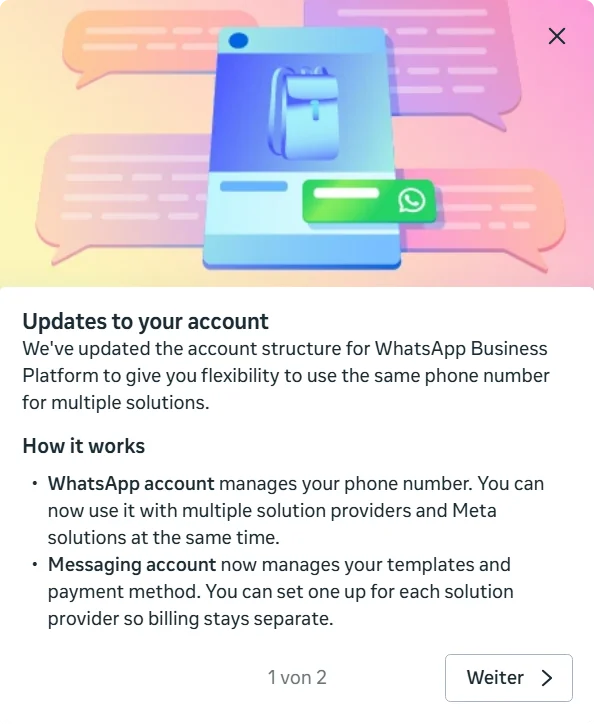
Meta announces the change with a short notice in two steps. The first explains the new split: the same number for several solutions, a WhatsApp account for the number and one Messaging Account per provider, with billing kept separate. The second shows where you will find each account from now on.
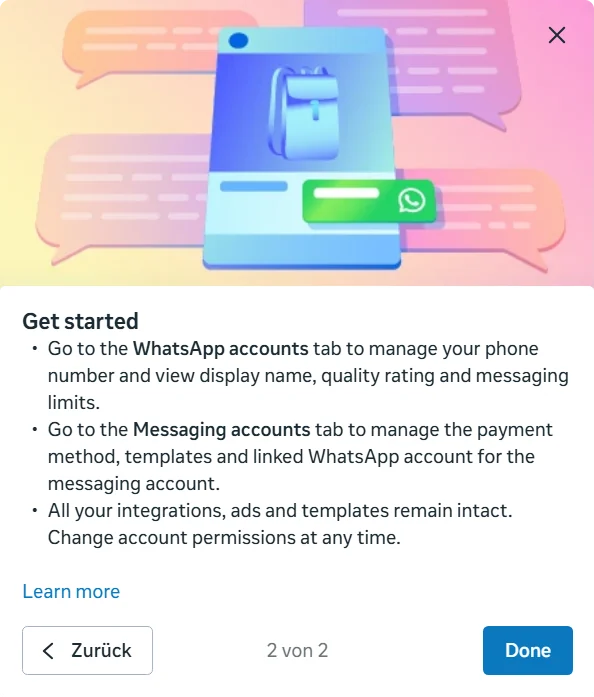
Instead of a single list, Business Suite then shows two tabs: WhatsApp accounts with the phone number, display name, quality rating and messaging limits, and Messaging accounts with the payment method, templates and the linked WhatsApp account. Meta adds that all integrations, ads and templates remain intact and that you can change account permissions at any time. For an overview of how Business Suite is organised, see Meta Business Suite in the glossary.
What do you need to do as a business?
Nothing for now. Meta converts existing accounts automatically and carries over phone numbers, templates, profiles and payment methods. You do not need to sign up again, and your current provider keeps sending as usual. Meta's prices are not affected by the new account model either. The technical work falls to providers and to businesses that connect to the API directly themselves. Meta plans the rollout in three phases:
| Phase | Timeframe | What happens |
|---|---|---|
| Phase 1: general availability | second half of 2026 | Meta splits existing accounts automatically, and Business Suite shows two tabs. Every new sign-up through Embedded Signup creates a separate Messaging Account for the provider, including for a number that already runs with another provider. |
| Phase 2: new API version | first half of 2027 | New IDs and endpoints for the WhatsApp account. Anyone using several Messaging Accounts on one number has to state in the newest API version which account they are sending from. |
| Phase 3: mandatory transition | first half of 2028 | All API versions require that information. Wherever the phone number ID used to go, the WhatsApp account ID goes instead. |
One thing is worth doing now anyway: check in Business Suite which providers have access to your accounts, and remove old access you no longer need. Every provider you share your WhatsApp account with has access to your number.
Can I use my WhatsApp number with several providers at the same time?
Yes. In the new model, you connect the same number to several providers, and each one works in its own Messaging Account. Your customers keep writing to the same number and see the same profile, and ongoing chats are not interrupted when a provider is added. Meta itself describes the old number migration as a step that "previously acted as a natural switching barrier", and that barrier is now gone.
In practice, your current provider no longer has to be switched off before you try a new one. You test the new provider with your real number, move your workflows over one at a time and end the old contract once everything runs, instead of switching everything on a fixed date. You may know the idea from Coexistence, where the WhatsApp Business App and the API share one number. Here, two providers share it instead.
What limits apply when several providers share one number?
- Throughput and the messaging limit are shared. How many messages can go out per second is set per number, not per provider. The messaging limit, meaning how many different recipients you may contact on your own initiative within 24 hours, is also shared by every provider on the number. A big campaign with one provider uses up headroom the other one no longer has.
- Templates only exist in their own Messaging Account. A template you created with your current provider does not automatically exist in SendSeven. You create it there again and submit it for review. Each template's rating starts from scratch in the new account, while your number's quality rating stays.
- Each provider bills through its own Messaging Account. A message is charged to the Messaging Account of the provider that sent it. If your current provider pays Meta's fees through its own credit line, that stays limited to its Messaging Account. In the Messaging Account for SendSeven, you add your own payment method.
- Any connected provider can deregister the number. Meta is not changing that for now. Because registration belongs to the number, a deregistration affects every provider until the number is registered again. Only share your account with providers you trust, and when you end a contract, make sure only the access is removed.
- Incoming messages are not yet described in detail. Meta's documentation does not yet spell out how customer replies are distributed when several providers use the same number. So decide which provider handles which job during the transition. If you have questions about the process, talk to us.
How do you bring your existing number to SendSeven?
Through the Meta sign-up directly in SendSeven, with your existing number. Your current provider does not have to be switched off yet: you test SendSeven with your real number first and switch once everything runs. SendSeven is a Meta Business Partner and connects WhatsApp itself through Embedded Signup. Meta automatically creates a separate Messaging Account for SendSeven, and your current provider stays connected until you switch. Here is how it works:
- Start a trial. Sign up for SendSeven's free 14-day trial.
- Connect WhatsApp. Start the WhatsApp connection in SendSeven. Meta's sign-up window opens, and you log in with a Facebook account that is allowed to manage your business portfolio.
- Choose your existing number. Select your business portfolio and the number that already runs with your current provider. Meta creates a new Messaging Account for SendSeven, and until you switch, the number stays active with your current provider too. This applies to numbers that run with another provider through the API. A number that is still registered in the WhatsApp Business App connects through Coexistence.
- Add a payment method. In Meta Business Suite, add a payment method to the new Messaging Account under the "Messaging accounts" tab. Without one, SendSeven cannot send paid messages through that account.
- Create your templates again. Create your templates in SendSeven and submit them to Meta for review. Within the 24-hour window after a customer message, you can reply without a template.
- Test and switch. Send your first messages, check delivery and replies, and move your workflows to SendSeven step by step. Once everything runs, end your current contract. Remove the old provider's access yourself in Business Suite, or get confirmation that it will not deregister the number.
The WhatsApp setup guide walks through each step with screenshots.
Can you switch in a single step?
Yes, with the classic number migration. It suits you if you want to switch completely right away, without a test phase. Your current provider turns off two-step verification on the number, and then you connect the number in SendSeven through Embedded Signup. According to Meta's documentation, this requires a verified business, an approved account and a valid payment method. Your display name, quality rating, messaging limit and any Official Business Account status stay in place, because the number itself does not change.
Who bills you for WhatsApp fees?
Meta bills you directly for message fees, separately for each Messaging Account. Messages you send through SendSeven are charged to the payment method in the Messaging Account for SendSeven. As long as your current provider is still connected, Meta bills its messages through that provider's Messaging Account. SendSeven's price is a fixed base fee with an included volume, plus a fixed price per message above that, not a percentage of Meta's price. You will find the plans on the pricing page, and how Meta charges for WhatsApp messages is covered in WhatsApp Pricing 2026.
Questions about your account or the switch? Talk to us.
The short version: Meta is separating your WhatsApp number from templates and billing, so you connect the same number to a new provider as well, test it at your own pace and only then switch, without migrating the number.
See everything SendSeven does with WhatsApp on the WhatsApp channel page. How to set up your business portfolio properly is covered in the Facebook Business Manager setup guide.
Further reading:
- WhatsApp Coexistence: Run the Business App and API in Parallel (2026 Guide)
- From the WhatsApp Business App to the API: Migrate the Easy Way with Coexistence (2026)
- WhatsApp Pricing 2026: What Meta Has Changed and What Stays the Same
- WhatsApp Username: How to Set It Up and Reserve It in 2026
Frequently asked questions
Will my templates be transferred to SendSeven automatically?
No. Templates belong to the Messaging Account they were created in. For SendSeven, you create them again and submit them to Meta for review. Until you switch, your templates stay usable with your current provider.
When does the new account model take effect?
Meta converts existing accounts in the second half of 2026, and the first accounts have shown the notice in Business Suite since October 2026. Further API changes follow in 2027 and 2028 and mainly affect providers and developers. Meta currently labels the model as a beta, so dates may still shift.
Will I keep my chat history?
On your customers' side, yes. Chat history is tied to the number, so your customers keep writing in the same chat, whichever provider replies. Messages stored in your current provider's software do not move over automatically, though. Save whatever you need from there before the contract ends.
Will my customers see two different contacts?
No. The number, display name and profile live in the WhatsApp account that every provider shares. For your customers, it stays one chat with your business, no matter which provider a message comes through.
What happens to my existing WABA ID?
It stays. In the new model, existing WABA IDs identify the Messaging Accounts. The WhatsApp account gets its own ID, which Meta adds to its APIs step by step from 2027.
Do WhatsApp prices change with the new model?
No. According to Meta, pricing is unaffected. The only new part is that each Messaging Account is billed on its own. While you use two providers during the test phase, billing runs through two separate Messaging Accounts.
Can I remove a provider's access again?
Yes. You can change permissions in Meta Business Suite at any time, and Meta notifies the provider. Before you switch, check whether any campaigns or automations are still running with your current provider that you should set up in SendSeven first.