WhatsApp Business Account: Setup and Costs in 2026
SendSeven Team, Editorial Team
Business profile, WABA, business portfolio: we untangle the terms, walk through the three routes to a WhatsApp Business Account, run the numbers for a real month with both bills, and cover setup step by step.
TL;DR
A WhatsApp Business Account bundles three layers: the business profile inside the chat, the WhatsApp Business Account (WABA) that Meta manages behind the scenes, and the business portfolio above it. The WhatsApp Business App is free. Once more than one employee replies or you want to message customers proactively, you need the WhatsApp Business Platform, and you pay two separate bills: Meta’s message costs and the platform. Incoming messages are always free.
At SendSeven, the platform starts at 49 € a month with 2,500 messages included, and every additional one at a fixed price instead of a percentage of Meta’s rate card.
What Is a WhatsApp Business Account?
Most people searching for a WhatsApp Business Account want the same thing: running WhatsApp professionally without handing out a personal number. The confusion starts with the name. Inside the WhatsApp Business App, the label under your company name simply reads Business account. In Meta’s technical documentation, the object behind the WhatsApp Business Platform is also called the WhatsApp Business Account, WABA for short, Meta’s container for your numbers, templates, and quality rating. Same words, two different things, and that overlap is where most setups go wrong.
The term Business Account really covers three layers:
| Layer | What it is | Do customers see it? |
|---|---|---|
| Business profile | Company name, logo, description, address, hours, website. Managed in the app or on the platform. | Yes, right in the chat |
| WhatsApp Business Account (WABA) | Meta’s container for your numbers, templates, and quality rating. Only relevant once you use the WhatsApp Business Platform. | No |
| Business portfolio | The umbrella over your Meta assets, formerly Business Manager. Holds the WABA, plus Pages, Instagram accounts, and user roles. | No |
The free app only needs the first layer. The WABA and the portfolio come into play once you move to the platform, and a portfolio can be created for you during sign-up if you don’t have one. User roles, ad accounts, and business verification stay your job inside Meta, though: a messaging platform connects your assets, it doesn’t manage your Meta account. For a clean walkthrough, see our guide to the Facebook Business Manager.
Three Routes to a WhatsApp Business Account
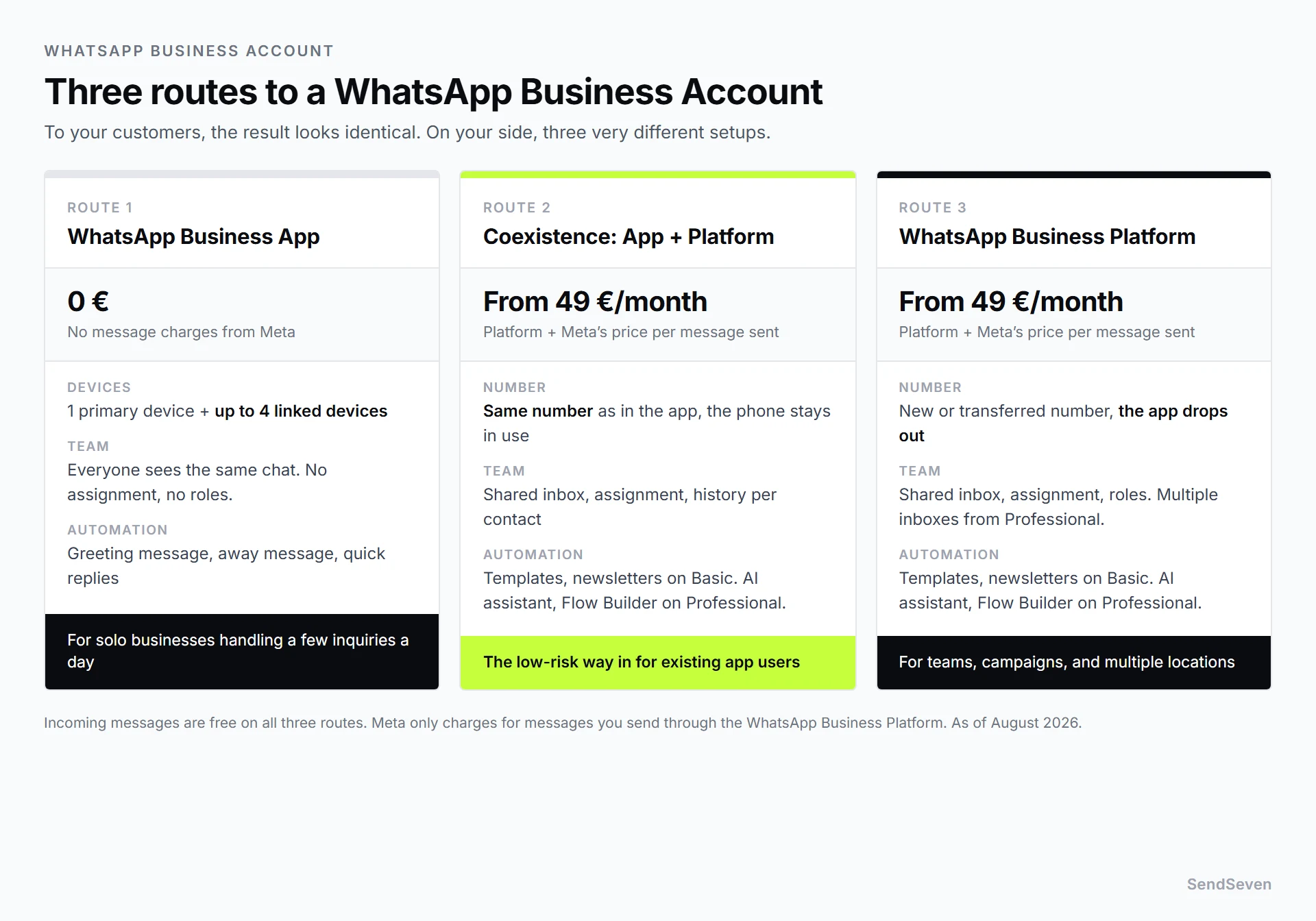
To your customers, the end result looks identical either way. On your side, there are three very different setups, with different costs and different ceilings.
Route 1: The WhatsApp Business App
Free, set up in ten minutes, running on one primary device plus up to four linked ones. You get a business profile, a greeting message, an away message, and quick replies. What you don’t get: assigning chats, roles, internal notes, or response-time tracking. Everyone sees the same chat, and nobody can tell who already replied.
Route 2: Coexistence, running the app and the platform side by side
Coexistence keeps your number in the WhatsApp Business App on the phone while it also runs on the WhatsApp Business Platform. Connecting it can carry over contacts and up to 180 days of chat history. The phone is the primary device, the platform a linked one, and it needs to be used once every 13 days or the linked devices drop off.
It’s the low-risk way in: nothing gets migrated, the number stays put, and you can disconnect it yourself in the app under Settings, Account, Business platform. Full details are in our Coexistence guide.
Route 3: The WhatsApp Business Platform
A new number, or your existing one moved over completely, with the Business App dropping out of the picture. In exchange you get what a team needs: a shared inbox, assignment, roles, and newsletter campaigns. Which route fits which business size is covered in our comparison of the app versus the API versus Coexistence.
What Does a WhatsApp Business Account Cost?
There are two bills, and they have nothing to do with each other: Meta charges for the messages, your messaging platform charges for the software, and anyone who only knows one is going to miscalculate.
Bill one: Meta
Meta charges per message sent, not a flat fee; the rate depends on the message category and the recipient’s country.
| Category | Typical case | Rate |
|---|---|---|
| Marketing | Newsletter, offer, promotion | Set by Meta, varies by recipient country |
| Utility | Appointment confirmation, status update, invoice | Set by Meta, varies by recipient country; also charged inside the 24-hour window since October 1, 2026 (free there until September 30, 2026) |
| Authentication | One-time code, login confirmation | Set by Meta, varies by recipient country |
| Service | Your reply inside the 24-hour window | Utility rate since October 1, 2026; first 1,000 per number and month free |
| Incoming | Any message a customer sends you | always free |
Important for your planning: since October 1, 2026, service and utility messages inside the 24-hour window are no longer free. A service message costs the same as a utility message, 0.0182 € in the UK and 0.0028 € in the US and Canada, and the first 1,000 service messages per business phone number and month are free. What changed is covered in WhatsApp Pricing 2026.
Bill two: the platform
To access the WhatsApp Business Platform you need software managing your inbox, templates, and phone numbers. At SendSeven, the entry-level Basic plan costs 49 € a month with 2,500 messages included, and each additional one averages 0.02 €, a fixed price rather than a percentage of Meta’s rate card. Users, contacts, and WhatsApp numbers are included on every plan at no extra charge, and incoming messages never count against the included volume. AI assistants, the Flow Builder, and multiple inboxes come from Professional at 79 € a month, with a 14-day trial and no credit card required.
Here’s how that adds up in a realistic month:
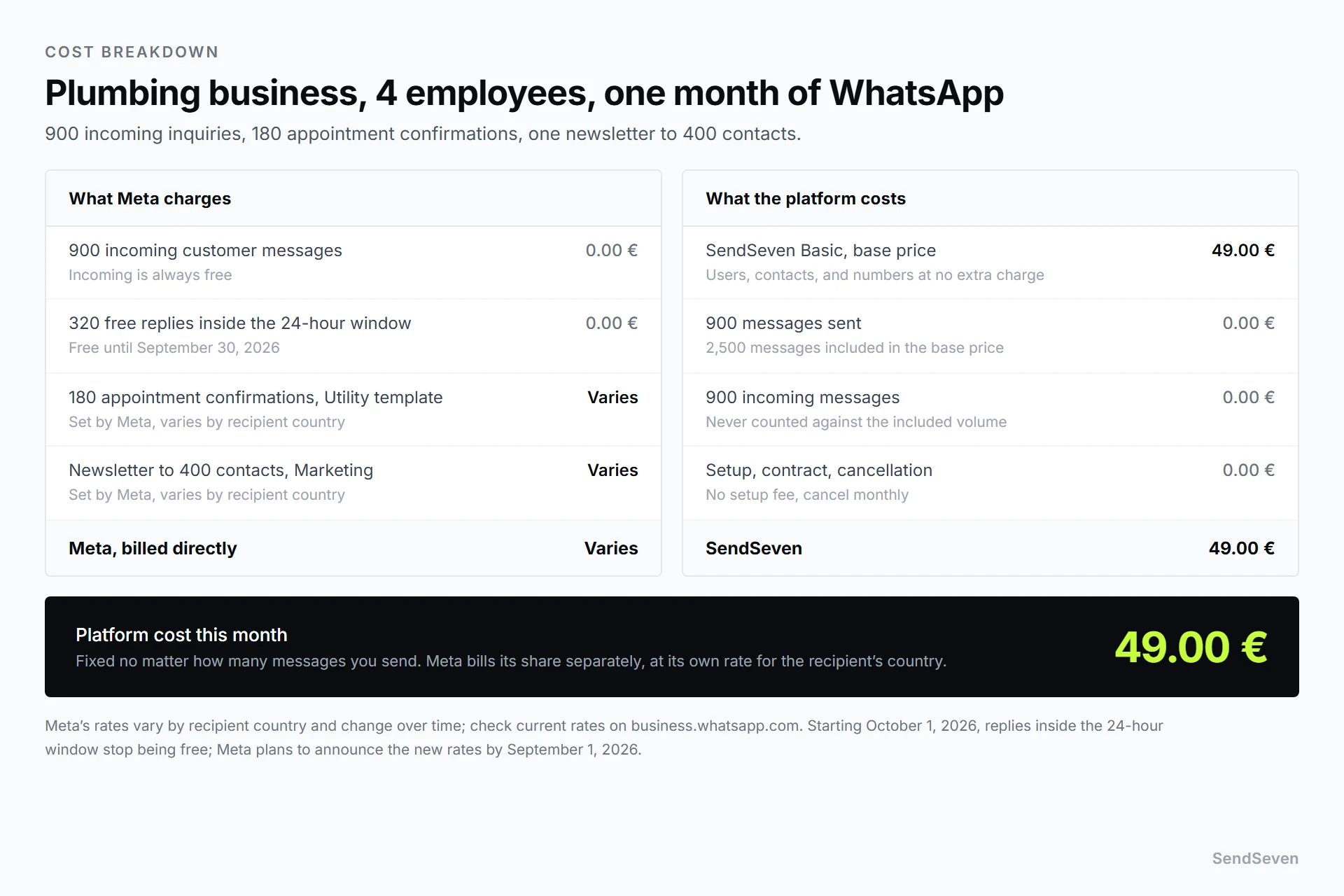
Take a four-person plumbing business sending appointment confirmations plus one newsletter campaign a month. Meta bills those sends directly, at whatever rate applies to the recipient’s country. The SendSeven side never moves: 49 € for Basic, plus 0.02 € for each message past the 2,500 included.
For the full breakdown, see WhatsApp Business API Pricing, and for when the free app gets more expensive than a paid platform, see free versus paid.
Setting Up a WhatsApp Business Account: The Steps
Option A: WhatsApp Business App
- Install the WhatsApp Business App from the App Store or Google Play.
- Enter a phone number and confirm it by SMS or call, using one not already registered in the personal app, or delete that account first.
- Enter your business name; it’s only editable to a limited extent afterward, so get it right the first time.
- Fill out the business profile: category, description, address, hours, website, logo.
- Set up a greeting message, an away message, and three to five quick replies, the app’s biggest time-saver.
So customers can message you inside the app, you’ll need a click-to-chat link. Generate one free, QR code included, with our WhatsApp Link Generator, for a storefront, invoice, or business card.
Option B: WhatsApp Business Platform through a messaging platform
- Create an account and start the channel. At SendSeven, pick WhatsApp in settings and follow the walkthrough for signing in with Meta.
- Sign in with Meta. Use the Facebook account with access to your business portfolio, created for you during sign-up if you don’t have one yet.
- Pick your route. Keep your existing number on the phone for Coexistence, confirmed with a consent screen, or use a new number, or migrate your existing one, for the full platform route.
- Review the business profile. Display name, description, address, website; it has to match your actual business, or Meta rejects it.
- Create templates. Anything sent outside the 24-hour window goes through a message template that Meta reviews first, so build templates before a campaign is planned, not after.
- Add a payment method with Meta. Without one, you can’t send templates in the marketing, utility, or authentication categories. You can still receive messages and reply inside the 24-hour window, but Meta only delivers the first 1,000 service messages per month and stops delivering from the 1,001st. It doesn’t affect your sending limit. Set it up before your first campaign.
- Invite the team and test it. Invite colleagues, set assignment rules, then message the number from a personal phone and walk the flow through yourself.
The Meta side of the platform route, sign-up, number review, and the display name, is covered step by step in our guide to connecting the WhatsApp Business API.
Realistic timing: the app, profile included, takes half an hour; the platform route usually takes an afternoon, mostly on templates and Meta access, not the technical setup.
Business Verification and the Verified Badge
Two terms that constantly get lumped together, even though they have nothing to do with each other.
Meta business verification is a review of your business by Meta, usually with a business registration document or comparable proof. It isn’t a gate: it stopped being required to operate the WhatsApp Business Platform back in late 2023. It’s a lever for your sending limit instead. How many new recipients you can message in 24 hours depends on verification and on your quality rating, not on the payment method. Since October 7, 2025, the limit applies per business portfolio, not per phone number. Tiers run from 250 unique recipients in 24 hours, up through 2,000 once verified, and 10,000, to 100,000, and finally unlimited. A payment method is required to send paid templates at all, but it isn’t a factor for the tier.
The verified business badge is something else entirely: a verified Meta account, what Meta calls an Official Business Account, granted at its own discretion, almost exclusively to well-known brands. It isn’t a quality seal, isn’t required to operate, and isn’t something a small business should hold out for. A clear name, a logo, and a well-maintained profile do more for a chat than a badge you likely won’t get anyway.
What Your Customers See in the Chat
Once your number is running as a business account, the chat changes in three places on the customer’s side: the label under the company name reads Business account, on first contact WhatsApp notes that a service from Meta manages the chat, and templates can carry a button instead of squeezing a phone number into the message text.
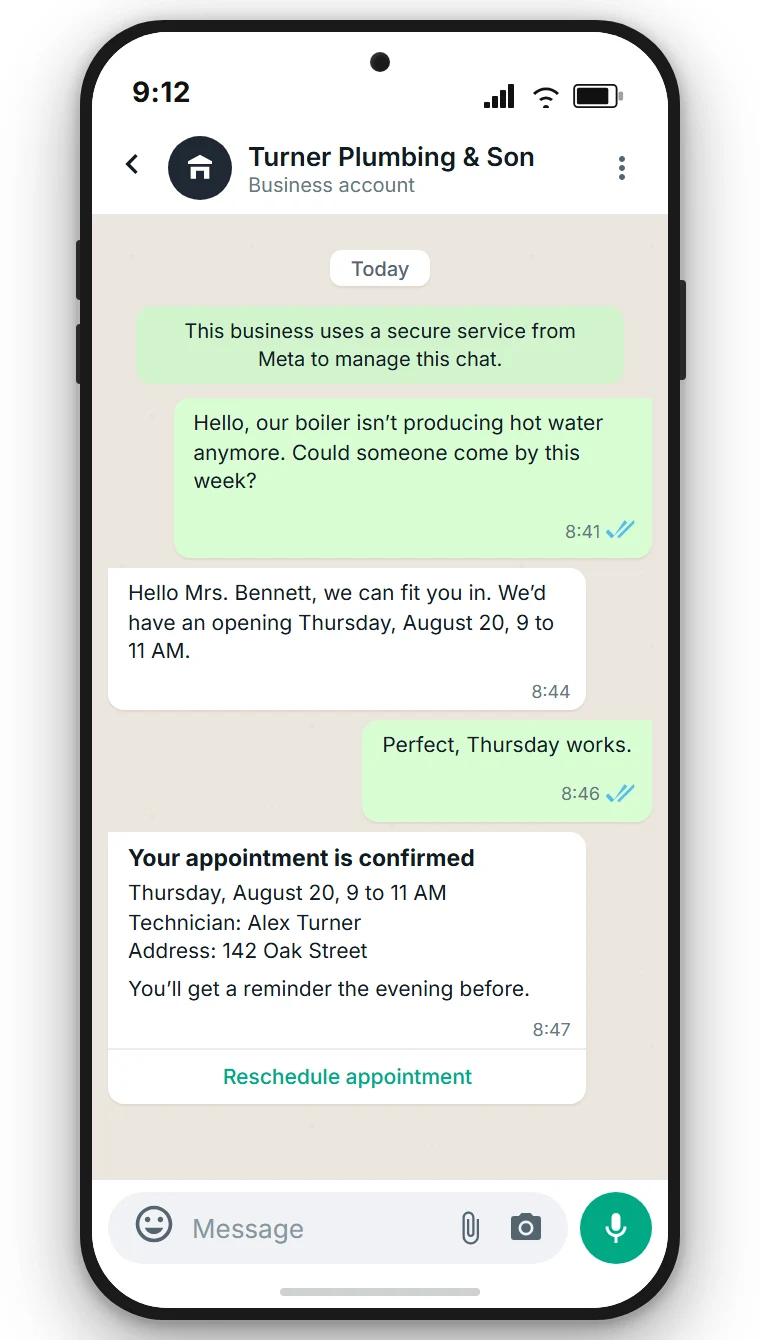
To the customer, it’s still the chat they already know. That’s the whole point: you don’t have to talk anyone into a new piece of software. More on this on our WhatsApp channel page.
Five Setup Mistakes
- Using the owner’s personal number. It can’t be cleanly separated once an employee leaves, and the phone becomes a bottleneck. Use a dedicated business number, even if you have to request one.
- The number is still active in the personal WhatsApp app. A number can’t run as personal and business at once, so moving it over means deleting that personal account first. Coexistence sidesteps this, since the number stays in the Business App.
- Leaving the profile blank. Without an address, hours, and a website, customers ask exactly what the profile could have told them, and each question is an answer someone has to type out by hand.
- Only creating templates once the campaign is ready. Templates need Meta’s review first, and submitting one on Thursday for a Friday promotion is a planning problem, not a technical one.
- Only one person has Meta access. If that person is on vacation, no template gets approved and no number gets added, so set up a second administrator from day one.
When the App Is Enough, and When It Isn’t
The free app isn’t a stopgap. For plenty of small businesses it’s exactly the right fit: one person answers questions, it’s a handful of chats a day, and nobody is messaging customers proactively.
You hit the ceiling once any of these apply:
- More than one employee needs to reply at once without stepping on each other.
- You want to see who picked up a request and how long it’s been open.
- You need a customer’s full history, not just the last chat.
- You want to message customers proactively, say with a newsletter or an appointment reminder.
- You run multiple locations or numbers, for example a chain of stores in retail.
- WhatsApp is only one of your channels, and email, Instagram, and live chat live somewhere else entirely.
That last point is the real difference. On the platform, WhatsApp, SMS, Email, Instagram, Messenger, Live Chat, Telegram, and Browser Push all land in one inbox, with one history per contact. What the app can’t do for a team is covered in WhatsApp Business with multiple users, and where WhatsApp Web hits its ceiling in WhatsApp Business Web and desktop.
What a multi-channel inbox looks like day to day, every channel in one view with AI suggestions built in, is shown on the page dedicated to it.
Frequently Asked Questions (FAQ)
What’s the difference between the WhatsApp Business App and a WhatsApp Business Account?
The WhatsApp Business App is an app for one phone. A WhatsApp Business Account is the umbrella term for running your number as a business, in one of three ways: the app alone, the app and platform together through Coexistence, or the WhatsApp Business Platform alone.
Does a WhatsApp Business Account cost money?
The app is free, and incoming messages are free on every route. Costs start on the WhatsApp Business Platform: Meta charges per message sent, and the messaging platform charges for its software. At SendSeven that starts at 49 € a month with 2,500 messages included.
Can I keep using my existing phone number?
Yes. With Coexistence, the number stays in the WhatsApp Business App on the phone while also running on the platform. Alternatively, you move the number over completely, and the app drops out of the picture.
Do I need a Facebook Page for WhatsApp?
No. For WhatsApp you need access to Meta Business Suite and a WhatsApp Business Account. A Facebook Page is required for Messenger, not for WhatsApp.
Do I need the verified business badge?
No. The verified business badge is a verified Meta account awarded at Meta’s own discretion, almost exclusively to well-known brands. It isn’t required to operate and doesn’t affect your sending limits; business verification is separate, and does raise those limits.
How many employees can work off one phone number?
In the app, everyone sees the same chat with no assignment, on one primary device plus up to four linked devices. On the platform, users are unlimited on every plan, with assignment, roles, and internal notes.
Can I go back if it doesn’t work out?
With Coexistence, you disconnect it yourself in the app under Settings, Account, Business platform, without needing Meta’s approval. With a fully migrated number, you remove it from Meta; a waiting period applies, and the conversations don’t come back to the phone.
Conclusion
A WhatsApp Business Account isn’t a decision you make once and regret later. Start with what fits your size: one person, a few inquiries, no campaigns, and the free app is enough. Once a second employee needs to reply, or you want to reach customers proactively, Coexistence is the lowest-risk route, because the phone number stays exactly where it is and you can always go back.
Either way, plan for two bills, not one. And don’t count the incoming messages against yourself: they’re free, and they’re the entire reason customers write to you in the first place.