From the WhatsApp Business App to the API: Migrate the Easy Way with Coexistence (2026)
SendSeven Team, Editorial Team
You don't have to give up the WhatsApp Business App to get a team inbox and API features. Coexistence lets you migrate in 10 to 15 minutes and keep the app running in parallel. Step-by-step, with the mistakes to avoid.
Key takeaways
Moving from the WhatsApp Business App to the Business API no longer means picking one or the other. With Coexistence, you keep the app and run the API in parallel, on the same phone number. The owner keeps typing from the app, the team works from one shared inbox, and AI can cover messages outside business hours (Professional plan and up).
Setup time: 10 to 15 minutes, active. History import: up to 6 months. Reversible: anytime, from the app. Cost: no Coexistence surcharge on any SendSeven plan; Meta doesn't bill messages typed in the app, while messages sent through the platform follow Meta's per-message rates.
Why switch from the app to the API at all?
Because the app stops scaling once several people need to answer or the volume keeps growing. The WhatsApp Business App is enough for many SMBs starting out: free, quick to set up, running on one smartphone. Then the business grows, and so do the cracks. Three classic signals that the app has hit its limit:
- More than 50 inquiries a day, and the phone can't keep up
- A team of three or more needs to reply, but there's no shared inbox to work from, only 5 devices total (1 phone plus up to 4 linked)
- Marketing messages are capped at 256 recipients per broadcast list, and there's no way to automate replies
For years, the only way past those limits was to give up the app entirely and move to the WhatsApp Business API. Coexistence ended that either-or. Meta launched it in February 2025, and businesses in the EU, EEA and UK have had it since October 2025: the app and the API now run on the same number at the same time.
How is Coexistence different from a full migration?
A full migration logs the app out and moves the number to the API. Coexistence keeps the app running and adds the API on the same number.
| What happens to… | Old-style Full Migration | Coexistence |
|---|---|---|
| Business App on the phone | Logged out, no longer usable | Stays usable, runs alongside the API |
| Phone number | Migrates fully to the API (removed from the app) | Stays active in the app and the API at once |
| Chat history | Not carried over automatically | Up to 6 months of 1:1 chats synced, if you opt in |
| Contacts | Manual CSV export and import | Contacts with a WhatsApp number synced automatically |
| Owner's way of working | Has to learn a new platform | Keeps using the familiar app |
| Throughput (messages/sec) | 80 by default, up to 1,000 at high volume | Fixed at 20 |
| Reversible | More involved: remove the number from the API in Meta Business Manager, then wait out Meta's waiting period | Anytime, from the app settings |
For most SMBs, Coexistence is the better path. The lower throughput only matters for very large campaigns that have to go out in a short window.
What should you sort out before you start?
A few technical basics, some team decisions and a clear view of the costs. None of it takes long.
Technical prerequisites
- WhatsApp Business App installed on the phone, version 2.24.17 or later (the latest version is safest)
- A phone with a working camera, for scanning the QR code during setup
- A Meta Business Portfolio with your business details at hand (legal business name, address, website, phone number); you can create one during signup
- A genuine WhatsApp Business number, not a personal WhatsApp account
Organizational prep
- Who does what? Define clear roles between the owner (replying from the app), the team (replying from the platform inbox) and AI (covering messages outside business hours, on Professional and up) before you switch anyone on.
- Opt-in strategy: marketing campaigns sent through the API need documented opt-in consent, which Meta's policy requires and GDPR (or your local law) expects. App contacts aren't automatically opted in for marketing just because they've messaged you before.
- Plan your templates: marketing messages sent via the API need Meta-approved templates. Approval is usually a matter of minutes, though it can take a few hours for a new business or an unusual template.
- Back up if it matters to you: app chat history isn't deleted by activating Coexistence, but if you want a separate backup of the current state, take it before you start, just in case.
Understand the pricing consequences
Coexistence has no separate fee: it's included on every SendSeven plan, starting with Basic at €49/month. According to Meta's Coexistence documentation, messages you type and send from the Business App itself aren't billed by Meta. Messages sent through the API side follow Meta's per-message rates.
One change to plan for: since October 1, 2026, Meta also charges for service messages inside the 24-hour window, per message, at each market's Utility/Authentication rate. The first 1,000 service messages per phone number per month stay free. In Germany, used here as an EU example, that rate is €0.0456 per message, and a marketing template costs €0.1131. Incoming messages are always free. See the full breakdown in Meta's 2026 pricing changes, and the current plan tiers on the pricing page.
How does the migration work, step by step?
In five steps, and SendSeven guides you through each one. The migration runs through Meta's official Embedded Signup process,. Active setup time: 10 to 15 minutes.
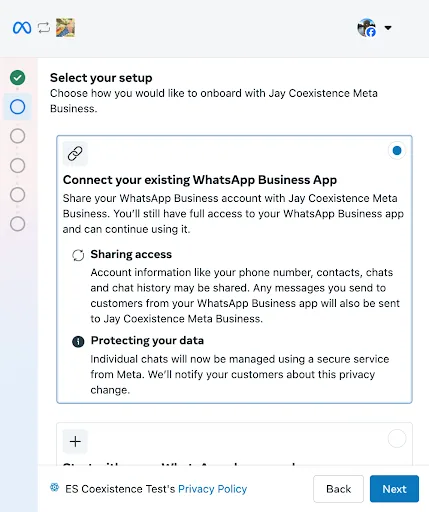
Step 1: Pick Coexistence, not Full Migration
Start SendSeven's onboarding by connecting your WhatsApp channel. On the first Meta screen, choose the option confirming the number is already in use in the WhatsApp Business App. If you pick Full Migration instead, the app gets logged out immediately, so take care at this step.
Step 2: Enter your number
Type in the phone number your Business App runs on. The signup window then shows a verification code and a QR code, and a message from Meta's official business account arrives in the app.
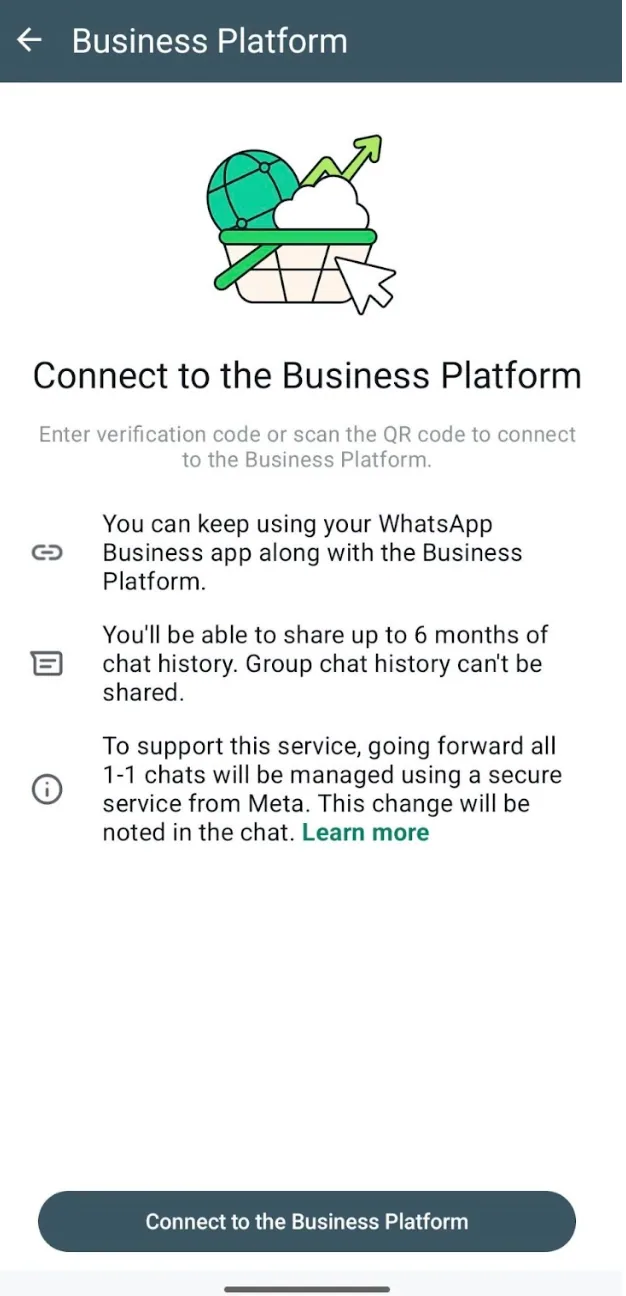
Step 3: Connect from the app
Open that message in the Business App, tap Connect, then Connect to the Business Platform, and enter the code or scan the QR code from the signup window. This step is what technically links the app and the API together.
Step 4: Decide on history sync
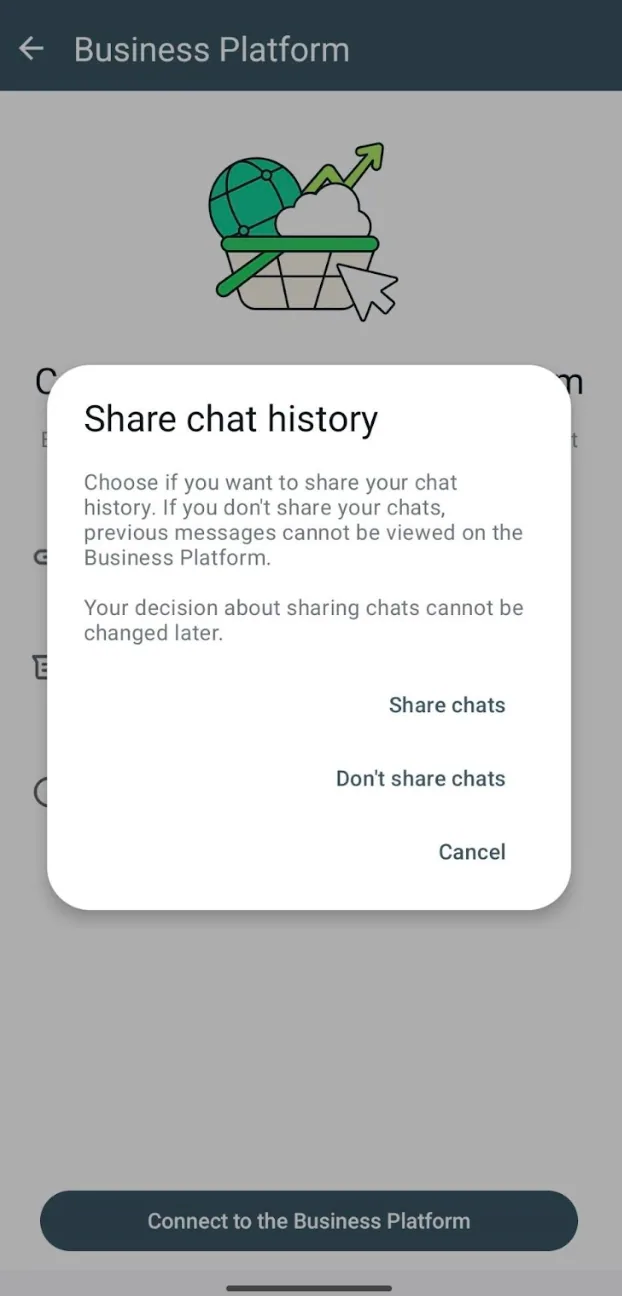
Meta explicitly asks whether to bring up to the last 6 months of 1:1 chat history and contacts into the API platform. We recommend yes: otherwise the team starts from an empty inbox with no context on existing conversations. This choice can't be changed after the fact.
Step 5: Confirm and wait for sync
Meta shows a final account overview and the connection goes live. History sync then runs in the background, usually within a few hours, up to a day for larger volumes. New messages appear in both the app and the platform inbox immediately.
What changes after activation?
Little changes for the person on the phone, and a lot for the team: the shared inbox fills up, and a handful of app features switch off.
Right after setup
The SendSeven inbox fills in gradually with the imported history. New customer messages arrive in parallel in the app and in the inbox, and either side can reply; a reply typed in the app echoes into the platform, and vice versa.
What changes in the Business App
A handful of app features are switched off at activation, so the parallel setup works cleanly: disappearing messages, view-once media, live location sharing, and the app's native broadcast lists (existing ones become read-only, and you can't create new ones). Group chats keep working in the app but aren't synced to the platform. WhatsApp for Windows and Wear OS aren't supported, and linked devices are unlinked during setup, so you re-link them afterwards. Editing and unsending messages keeps working. None of these limits matter much for most SMBs, and broadcast lists get replaced by proper campaigns through the API anyway.
The 13-day rule
For the Coexistence link to stay active, the Business App needs to be opened at least every 13 days; leave it untouched much past that and the connection can go inactive around the 14-day mark. In practice, if the app is already part of the daily routine, this never comes up. If it's rarely opened because the team now runs mostly through the platform, a recurring calendar reminder solves it.
Which mistakes should you avoid?
These five come up most often, and each one is easy to prevent.
- Picking Full Migration by accident. Coexistence is a distinct, explicit option in the Embedded Signup flow. Click past it and the flow defaults to the old full-migration logic instead, logging the app out.
- Declining history sync. Some people click away the history-sync consent out of caution. The result is an empty inbox, a team with zero context on existing conversations, and everything has to be reconstructed manually from the app.
- Forgetting an opt-in strategy. Marketing campaigns sent via the API need documented opt-in consent. App contacts don't count as opted in automatically. Work out how you'll collect consent before the first campaign goes out.
- Ignoring the 13-day rule. Leave the app unopened for weeks after activation and the Coexistence connection drops, which means re-onboarding from scratch.
- No plan for double replies. Technically, the owner (app) and the team (inbox) can answer the same inquiry at the same time. Without a clear split of responsibilities, that confuses customers fast. SendSeven's assignment and status tags keep handoffs clean between the two sides.
Conclusion: migration isn't a risk anymore
Moving off the WhatsApp Business App used to mean an all-or-nothing decision: give up the tool the owner already knows, or keep hitting the app's limits. Coexistence removes that trade-off. Setup takes 10 to 15 minutes, history comes with you, and the whole thing is reversible from the app's own settings if it doesn't work out. For most SMBs outgrowing the app, that makes Coexistence the lowest-risk way to add a team inbox (and, from the Professional plan, AI coverage) without losing what already works.
Move to Coexistence in 15 minutes.
Keep the app, add the platform. 14 days free, no credit card. From €49/month.
Start your 14-day free trial →FAQ
How long does the whole migration take?
Active click time is 10 to 15 minutes. Full chat history sync then runs in the background, usually within a few hours, up to a day for larger volumes.
Do I need technical know-how to switch?
No. The migration runs through Meta's official Embedded Signup process and is fully UI-guided. A step-by-step walkthrough with screenshots lives in the WhatsApp setup guide.
Can I still choose the old Full Migration later?
Yes. If you notice after a few weeks that nobody's using the app anymore, you can disconnect Coexistence in the app settings and switch to Full Migration through Embedded Signup. That logs the app out.
What happens to my WhatsApp Status updates and catalog?
Both keep working in the Business App exactly as before. Status and catalog don't sync to the API platform; they stay app-only features.
What does the switch cost?
Setup itself is free. Once the connection is live, the regular SendSeven platform fee applies, starting at €49/month on the Basic plan. Coexistence isn't a premium add-on; it's included on every plan, from Basic up. Meta doesn't bill messages typed in the app, while messages sent through the platform follow Meta's per-message rates. See the full pricing overview for details.
Can I turn Coexistence off again?
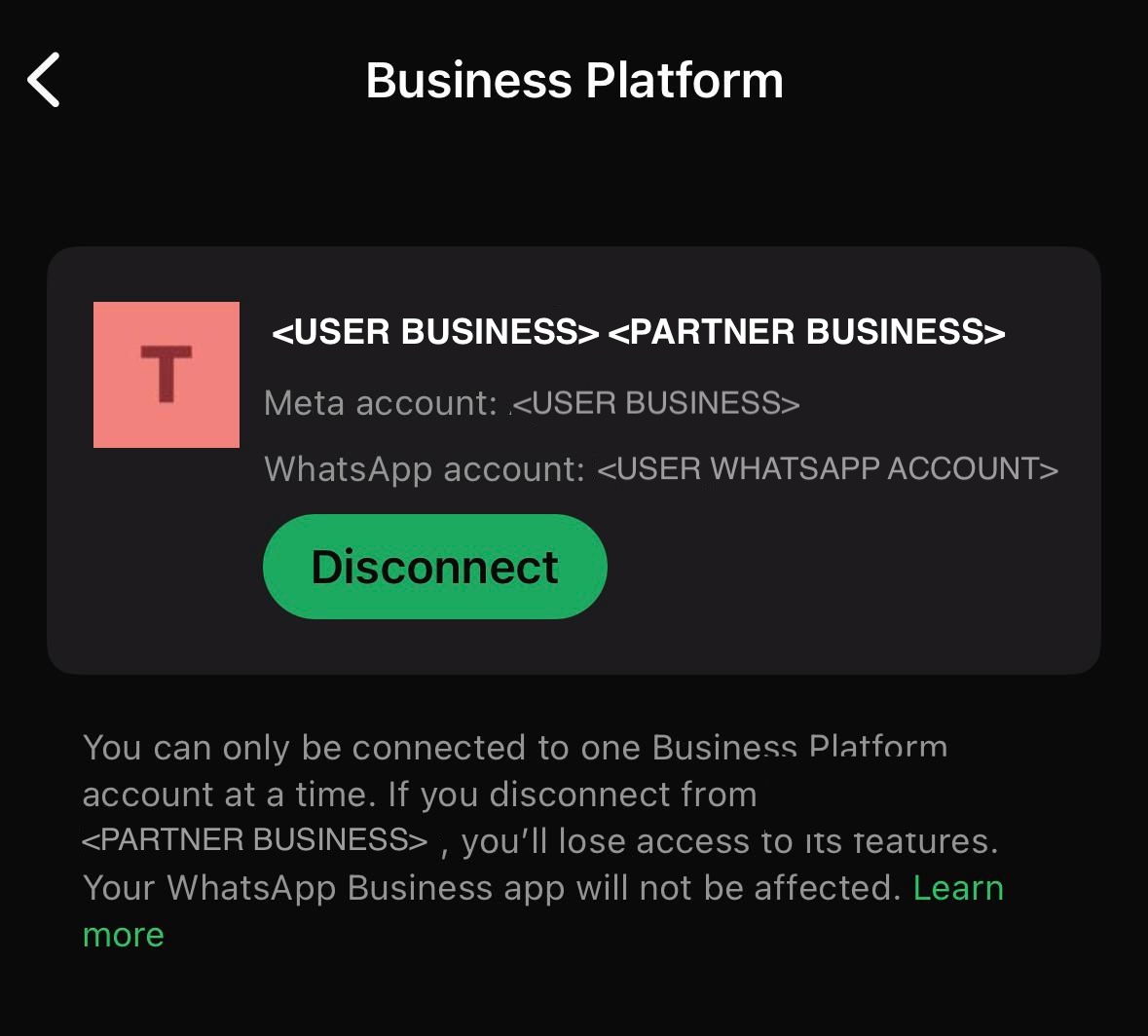
Yes, anytime. In the Business App, go to Settings, then Account, then Business Platform, then Disconnect. The number can then keep running on the app alone, or move fully to the API through Full Migration.