WhatsApp for insurance brokers: keep the app, bring in the team
SendSeven Team, Editorial Team
Clients already send WhatsApp messages, but they all land on the owner's phone. How a brokerage brings the same number into a team inbox with Coexistence, what doesn't work, and what data protection gains.
TL;DR
Clients already message insurance brokers on WhatsApp, but it all lands in the WhatsApp Business app on one phone. With WhatsApp Coexistence, the Business app and the WhatsApp Business API run in parallel on the same number: the owner keeps typing on the phone, the office manager replies from a team inbox, and no client has to change anything.
What comes across: your 1:1 chats from the last up to 180 days. What you gain: assignment, internal notes, templates, campaigns with opt-in, export as PDF or ZIP and a data processing agreement on request. What stays as it is: groups run in the app only, and the phone must be opened at least every 13 days. What it costs: Coexistence is included in every SendSeven plan, from €49/month, plus Meta's own fees on outbound messages (details).
Why insurance brokers are already on WhatsApp
Whether insurance brokers should use WhatsApp is no longer an open question in most offices. Clients simply message. A photo of a dented bumper, a question about where the renewal notice has gone, a quick "Does Thursday work?". Most of it lands in the WhatsApp Business app, on the owner's phone.
Figures for brokers alone are thin, so here is the backdrop. Ofcom's Online Nation 2025 reports that 90% of UK adults online used WhatsApp in May 2025, and 74% used it daily (as reported by ISPreview on 10 December 2025). Brokers matter in that picture: according to BIBA figures reported by Insurance Business on 14 July 2026, general insurance brokers arrange 77% of all UK general insurance. We found no reliable figure for broker use of WhatsApp, so we quote none.
As a messaging provider we still say: the messenger replaces neither the call nor the meeting. In the Wavestone study "Customer Centricity 2026" (July 2026), the UK profile for after-sales support from their insurer shows the phone ahead with 43% of insurance customers, followed by live chat with 27% and WhatsApp or text message with 24%. Wavestone asked about insurers, not brokers, but the order is telling. Messaging earns its place where the phone is weakest: a message sent at 7:30am and answered at 8:15am spares both sides a round of phone tag.
So the channel is already running. What is open is how well it is organised in the office. How a brokerage handles client communication as a whole is covered in our guide to client communication for insurance brokers. Features and examples are on the industry page for insurance brokers.
The real risk: one phone, one person
The risk is rarely WhatsApp. It is the one phone the Business app runs on, and the one person who has it in their pocket. Three scenes that many offices know:
- Holiday. Daniel Ellery is in Portugal for two weeks. On Monday a client writes that her motorhome was damaged on a campsite in the Lake District, and sends photos. Priya, the office manager, could log the claim straight away, but the message sits on the phone in a hotel room. She finds out on Thursday, when the client rings the office landline to ask why nobody has replied.
- Illness. The owner is off for a week and the phone is at home. In the office nobody knows which clients are waiting for a reply and which documents have already arrived.
- A colleague leaves. The colleague who looked after the office mobile for years moves on. The agreements go with the device: who was promised a call back, who still wanted to send a document, which client prefers to write in the evening. If the phone breaks without a recent backup, the history goes too.
Then comes the question every office asks sooner or later: who actually promised the client what? A single phone has no assignment, no internal note and no overview of which requests are still open. WhatsApp Web and the desktop app do not fix that: several people type in the same chat, with no shared inbox and no sign of who is replying.
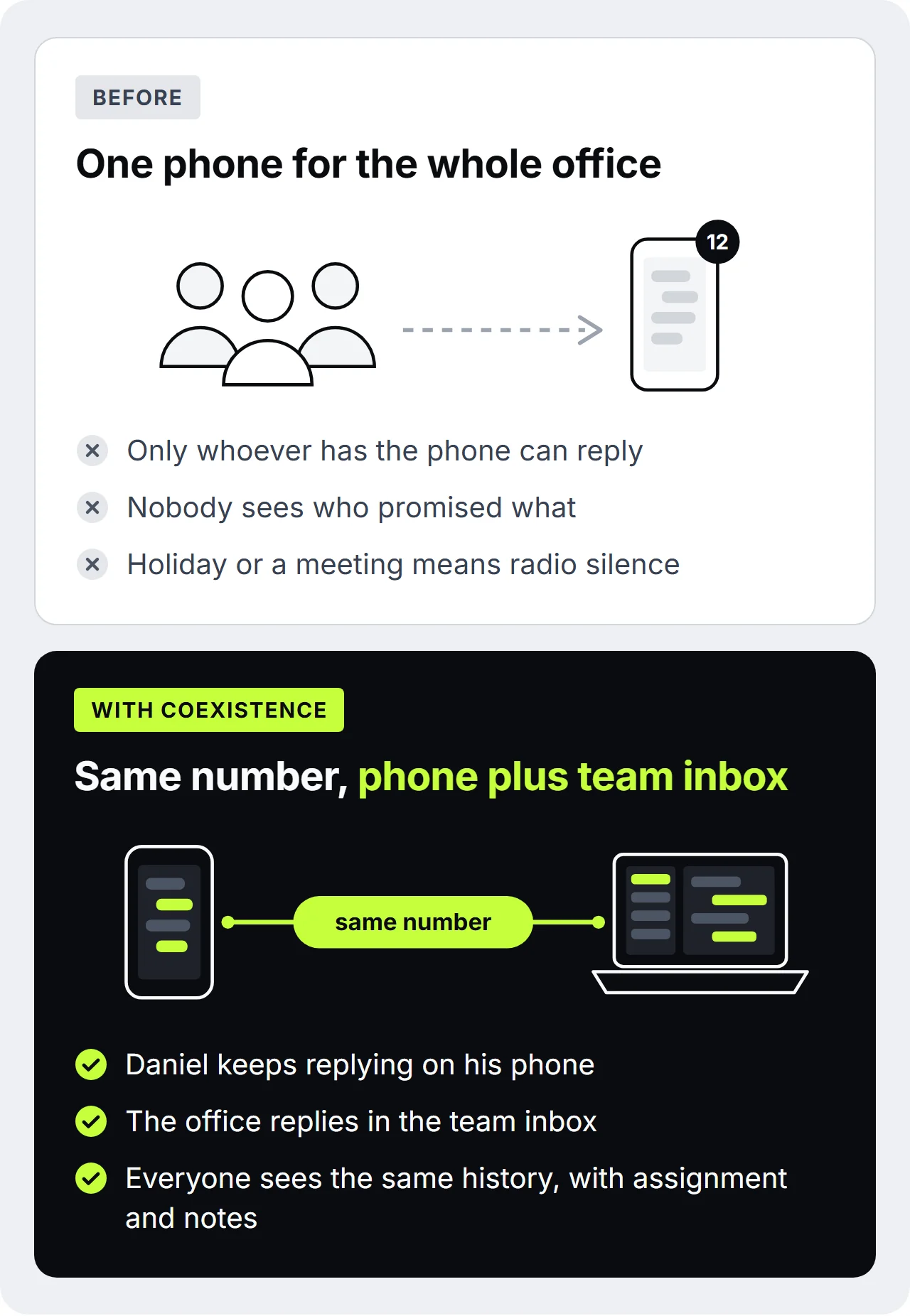
Practical tip: check in the phone's settings which contacts the WhatsApp Business app can see. On a phone used for both private and work, private numbers mix quickly with client data, so sort that out before connecting.
What is WhatsApp Coexistence?
WhatsApp Coexistence means the WhatsApp Business app and the WhatsApp Business API run in parallel on the same number. The phone with the app stays as it is. Through an official Meta process you additionally connect the number to a platform such as SendSeven, and your team works from a shared team inbox. One number, two ways in. Meta has supported Coexistence in the EEA, EU and UK since 23 October 2025. The other variant, where the number moves completely to the API and the app is signed out, is called Full API.
- Requirements: the WhatsApp Business app, version 2.24.17 or later, and a Meta business portfolio for your office.
- Consent: when connecting you consent as a business, by ticking a box. Your clients do not have to confirm anything.
- History: your 1:1 chats from the last up to 180 days come across to the team inbox, and media such as photos from the last up to 14 days. You decide once, when connecting, whether the history comes across. It cannot be changed later.
- Contacts: your WhatsApp contacts come across with name and number.
- Mirroring: the phone is fully mirrored. Replies typed on the phone also land in the team inbox, and what the office manager writes from the inbox, the owner sees in the app.
- Team size: Coexistence suits any office size, from two people to several hundred staff.
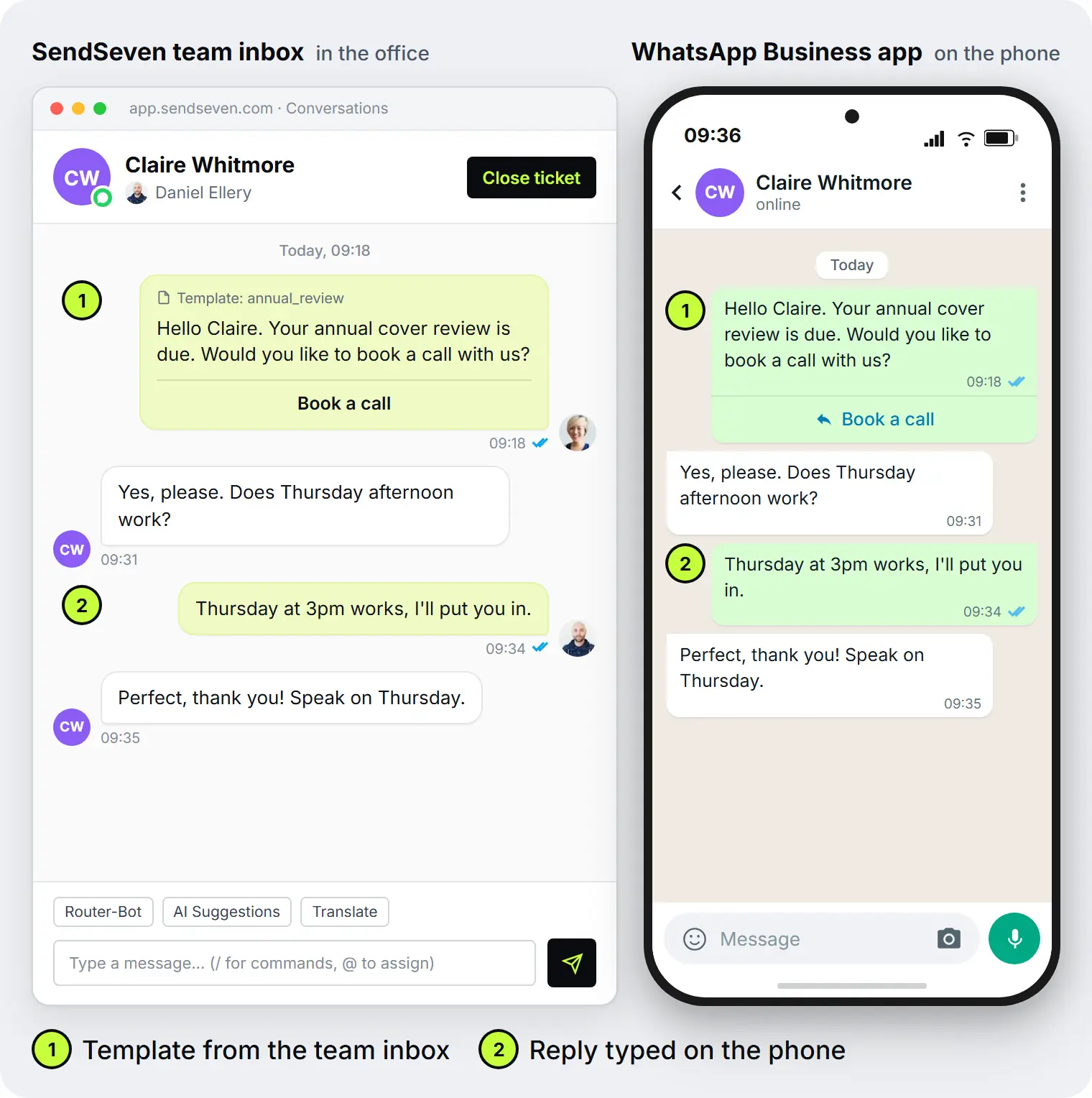
For your clients nothing changes. They write to the same number, see the same sender name and do not have to install a new app or confirm anything. For Claire Whitmore, every reply comes from Ellery Insurance Brokers, whether Daniel Ellery types it on his phone or Priya types it in the team inbox.
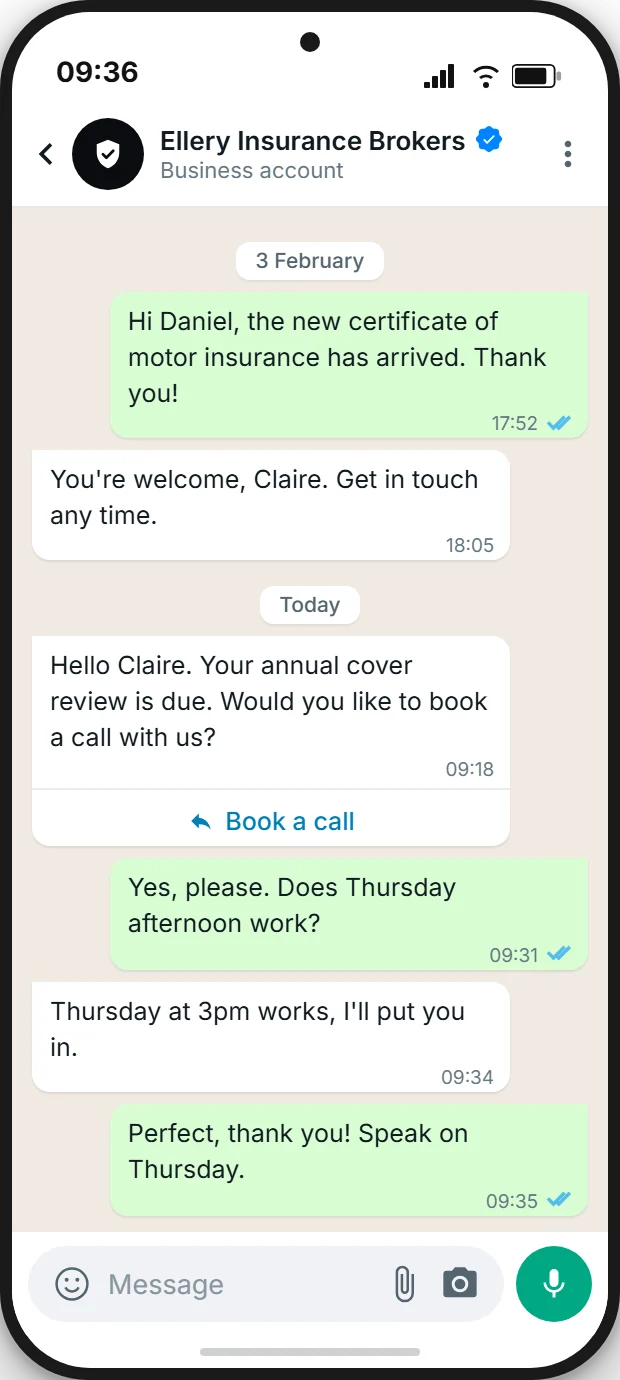
How Coexistence works technically is described in detail in our Coexistence guide. When the app alone is enough and when Full API makes more sense is shown in the comparison of app, API and Coexistence.
What your team can also do
With the number connected, the client phone becomes an office tool. The owner learns nothing new, and the office manager gets access.
Can several staff reply on the same WhatsApp number?
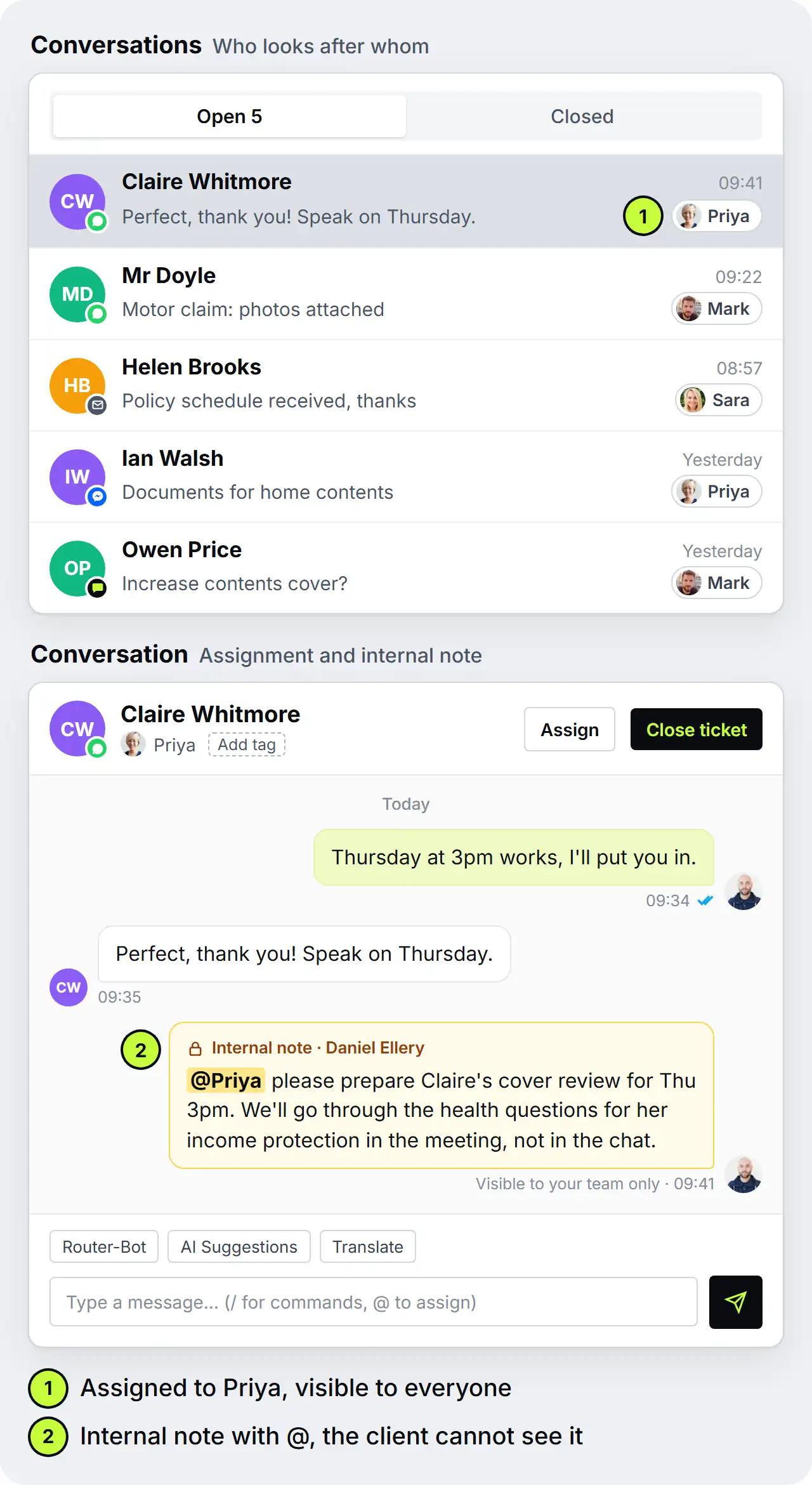
Yes. In the team inbox the owner, the office manager and colleagues work on the same number, each person with their own login. You assign a new message to one person, sort it with tags such as "Claim" or "Renewal" and add an internal note that the client never sees. So everyone in the office knows who is dealing with it and what has been agreed. The owner keeps replying from the phone, and those replies appear in the same history.
On top of that come tools the Business app alone does not have:
- Templates outside the 24-hour window. When a client writes, you can reply freely from SendSeven for 24 hours. After that, SendSeven sends a template approved by Meta, such as the invitation to an annual cover review. Approval of a template usually takes minutes, and up to 24 hours when Meta reviews it manually. The 24-hour window applies only to messages sent from SendSeven. The owner keeps writing freely in the app.
- Buttons instead of follow-up questions. From SendSeven you send interactive messages with buttons such as "Book a call". Your client taps once instead of typing a sentence, and your team sees at once what it is about.
- Campaigns to existing clients, with opt-in only. The invitation to the annual review goes out as a campaign to a segment of your clients. A marketing message like this needs a documented opt-in from each recipient, and a contact stored in the app is not one. In the UK the relevant rules are PECR, which the ICO explains for electronic mail marketing, and UK GDPR. PECR has a "soft opt-in" for existing clients of similar products, with an opt-out in every message, but Meta's WhatsApp Business Messaging Policy asks for opt-in before a business messages someone, so we recommend an explicit WhatsApp opt-in. Since 1 October 2026 Meta also charges for outbound messages (see WhatsApp pricing in 2026). How to collect consents cleanly is shown in our opt-in strategies for WhatsApp.
- Export for the client file. You export each chat as a PDF or ZIP and file it where your client file lives. What that looks like in daily work is shown in our article on WhatsApp chats as advice records.
- More channels in the same inbox. Besides WhatsApp, emails and messages from the live chat on your website arrive in the same inbox. In total SendSeven connects eight channels: WhatsApp, SMS, email, Instagram, Messenger, live chat, Telegram and push.
- An AI agent on the same number, from Professional. From the Professional plan, an AI agent working from your knowledge base answers recurring questions, such as which documents are needed after a claim, even at 9pm. It introduces itself as AI and, if the client wants, hands over to your team by button. Advice stays with your team. Where the line to advice runs is covered in AI for insurance brokers.
What this looks like in the daily routine of an office is on our page WhatsApp Business app in a team.
What doesn't work with Coexistence?
Coexistence has limits, and they belong on the table before you switch. Most concern app features that rarely matter in a brokerage. Two deserve attention: groups stay outside, and the phone has to be in regular use.
| Topic | Works | Doesn't work |
|---|---|---|
| Chats | 1:1 chats run in parallel in the app and the team inbox | Groups are not brought into the team inbox, they stay in the app |
| Broadcast lists | Existing lists stay readable in the app, campaigns with opt-in run through SendSeven | Sending through the app's broadcast lists, they are read-only |
| Editing and deleting | Editing and revoking messages keeps working | "Delete for everyone" is not mirrored to the team inbox |
| App features | Status and catalogue stay usable in the app | Disappearing messages, View once and live location are dropped |
| Devices | Phone plus linked devices such as WhatsApp Web, to be re-linked after connecting | WhatsApp for Windows and for Wear OS stop working |
| Phone | The owner uses the app as usual | Leaving the phone untouched for weeks: the app must be opened at least every 13 days |
| WhatsApp Flows | Static WhatsApp Flows (Beta), for example a form for a call-back request | Dynamic Flows with live data |
| Throughput | 20 messages per second, usually enough for a brokerage's campaigns | Higher throughput, which only Full API offers |
The 13-day rule hits the holiday scene from above. If you go offline for three weeks, either open the app at least once every 13 days or leave the phone in the office, where someone opens it. And if you send a winter cover reminder through a broadcast list today, from now on you plan it as a campaign to clients with opt-in.
Data protection with Coexistence: what the team inbox settles
Is WhatsApp with Coexistence GDPR-compliant?
No tool makes a firm compliant by itself, and Coexistence does not either. For the team inbox, SendSeven is GDPR-compliant: it is hosted in the EU (Frankfurt), and your data is encrypted in transit and at rest. You get a data processing agreement (DPA) on request. WhatsApp itself remains a Meta service: messages run over Meta's infrastructure, in the app as through the API, and Meta also processes WhatsApp data outside the EU and UK, including in the US. For the app on the phone, Meta's own terms apply. Whether that suits your firm is something to settle with your compliance consultant or data protection lead.
Above all, the team inbox brings order. The chats no longer sit on one phone but in a system with clear rules:
- Roles instead of passing the phone around. Everyone on the team has their own login with a role that sets what they can see and do. Nobody has to borrow the boss's phone any more.
- Opt-ins and chat histories documented with date and time. When a client consented and what was discussed in the chat is kept on file, not in the memory of one handset.
- Export as PDF or ZIP. For the client file, or for a client's subject access request.
- The history stays in the firm. If a colleague leaves or a phone breaks, the chats stay in the team inbox.
The legal basis is UK GDPR, with PECR for electronic marketing. What both mean for business messaging is summarised in our glossary entry on GDPR and messaging. This is general information, not legal advice. Check the details with your compliance consultant or data protection lead.
What doesn't belong in the chat
A team inbox turns WhatsApp into an office tool. It still does not make the chat the right place for every detail. Two kinds of data do not belong in it, neither in the app nor in the team inbox:
- Health information. For income protection, private medical, accident or life cover, the application asks about previous illnesses, treatments and medication. Such health data counts as special category data under UK GDPR Article 9, as the ICO explains.
- Full card, account and ID numbers. Meta's WhatsApp Business Messaging Policy prohibits businesses from asking for such numbers over WhatsApp.
The better way is a link. Send a link in the chat to your client portal, if you have one, or to a secure upload that your compliance consultant is comfortable with, and collect the details there. Or keep them for the meeting itself. The chat then only says: "You will find the health questions in the portal, and I will be in touch once everything is in." That is what the internal note in the picture above is for: Daniel keeps the health questions for Claire's income protection for the meeting, so nobody on the team asks over WhatsApp out of habit. If a client sends such details unprompted, reply with the portal link and agree in the office how to handle the message.
Switching in five steps
The switch runs through Meta's official set-up process and needs no technical knowledge. Agree in the office beforehand who answers which chats. Otherwise the owner and the office manager will both reply to the same message in the first week.
- Update the app. The WhatsApp Business app on the phone must be version 2.24.17 or later, ideally the latest.
- Connect WhatsApp in SendSeven. In the Meta window you pick the option for a number that already runs in the WhatsApp Business app. The other option leads to Full API, and the app is then signed out. If your office does not have a business portfolio at Meta yet, you create it here.
- Enter the number. You type in the number of your Business app. Meta shows a code and a QR code, and at the same time a message from Meta's official business account arrives in the app. You do not need a verification code by SMS.
- Confirm in the app. Open that message, tap "Connect" and then "Connect to the Business Platform". Enter the code or scan the QR code.
- Share history and invite the team. Meta asks whether your 1:1 chats from the last up to 180 days should come across to the team inbox. We recommend yes, otherwise your team starts with no history. The sync runs in the background and can take up to 24 hours. Then invite the office manager and colleagues to the team inbox.
All screens of the set-up, with screenshots, are in our step-by-step guide to switching with Coexistence. The key facts about app and API at a glance are in our WhatsApp essentials guide.
All in all, Coexistence turns WhatsApp in a brokerage from the owner's private matter into a tool for the whole office. Clients keep writing to the same number. What is new is that somebody answers during the owner's holiday and that the history stays in the office when a phone or a colleague goes.
FAQ
Can a brokerage keep its WhatsApp number if it uses a team inbox?
Yes. With Coexistence the number stays active in the Business app on the phone and is also connected to the team inbox. Your clients keep writing to the same number and see the same sender name. You need neither a new number nor an announcement to your clients.
Do the old chats survive the switch?
Yes. Connecting changes nothing in the app, so all your chats stay there. Into the team inbox come, if you choose, your 1:1 chats from the last up to 180 days and media from the last up to 14 days. You make that choice once, when connecting. Group chats stay in the app and do not appear in the team inbox.
What does Coexistence cost a brokerage?
Coexistence is included in every SendSeven plan, starting with Basic at €49/month with 2,500 messages included, no per-user fee and monthly cancellation. AI comes with Professional at €79/month, and its replies count as AI Credits. Since 1 October 2026 Meta charges for outbound messages sent from SendSeven, except the first 1,000 service messages per number per month. Incoming messages carry no Meta fee, and Meta bills its fees directly, not on the SendSeven invoice. Every outbound message also counts against the messages included in your plan. Messages typed in the app are not billed by Meta, according to Meta. More in WhatsApp pricing in 2026 and the pricing overview.
Can Coexistence be undone?
Yes, at any time and on your own. In the Business app you disconnect under Settings → Account → Business Platform → Disconnect. The app carries on as normal afterwards, and your number stays your number.
Sources
- Ofcom: Online Nation 2025 (report, PDF), as reported by ISPreview on 10 December 2025
- Wavestone: Customer Centricity 2026 (July 2026), UK profile, fieldwork 20 to 23 January 2026, YouGov panel
- BIBA figures, reported by Insurance Business on 14 July 2026
- Meta: Onboarding WhatsApp Business app users, developer documentation on Coexistence
- Meta: WhatsApp Business Platform changelog, Coexistence support in the EEA, EU and UK
- Meta: WhatsApp Business Messaging Policy
- ICO: What is special category data?
- ICO: Electronic mail marketing (PECR guide)
Further reading
- Customer communication for insurance brokers: the 2026 guide
- AI for insurance brokers: faster replies, advice stays with you
- WhatsApp records for insurance brokers: chats and consent on file
- WhatsApp Coexistence: using the Business app and the API in parallel
- WhatsApp Business app, API or Coexistence: which route fits?
- WhatsApp Business Web and desktop: where the limits are
- WhatsApp team inbox: managing conversations with multiple agents
- Client communication for insurance brokers and intermediaries