AI for insurance brokers: faster replies, advice stays with you
SendSeven Team, Editorial Team
AI can answer the 9pm question about moving house, summarise a policy schedule and translate a client's Polish. What it should not do is advise. A practical guide for small UK brokerages.
Key takeaways
AI for insurance brokers pays off where clients wait today: the first reply in the evening, sorting documents and messages in another language. An AI agent answers from your own knowledge base, says it is AI and hands over to your team when the question is about a recommendation, cover or health. You set that line in the instructions. AI replaces the waiting, not the broker.
What the AI takes on: first reply, summarising documents, reply suggestions, translation. What stays with the broker: advice, product recommendations, cover questions, health information. What it costs: SendSeven's AI agent is included from the Professional plan, €79/month. Its replies count as AI credits and come out of the plan's included volume.
What do insurance brokers use AI for in 2026?
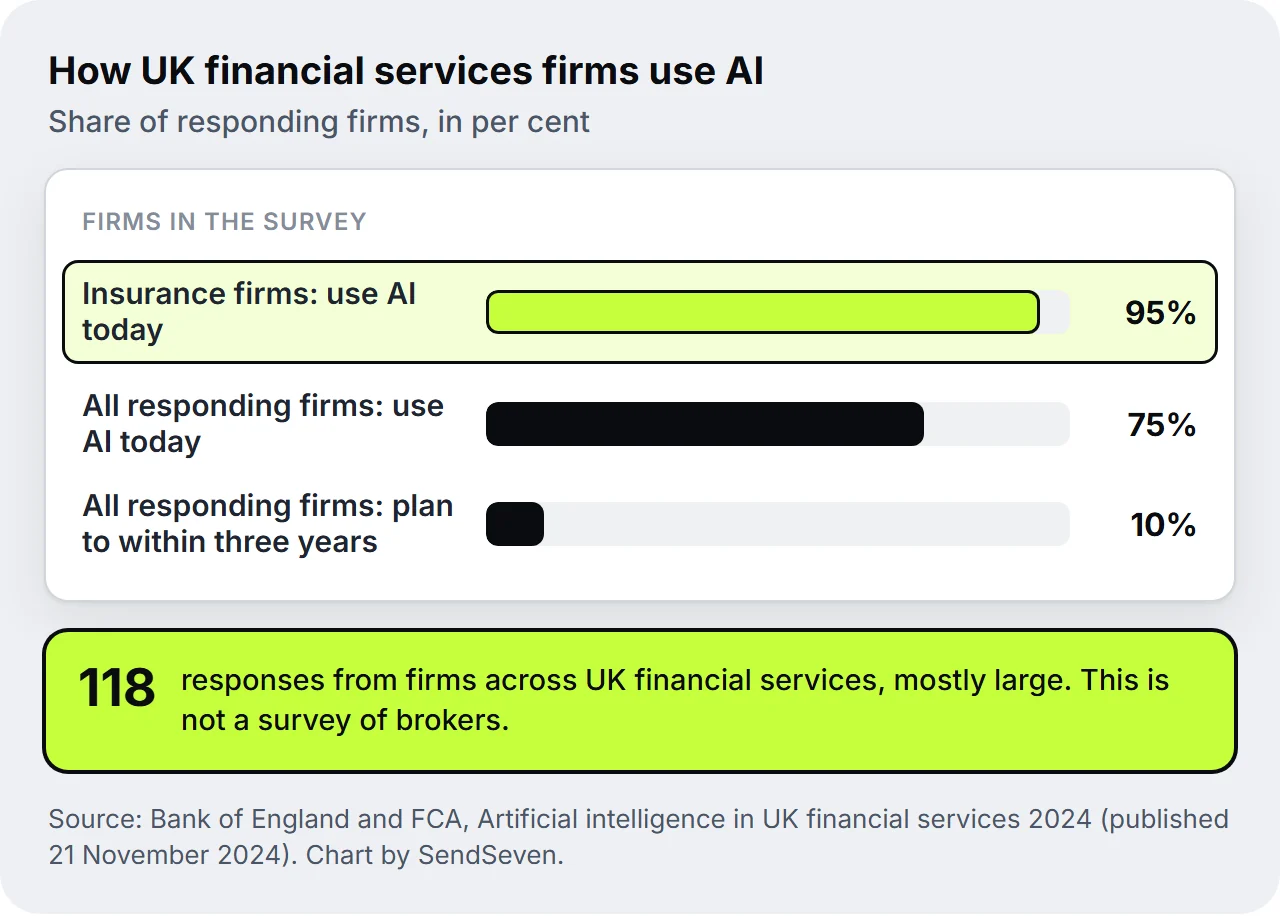
We found no neutral survey of UK brokers alone, so the best picture comes from the regulators: AI is already normal across UK financial services, and insurance leads. In the Bank of England and FCA survey Artificial intelligence in UK financial services 2024, published on 21 November 2024, 75% of the 118 responding firms already used AI and a further 10% planned to within three years. Insurance had the highest share of any sector, at 95%.
Read those numbers with care. The respondents are UK financial services firms, mostly large ones, not brokerages. They show where the industry is heading, not what a six-person broker does on a Tuesday.
The regulator's stance is just as practical. On its AI approach page, last updated on 2 October 2026, the FCA says: "We do not plan to introduce extra regulations for AI." It relies instead on existing frameworks, including the Consumer Duty and the Senior Managers and Certification Regime (SM&CR). For a brokerage that means there is no separate AI rulebook to learn. In practice, what an AI sends in your firm's name is your firm's communication, and the rules you already follow apply to it.
This is where the gap sits. A general AI chat in the browser can help your team draft a letter, but it never reaches the client. The client is still waiting for the reply in the evening, for the list of documents, for the callback. An AI agent in the team inbox starts at exactly that point. It answers recurring questions at once and prepares everything else so that your team only has to decide the next morning.
What do insurance clients expect from AI in service?
Insurance clients want to know whether an AI is writing, and they want to reach a person at any time. In the Customer Centricity 2026 study by Wavestone, 92% of the insurance customers surveyed want to know whether they are talking to an AI or a person. In every one of the six countries studied, more than 89% agree that they should be able to switch quickly to a human.
The UK profile in the same study is stricter still: 96% want AI transparency and 93% want human escalation. Wavestone also finds that the preference for human interaction is the main barrier to AI channels, ranging from 52% in Switzerland to 67% in the UK. Put plainly, the UK clients in the study want a person within reach, whatever the AI can do.
For a brokerage that sets the brief. The AI may be fast, but it has to say it is AI, keep the way to a person open and handle data carefully. How you shorten your office's overall first response time is described in our 2026 guide to communication for insurance brokers.
Which tasks can AI take on in a brokerage?
Four tasks suit a brokerage best: the first reply to recurring questions, receiving and summarising documents, reply suggestions for your team and translation in the chat. In all four the AI saves time without making a decision for the client.
1. The first reply from your knowledge base
An AI agent answers mainly from your knowledge base: your website, uploaded documents, your own FAQ entries and, if you wish, closed tickets. You switch on a web search only if you want one. If a client asks which documents they need for a house move, what your office hours are or how to report a claim, the answer is there in seconds, at 9pm too.
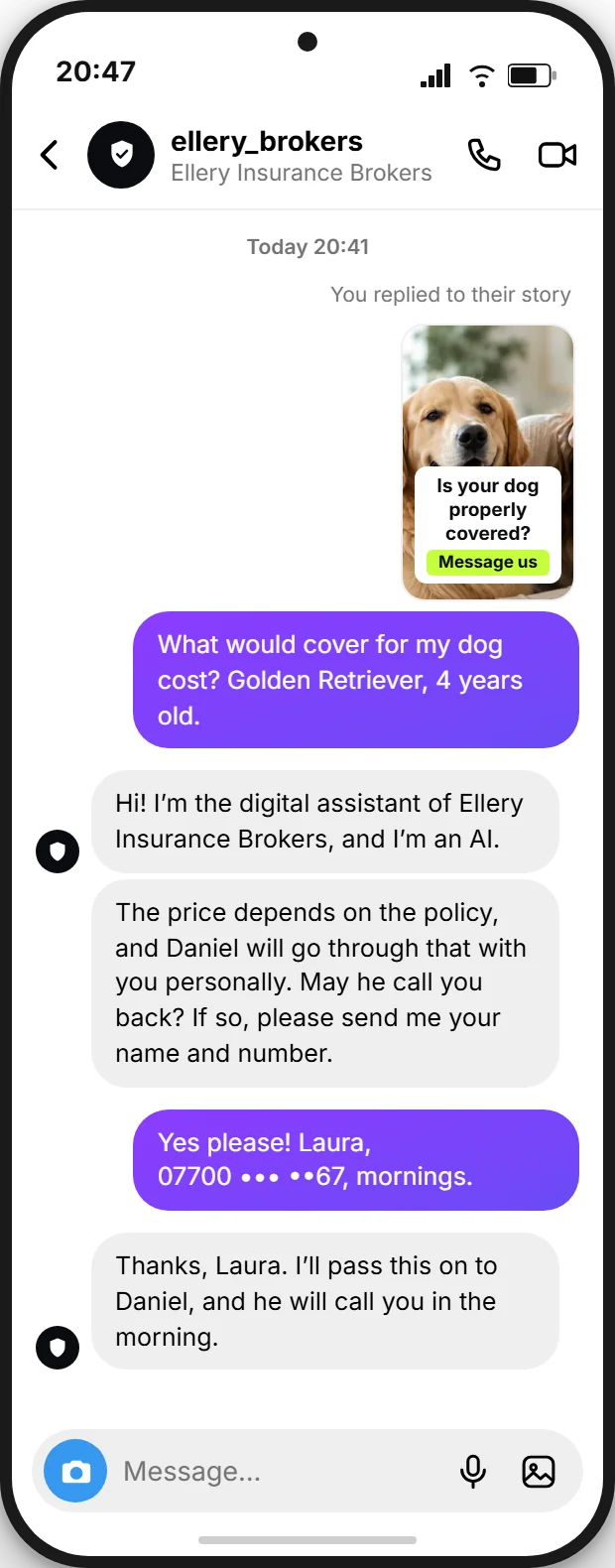
Here is an example from a pet insurance campaign. A client replies to an Instagram story and asks what cover for her dog costs. The reply lands in the inbox as a direct message. The AI assistant introduces itself as AI, names no price because that depends on the animal and the policy, and asks for a name and a callback number. The callback is the broker's job.
2. Receiving and summarising documents
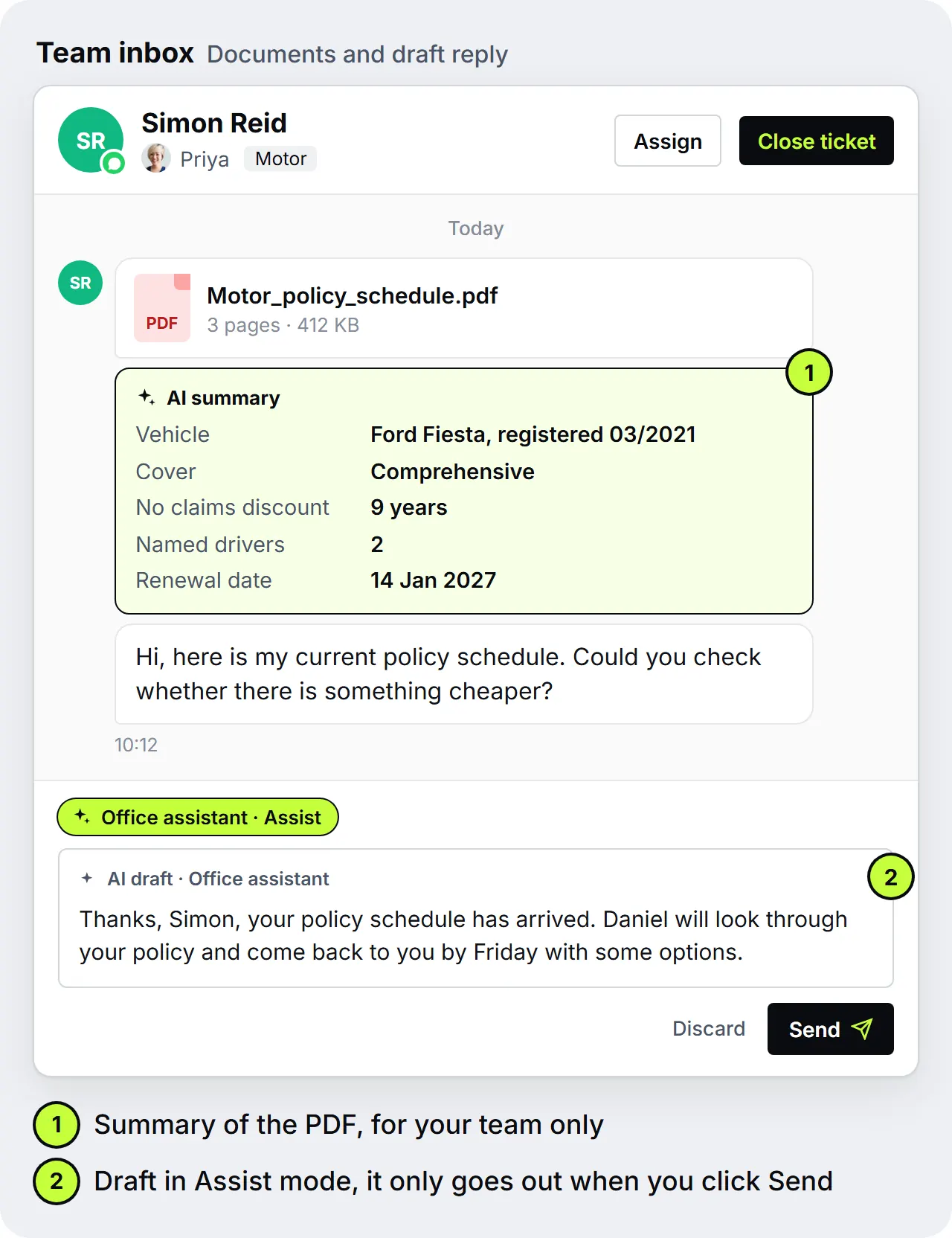
Clients send photos, scans and PDFs, often without a word of explanation. For images and PDFs your team can have a summary created, and for longer documents the AI reads the first 10 pages. Say a client sends his current policy schedule ahead of renewal. Instead of opening the PDF, your office manager sees vehicle, cover type, no claims discount, named drivers and renewal date at a glance. The summary appears in the inbox for your team, not for the client.
3. Reply suggestions for your team
In Assist mode the AI agent writes drafts but sends nothing. In conversations where your team is not active at the moment, it creates the draft by itself, otherwise on a click. Only when someone on your team clicks Send does the reply go out. This is the safe way in: your team sees every suggestion, corrects it where needed and learns how well the knowledge base already carries. Besides Off and Assist there is Auto mode, in which the agent replies by itself.
4. Translation in the chat
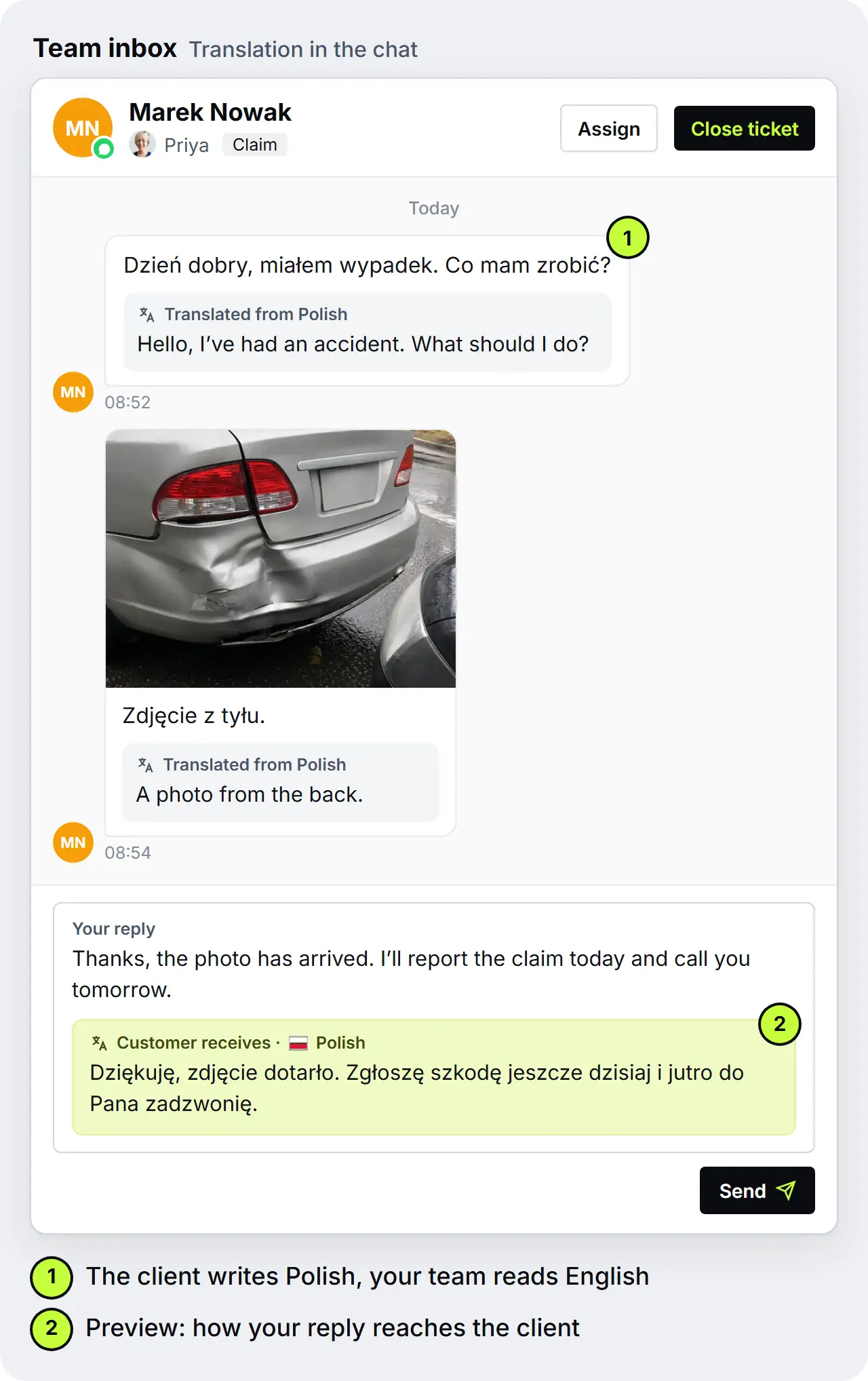
If a client writes in Polish, one click on Translate shows the English translation under the message. Your team replies in English, and a preview shows what reaches the client. Polish is no accident: after English it is the most common main language in England and Wales, according to the 2021 Census by the Office for National Statistics. Translation into more than 100 languages is available from the Professional plan, at no extra charge. For claims and questions about a policy it helps to avoid misunderstandings.
Should an AI chatbot advise insurance clients?
No, an AI chatbot should not advise insurance clients. Advice and recommendations are the core of a broker's work and stay with a person in the firm. An AI chatbot in a brokerage informs and sorts, but it recommends no product and judges no cover. "Advice" has a regulatory meaning in the UK, which is one more reason not to hand it to a bot.
The line is easier to hold when you can see it. An AI may say which documents a client needs for a house move, when the office is open and how a claim is reported. It should not say which policy suits a client, whether a particular loss is covered or whether a client should cancel. Those questions go to a person. A person answers for the reply, and an AI does not. The FCA plans no extra rules for AI, as the quote above shows, and Wavestone's UK respondents want a human within reach when it matters.
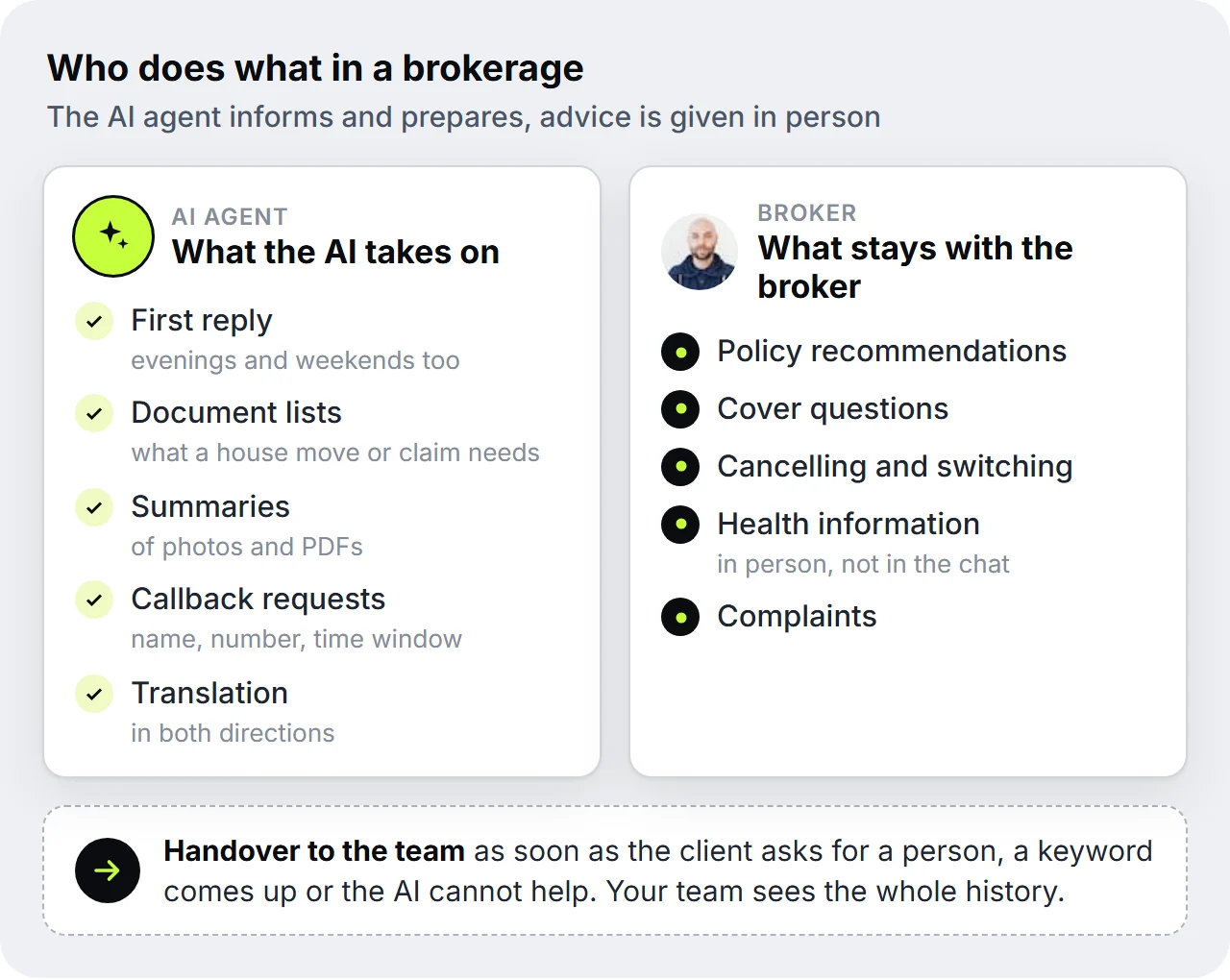
In practice you draw the line in three places:
- In the instructions: State explicitly that the assistant recommends no products, makes no statement about cover and, for questions about switching, cancelling or a claim decision, hands over to your team.
- In the knowledge base: Store your own texts, such as document lists, processes and office hours. Policy wordings do not belong in it: the AI can quote what is there, and a quote quickly turns into a statement about cover.
- With sensitive data: Do not ask clients to send health data in the chat. Questions about income protection or health insurance you discuss in person.
Where the line runs for your firm in a particular case, you settle with your compliance consultant or your trade body.
How does a chatbot hand over to the broker?
Through fixed triggers: the client asks for a person, writes a keyword you have set, or the AI agent cannot help. The conversation then goes to your team with the whole history, and the client does not have to repeat anything.
Who gets the request is up to you. The inbox distributes new conversations in turn using round robin or to the person with the lowest workload, separately by tag if you like. That way a claim reaches the colleague who handles claims, and a question about income protection reaches the owner. In the team inbox, your team sees everything the client and the AI wrote. How that history ends up on the client file as a record is the subject of our article on WhatsApp records for insurance brokers.
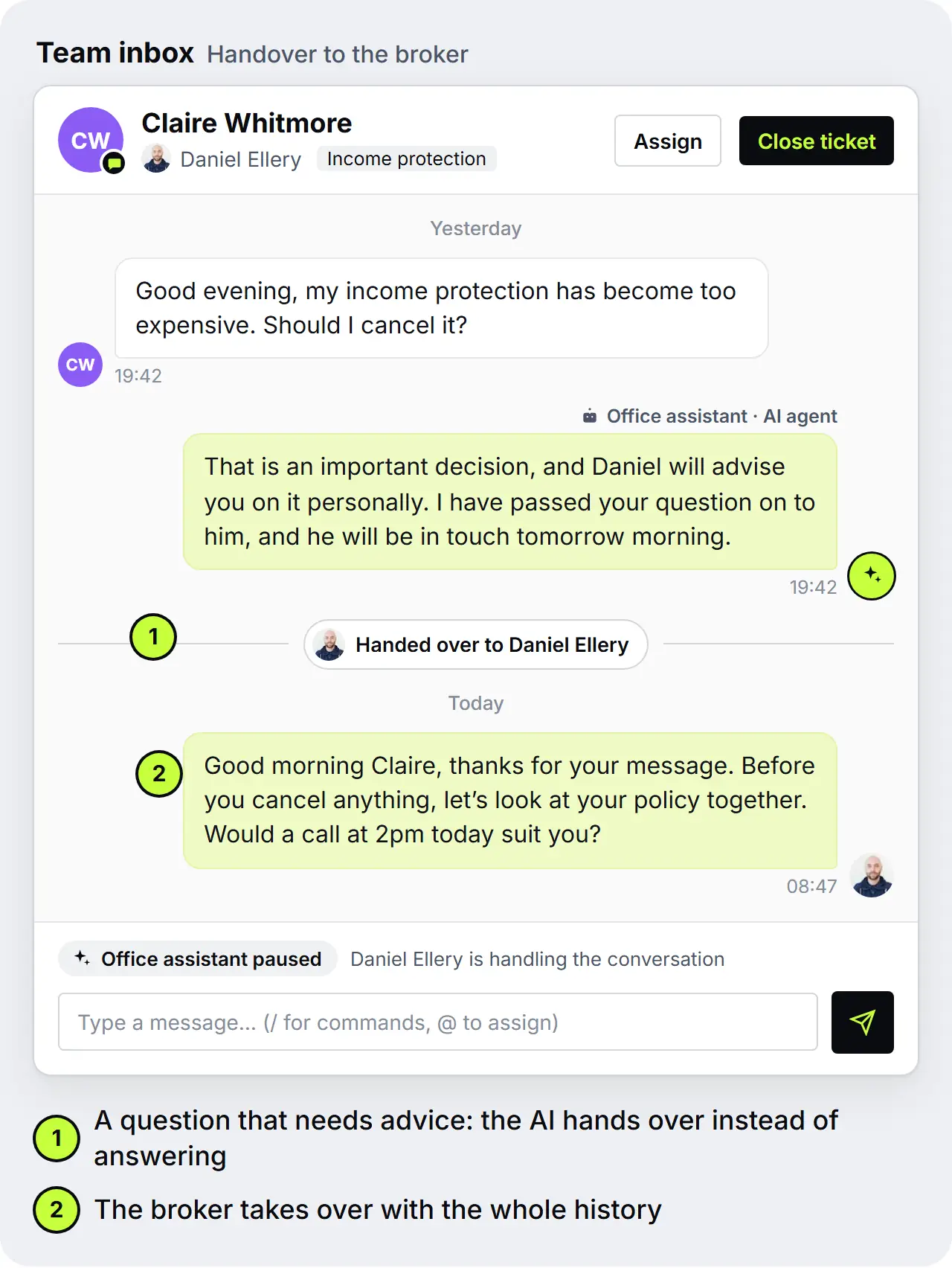
Outside office hours an automated flow sends an away message with the time from which someone is back in the office. Questions your knowledge base covers are still answered by the AI agent straight away. Everything else waits in the inbox for the next working day. How to mix people and AI sensibly in service is covered in the article Live chat or chatbot?
Labelling and data protection before you start
Before you start, settle two things: how the AI assistant makes clear that it is AI, and where your clients' data is processed.
Does a broker have to say a chatbot is answering?
Not by an AI-specific UK law, but label it anyway. The UK has no statute written specifically for AI chatbots, and the FCA says it does not plan extra regulation for AI. Clients, though, clearly want to know: in Wavestone's UK profile, 96% ask for AI transparency. For clients it is also a question of trust.
If your firm also serves clients in the EU, the picture changes. The transparency obligation of the EU AI Act may apply to you since 2 August 2026. It requires that people are told, at the latest at the first interaction, that they are chatting with an AI, unless that is obvious. The European Commission's guidelines on transparency obligations explain how it is meant to be applied. How the AI disclosure looks in the chat depends on the channel:
- Live chat: The header of the widget shows whether an AI or a person is answering and switches by itself at handover.
- Email: If the AI agent gives its name in an automatically sent reply, the signature says that a virtual AI assistant wrote it.
- WhatsApp and Instagram: In the instructions you decide that the assistant introduces itself at the start as your firm's AI assistant.
You can read more on duties, exceptions and wording in the article EU AI Act: do you have to label your chatbot?
Which data protection questions should you settle first?
Four questions are enough to begin with: where is the data processed, is your client data used for training, is there a data processing agreement, and can you switch the AI off at any time? They are the same UK GDPR questions you would ask of any tool that touches client data, and the AI agent is no exception.
SendSeven is hosted in the EU (Frankfurt), and the AI works in the EU too. No AI model is trained on your client data. You get the data processing agreement on request. The AI agent is optional and off by default. You decide on which channels it works, and in Assist mode every reply stays in your hands. On WhatsApp, Instagram and Messenger, Meta also processes data outside the EU and UK, including in the US. Health information does not belong in the chat, whichever tool you use. More on the basics is in our glossary entry on GDPR and business messaging. This is general information, not legal advice. Check the details with your compliance consultant or data protection lead.
AI for insurance brokers: start in 14 days
You can start in 14 days if you build a knowledge base from your most frequent questions, write clear instructions and let the AI agent run in Assist mode for five working days. Your team then sees every draft before the AI agent replies by itself. For a small brokerage that takes a few hours spread over two weeks.
- Days 1 and 2: Collect the 20 most frequent questionsGo through the chats and emails of recent weeks and note the 20 questions that come up most often, for example about documents, opening hours, reporting a claim, changes of address and motor renewals.
- Days 3 and 4: Fill the knowledge baseAdd your website, your answers to the 20 questions and information sheets you wrote yourself. No policy wordings and no client data. The knowledge base guide explains how.
- Day 5: Write the instructionsDecide how the assistant introduces itself as AI, that it recommends no products and judges no cover, and which keywords make it hand over to your team.
- Days 6 and 7: Set up handover and office hoursDecide who gets which request, in turn or by day, and what the flow writes outside office hours.
- Days 8 to 12: Five working days in Assist modeThe AI agent writes drafts, your team checks them and clicks Send. Where a draft misses the mark, add to the knowledge base.
- From day 13: Switch to Auto and sharpen weeklySet the agent to Auto, ideally first on one channel only, such as live chat or Instagram, and read a sample of its replies once a week.
SendSeven is an AI-powered platform for marketing and client communication. The AI agent works on WhatsApp, SMS, email, Instagram, Messenger, live chat and Telegram. It is included from the Professional plan at €79/month. Its replies count as AI credits and come out of the plan's included volume, and beyond that a credit costs €0.01. All plans are on the pricing page. If you use the WhatsApp Business app on your phone today, you do not have to give it up: with WhatsApp Coexistence, which Meta has supported in the UK since 23 October 2025, the app stays, and the AI agent works on the same number in the team inbox. How that looks in a brokerage is shown in the article WhatsApp for insurance brokers: keep the app, bring in the team.
In the end, AI does not make a brokerage less personal but easier to reach. Routine questions are answered before the client has to chase, and the broker has more time for what only a broker can do: advise.
Frequently asked questions
Does AI replace the insurance broker?
No, AI does not replace the insurance broker, it replaces the waiting. It answers recurring questions, receives documents and writes drafts. Advice, recommendations and the responsibility for them stay with the broker. Clients see it the same way: in Wavestone's UK profile, 93% want human escalation.
Does AI work with the WhatsApp Business app?
Yes, with WhatsApp Coexistence you keep the app on your phone, and the AI agent answers on the same number in the team inbox. On the phone you carry on writing yourself. Your clients keep writing to the number they know and install nothing. When the AI agent replies, it introduces itself as AI.
What does an AI assistant cost a brokerage?
With SendSeven the AI agent is included from the Professional plan, at €79/month. Its replies count as AI credits and come out of the plan's included volume, which also covers your messages. Beyond that a credit costs €0.01. The knowledge base and the handover to your team are included, and translation is available from Professional too. The plan is cancellable monthly.
Which AI suits an insurance brokerage?
A brokerage needs an AI that answers from your own content, says it is AI, hands over to your team, runs in the EU and is not trained on client data. A general AI chat in the browser helps with wording, but it knows neither your channels nor your processes, and it hands over to nobody.
Does the AI also answer at night and at weekends?
Yes, in Auto mode the AI agent answers questions your knowledge base covers around the clock. For email there is an adjustable confidence threshold. Whatever it hands over to your team waits in the inbox for the next working day. Outside office hours, a flow tells the client when someone is back in the office.
Does the AI learn from my clients' data?
No AI model is trained on your client data. The agent uses your knowledge base. If you like, you add closed tickets as a source so that the answers fit your firm better. That knowledge stays in your account and does not flow into any model training.
Sources
- Bank of England and FCA: Artificial intelligence in UK financial services 2024, 21 November 2024
- FCA: Our AI approach, last updated 2 October 2026
- Wavestone: Customer Centricity 2026, July 2026
- Office for National Statistics: Language, England and Wales: Census 2021
- European Commission: Guidelines on transparency obligations for providers and deployers of AI systems
- Regulation (EU) 2024/1689, Artificial Intelligence Act, EUR-Lex
- Meta: WhatsApp Business Platform changelog
Further reading
- Customer communication for insurance brokers: the 2026 guide
- WhatsApp for insurance brokers: keep the app, bring in the team
- WhatsApp records for insurance brokers: chats and consent on file
- What Is an AI Chatbot? AI Agents Explained
- EU AI Act: Do You Have to Label Your Chatbot? (Since 2 August 2026)
- Live Chat or Chatbot? Getting the Human and AI Mix Right
- WhatsApp Coexistence: Run the Business App and API in Parallel (2026 Guide)
- Client communication for insurance brokers