What Is an AI Chatbot? AI Agents Explained
SendSeven Team, Editorial Team
AI chatbot, AI agent, AI assistant: we sort out the terms, show in four steps how an AI answer takes shape, where the limits sit, and how a small business gets started in a week.
TL;DR
An AI chatbot is a program that answers customer questions in plain language: it reads the question, looks up the answer in your own content, and writes a reply. Even a chatbot triggers actions, such as handing off to a teammate. An AI agent goes further and carries a task across several steps, down to booking a slot on the calendar.
In everyday use, the two terms mean the same thing. At SendSeven, the part that answers is called the AI assistant, included from the Professional plan at €79/month.
What Is an AI Chatbot?
An AI chatbot is a program that writes with your customers. It takes a question in plain language, finds the matching information in your content, and turns it into a reply on WhatsApp, your website’s live chat, Instagram, or email.
The difference from the chatbots of five years ago is understanding. Older bots needed the exact keyword. Someone who typed "hours" got an answer. Someone who typed "are you still open today?" got nothing.
An AI chatbot runs on a language model. It recognizes that both sentences want the same thing. It handles typos, casual phrasing, and questions that change direction mid-sentence. And it replies in whatever language it was asked in.
One thing matters here: an AI chatbot should not invent answers, and set up correctly, it does not. It works only from content you provide, your price list, hours, return policy, nothing else. Without that content, it knows nothing about your business.
AI Chatbot or AI Agent: What’s the Difference?
Both terms are in circulation, often for the same product: one vendor’s "AI agent" is another’s "AI chatbot." It is still worth knowing the real difference, because a genuine buying decision sits behind it.
A chatbot replies, and already triggers actions while doing so, handing a conversation to a teammate when confidence isn’t high enough. That stays inside the inbox, though. An AI agent reaches further: it carries a task across several steps and reaches outside the conversation to do it. Anything that touches another system, a slot on a calendar or an order status in a shop, runs through a connection to Zapier, Make, or n8n.
| Question | AI Chatbot | AI Agent |
|---|---|---|
| Understands free-form language | Yes | Yes |
| Answers from your content | Yes | Yes |
| Triggers an action | Yes, inside the inbox, such as handing off to a teammate | Yes, also across several steps and outside the conversation |
| Accesses other systems | No | Yes, via Zapier, Make, or n8n |
| Setup effort | An hour to a day, mostly for your content | More, because systems get connected |
| Worth it from | the first repeat questions | the point where answering alone is not enough |
For most small and medium businesses, the answer is clear: start with the part that answers. That covers what actually costs time, namely the same questions coming in again and again. Actions can come later, once it is clear which ones are worth the effort.
How Does an AI Chatbot Arrive at an Answer?
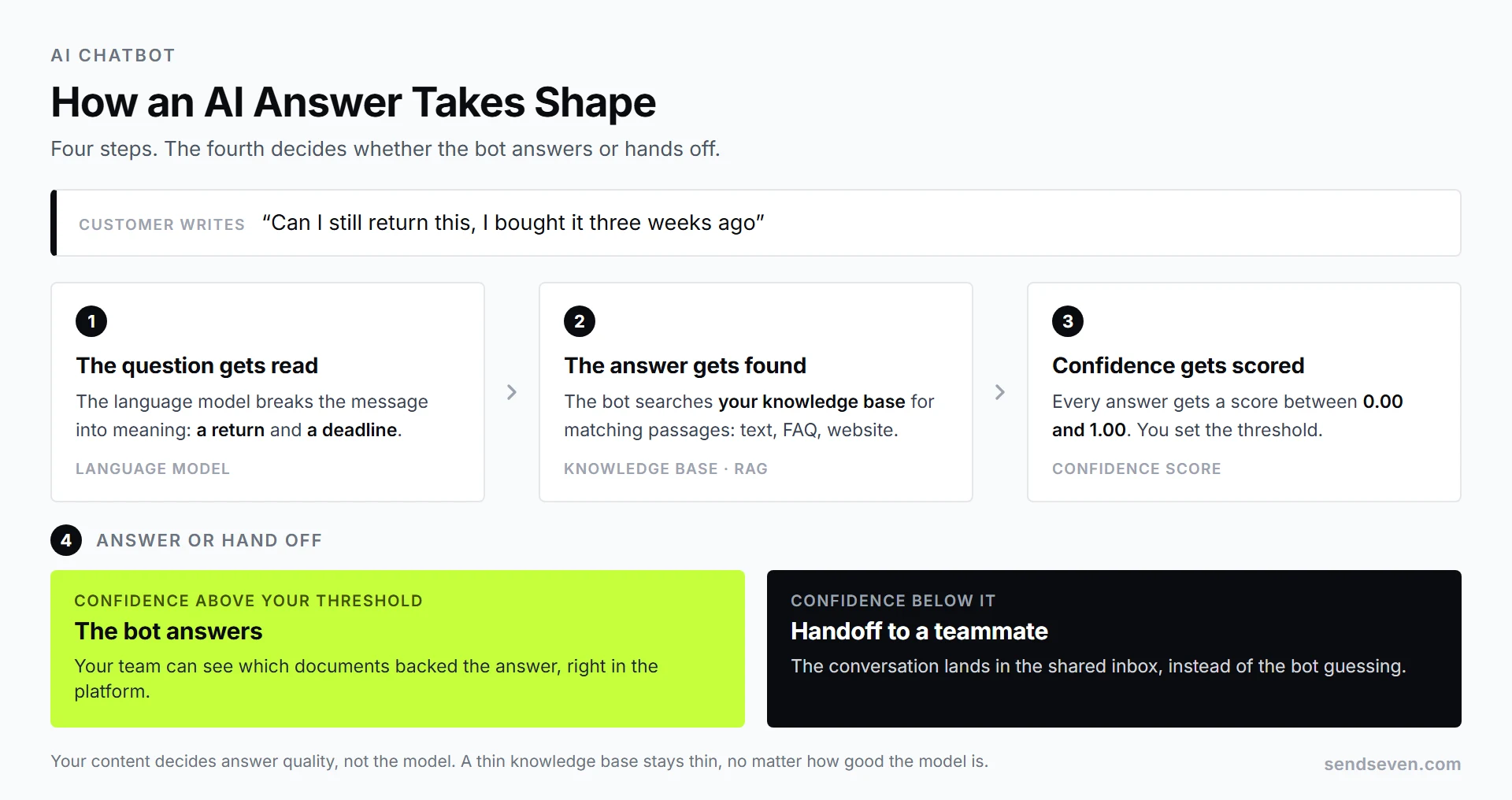
The answer takes shape in four steps. Knowing them also explains why a bot sometimes gets it wrong, and what to do about it.
1. The question gets read
The language model breaks the message down into what it means. "Can I still return this, I bought it three weeks ago" becomes two things: a return, and a deadline.
2. The answer gets found
This is where your knowledge base comes in: the folder holding your content, text, FAQ entries, your website. The method behind it is called RAG, retrieval-augmented generation, or roughly "answering by looking things up." The bot pulls out the matching passages and puts them in front of the model.
That is why this point matters so much: the quality of your answers depends on your content, not on the model. A bot running on a thin knowledge base stays thin, no matter how good the model is.
3. Confidence gets scored
Every answer comes with a number, the confidence score. It sits between 0.00 and 1.00 and combines how well the passages found match the question with how sure the model is of the answer. You set the threshold above which the bot is allowed to reply.
4. Answer or hand off
Above your threshold, the bot answers, and your team can see which documents backed it, right in the platform. Below it, the bot hands the conversation to a teammate instead of guessing. That is the single most important switch in the whole setup.
Rule-Based Bot or AI: What Fits When?
AI is not always the right answer. For some tasks a fixed rule works better, because it is predictable and costs nothing to run. In practice, three building blocks work together.
| Building block | What it does | Fits for |
|---|---|---|
| Keyword bot | Replies to fixed keywords and outside business hours | An away message, sending a price list, sharing a location |
| AI assistant | Understands free-form language, answers from the knowledge base | Anything asked in the customer’s own words |
| Flow | Walks people through fixed steps with buttons and branches | A booking request, filing a claim, tracking an order |
The usual setup: a flow catches the request and sorts it, the AI assistant takes anything phrased freely, and a teammate steps in once it gets personal. That order is why "bot or human?" is usually the wrong question. We took it apart in a separate piece on live chat and chatbots.
Does an AI Chatbot Learn Over Time?
Yes, but not the way most people assume. Two different things both get called "learning," and confusing them raises eyebrows fast in a privacy conversation.
One is model training. That would mean your conversations flow into the language model itself and change it permanently. That does not happen at SendSeven. We run on an enterprise AI tier, not a public model API, which contractually guarantees customer data is never used to train or improve the models.
The other is the knowledge base. And that does grow. Resolved conversations and summaries of requests can flow back in as source material. The bot gets more, and better, material in front of it next time. It gets more accurate because your knowledge grows, not because the model changes.
In practice, that means you do not train anything. You maintain your content, the way you would maintain a manual.
What Happens When the Bot Doesn’t Know?
This is where usable setups part ways from unusable ones. A bot that answers anyway whenever it is unsure produces wrong information. A bot that gives up too early does not take any real work off your plate.
The clean solution is a handoff to a teammate, triggered by the confidence threshold above. The conversation lands in the shared inbox, the teammate sees the full history, and keeps writing in the same thread. For the customer, it reads as one conversation, not a restart.
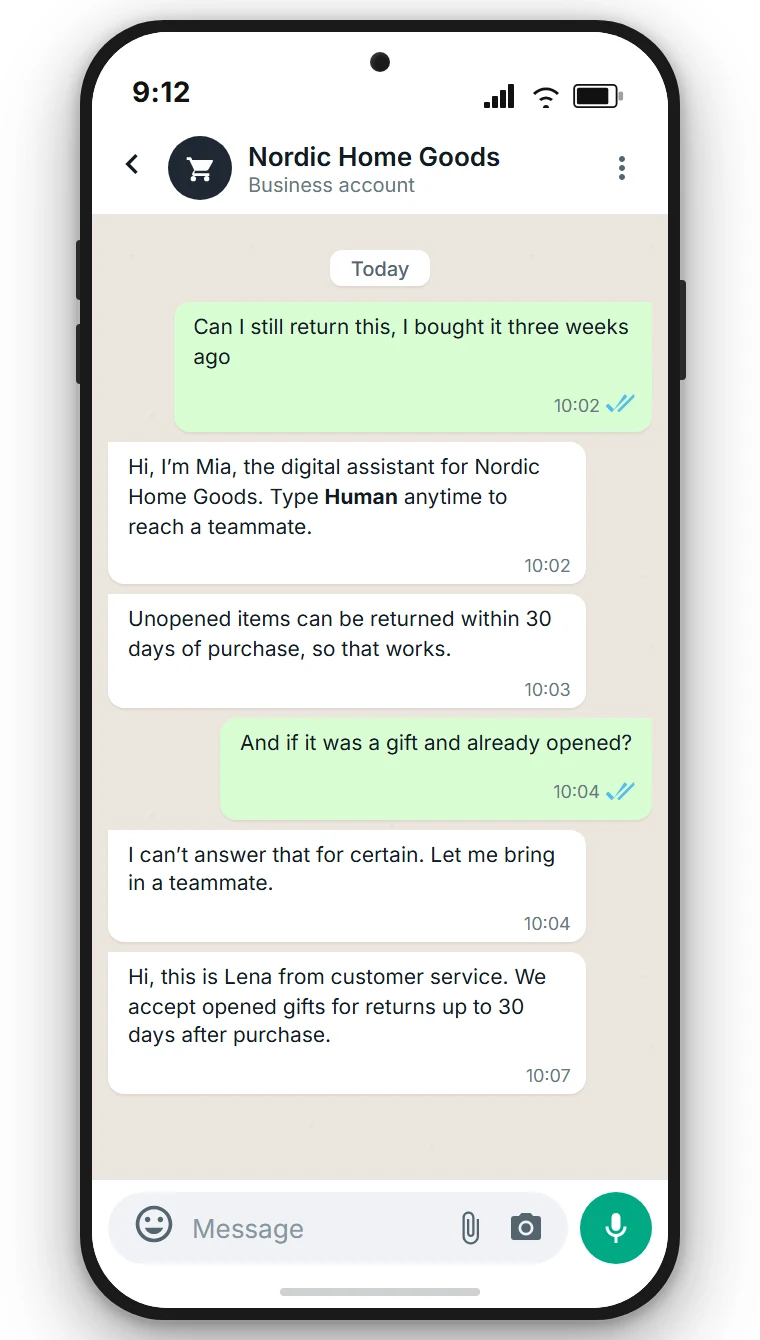
Two rules from practice. First, say in the very first message that an assistant is writing, and how to reach a person. Second, set the threshold high at the start and only lower it once you have read the transcripts. Not the other way round.
What an AI Chatbot Can’t Do
An honest list helps more than a promise. These do not belong to a bot:
- Binding answers with legal consequences. Commitments on warranty, goodwill, or an insurance payout belong to a person.
- Negotiating price. A bot quotes list prices. Discounts are a decision for your sales team.
- Absorbing complaints. Someone writing while angry wants a response, not a correct answer. Those conversations should move to a person right away.
- Answering health or medication questions. Not even when the information sits in the knowledge base.
- Answering what is written nowhere. If the content is missing, so is the answer. That is not a bug, it is the safeguard.
What a bot handles well is volume: hours, delivery times, return deadlines, directions, availability, status questions. At many businesses, those questions come in most often, and around the clock.
Disclosure, Compliance, and Where Your Data Lives
Three things you should have settled before the bot goes live.
Disclosure duty
The practical rule is the same everywhere: tell people, in the first message, that they’re talking to an assistant. A growing number of US states require this by law, and the FTC treats an undisclosed AI posing as a human as a deceptive practice. Say so, up front.
For businesses serving EU customers, this is a hard requirement. Since 2 August 2026, Article 50 of the EU AI Act requires that people can recognize when they’re writing with an AI, unless obvious. One sentence at the start is enough, for example "Our digital assistant is answering first." At SendSeven, you write it into the assistant’s "AI Identity & Disclosure" tab, alongside a note that a teammate can take over. Details and exceptions are in our piece on chatbot labelling.
Data processing agreement
You need a data processing agreement with your provider, and your provider needs one with the AI service behind it. Ask for both, and ask to see the subprocessors.
Where processing happens
At SendSeven, your platform data is hosted in the EU. AI features are opt-in and off by default. Once switched on, the AI runs in the EU too. Your data is never used for training, and the full agreement is available on request.
How a Small Business Gets Started
Getting started is smaller than most people expect. You need neither a project team nor a consultant.
- Collect your twenty most common questions. Track what actually comes in for two weeks. That is the real work, and it is legwork, not a technical one.
- Put the answers in the knowledge base. As text, as FAQ entries, or by letting it read your website.
- Load a preset. At SendSeven, 55 prompt presets across five categories and eleven languages are ready to use, pre-written instructions for the assistant that you open in the bot editor and adjust to your business. What goes into a preset is explained under agent templates.
- Set the threshold and write the disclosure. Start high, and the note about the assistant belongs in the first message.
- Launch on one channel. Usually WhatsApp, since that is where the volume sits. Access is covered in our piece on the WhatsApp Business account.
- Read along for a week. Every handoff points to missing content. That week decides the quality, not the setup.
At SendSeven, AI assistants, the knowledge base, and the flow builder are included in the Professional plan from €79/month. The number of assistants isn’t capped, so run one for support and one for sales. A 14-day trial with no credit card comes with it.
Frequently Asked Questions (FAQ)
What is the difference between a chatbot and an AI chatbot?
A classic chatbot follows fixed rules and needs the right keyword. An AI chatbot runs on a language model, understands questions phrased freely, and answers from the content you provide.
Is an AI agent better than an AI chatbot?
Not better, just wider in reach. An agent works across several steps and can query other systems, which takes more setup and only pays off once answering alone is not enough.
Does an AI chatbot make up answers?
It can, without safeguards. Two things are non-negotiable: it only answers from your knowledge base, and below a set confidence threshold, it hands off to a teammate.
Do I have to disclose my chatbot?
In most cases, yes, unless it is already obvious to the customer. Several US states now require this kind of bot disclosure by law, and since 2 August 2026, Article 50 of the EU AI Act requires it for businesses serving EU customers. A note in the first message covers it, and in practice you would want one anyway.
Is my customer data used to train AI models?
Not at SendSeven. We run an enterprise AI tier, not a public model API, and that tier contractually guarantees customer data is not used to train or improve the models.
How long does setup take?
Minutes, technically, since you load a ready-made preset. The real effort sits in collecting your most common questions and reading along in the first week.
Which channels does an AI chatbot work on?
At SendSeven: WhatsApp, email, Instagram, Facebook Messenger, live chat, and Telegram. A bot also replies on SMS if your sender can receive replies: an alphanumeric sender ID cannot, a real phone number can. Only browser push is excluded, since that channel only sends. The same assistant serves several channels, set up once.
Do I need to know how to code?
No. Load a preset, connect the knowledge base, set the threshold. Actions in other systems do not need code either, just a connection through Zapier, Make, or n8n.
Conclusion
AI chatbot and AI agent describe the same thing in everyday use. The question that actually matters is a different one: should the system only answer, or also act? For most small and medium businesses, answering is the first and most important step, because that is where the repeat questions live.
Three things then decide the outcome. Your content, because the bot only answers from it. The confidence threshold, because it separates a correct answer from a guess. And the first week of reading along, because every handoff shows what is still missing from the knowledge base.
If you want to try this: AI assistants and the knowledge base sit in the SendSeven Professional plan, and the trial costs nothing but the two weeks you spend writing down your most common questions.