WhatsApp Business for Multiple Locations and Branches
SendSeven Team, Editorial Team
One shared WhatsApp number for every branch, or a separate number per location? We look at when each approach fits, how many numbers Meta allows, why the recipient limit is shared, and how each branch sees only its own conversations.
TL;DR
For multiple branches, there are two clean options: one shared WhatsApp number for the whole business, or a separate number for each location. A shared number is easier to promote and needs only one verification. A number per branch pays off when customers already know which location they mean and each team works independently.
Either way, every conversation lands in one shared inbox, and each location sees only its own conversations through a dedicated mailbox. Meta’s limit: new business portfolios start with two phone numbers, verification raises that to 20, and more is available on request. SendSeven itself never caps how many numbers you run, and every plan, starting at 49 € a month, includes unlimited WhatsApp numbers; see pricing for the full breakdown.
One Number for All Locations, or One per Branch?
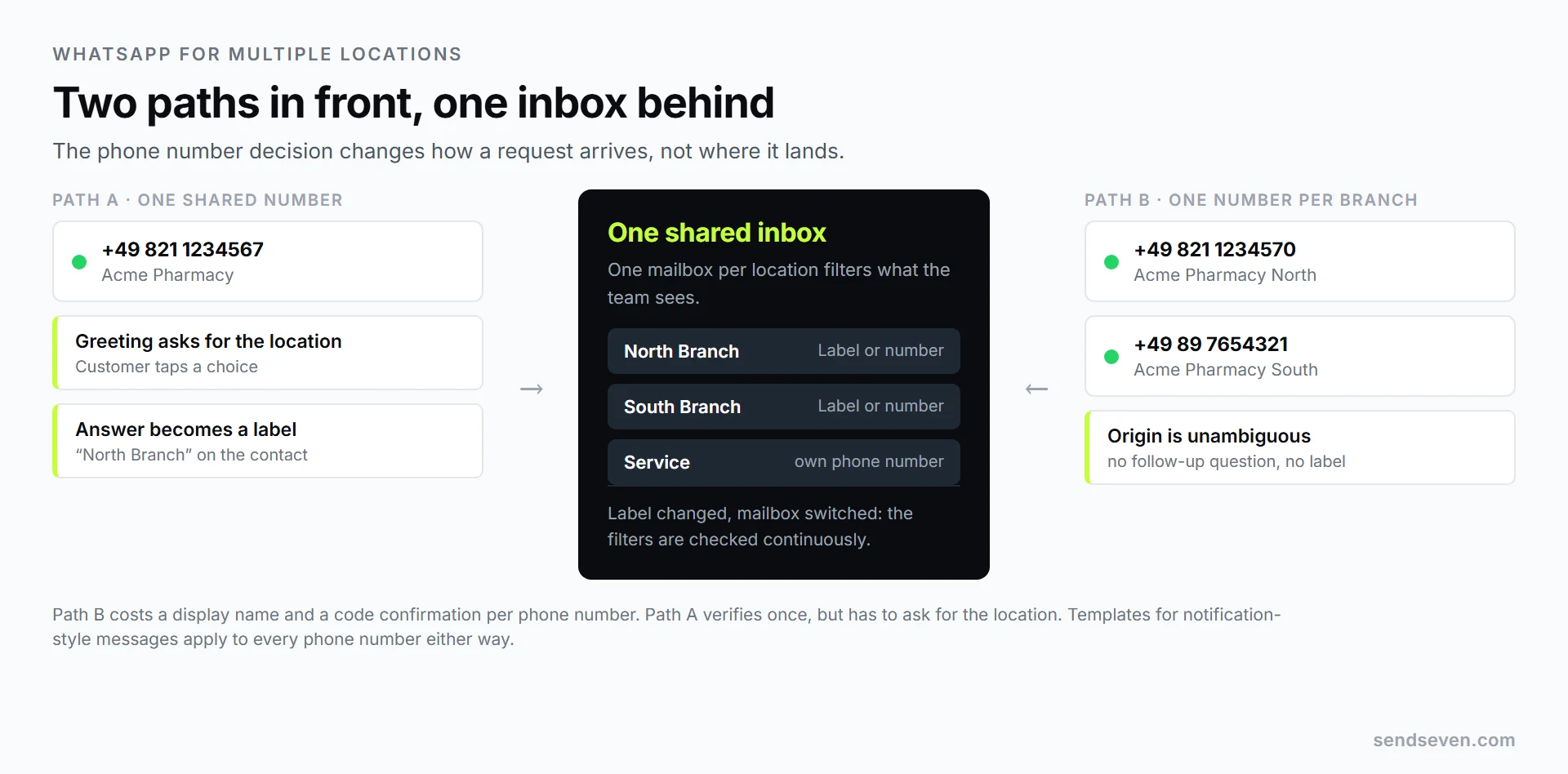
Choose a shared number when customers mainly know your brand and requests can be routed by topic, such as service, sales, or support. Choose a number per branch when customers address a specific location directly, each branch keeps its own hours, and the teams work independently. Both are straightforward to set up, and both end up in one inbox. The real difference is setup effort and how clearly you can trace where a request came from.
The question comes up in almost any business with more than one address: a dental group with four practices, a garden center with three stores, a restaurant chain, several fitness studios, a real estate office with a second branch. It usually gets solved the wrong way, with a personal phone per branch: customer history sits on a device nobody else can reach, and disappears the moment that person leaves.
| Criterion | One shared number | One number per branch |
|---|---|---|
| Ads, signage, website | One number everywhere, even in ads | Separate materials needed per location |
| Where did the inquiry come from? | Must be asked, or inferred from the link | Clear from the phone number |
| Display name and verification | Once, for the whole business | Once per phone number |
| Google Business Profile | Same number on every profile | Each location keeps its own number |
| Cover during time off | No changes needed, everyone sees everything | Access must be granted in advance |
| 24-hour recipient limit | Applies jointly | Still applies jointly |
When a Single Number Is the Right Call
One phone number for the whole business is the pragmatic default, especially early on. You verify once, maintain one display name, and every ad, every sticker and every click-to-WhatsApp link points to the same address. If you move to multiple numbers later, this one stays on as the main number.
Routing to the right branch then happens in the greeting. The first message asks for the location, the customer taps a choice, and that becomes a label on the contact. The branch mailbox then filters on that label. Automations like this unlock from the Professional plan; the Basic plan includes the inbox and campaigns without automation.
A second, more practical advantage: templates for notification-style messages belong to the WhatsApp Business Account, not the individual phone number. Write an appointment reminder once and get it approved by Meta once, instead of submitting the same text branch by branch.
When Each Branch Needs Its Own Number
There are three situations where a dedicated number per location is clearly the better fit.
First: your customers think in locations. Someone messaging “their” branch does not want to click through a menu first. On short questions like “do you have this in stock?”, every extra step costs you replies.
Second: you use Google Business Profile. Every verified location has its own profile, where you can add WhatsApp as a contact button. It only shows on mobile, with no way to pre-fill a message, so an open-ended question arrives with no clue where it came from. List the same number everywhere and you will not know which location the customer meant; list the branch number and the question is answered before it is asked.
Third: separate accountability. When branches run like independent businesses, each with its own hours and away messages, a dedicated number fits that structure. Schedules and automated replies are set per channel, and a channel is exactly one phone number, included from the Professional plan.
How Many WhatsApp Numbers Does Meta Allow?
New business portfolios are capped at two registered phone numbers to start. Meta automatically raises that limit to 20 once your business is verified or you reach the 2,000 recipient tier. If you need more, talk to us and we will work the case with Meta. SendSeven does not limit how many phone numbers you run.
Two details matter more than the number itself: the display name is set per phone number and appears in that number’s WhatsApp profile, and verification also happens per phone number, by code over SMS or a phone call. Five branch numbers mean five small setup steps, not one. Source: Meta’s documentation on Business Phone Numbers.
A phone number always belongs to exactly one path: either the WhatsApp Business App on a phone, or the WhatsApp Business Platform. The regulated middle path is called Coexistence, covered further down.
The 24-Hour Limit Applies per Portfolio, Not per Branch
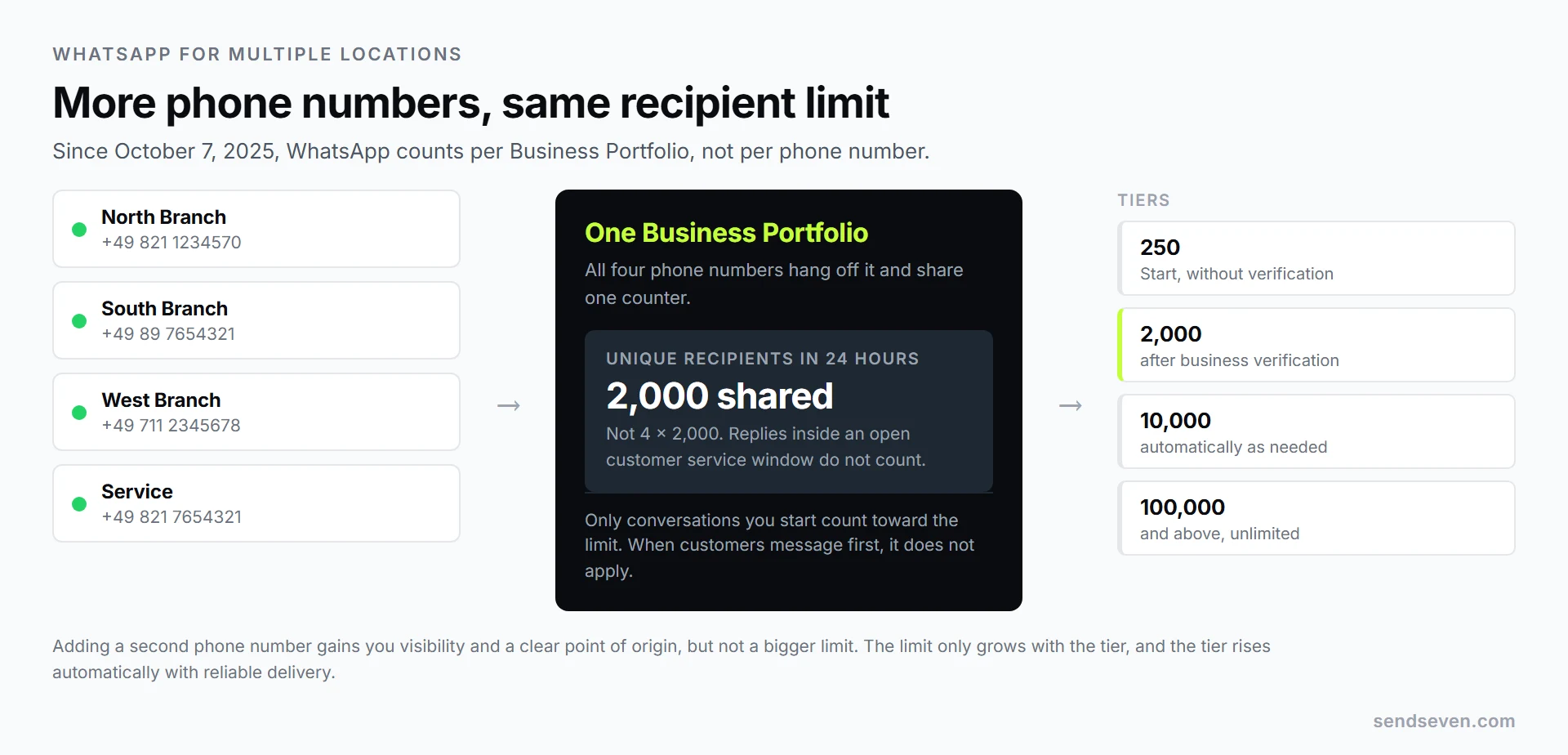
WhatsApp’s messaging limit counts the number of unique recipients you can message for the first time within a rolling 24 hours. Since October 7, 2025, it applies per Business Portfolio, not per phone number. Five branch numbers do not multiply your allowance by five. The tiers are 250, then 2,000 after verification, then automatically 10,000, 100,000, and unlimited.
This is where expectations most often go wrong. Adding numbers to send more marketing messages gets you nothing. Replies inside an open customer service window do not count toward the limit; it only covers messages you start outside an ongoing conversation. For normal branch operations, where customers message first, the limit is rarely a problem. It becomes one during promotions and broadcasts. Source: Meta’s documentation on Messaging Limits.
How Each Branch Sees Only Its Own Conversations
The real lever is not the phone numbers, it is what sits behind them. In SendSeven, you split the shared inbox into mailboxes, for example “North Branch”, “South Branch” and “Service Department”. Each mailbox gets its own rules:
- Channels: which phone numbers and email connections feed into it. The same channel can sit in more than one mailbox.
- Labels: filters on labels applied to the contact, with “any of”, “all of” and “none of” modes.
- Custom fields: filters on custom contact fields, for example “location is North”.
These filters run continuously. If someone changes a contact’s label, the conversation automatically moves to the matching mailbox. Access works on two independent settings: a mailbox is visible to the whole team or restricted to specific users, and separately, each team member either sees the full contact history or only the conversations in their own mailboxes. Owners and admins always see everything. Mailboxes are set up in the web app and can be viewed in the mobile app.
Mailboxes are included from the Professional plan. Without them, labels and assignment inside the shared inbox get you most of the way. For how customer data comes together across every channel, see our article on centralized contact management.
Setting It Up in Six Steps
- Decide how many phone numbers you need. When in doubt, start with one. Adding a second number later is easier than pulling back a number you have already advertised.
- Start business verification. It raises the number cap to 20 and the recipient tier to 2,000, and takes time, so start early.
- Register your phone numbers. Set a display name for each one and confirm it by code. The display name should make the location clear, for example “Acme Dental North”.
- Set up one mailbox per location and filter it: by channel for dedicated numbers, by label or custom field for a shared number.
- Assign your team. Put staff on their mailboxes and build in cover, so nobody is locked out while someone is on leave.
- Set up the greeting, menu and away messages, then test with a real inquiry: message from a personal phone and check whether the conversation lands in the right mailbox.
If you are still at square one on the first step, our article on the WhatsApp Business Account walks through the basic setup.
Bringing Existing Branch Phones on Board
Most businesses already have something in place: a phone per branch running the WhatsApp Business App, with years of history on it. With Coexistence, the app keeps running on the branch phone while the same number also runs on the platform.
Four things worth knowing:
- Up to 180 days of history can be carried over, and contacts come across with name and number.
- The phone is mirrored in full: even messages typed directly in the app show up in the shared inbox. Assignment, notes and response times, though, are only generated from replies sent through the platform, so agree on one place to reply from.
- The phone needs to be used at least once every 13 days, or linked devices drop off. Up to five devices can hang off one number, the primary phone plus four linked devices, with the platform counting as one.
- Throughput is lower: 20 messages per second, versus 80 over the Cloud API. That is enough for normal branch operations; for large campaigns, a full switch is the better route.
One detail for mailboxes: imported history lands on the WhatsApp channel, so it appears in any mailbox filtering by channel. The import does not apply labels, so if you filter by label, tag the imported contacts afterward, either by hand or through a column in the CSV file during import.
What Does It Cost With Multiple Locations?
At SendSeven, an extra location does not add another base fee. Every plan includes unlimited WhatsApp phone numbers, unlimited users and all eight channels. You pay your plan’s flat base fee, starting at 49 € a month on the Basic plan, which includes a message allowance. Mailboxes and automations are part of the Professional plan, starting at 79 € a month.
One thing to plan around: the included message allowance applies to the account, not per branch, the same way the recipient limit is shared. At SendSeven, Meta bills its own messaging fees directly, at list price, and those rates depend on the recipient’s country. The platform itself charges a flat price per message, never a percentage on top of Meta’s price list. Full numbers are on our pricing page.
Frequently Asked Questions (FAQ)
Can I use one WhatsApp number for multiple branches?
Yes. Routing to the right branch then happens through the greeting or a label on the contact, and each branch team sees only the matching conversations through its own mailbox.
How many phone numbers can I add?
New business portfolios start at two registered phone numbers. After business verification, or once you reach the 2,000 recipient tier, Meta automatically raises that to 20. If a business needs more, we work the case together with Meta. Alternatively, every branch can run on one number and be separated with labels. SendSeven itself does not limit the number.
Do I need a separate contract per branch?
No. One account covers every location; for full accounting separation, set up a separate tenant with its own invoice per location.
Can the North branch see the South branch’s conversations?
Only if you allow it. A mailbox is either visible to the whole team or restricted to specific users, and on top of that, you can set per team member whether they see the entire contact history.
Does every branch need to be verified separately?
Business verification applies to the portfolio, and so covers every location. The display name and phone number confirmation, though, happen per phone number.
Do five numbers get me five times the recipients?
No. The recipient limit has applied per Business Portfolio since October 7, 2025. More phone numbers do not raise it.
Conclusion
Start with one phone number if your customers address your brand, and with one per location if they address the branch. More important than that decision is getting messages off personal phones: one inbox, one mailbox per location, clearly defined access. For how several team members work the same number without stepping on each other, see our article on the team inbox. For individual industries, we have dedicated pages, including retail and car dealerships.