Connect SendSeven to ChatGPT: Plugin and MCP Setup Guide
SendSeven Team, Editorial Team
· Last reviewed · 8 min read
How to connect ChatGPT to your SendSeven inbox: install the plugin, sign in, choose capabilities. Which ChatGPT account you need, what permissions ChatGPT gets and how to enable campaigns.
Short answer
SendSeven is listed in ChatGPT's app directory, now called Plugins. In ChatGPT, open Plugins, search for SendSeven, click Connect and sign in with your SendSeven account. ChatGPT can then read and answer your inbox on six channels, manage contacts and create campaign drafts. Connecting costs nothing extra at SendSeven.
Prompt for ChatGPT
Help me connect SendSeven from the plugin directory.
Then summarize today's open conversations by urgency and suggest a reply for the top three. Don't send anything without my OK.
Without a prompt: in ChatGPT, open Plugins in the sidebar, search for SendSeven and click Connect. The direct link to the SendSeven plugin works when you are signed in to ChatGPT.
Does ChatGPT support MCP?
Yes. ChatGPT connects outside services through plugins, and many of them run on the Model Context Protocol (MCP) under the hood. The SendSeven plugin connects ChatGPT to the SendSeven MCP server without you typing in a server address. OpenAI's ChatGPT help describes plugins as bundles of apps and skills.
SendSeven is listed in ChatGPT's app directory, now called Plugins; the app directory moved into the plugin directory on 9 July 2026. Older versions of the mobile app still show "Apps". The SendSeven plugin has one app and three skills: get-started, reply-across-channels and triage-inbox. It works in ChatGPT and in Codex.
Our glossary explains what an MCP server is and how connectors link AI assistants to software. Day to day, all you need is: connect the plugin, sign in, get going.
How do I connect SendSeven to ChatGPT?
You connect SendSeven to ChatGPT in six steps through the plugin directory, with no code and no API key. You sign in with your SendSeven account. It takes about two minutes. The steps apply to ChatGPT in the browser, the desktop app and on mobile.
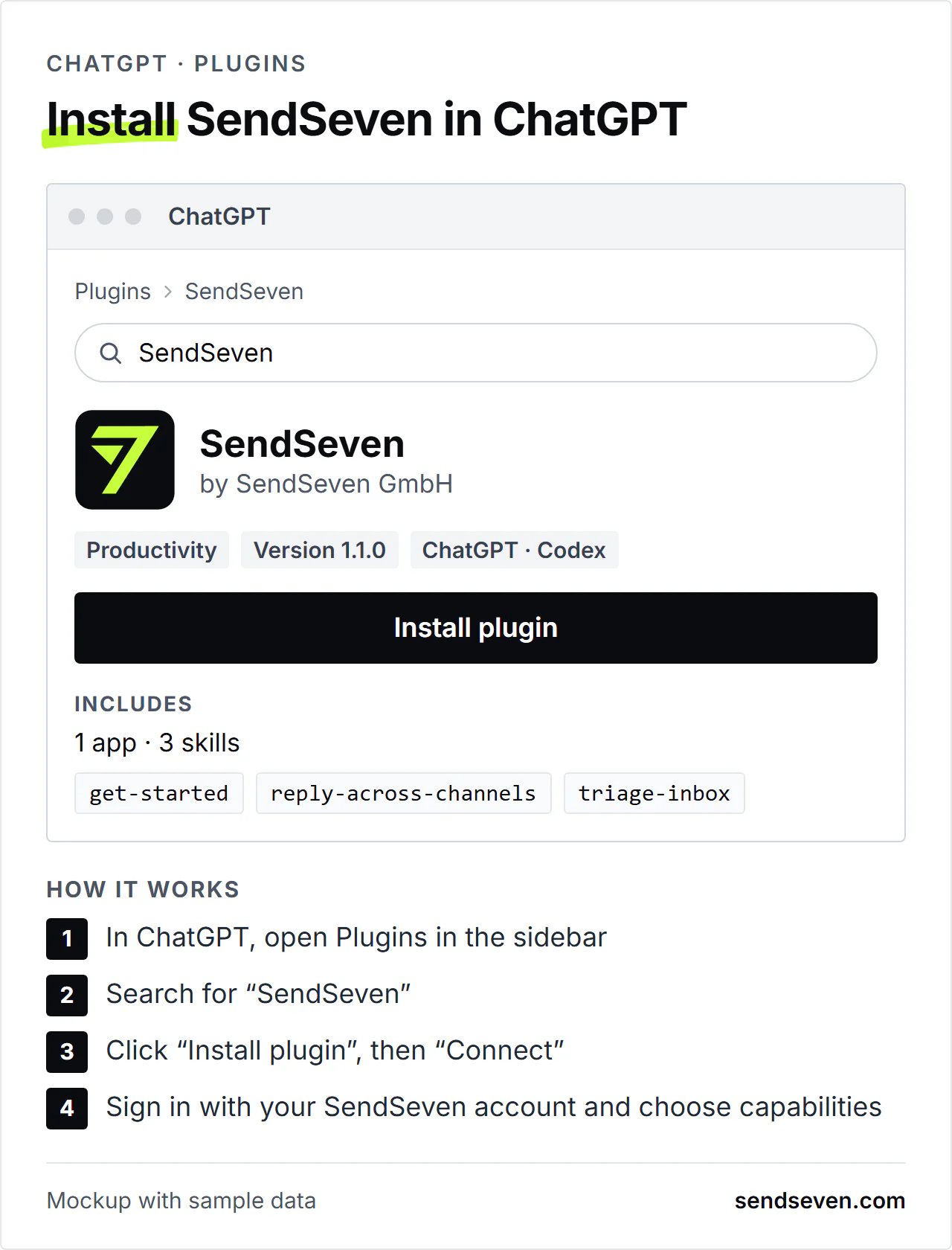
- Open Plugins: In ChatGPT, open Plugins in the sidebar. You can also find plugins under Settings.
- Find SendSeven and connect: Search for SendSeven and click Connect. If ChatGPT first shows a button to install the plugin, click that before.
- Sign in to SendSeven: Sign in with your SendSeven account and choose the workspace ChatGPT may access. You do not need an API key.
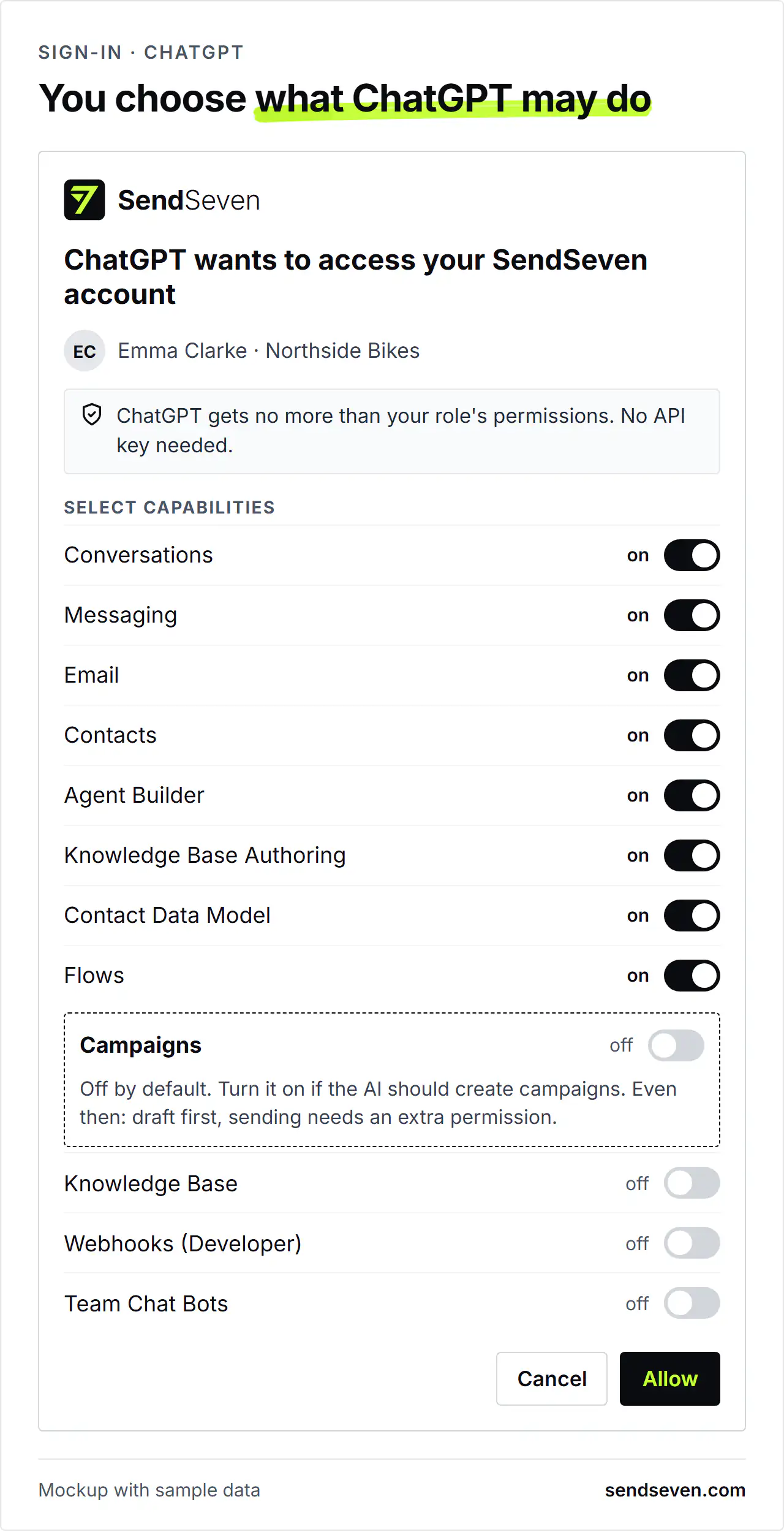
- Choose capabilities: Choose what ChatGPT may do. The Select capabilities screen lists 12 groups. Conversations, Messaging, Email, Contacts, Agent Builder, Knowledge Base Authoring, Contact Data Model and Flows are selected by default. Campaigns, Knowledge Base, Webhooks (Developer) and Team Chat Bots are off.
- Enable campaigns if you need them: If ChatGPT should create campaign drafts, turn on Campaigns. If you already connected, disconnect and reconnect so the new capability applies. Campaigns stay drafts as long as the send permission is missing.
- Use it in the chat: Mention SendSeven in the chat with @ or pick it through "+" and Plugins. Start with a question like "Show me today's open conversations".
You will also find every route inside SendSeven: the Connect Your AI page has a button for ChatGPT. If you prefer Claude, follow the Claude guide.
Which ChatGPT account do I need?
You need a ChatGPT account that can use plugins. On ChatGPT Business, Enterprise and Edu, a workspace admin may need to allow the SendSeven plugin first. OpenAI's help on plugins says whether a plugin can be used depends on your plan, workspace, role, region and the plugin's capabilities.
OpenAI does not publish a list of which plan can use which plugin. The quickest test: open Plugins and search for SendSeven. If the plugin shows up but you cannot install it, ask whoever manages your ChatGPT workspace.
You do not need to add your own MCP server by address for SendSeven. In ChatGPT that is a separate feature for workspace admins, and SendSeven does not need it.
What permissions does ChatGPT get?
ChatGPT gets exactly the capabilities you choose at sign-in and never acts with more rights than your role in SendSeven. The sign-in screen, Select capabilities, lists 12 groups. Campaigns, Knowledge Base, Webhooks (Developer) and Team Chat Bots are off by default.
Most of the other groups are on by default, including Conversations, Messaging, Agent Builder and Flows. The open-source code of the SendSeven MCP server sets these defaults, and the SendSeven documentation for ChatGPT covers the setup.
| Group | What ChatGPT can do with it | Default |
|---|---|---|
| Conversations | Read, assign and close conversations, add notes | On |
| Messaging | Send replies and messages on WhatsApp, SMS, Instagram, Messenger and Telegram | On |
| Send email, list mailboxes and verified domains | On | |
| Contacts | Search, create and tag contacts | On |
| Agent Builder | Build and test AI agents as inactive drafts; live only after your confirmation | On |
| Knowledge Base Authoring | Fill the knowledge base: documents, website import, FAQ entries | On |
| Contact Data Model | Create custom contact fields and lists | On |
| Flows | Create and test automations as drafts (not WhatsApp Flows) | On |
| Campaigns | Create campaign drafts; sending only with send permission | Off |
| Knowledge Base | Search the knowledge base | Off |
| Webhooks (Developer) | Create and manage webhooks | Off |
| Team Chat Bots | Post as a bot in the internal team chat | Off |
To add a capability later, reconnect SendSeven and tick it at sign-in. You can revoke access at any time in ChatGPT or in SendSeven under Settings, Connected Apps.
What can ChatGPT do with your SendSeven inbox?
Once connected, ChatGPT works like an assistant in your team inbox: it summarizes conversations, drafts replies on six channels (WhatsApp, SMS, email, Instagram, Messenger, Telegram), finds and updates contacts and prepares campaign drafts. You decide what goes out.
- Morning triage: "Which conversations have been open since yesterday, and where has someone waited longer than four hours?"
- Reply across channels: "Answer Emma Clarke's question about opening hours on the channel she used. Show me the text first."
- Keep contacts tidy: "Tag everyone who asked about payment plans this week with financing."
- Prepare a campaign: "Create a campaign draft for everyone tagged financing, with a short note about our offer." (Campaigns must be enabled.)
ChatGPT does not build forms inside the WhatsApp chat, known as WhatsApp Flows. SendSeven Cowork, your in-app AI assistant, does, as Build a WhatsApp Flow by chat shows. ChatGPT can, however, build an AI agent for your customers: Build an AI agent from ChatGPT or Claude. For the full picture, read the Cowork and MCP guide.
Frequently asked questions
Is connecting free?
Connecting costs nothing extra at SendSeven; MCP access is included in every package. Messages that ChatGPT sends through SendSeven are billed like any other message. You pay your ChatGPT subscription to OpenAI. Packages are on the pricing page.
Can ChatGPT send campaigns?
Only if you explicitly allow it. Campaigns is off at sign-in. Turn it on and ChatGPT creates campaigns as drafts. Sending also needs the send permission. If you enable a capability later, reconnect SendSeven.
How do I add an MCP server to ChatGPT?
For SendSeven, you don't add it by hand: the plugin from the directory already includes the connection. Adding your own MCP servers by address is a separate ChatGPT feature that workspace admins enable.
Are ChatGPT apps and plugins the same as MCP?
Not quite. Plugins are ChatGPT's packaging; they bundle apps and skills. Many apps use MCP under the hood, SendSeven included. For you, that means you install a plugin, and in the background ChatGPT talks to the SendSeven MCP server.
What is the difference between connectors, plugins and MCP?
MCP is the open standard AI assistants use to call tools. ChatGPT calls its integrations plugins, Claude calls them connectors. Both can be built on MCP. More in the WhatsApp MCP server guide.
SendSeven doesn't show up or won't install. What now?
First check whether your workspace admin allows plugins. Older mobile apps still call the section "Apps". If ChatGPT reports plan_upgrade_required for a task, the feature is not part of your SendSeven package. If a newly chosen capability does not work, reconnect SendSeven.
Does the plugin work in Codex too?
Yes. The SendSeven plugin is built for ChatGPT and Codex. In Codex, it is available in the supported task views.
Last checked on 23 November 2026 against OpenAI's help on plugins in ChatGPT and Codex, OpenAI's help on apps in ChatGPT and the SendSeven documentation for ChatGPT.
Connect ChatGPT to your inbox
MCP access is included in every SendSeven package. 14-day free trial.