Build an AI Agent from ChatGPT or Claude over MCP
SendSeven Team, Editorial Team
· Last reviewed · 8 min read
ChatGPT or Claude builds a WhatsApp AI agent through the SendSeven MCP server: website, knowledge base, skills, test. It only goes live after your approval. With the steps, costs and Meta's rules.
Short answer
Yes. Through the SendSeven MCP server, ChatGPT or Claude builds an AI agent for WhatsApp and your other channels in conversation: from website and goals through knowledge base, skills and fields to testing. The agent stays an inactive draft until you approve it. Building costs nothing; testing and running cost AI credits. Available from the Professional package.
Prompt for ChatGPT or Claude
Use SendSeven to build a WhatsApp AI agent that answers questions about appointments, opening hours and repair prices. Source: https://www.my-company.com
Walk me through each step, show me the test conversations and publish nothing without my OK.
Before you start: SendSeven is connected, see Connect SendSeven to ChatGPT or Connect SendSeven to Claude. The Agent Builder group is on by default at sign-in.
Can I build an AI agent from ChatGPT or Claude?
Yes. Once SendSeven is connected to ChatGPT, Claude or another MCP client, your AI assistant builds a complete AI agent in your SendSeven account. You describe in the chat what the agent should do, and the assistant sets everything up step by step. That is how the SendSeven MCP server documentation describes it.
The agent does not live in ChatGPT or Claude but in SendSeven. It keeps answering your customers' messages long after you have closed the chat window.
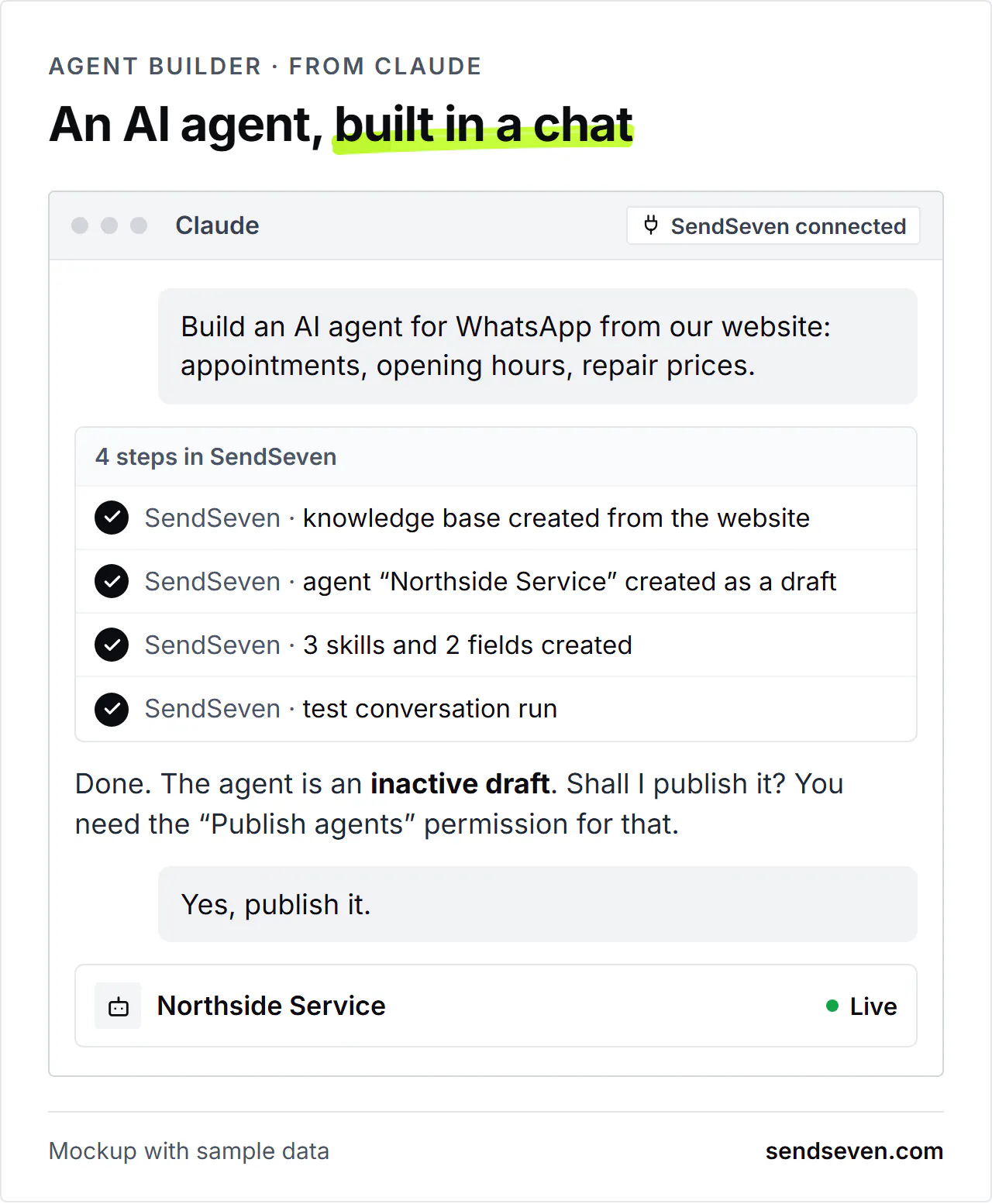
An example: Emma Clarke from Northside Bikes writes in Claude: "Build a WhatsApp AI agent from our website: appointments, opening hours, repair prices." Claude creates the knowledge base, sets up the agent with three skills and two fields and runs a test conversation. Then Claude asks whether the agent should go live. Emma says yes. What sets agentic AI apart from a simple chatbot is in the glossary.
How does the build work?
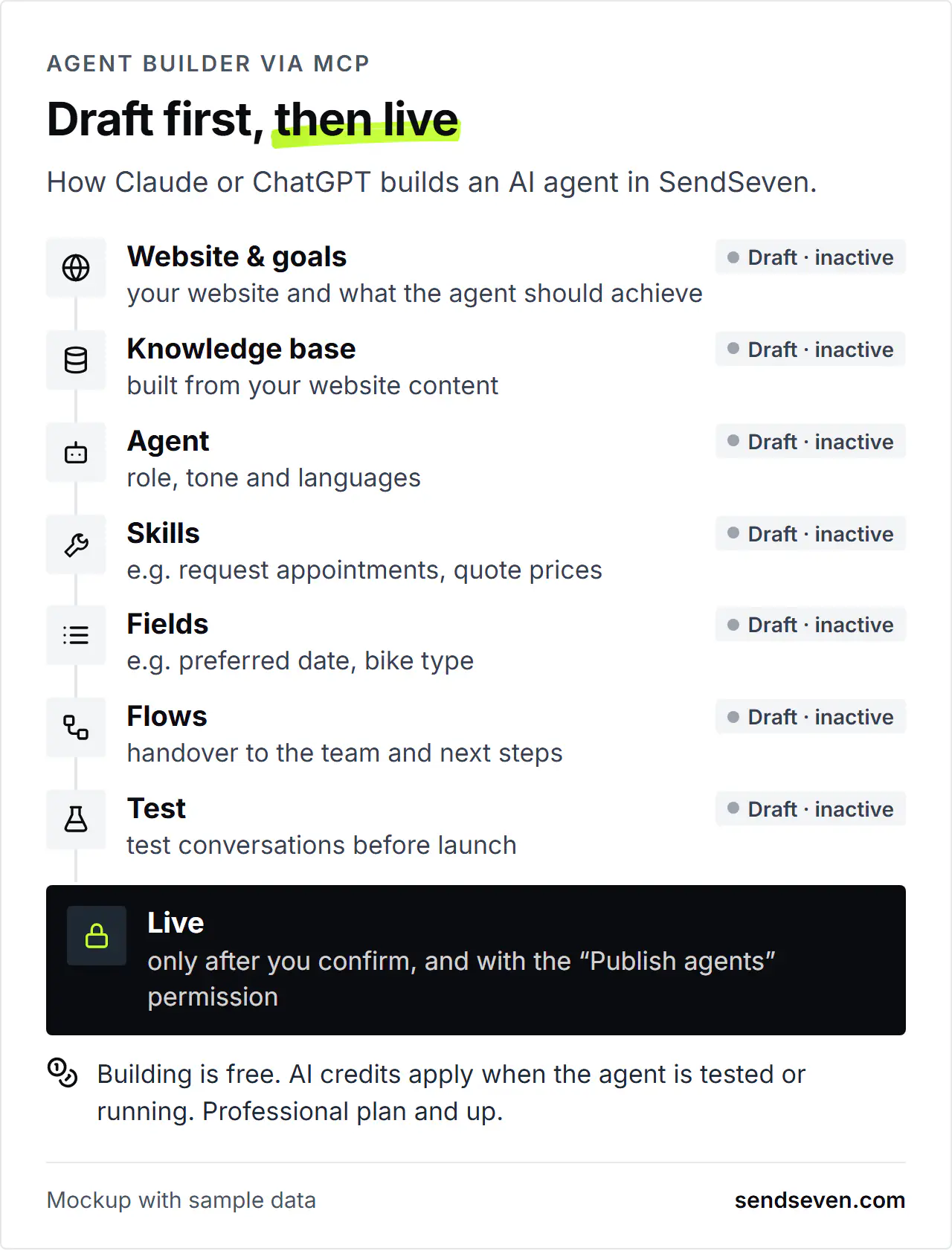
The build follows eight fixed steps set by SendSeven. Seven of them only create drafts; the eighth puts the agent live and needs your approval. You don't need to know the order: the AI assistant guides you, asks when details are missing and shows you the test conversations at the end.
- Website and goals: You name your website and say what the agent should achieve, such as taking appointment requests, quoting prices and answering opening-hours questions.
- Knowledge base: The AI assistant builds a knowledge base in SendSeven from your website content. If something is missing, you add it in the chat.
- Agent: It creates the agent with a role, tone and languages, as an inactive draft.
- Skills: It creates the agent's skills, such as "request an appointment" or "quote a price".
- Fields: It creates contact fields the agent fills in during the conversation, such as preferred date or bike type.
- Flows: It builds automations for the handover to your team and for follow-up steps, also as drafts.
- Test: It runs test conversations with the agent and shows you the answers. These tests cost AI credits, and the test reports what it used.
- Go live: Only when you explicitly agree and have the "Publish agents" permission does the agent go live.
To get started, the SendSeven MCP server ships three guided prompts: build_conversational_agent for the whole agent, design_agent_flow for the conversation flow and write_skill for single skills. You don't need to know their names: describing what you want in your own words is enough. More on the server itself is in the MCP server guide.
What does the agent need before you start?
The agent needs three things: a source for its knowledge, a clear goal and a connected channel. The source is usually your website, the goal a sentence like "take appointment requests and answer price questions". You connect the channel, such as your WhatsApp number, once in SendSeven. The AI assistant sets up everything else.
- Website or documents: price lists, opening hours, frequent questions. The clearer the content, the better the answers.
- Goals: what should the agent achieve, and when does it hand over to your team?
- Connected channel: WhatsApp, Instagram, Messenger, Telegram, SMS or email.
- Connection to your AI client: SendSeven connected in ChatGPT or Claude with the Agent Builder group. It is on by default at sign-in, as are Knowledge Base Authoring for the knowledge base and Flows for the automations.
- Package: Professional or higher.
You can extend the knowledge base at any time, in the chat or directly in the SendSeven knowledge base.
Who puts the AI agent live?
You do. The SendSeven MCP server always creates agents and flows as inactive drafts. An agent only goes live when you explicitly approve publishing and your role has the "Publish agents" permission. The AI cannot publish anything on its own; that is how the open-source MCP server is built.
- Draft first: every agent, skill and flow starts inactive.
- Explicit approval: the assistant asks before it publishes. Without your "yes", nothing happens.
- Permission in SendSeven: without "Publish agents", nobody can put an agent live through ChatGPT or Claude either.
- Always reviewable: you also see the draft in the app under AI agents and can edit it there.
What does an AI agent built over MCP cost?
Building through ChatGPT or Claude costs nothing at SendSeven, because your own AI assistant does the work. AI credits apply once the agent is tested or answers real messages. The MCP test reports the credits used. AI agents come with the Professional package (€79 a month).
| Over MCP (ChatGPT, Claude) | In the in-app Agent Builder | |
|---|---|---|
| Building | Free at SendSeven | About 12 to 18 AI credits per build |
| Testing | AI credits; the test reports usage | Test console free up to 500 replies a day |
| Running | AI credits per reply | AI credits per reply |
| Package | From Professional | From Professional |
1 AI credit equals €0.01. You pay for your OpenAI or Anthropic plan there; SendSeven charges nothing extra for the connection. All packages are on the pricing page.
What does Meta say about AI agents on WhatsApp?
Since 15 January 2026, Meta's WhatsApp Business Platform terms no longer let AI providers offer general-purpose AI assistants (a ChatGPT-style bot) on WhatsApp, except in markets where Meta is legally required to allow it.
Businesses that use an AI agent for their own customers, for service or sales, are not the target of the rule, according to Meta (Meta for Developers).
An agent that answers appointment and price questions for your own business, as in the example, is exactly that second case. Not legal advice; Meta's current terms apply.
When is the in-app Agent Builder the better choice?
The in-app Agent Builder fits when you prefer clicking to chatting or don't use ChatGPT or Claude. It is part of AI agents in SendSeven, available from Professional, and costs about 12 to 18 AI credits per build. SendSeven Cowork, your in-app AI assistant, also opens the Agent Builder for you on request.
- Over MCP: you already work in ChatGPT or Claude, want to design the agent in conversation, and building should cost nothing.
- In the app: you want to see and click every step, test in the free test console and don't need an external AI client.
- Both: build over MCP and fine-tune in the app afterwards. It is the same agent in the same account.
For everything else Cowork does, read about SendSeven Cowork. Forms inside the WhatsApp chat are built by Cowork in the app, not by ChatGPT or Claude: Build a WhatsApp Flow by chat.
Frequently asked questions
Is the AI agent active right away?
No. The agent, its skills and its flows are created as inactive drafts. You test it, read the test conversations and then explicitly approve it. Only after that does it answer your customers' messages.
What can't the Agent Builder do over MCP?
It does not build WhatsApp Flows, the forms inside the WhatsApp chat; Cowork builds those in the app. It publishes nothing without your approval and can only do what your role and package allow. And it is only as good as the content it learns from.
Which package do I need?
AI agents come with the Professional package (€79 a month), both over MCP and in the app. You can connect the MCP server itself on every package, for the inbox, contacts and campaign drafts. Details are on the pricing page.
Which AI clients work?
ChatGPT and Claude through their directories, plus Cursor, VS Code, Claude Code and other clients that support MCP. The SendSeven documentation covers the setup. The MCP server glossary entry explains what MCP is.
Can I change the agent later?
Yes, in the chat with ChatGPT or Claude or directly in the app. You confirm changes to a live agent the same way as the first publish.
Last checked on 23 November 2026 against the SendSeven MCP server documentation, the source code on GitHub and Meta's terms for AI providers.
Your first AI agent, built in chat
AI agents from Professional. Building over MCP costs nothing extra.