AI Assistant for WhatsApp: SendSeven Cowork or ChatGPT and Claude via MCP
Kai Viertel, Co-Founder & CMO
· Last reviewed · 10 min read
Two ways to work with AI in SendSeven: SendSeven Cowork builds flows, templates and campaign drafts in the app, and the MCP server brings your inbox into ChatGPT and Claude. What each one does, what it costs and how you stay in control.
Short answer
SendSeven gives you two ways to use an AI assistant for WhatsApp and your inbox. SendSeven Cowork, your in-app AI assistant, builds flows, templates, emails and campaign drafts right inside SendSeven. The SendSeven MCP server brings your inbox into ChatGPT, Claude or Cursor. Both work with the permissions of your role. Cowork is included in every package, and connecting via MCP costs nothing extra.
Prompt for ChatGPT or Claude
Help me connect SendSeven (ChatGPT: Plugins, Claude: Connectors) and walk me through signing in.
Then show me my five newest open conversations and suggest a short reply for each. Don't send anything without my OK.
Without a prompt: in ChatGPT, open Plugins in the sidebar, search for SendSeven and click Connect. In Claude, click "+" in the chat, then "Connectors" and "Manage connectors", or open the SendSeven listing in the Claude directory.
What is SendSeven Cowork?
SendSeven Cowork, your in-app AI assistant, is a chat panel inside SendSeven that gets work done in your account. It builds flows, WhatsApp Flows, templates, emails, campaign drafts, tags, fields, lists and contacts. You open Cowork with Ctrl+J (Mac: ⌘J) and describe the task in your own words, as our AI credits page explains.
Picture a Friday evening at Northside Bikes. Emma Clarke types into Cowork: "Build me a WhatsApp template that tells customers their bike is ready for pickup, and an automation that sends it when I mark the repair as done." Cowork does not reply with instructions. It replies with a plan: three steps, the cost in AI credits and a list of requirements. Nothing happens until Emma clicks "Run plan".
That is the core idea. Cowork shows you a plan with the cost before anything runs. Messages, publishing and risky steps only run when you click Run. Campaigns stay drafts that you send yourself. Every new chat starts with a notice that Cowork is experimental.
Cowork is not an AI agent that talks to your customers. It works for your team, behind the scenes of the platform. What Cowork builds in detail, and where its limits are, is covered in the SendSeven Cowork guide.
What is the SendSeven MCP server?
The SendSeven MCP server connects AI clients such as ChatGPT, Claude, Cursor or VS Code to your SendSeven account through the Model Context Protocol. Your AI assistant can then read conversations, reply, manage contacts and create campaign drafts on six channels: WhatsApp, SMS, email, Instagram, Messenger and Telegram, as the SendSeven documentation describes.
The Model Context Protocol (MCP) is an open standard that lets AI assistants use tools outside the chat. Our glossary explains what an MCP server is. What matters for you: ChatGPT or Claude gets access to your SendSeven inbox without code and without an API key. You sign in with your SendSeven account (OAuth) and choose the workspace and the capabilities the assistant gets.
SendSeven is listed in ChatGPT's app directory, now called Plugins, so the menu item in ChatGPT reads "Plugins". It is also listed in Claude's connector directory as a community connector. The steps are in our guides Connect SendSeven to ChatGPT and Connect SendSeven to Claude.
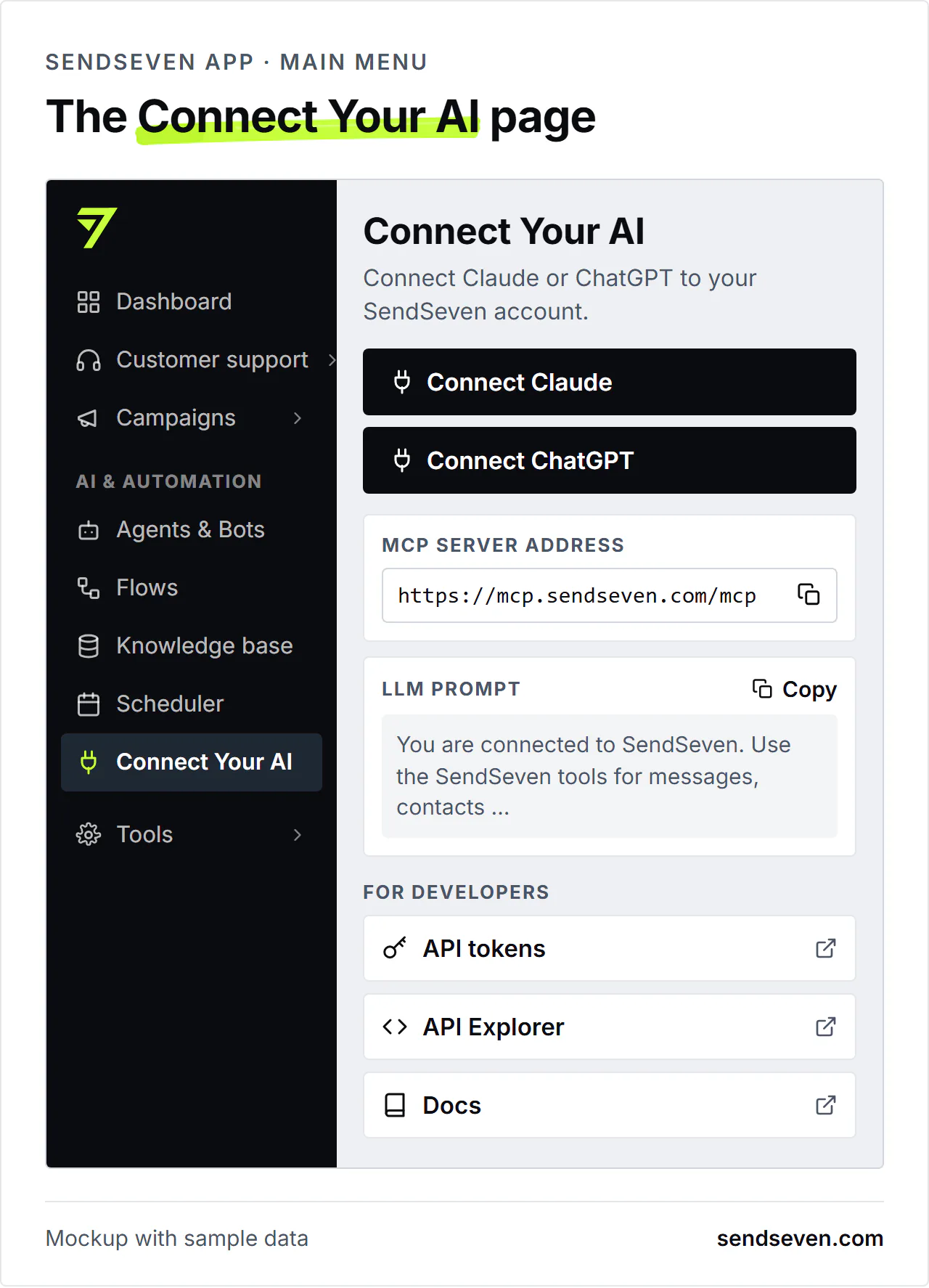
Inside the SendSeven app, everything sits on the Connect Your AI page, in the AI & automation menu group (on API Only, right below the Dashboard). It has buttons for Claude and ChatGPT, the MCP address https://mcp.sendseven.com/mcp and an LLM prompt to copy. The server is open source (GitHub) and listed in the MCP Registry as com.sendseven/messaging. For every tool and use case, read the WhatsApp MCP server guide.
Live Chat and Browser Push are part of the platform's eight channels but do not run through the MCP server. For those, use the app or Cowork.
Cowork or MCP: which one should I use when?
Use Cowork when you want to build something in SendSeven: a flow, a WhatsApp Flow, a template or an email. Use the MCP server when you already work in ChatGPT or Claude and want to handle your inbox, manage contacts or build an AI agent from there. Both use the same account and permissions.
| Criterion | SendSeven Cowork | SendSeven MCP server |
|---|---|---|
| Where you work | In the SendSeven app, opened with Ctrl+J or ⌘J | In ChatGPT, Claude, Claude Code, Cursor, VS Code or another MCP client |
| Strength | Building: flows, WhatsApp Flows, templates, emails, campaign drafts, tags, fields, lists, contacts | Working in chat: read and answer the inbox, manage contacts, campaign drafts, build AI agents |
| Channels | The platform, within your package | Six channels: WhatsApp, SMS, email, Instagram, Messenger, Telegram |
| WhatsApp Flows | Yes, as a draft in the editor (from Professional) | No |
| AI agents | Opens the agent builder in the app | Builds the agent as an inactive draft (from Professional) |
| Control | A plan with cost before anything runs; risky steps only after you click Run | Choose capabilities at sign-in; campaigns are drafts by default |
| Cost | AI credits by usage, cost shown before it runs | No extra charge to connect, messages billed as usual, AI subscription with your AI provider |
| Best for | Teams working inside SendSeven | Teams already working in ChatGPT or Claude, and developers |
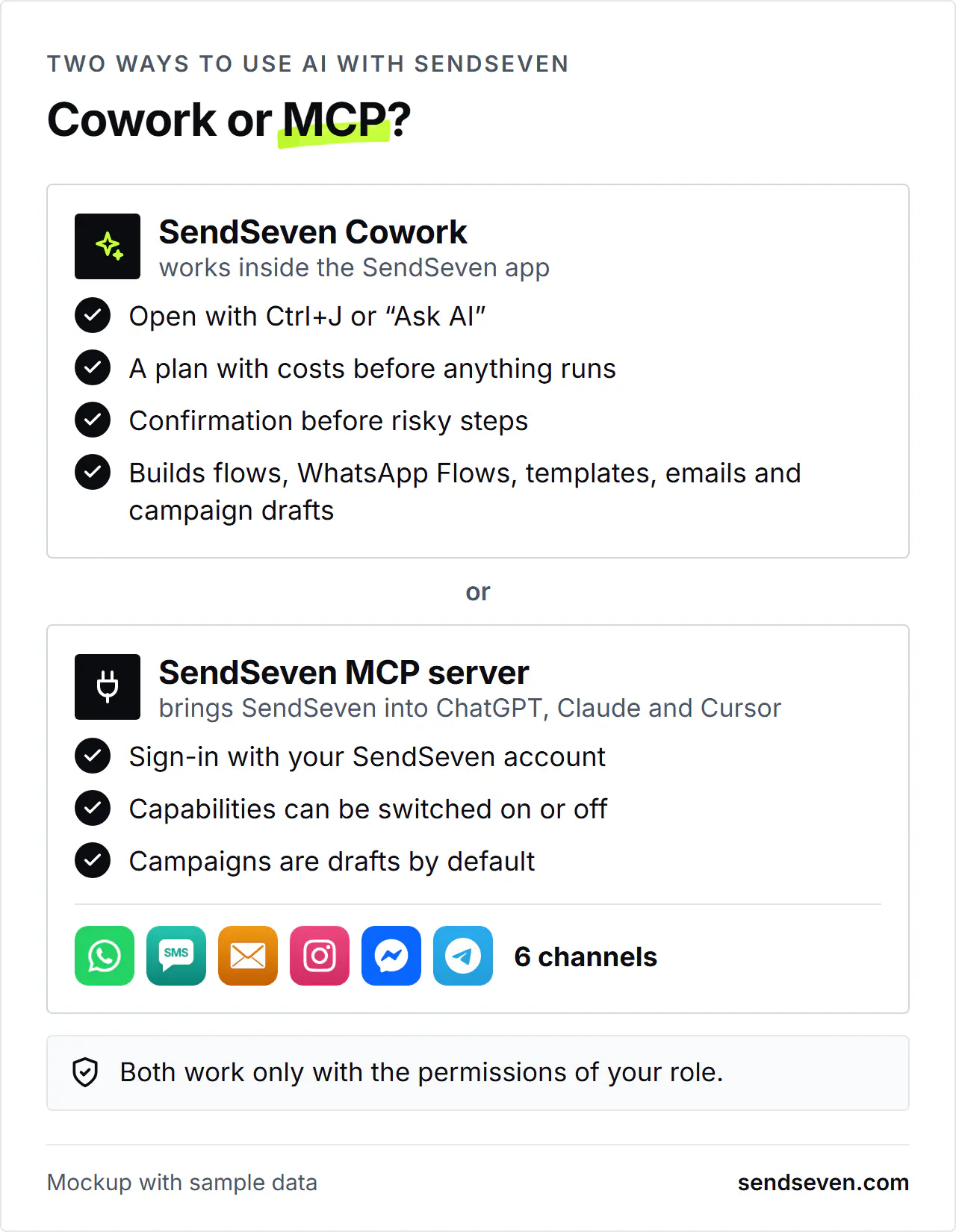
Many teams use both. The marketing lead builds next week's template in Cowork in the morning. In the afternoon she asks ChatGPT: "Which customers asked about payment plans this week?" and gets a list with suggested replies. Two tools, one inbox, nothing maintained twice.
Which AI assistant works with my WhatsApp inbox?
The right choice depends on where your team already works and what the AI should do. For work inside the platform, Cowork is the shortest path. If your team lives in ChatGPT or Claude, bring SendSeven there via MCP. If the AI should talk to your customers directly, you need an AI agent.
- Shop or practice with a small team: Cowork. You stay in SendSeven, have it build templates, pickup notices or an appointment request flow, and check the result before it goes live.
- Marketing or sales working in ChatGPT: the MCP server through ChatGPT. Summarize the inbox, find contacts, prepare campaign drafts without switching windows. See the ChatGPT guide.
- Agency or developer team: the MCP server in Claude, Claude Code, Cursor or VS Code. The Claude guide shows how to set up the connector.
- 24/7 customer service: an AI agent in SendSeven that answers customer questions on WhatsApp. Build it in the app's agent builder, or have Claude or ChatGPT build it via MCP.
A form inside the WhatsApp chat, such as an appointment request, is built by Cowork in the app; the MCP server cannot build it. See Build a WhatsApp Flow by chat.
How safe is it, and who can do what?
Cowork and the MCP server act with the permissions of the signed-in person and within their package, never more. With the MCP server, you also choose at sign-in which capabilities the AI client gets.
The Select capabilities screen lists 12 groups; Campaigns, Knowledge Base, Webhooks (Developer) and Team Chat Bots are off by default (according to the open-source MCP server code).
In Cowork, the plan and the confirmation card keep you in control. The card highlights risky steps such as admin rights, changes to a live bot, sends or deletes. Those steps only run after you click Run. Typing "yes" confirms simple plans only. Cowork never sends a campaign; campaigns stay drafts.
Through the MCP server, the AI client creates campaigns as drafts by default. It can only send them once you have enabled the Campaigns capability and the send permission is in place. You can revoke access at any time in your AI client or in SendSeven under Settings, Connected Apps.
On data protection: SendSeven offers GDPR-compliant EU hosting. When you use the MCP server, the content your AI client reads also goes to your AI provider, OpenAI or Anthropic. Check which plan you use there and which data rules apply to it.
What does it cost?
SendSeven Cowork is included in every package, including Basic (from €49 a month). Cowork uses AI credits (1 credit = €0.01) and shows the cost before anything runs. AI agents, the Flow Builder and the AI builder for WhatsApp Flows come with the Professional package (€79 a month). All prices exclude VAT (pricing page).
What a Cowork task costs depends on the level. A question costs about 2 credits at Fast and about 7 to 10 at Advanced. The plan card shows a range up front. Failed or cancelled runs cost nothing. During the trial, Cowork draws on the trial's own AI credit budget.
MCP access is included in every package; connecting costs nothing extra. Messages that ChatGPT or Claude sends through SendSeven are billed like any other SendSeven message. You pay your OpenAI or Anthropic subscription there. An AI agent built via MCP costs no SendSeven credits to build; testing and running it use AI credits. Details are on the AI credits page.
Frequently asked questions
Do I need to know how to code?
No. You talk to Cowork in plain language, and you connect ChatGPT or Claude in a few clicks through their directories. You only touch code when you set up the MCP server in developer tools such as Claude Code, Cursor or VS Code, and even there one line of configuration is enough.
Can the AI send messages without my confirmation?
Cowork sends messages and templates only after you click Run on the confirmation card, and it never sends campaigns. Through the MCP server, ChatGPT or Claude can reply on your behalf as long as the Conversations and Messaging groups are enabled; both are selected by default at sign-in. Campaigns stay drafts there by default.
Can I use Cowork and the MCP server at the same time?
Yes. Both work on the same SendSeven account. Drafts that Claude creates via MCP show up in the app, and what Cowork builds can be read by ChatGPT later, as far as the chosen capabilities allow.
Do I need an API key?
No. ChatGPT, Claude and the developer tools sign in with your SendSeven account through OAuth. You only need API keys if you call the REST API directly from your own software.
Does Cowork build AI agents too?
For AI agents, Cowork opens the agent builder in the app; it does not build the agent in the chat. Via MCP, Claude or ChatGPT can build an agent as an inactive draft, from the Professional package. The Agent Builder via MCP guide shows how.
Which channels work through the MCP server?
Six: WhatsApp, SMS, email, Instagram, Messenger and Telegram. Live Chat and Browser Push are part of the platform but do not run through the MCP server.
Last checked on 23 November 2026 against the SendSeven documentation on AI assistants, OpenAI's help on plugins and Claude's help on connectors.
Try both ways
Cowork is included in every package, and so is the MCP server. 14-day free trial, no credit card.