Fewer No-Shows at Property Viewings
SendSeven Team, Editorial Team
A cancellation costs nothing. A no-show costs a wasted trip. How to get prospects to confirm a viewing, put cancelling behind one button, and hand the freed slot to the next name on the list: the three messages per appointment, the right WhatsApp template, the cost, and the limits.
TL;DR
Property viewings fall through less often when prospects have to actively confirm the appointment and can cancel it with a single button tap. A reminder sent 24 hours in advance, with the address, buzzer name and a cancel button, is enough for most agencies. The slot that opens up when someone cancels goes straight to the next prospect on the waiting list.
This guide covers what to track for two weeks before changing anything, what belongs in each message, why a WhatsApp reminder needs an approved template, the cost per appointment on SendSeven, and what the law requires. Current per-message prices for every plan are on our pricing page.
Why property viewings fall through
A prospective tenant books a Thursday 4 p.m. viewing, or showing, on Monday. On Thursday you are standing outside the building with the keys, you wait twenty minutes, and you leave. No call, no text, no cancellation. (We’ll say viewing from here on, and agent whether your card says estate agent or realtor; the mechanics are the same either way.)
After this happens a few times, it is tempting to blame rudeness. Usually it is something else. There are four reasons, and only one has anything to do with the prospect as a person.
First: they forgot. Three to five days often pass between booking and the viewing. The appointment sits in an email that has scrolled off the screen, or in a portal inbox nobody opens twice.
Second: they are shopping around. Someone looking for a place does not message one agent, they message six. Four viewings in a week is normal. As soon as two collide, one gets dropped, and it is the one that is most awkward to cancel.
Third: it is already settled. The prospect got a yes somewhere else. Your viewing is done as far as they are concerned, and nobody but them knows it.
Fourth: the threshold to cancel. Cancelling means calling a real person to say you are not coming, which is uncomfortable. Not showing up is easier, because it costs no confrontation.
The first three reasons are solved by a reminder. The fourth is only solved by making cancelling easier than staying away. That is the lever most agencies never pull.
Count for two weeks before you change anything
Search for viewing no-show rates and you will find figures anywhere from ten to forty percent. None of them is yours. The rate at a city agency running four group viewings a week has nothing to do with a solo agent covering a rural patch.
So count first. Two weeks is enough, and you do not need any software for it, just a list with four columns: property, appointment, showed up yes or no, cancelled in advance yes or no.
The last column matters most. It separates two things that usually get lumped together:
- A cancellation is information. It arrives early enough for the slot to be handed to someone else. It costs you almost nothing.
- A no-show is a wasted trip. Travel there, waiting time, travel back, plus the prospect who could have had that slot.
If after two weeks half your missed appointments turn out to be cancellations, you do not have a scheduling problem, you have a re-booking problem. In that case, read the section on filling a freed slot and leave your reminders as they are for now. If almost every miss is a silent no-show, start with the confirmation.
The confirmation matters more than the reminder
A reminder says: don’t forget. A confirmation asks: are you coming? That sounds like a small difference, but it is the gap between a message that gets read and one that triggers an action.
Someone who taps “Yes, I’ll be there” has just committed to themselves. Someone who does not tap gives you a signal well before the appointment. A prospect who ignores two messages rarely shows up. That is not a guarantee, but it is more than you had before.
In practice, that means the confirmation question belongs in the first message after booking, not only in the reminder the day before. You confirm the appointment, the prospect confirms back, and both sides have it in writing. On WhatsApp that works with reply buttons; on SMS, a short instruction such as “Reply Y to confirm” does the same job.
A second detail costs nothing and pays off: name the person who will be showing the property. “Sarah will be meeting you there” creates more commitment than “Your viewing appointment.” People cancel on a person less easily than they cancel a calendar entry.
What goes in which message
Three messages are enough. More reads as pestering, fewer leaves too much room for things to slip. What matters more than timing is content: the most common cause of a late arrival is not forgetfulness, but an address with no buzzer name attached.
| Timing | Channel | What goes in it | Purpose |
|---|---|---|---|
| Right after booking | WhatsApp or email | Property, date, time, address, name of the agent showing up, a request to confirm | Create commitment and get the confirmation in writing |
| 24 hours before | Reminder, address with buzzer name, parking notes, documents to bring, a cancel button | The message that is meant to save the appointment | |
| 2 hours before | SMS | Just the time, the address and your phone number, one sentence | Reaches the prospect even without a data connection or WhatsApp |
The last message is deliberately SMS. It works in a dead spot outside the building, needs no data plan, and does not land in a chat buried under forty others. Our guide to SMS appointment reminders covers the timing and wording of that combination in more detail.
Leave marketing out of all three messages. No second listing, no newsletter plug, no review request. A viewing reminder that carries advertising is a different thing legally from a viewing reminder, and there is more on that below.
Make cancelling easy
This is the part many agencies hesitate on, because it feels backwards: you are actively inviting the prospect to cancel. That is exactly the point. You cannot stop someone from not showing up. You can only influence whether you find out beforehand.
Three buttons in the reminder are enough, and WhatsApp reply buttons do not allow more than three anyway:
- I’ll be there. The appointment is marked confirmed, nothing else happens.
- Please reschedule. The conversation lands in the inbox, a colleague picks it up and proposes two new times.
- I can’t make it. The slot opens up, the prospect gets a short acknowledgment, and re-booking begins.
The third button is the important one, and it is important that nothing unpleasant follows it. Someone who cancels and then gets a call asking why will not bother cancelling next time, they will just stop showing up. One line is enough: “Thanks for letting us know, we’ll be in touch about new listings.”
Expect your cancellation rate to go up once you add the button. That is the intended effect, not a step backwards. What you are comparing is not the number of cancellations, it is the number of wasted trips.
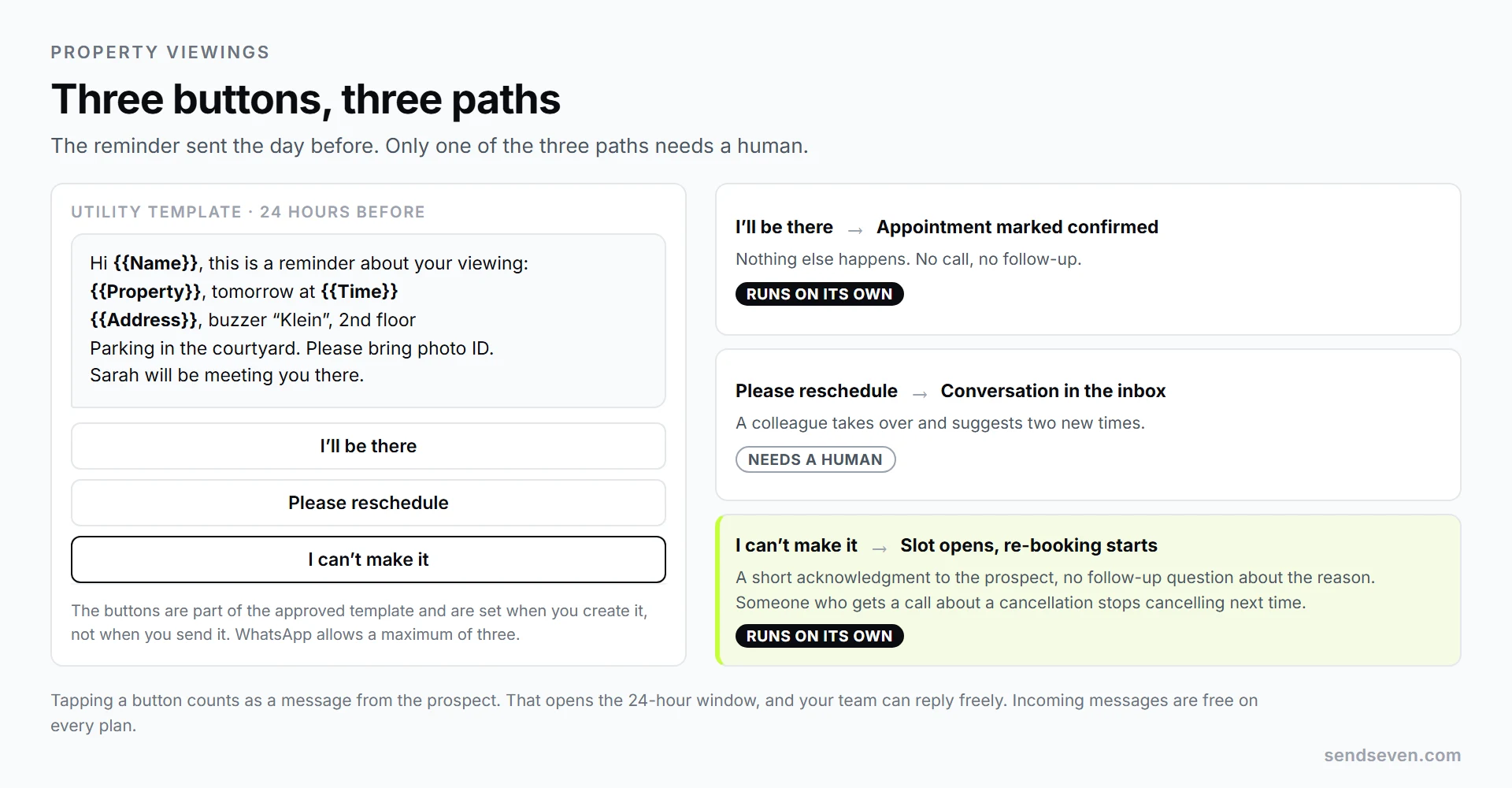
Three reply buttons, three paths. Each button triggers a different response, and only one of them needs a human.
The freed slot: filling it from the waiting list
A cancellation 22 hours before the appointment is an opportunity, but only if someone at the agency acts on it. Most of the time, nothing happens: the cancellation comes in, gets noted, and the slot stays empty.
For a single property you almost always have a list: enquiries from the portal, prospects from the last viewing, people whose search criteria match. If those contacts sit in your inbox tagged to the property, re-booking becomes one message to a group instead of twenty individual calls.
Three things separate a message that fills the slot from one that gets ignored:
- Be specific. “A slot just opened up tomorrow at 4 p.m.” works. “We still have some appointments” does not.
- Keep the list small. Five to ten matching contacts, not your entire database. Someone searching for a four-bedroom house does not need to hear about a studio that just opened up.
- First come, first served. Say so openly. It speeds up replies and saves you from explaining why someone else got the slot.
The difference from a reminder: an invitation to an appointment the recipient never booked is marketing. It needs consent for the channel, and on WhatsApp it runs as a marketing template at the corresponding rate. Our glossary entry on opt-in covers collecting that consent properly. For grouping contacts by property and search profile, segments are the right tool, and sending to one is included in our campaigns from the Basic plan.
Group viewing or individual appointment
The choice sounds organizational, but it is the single most effective lever against wasted trips. At a group viewing with eight confirmed attendees, it barely matters if two do not show. At an individual appointment with one confirmed prospect, a no-show is a total loss.
| Criterion | Group viewing | Individual appointment |
|---|---|---|
| Effect of a no-show | Barely noticeable, the viewing goes ahead regardless | Wasted trip, the slot is lost |
| Effort per prospect | Low, one appointment for many | High, one trip per person |
| Quality of the conversation | Limited, little room for questions | High, real advice is possible |
| Reminder needed? | Yes, otherwise too few turn up | Yes, everything hinges on it |
| Best suited to | Rentals with high enquiry volume, first-round screening | Purchase properties, high-value units, second round |
The common approach is a combination: a group viewing as a filter, followed by individual appointments with the three prospects who are genuinely in the running. Both need the reminder, for different reasons. At the group viewing it protects the headcount; at the individual appointment it protects that one slot.
Why the reminder needs a template
This is where many agencies trip up first, and the reason is a WhatsApp rule, not one of ours. A business may only send freely worded messages within 24 hours of the customer’s last message: the 24-hour window.
A reminder sent 24 hours before the appointment almost always falls outside that window, because the prospect has not written anything since booking. It therefore needs a message template that Meta approves in advance. In practice that means:
- You create the wording once, with placeholders for property, date, time and address.
- The template goes for review, usually approved within minutes to a few hours.
- The category is Utility, because it relates to an existing transaction, not advertising. That is the cheaper category.
- The reply buttons are part of the template. You set them when you create it, not when you send it.
When the prospect taps a button, that counts as a message from them, and the 24-hour window opens. From that moment your team can reply freely, reschedule, or ask follow-up questions: the buttons turn a one-way message into a conversation.
One practical note: do not change a template on the day of your first campaign. New and edited templates need to sync after Meta approves them, and that does not happen instantly. Create templates a day ahead and the timing never becomes an issue.
What a reminder costs
The bill has two parts, and only one is fixed. Meta bills its message prices to you directly, at the rate it publishes for the recipient’s country. Check the current rate for any market on Meta’s rate card. Our side works differently: a fixed base fee with an included message allowance, plus a fixed price per message above it, not a percentage of Meta’s rate. The Basic and Professional plans include 2,500 sent messages a month in the base fee, and only messages beyond that bundle cost 0.02 € each.
An agency running 15 viewings a week, around 60 a month, sends two messages per appointment: the confirmation and the reminder. That is 120 messages a month, far inside the 2,500 the plan includes, so the reminders add nothing to our side of the bill. Only Meta’s per-message fee applies, at the rate for wherever your prospects are based, and the total still lands well under the cost of one wasted trip. Your prospects’ replies cost nothing, because incoming messages are free on every plan.
Set against that is a single avoided no-show a month, which in travel, waiting time and follow-up easily costs an agency more than an hour of staff time. The reminder pays for itself the moment it saves one appointment a month. Current per-message prices for every plan are on our pricing page.
One change worth knowing about: since October 1, 2026, Meta also charges for messages your team sends inside the 24-hour window, at the utility rate of the recipient’s market, with the first 1,000 per business phone number and month free. It changes little for viewing reminders, since they run outside that window as Utility templates and were billed per message before the change as well.
Set up in seven steps
The order matters more than completeness. Anyone who stops at step four already has most of the benefit. Steps one through four work on Basic; steps five through seven need Professional, where scheduled sending and the Flow Builder live.
- Count for two weeks. Showed up, cancelled, no-show. Without that number you will not know later whether anything actually improved.
- Create a Utility template. Wording with placeholders for property, date, time and address, plus the three reply buttons. Get it approved once, and it is ready to use.
- Fix your address block. Street, unit number, buzzer name, floor, parking notes. Write these lines once and never again, they belong in every reminder.
- Send by hand first. Send the template from the inbox for two weeks. You will see immediately where the wording falls flat, before you automate anything.
- Set up scheduled sending. The reminder goes out 24 hours before the appointment without anyone having to remember it.
- Branch the buttons. In the Flow Builder, each button leads down its own path: mark as confirmed, move a reschedule request to the inbox, confirm a cancellation and flag the freed slot.
- Prepare re-booking. One segment per property, a short template for the newly freed slot. Re-booking then becomes a minute of work instead of half an hour.
One thing that explicitly does not happen: there is no sync with your calendar. The appointment either comes from the flow that captured it, or you start the reminder by hand from the inbox. If your team runs appointments purely through an external calendar, Zapier, Make or n8n connects the two, or you can enter the appointment with us directly at the time of booking.
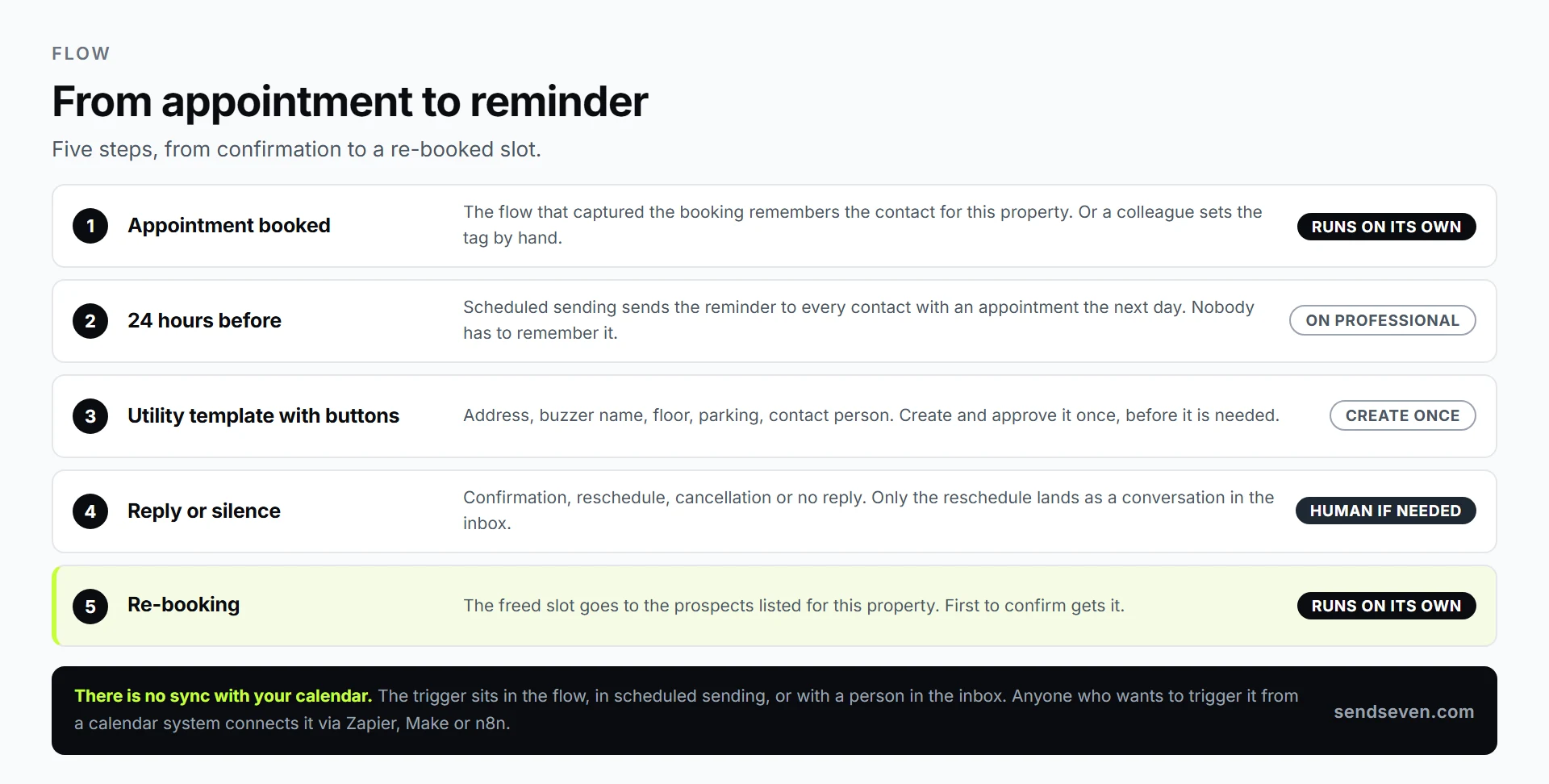
From a booked appointment to a re-booked slot. The calendar stays out of it; the trigger sits in the flow or with a person.
What the law requires
A viewing reminder is legally straightforward as long as it stays a viewing reminder. Three things are worth keeping separate.
The appointment itself. In the US, an automated text or WhatsApp message about a scheduled appointment generally sits under the same prior-express-consent logic as the TCPA: someone who books a viewing and leaves a number for it can reasonably expect a message about it. In the UK, PECR covers the same ground. Either way, keep an opt-out in every message, even a transactional one.
The channel. A separate question is whether you may write to someone on WhatsApp at all, which takes the number plus a clear statement that this is the channel you will use. A checkbox on the booking form, “Please remind me by WhatsApp,” is enough, logged with a timestamp.
Everything beyond that. New listings, newsletters, review requests, invitations to appointments nobody booked: that is marketing, and it needs its own consent. That is exactly why the reminder itself contains nothing but the appointment.
For agencies operating in the EU, a short note on top: WhatsApp is a Meta service, and delivery runs through Meta’s infrastructure, while what we process and store ourselves sits in the EU. A data processing agreement with Meta is put in place when you set up your account. See our privacy policy for details.
Frequently asked questions (FAQ)
How many reminders is too many?
Three messages per appointment is the ceiling: confirmation at booking, a reminder 24 hours before, a short text two hours before. A fourth message reads as pushy and gets muted. For appointments booked less than 48 hours out, skip the first reminder.
What do I do if nobody responds to the confirmation?
No reply to two messages is a reliable signal. For individual appointments, one phone call is worth the thirty seconds. For group viewings, invite one extra prospect instead and factor the non-response into your numbers.
Isn’t email enough?
For the confirmation right after booking, yes, since it arrives with the listing details and gets archived. For the day-before reminder, no, because it can go unread. The bigger reason is the reply: people tap a reply button, they rarely answer an email at all.
Can the reminder come straight from my calendar automatically?
No, we don’t have a direct calendar sync. The trigger is either the flow that captured the appointment, a scheduled send, or your own hand in the inbox. Zapier, Make or n8n can connect an external system that kicks off a flow.
What does a viewing reminder cost?
Meta bills its per-message price to you directly, at the rate it publishes for the recipient’s country. On our side, the Basic and Professional plans include 2,500 sent messages a month in the base fee, so a reminder below that threshold adds nothing, and each message beyond it costs a fixed 0.02 €, not a percentage of Meta’s rate. Your prospects’ replies cost nothing, because incoming messages are free on every plan.
Do I need the Professional plan for this?
Not to get started. Templates with reply buttons, sending from the inbox and campaigns to a segment are all available from Basic. Scheduled sending and the Flow Builder, which branches the buttons automatically, unlock on Professional, which is why the first four steps here work without upgrading.
Conclusion
Fewer wasted trips is not a question of persistence, it is a question of friction. A prospect who can confirm, confirms. One who can cancel, cancels. And a slot that opens up 22 hours before the appointment is not a loss, it is an appointment for the next person on the list.
Start by counting, create a template with three buttons, and send it by hand for two weeks. Your own numbers will then tell you what automation still needs to add. For how this fits together across an agency, from the first enquiry to closing, see our page for real estate. And if your team wants to answer enquiries faster overall, our guide on responding to WhatsApp messages faster can help.