Turn Facebook comments into direct messages automatically
SendSeven Team, Editorial Team
A comment under your Facebook post can trigger a direct message automatically. Since August 2026 the trigger covers Facebook too, and that first message can hand over your price list as a button. Here is how to set it up.
TL;DR
A comment under your Facebook post can trigger a direct message automatically. Three things have to line up: a defined trigger word, a flow you have built, and someone who comments exactly that word. New since August 2026: the “Comment received” trigger in the Flow Builder no longer covers Instagram only, it covers Facebook too. That first automated message can do more than text: you attach your price list, your menu or your spec sheet as a button that opens the file with one tap. The same works on Instagram. Two rules apply either way: exactly one automated message per comment, and only a reply from the recipient opens the 24-hour window.
How a comment turns into a direct message
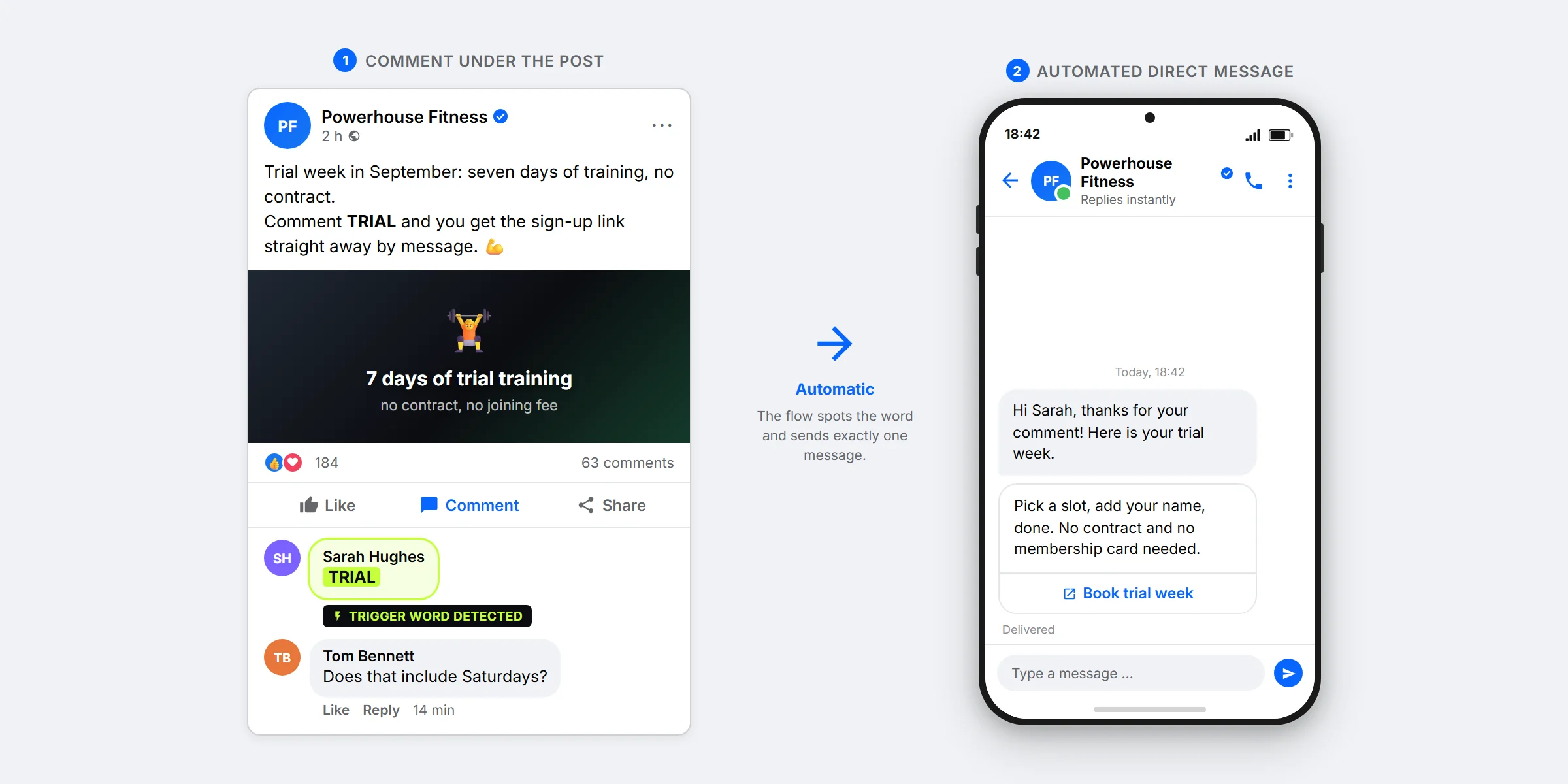
You publish a post on your Facebook page and write: “Comment TRIAL and you will get the sign-up link by message right away.” Anyone who comments TRIAL receives a direct message in Messenger seconds later. That is exactly what comment-to-DM is, and since August 2026 it works on Facebook the same way it works on Instagram.
There is no surveillance of your comment section behind it. For anything to happen at all, three conditions have to be met: you have defined a trigger word, you have built a flow for it, and someone comments exactly that word. Every other comment stays untouched. The question “Does that apply on Saturdays too?” triggers nothing.
What does not happen matters just as much: no automated public reply appears under your post. The comment stays exactly as it is, and the response arrives as a private message. Meta calls this route private reply. It is the official interface for precisely this case.
The difference to Instagram is smaller than it sounds
If you already know the mechanism from Instagram, you probably expect “the same thing again, for Facebook”. That is exactly what it is. The trigger carries the same name, the rules from Meta are the same, and the first message may carry the same content on both networks.
One point often gets told the wrong way round: a price list or a menu does not arrive as an attachment in the chat, it arrives as a button that opens the file with one tap. That applies on Facebook and on Instagram alike. You upload the file once in the flow, SendSeven takes care of the rest.
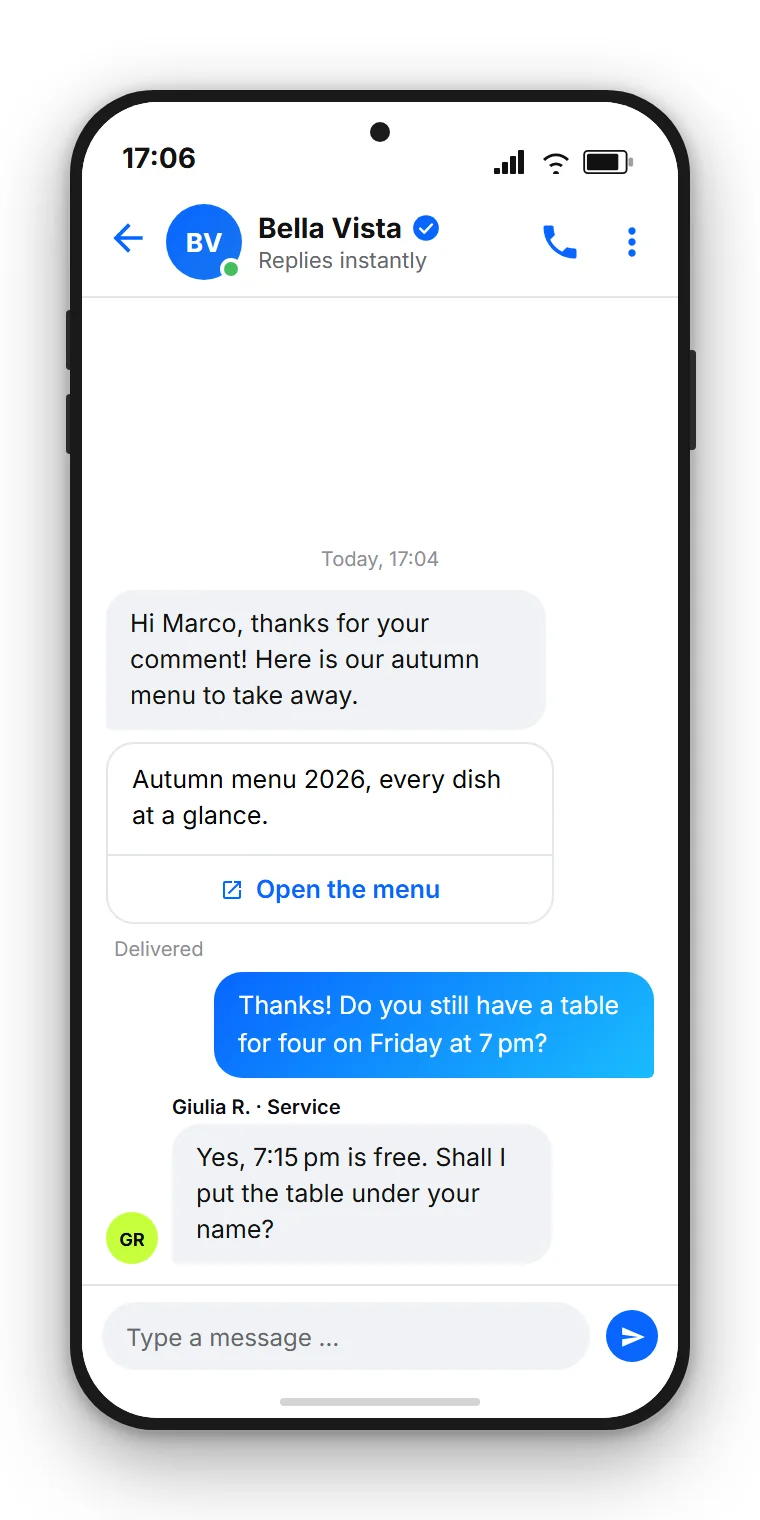
For a small business that is the whole difference between “this works” and “this is not worth it”. A restaurant has its menu as a PDF, a trade business has its list of services, a car dealership has its spec sheet. Those files already exist, and they need no landing page and no download form in front of them.
Two paths: button right away, or ask for a reply first
For text and buttons there are two paths on Facebook as well, and both are correct. Either the link sits in the first message as a button, or the first message asks for a short reply and everything else follows after that.
The difference is not in the effort, it is in what stays possible afterwards. Exactly one automated message is allowed per comment. Only a reply from the recipient opens the 24-hour window, in which you can keep writing freely. Whoever taps ends up on your website. Whoever replies ends up in your inbox.
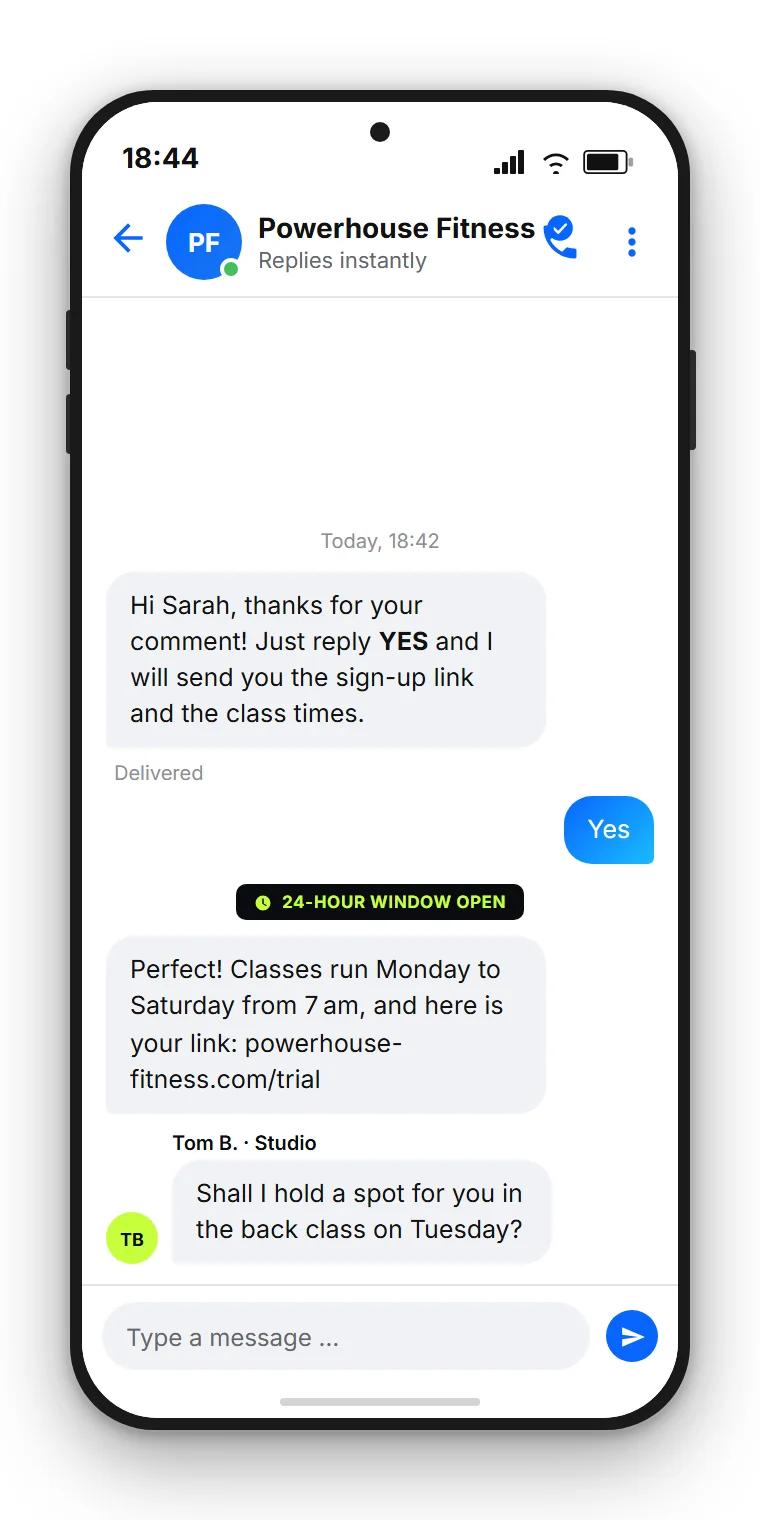
As a rule of thumb: if it comes down to one clear step, so a booking, a download or a purchase, the button belongs in the first message. If it is about advice, a follow-up question or a later contact, the route via the reply is the better one. Both versions can be built in the same flow, and you can try them side by side across two posts.
Where this pays off most on Facebook
Facebook pages live off opening hours, appointments and local occasions more than Instagram profiles do. That is exactly where a first message with the right file plays to its strength.
| Occasion | Trigger word | What the first message carries |
|---|---|---|
| New menu or price list | MENU | The PDF as a button |
| Booking campaign or trial week | SLOT | Button to the booking page |
| Event or open day | INFO | Schedule as an image, plus a question back |
| Product, catalogue or spec sheet | SPECS | The spec sheet as a PDF |
| Giveaway or promotion | WIN | Confirmation and a request for a short reply |
Pick exactly one trigger word per post and name it verbatim in the post text. Short words in capitals work best, because they stand out from ordinary comments and nobody has to guess.
The Meta rules you need to know
The route is officially supported, but it has clear limits. Four of them decide how you should build your message.
- Exactly one automated message per comment. You cannot follow up as long as the person has not replied. Everything that matters therefore belongs in that one message.
- Only the reply opens the window. Once the person gets back to you, the 24-hour window is running and your team can answer freely. Inside that window, the exchange over Messenger is free of charge.
- No automated public reply. SendSeven does not write comments under your posts. The response is always private, in the chat.
- Trigger word required. Without a defined keyword and without a flow that has been built, nothing happens. There is no blanket monitoring of your comment section.
Technically you need a Facebook business page connected as a Messenger channel. How to set up the page and the permissions cleanly is covered in the Facebook Business Manager guide.
Data protection: what the comment allows and what it does not
The comment is a voluntary act, and the automated message is the direct response to it. The person started the contact themselves, and every further step depends on them again. That is a clean basis for this one conversation.
What does not follow from it: consent for ongoing marketing. Someone who comments TRIAL has not subscribed to a newsletter. If you want to message that person again later, you need a separate, documented opt-in for it. Keep the way out available at all times, and state briefly in the first message who is writing and why.
SendSeven is a German platform headquartered in Augsburg, hosts in the EU and provides the data processing agreement. The connection runs exclusively over the official Meta interfaces, not over unofficial routes.
Setting it up with SendSeven
The process has four steps and takes about fifteen minutes the first time round.
- Connect the page. Connect your Facebook page as a Messenger channel. All messages then land in the unified inbox.
- Create the flow. In the Flow Builder, pick the “Comment received” trigger. Since August 2026 it covers Instagram and Facebook.
- Check the trigger word. A condition node filters for your keyword, so that only matching comments get a message.
- Define the message. In the send node you set what the person receives: text, a button, or a file that goes out as a button.
The “Comment received” trigger is a beta feature and is enabled per account. It belongs to the Full Suite plans and is not available on the API Only plan.
If you want routine questions answered automatically beyond that, combine the flow with an AI assistant. How the two work together in Messenger is shown in the article on Messenger automation.
Comment-to-DM without writing code
SendSeven brings Facebook and Instagram into one unified inbox and adds the visual Flow Builder on top. Incoming messages are always free, and the Flow Builder starts at €79/month on the Professional plan.
See pricingFour mistakes that make the whole path useless
The technology is rarely the problem. The four most common stumbling blocks sit elsewhere.
The trigger word is too everyday. “Yes”, “Info” or “Please” show up in ordinary comments all the time. Pick a word nobody writes by accident.
The trigger word is not in the post. Nobody guesses a keyword. Write it out in the post text, ideally in the first two lines, so it is visible without tapping “See more”.
Nobody reads the inbox. When somebody replies to the automated message, a real conversation starts and the clock is running. Agree beforehand who is responsible. How that works in a team is described in the article on the shared Messenger inbox.
Too much in the first message. You have exactly one attempt. A greeting, the thing you promised and one clear next step are enough. Three links and four paragraphs achieve the opposite.
Further reading
This article put the path from Facebook comment to direct message at the centre. The following pieces fill in the rest of the picture.
- Facebook Messenger for business: the bigger frame, from the channel to the service concept.
- Comment-to-DM on Instagram: the same mechanism in the neighbouring network, with all the differences.
- Click-to-Messenger ads: for when the route into the chat should be paid for instead of organic.
- Messenger or WhatsApp Business: which channel suits which occasion.
Frequently asked questions
Does SendSeven reply publicly to comments?
No. No automated reply appears under your post. The response is always private, through a direct message in Messenger. The comment itself stays exactly as it was.
Can the first automated message contain a file?
Yes, though not as an attachment in the chat. You upload the file in the flow and the person receives a button that opens it with one tap. It works the same way on Facebook and on Instagram.
How many messages may I send per comment?
Exactly one. Only when the person replies does the 24-hour window open and you can keep writing freely. Inside that window, the exchange over Messenger is free of charge.
Does the flow react to every comment?
No. Something only happens if you have defined a trigger word, built a flow for it and somebody comments exactly that word. All other comments stay untouched.
What does comment-to-DM cost at SendSeven?
The Messenger channel is included in every SendSeven plan, and incoming messages are always free. The Flow Builder you use to build the trigger is available from the Professional plan at €79 per month. The exact terms are on the pricing page.