WhatsApp Flow customer survey: collect feedback in the chat
SendSeven Team, Editorial Team
Two or three questions in the chat instead of a questionnaire behind a link: how a customer survey with a WhatsApp Flow is built, how a poor rating turns into a callback and how to work out CSAT and NPS from the CSV export.
TL;DR
A customer survey with a WhatsApp Flow asks where your customer already chats with you: two or three questions on one or two screens instead of a questionnaire behind a link. The real value lies in what happens next. The answer sits on the contact, and anyone who rates you low is offered a callback that your team picks up through a tag or an automation. Your Google review link goes to everyone in a follow-up message, whatever their rating; only someone waiting for a callback gets it after the call. SendSeven has no separate survey tool: the survey is a flow, the results sit in the response table, the card in the chat and the CSV export, and you work out NPS yourself with a spreadsheet formula.
When is the right moment to ask for feedback?
Shortly after the job you're asking about: the finished work, the delivery or the appointment. The impression is still fresh, and the customer doesn't have to think about what you mean. This post follows Quillfield Bathrooms, a fictional bathroom fitter in Bristol. Hannah has just had a new bathroom fitted, and the day after the handover the business asks in the chat how happy she is. That's easier to answer than a general question with no job attached.
Whether you can simply send the question depends on the 24-hour window. If Hannah has messaged you in the last 24 hours, you send the survey as a session message; after that, only a message template will do. There are three ways to get the survey to her:
- From the inbox: Your team sends the survey flow by hand, for example at the end of a conversation. That works on Basic and up while the window is open.
- From an automation: On Professional and up, an automation in the Flow Builder starts the survey without anyone on your team lifting a finger, for example from the trigger called On conversation closed. Its Send WhatsApp Flow step sends the form and waits for the answer for anything from 60 seconds to 72 hours (24 hours by default), with three outcomes: completed, timeout and fallback. If nothing comes back, you can send one friendly nudge or leave it there. By the time a chat is closed, though, the 24-hour window may already have passed, and then the survey needs the third route.
- From a template with a Flow button: Once the window has closed, the survey can only go out as a Meta-approved message template with a Flow button, which is also the route for a campaign to several customers. The link behind the button stays valid for 72 hours. As with any template, the customer must have opted in first.
With a template, the category matters. If the message refers to a specific job or appointment, Meta can treat it as Utility; a general satisfaction survey counts as Marketing. Meta can also move a template into another category on its own, as Meta's documentation on template categorisation explains. So word the template closely around the job, and don't count on a particular category.
An AI bot doesn't send a flow: your team or an automation does. And ask once per job. Customers who are asked after every chat stop answering sooner or later.
Which questions belong in a short customer survey?
Two or three, and each one should lead to something you act on. You can ask more, but every extra question costs patience. For most businesses these building blocks are enough:
- CSAT, 1 to 5: “How happy were you with …?” measures satisfaction with one job. WhatsApp Flows have no slider or star rating, so you build the scale as a Single choice field with labels from “Very happy” to “Very unhappy”.
- NPS, 0 to 10: “How likely are you to recommend us to a friend or colleague?” The eleven values fit into one Single choice field too, as it holds up to 20 options.
- One open question: “Is there anything else you'd like to tell us?” as a Long answer field, ideally optional. A written comment often explains why someone rated you the way they did.
As a starting point, the WhatsApp Flow templates include Surveys, CSAT & NPS, which you adapt to your own questions and wording. On Professional and up, you can also describe the survey in your own words and let the AI builder create a static flow from it. It uses AI Credits, only for successful runs. When reply buttons are enough and when a whole flow is worth it is covered in WhatsApp Flow, buttons or chatbot.
Practical tip: give every option a readable ID
Every option has a title the customer sees and an ID that is stored in the background. The response table and the card in the chat currently show the ID, not the title. So give your options readable IDs such as very_happy, happy, okay, unhappy and very_unhappy instead of 1 to 5, and for NPS use IDs that contain the value: nps_0 to nps_10. The spreadsheet formula further down builds on that.
Details customers share with you voluntarily like this are called zero-party data. Because the answer is tied to the contact, the survey isn't anonymous, so say so in the invitation. For consent and data protection, see WhatsApp Flows and GDPR.
How does a poor rating turn into a callback?
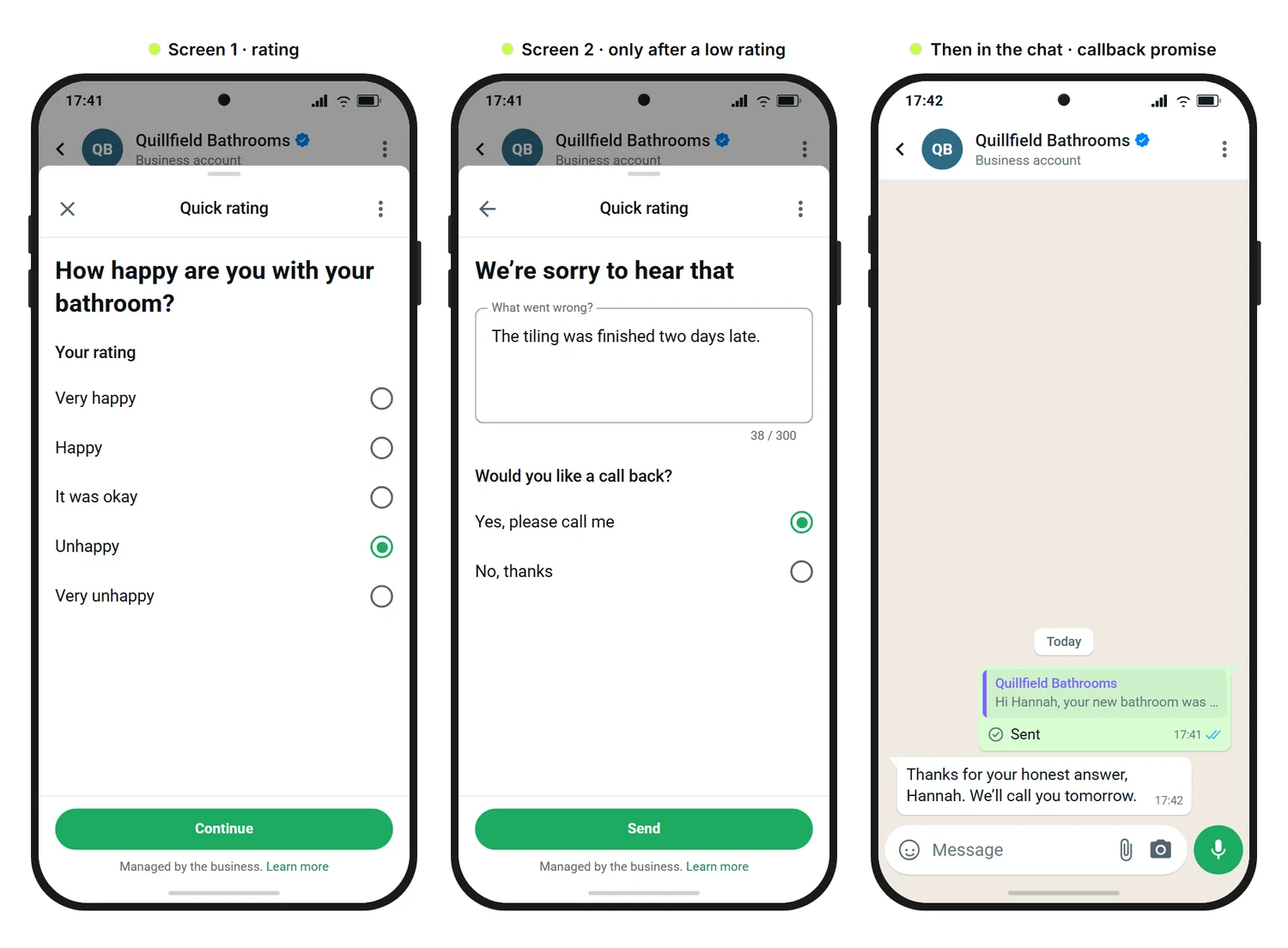
When the flow follows up straight away and your team hears about it. On its own, a low rating is just a number. Quillfield Bathrooms does it in three steps: Hannah rates the bathroom “Unhappy”, an extra screen asks what went wrong and whether she'd like a call back, and once she submits, a message in the chat confirms the callback. She doesn't get the Google review link at that moment.
How does the flow branch on a low rating?
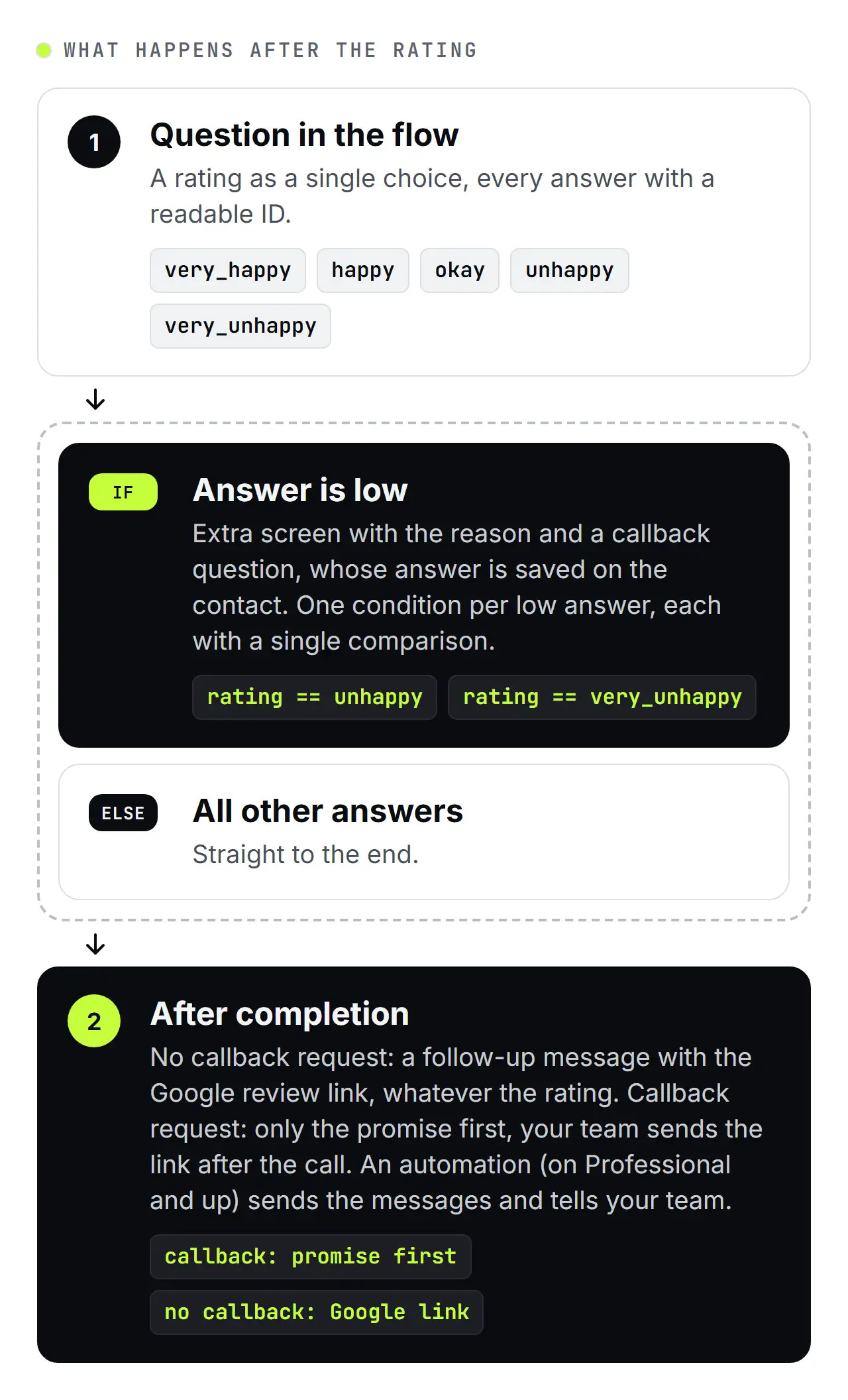
With the If / Else logic component. Each condition checks exactly one comparison, for example whether the answer equals the option unhappy. So you create one condition for each low option, here one for unhappy and one for very_unhappy. Anyone who picks one of them follows the If branch to the extra screen; everyone else follows the Else branch straight to the end. You build the extra screen yourself in the editor, as there's no ready-made feature for it: a short apology, a field for the reason and the callback question.
Only promise a callback that someone will actually make: decide in advance who rings back and by when.
How does your team find out about a callback request?
Through a tag and, on Professional and up, an automation. With Tag contact on completion, everyone who finishes the survey gets a tag such as “Bathroom survey”. With Save the answer, the answer to the callback question also lands on the contact, for example as a tag. On Basic, you filter your contacts by that tag and ring back. On Professional and up, the WhatsApp Flow completed trigger starts an automation that can branch on the saved answer, assign the chat round-robin to a team member, email your team and tell Hannah when she'll hear from you.
Who gets the Google link, and when?
Everyone who doesn't ask for a callback gets a follow-up message with the link to your Google Business Profile once they've completed the survey, happy or not. The link sits in a message of its own in the chat, not in the form. Anyone who, like Hannah, asks for a callback first gets only the promise, because asking for a review while a complaint is still open feels out of place. Your team sends Hannah the link by hand after the call, or as a template if the 24-hour window has closed by then.
On Professional and up, an automation sends these messages straight after the survey: the WhatsApp Flow completed trigger, or the completed outcome of the Send WhatsApp Flow step, leads to a condition on the saved callback answer, which then sends either the promise or the link. Without an automation, your team sends both by hand. So the callback request only decides the timing; the rating never decides who gets asked. That matters because Google's policies forbid selectively asking satisfied customers for reviews, and sending the link only to customers who rated you well would be exactly that. Google's help on reviews has tips on asking customers with a link, and Too Few Reviews? Use WhatsApp Broadcasts as Your Review Booster shows how to prompt reviews with broadcasts.
How do you analyse the answers?
In a spreadsheet, with the raw data SendSeven gives you. The survey is a flow, not a separate survey tool with ready-made reports, and its answers turn up in three places:
- As a card in the chat: As soon as Hannah submits, a Flow completed card with the questions and answers appears in the conversation in your inbox.
- In the response table: Each flow has its own analytics with a response table that you can export as a CSV file.
- On the contact: Whatever you stored with Save the answer as a field or tag sits on the contact and can be passed on to your CRM by webhook or the REST API, as the webhook setup guide shows.
To be upfront: there are no ready-made NPS or CSAT reports and no trend over time, and as a WhatsApp Flow only runs on WhatsApp, the survey only reaches customers on that channel. Two details help with the analysis. As the tip above says, the table shows the option IDs. And times in the analytics are in UTC, while the chat shows your local time. In the UK that's a one-hour difference during British Summer Time, which matters if you analyse by day or time of day.
How do you calculate your NPS?
NPS is the percentage of promoters (scores 9 and 10) minus the percentage of detractors (0 to 6). Passives (7 and 8) only count towards the total. Export the response table as a CSV file and open it in Excel or Google Sheets. Say the answers to the NPS question are in column B from row 2, using the IDs nps_0 to nps_10 from the tip. In a helper column C, pull the score out of the ID with =IF(B2="","",VALUE(MID(B2,5,2))) in cell C2 and copy it down; rows without an NPS answer stay empty. One formula then gives you the NPS: =(COUNTIF(C:C,">=9")-COUNTIF(C:C,"<=6"))/COUNT(C:C)*100. It subtracts the detractors from the promoters and divides by the number of scores.
| Group | Scores | IDs | Answers in the example |
|---|---|---|---|
| Promoters | 9 to 10 | nps_9, nps_10 | about 55 |
| Passives | 7 to 8 | nps_7, nps_8 | about 30 |
| Detractors | 0 to 6 | nps_0 to nps_6 | about 15 |
| NPS | (promoters minus detractors) ÷ number of answers × 100 | about 40 | |
NPS always lies between minus 100 and plus 100. With only a few answers it swings widely, so read it as a direction, not a precise measurement. CSAT follows the same pattern: divide the number of very_happy and happy answers by the number of answers to the CSAT question and multiply by 100. That's your percentage of satisfied customers.
If you change a question later, edit the published flow and publish it again; SendSeven creates a new version in the background. A template with a Flow button keeps opening the old version until you resubmit the template to Meta.
The short version: A survey with a WhatsApp Flow asks a few questions at the right moment, turns a poor rating into a callback and gives you the raw data for CSAT and NPS, which you work out yourself.
All the features are on the WhatsApp Flows and Flow Builder pages, the WhatsApp Flows guide walks you through building and publishing a flow, and the contact management use case shows how teams organise contacts, fields and tags.
Further reading:
- WhatsApp Flows explained: forms inside the chat for small businesses
- WhatsApp Flow, buttons or chatbot: which fits which question?
- Qualify leads with a WhatsApp Flow: all the details at once
- WhatsApp Flows and GDPR: consent and data protection
- Too Few Reviews? Use WhatsApp Broadcasts as Your Review Booster
Frequently asked questions
What is the difference between CSAT and NPS?
CSAT measures how happy a customer was with one specific job, such as a delivery or an appointment, usually on a scale of 1 to 5. NPS asks how likely they are to recommend you, on a scale of 0 to 10, and says more about the relationship as a whole. So ask for CSAT straight after a job and for NPS less often. In a short survey, one of the two plus an open question is enough.
Why ask in WhatsApp instead of sending an email survey?
Because the customer sees the question where they already chat with you: no link to open, no browser, and tapping instead of typing. The answer is also tied to the contact, so your team sees it in the chat and can respond. How many customers reply depends on your business, so there's no general response rate to quote. An email survey still makes sense for customers who don't message you on WhatsApp or haven't opted in.
What do I need to watch when asking for Google reviews?
Ask everyone who completes the survey, not only the satisfied ones; anyone waiting for a callback gets the request after the call. Google's policies forbid selectively asking satisfied customers for reviews, and they also forbid offering money, goods or services in return for a review. Word the request as an offer, such as “If you'd like to, …”, and check Google's current rules yourself. This isn't legal advice.
What does a customer survey with a WhatsApp Flow cost?
WhatsApp Flows is in beta. Completed flows are free during the beta. Every flow you send counts as one message from your plan's message allowance, just like any other WhatsApp message, and Meta's fees apply as usual. Once WhatsApp Flows is generally available, an additional charge per completed flow will apply. We'll let you know well in advance.
For the full picture, see the cost section of WhatsApp Flows explained.
When is a WhatsApp survey the wrong tool?
When the survey has to be anonymous, or when your customers don't use WhatsApp with you. The answer is always tied to a contact, and a WhatsApp Flow only runs on WhatsApp. A WhatsApp survey suits businesses that already chat with their customers there, such as tradespeople, salons, cafés and local shops, and it needs a contact who has opted in.