What Is a Business Messenger? Plainly Explained
SendSeven Team, Editorial Team
A business messenger is the software a team uses to answer customer messages together, not a chat tool for coworkers. We explain what it does, why a company phone starts slowing things down once a second person joins, which eight channels belong to it, and what getting started costs.
TL;DR
A business messenger is software that lets a team answer customer messages together, not a chat tool for coworkers. WhatsApp, email, Instagram, and other channels flow into one shared inbox. Each teammate gets their own login, every conversation keeps a full history, and nobody has to hand around a company phone.
Your customers do not install anything new: they keep writing wherever they already are. With SendSeven, this starts on the Basic plan at 49 € a month, with unlimited teammates.
What Is a Business Messenger?
A business messenger is software for the company side of customer conversations. Messages from WhatsApp, email, Instagram, Facebook Messenger, live chat, or Telegram land in one shared inbox. Teammates work from that inbox with their own logins, see the same history, and split up the replies.
Your customers notice none of this, and install nothing. They keep writing through whichever app they already use. Only the side that answers changes.
Several terms describe the same thing: team inbox, shared inbox, customer messaging platform, unified inbox. We use business messenger here, because that is the phrase most business owners type first when they start searching.
One clarification saves confusion later. Business messenger is used in English for two different things. Search for it and you mostly find internal team chat apps, the tools coworkers use to message each other instead of texting on personal phones. Slack and Microsoft Teams sit in that group. The second meaning, and the only one this article covers, is software for customer messages: customers write in from outside, and a team answers together. The two kinds of software share a name but solve different jobs. Plenty of businesses need both, just not the same tool for each.
It also helps to rule out what it is not. Not a newsletter tool, even though you can message many recipients at once. Not a CRM, either, even though it stores contacts and their history. Its job is the ongoing conversation: sorting, assigning, and answering what comes in. More on the term is in the glossary entry for unified inbox.
What’s Different from WhatsApp on a Company Phone?
Most businesses start with the free WhatsApp Business App on a company phone. That works as long as one person is answering. Once it becomes two or three people, you hit four limits: the device, the overview, ownership, and history.
A number in the Business App runs on one phone, with a handful of linked devices attached. All of them show the same view, and the phone stays the anchor. Whoever clocks out takes the inbox home, or locks the device in a drawer. When a teammate leaves the company, the conversation history leaves with their login.
| Question | Company Phone with the Business App | Business Messenger |
|---|---|---|
| How many teammates can answer at once? | One phone plus linked devices, all sharing the same view | As many as you want, each with their own login |
| Who owns a given request? | Decided by whoever speaks up first, or by chance | The conversation is assigned to one person |
| Where does the conversation history live? | On the device, tied to the phone number | In the contact profile, independent of any device |
| What happens when staff change? | Access and history leave with them | Access is revoked; the history stays |
| Do other channels come along? | No, the app only knows WhatsApp | Yes, eight channels in the same view |
| Are automated replies possible? | Away message and greeting message | Saved replies and templates; Professional and up add rules and AI assistants |
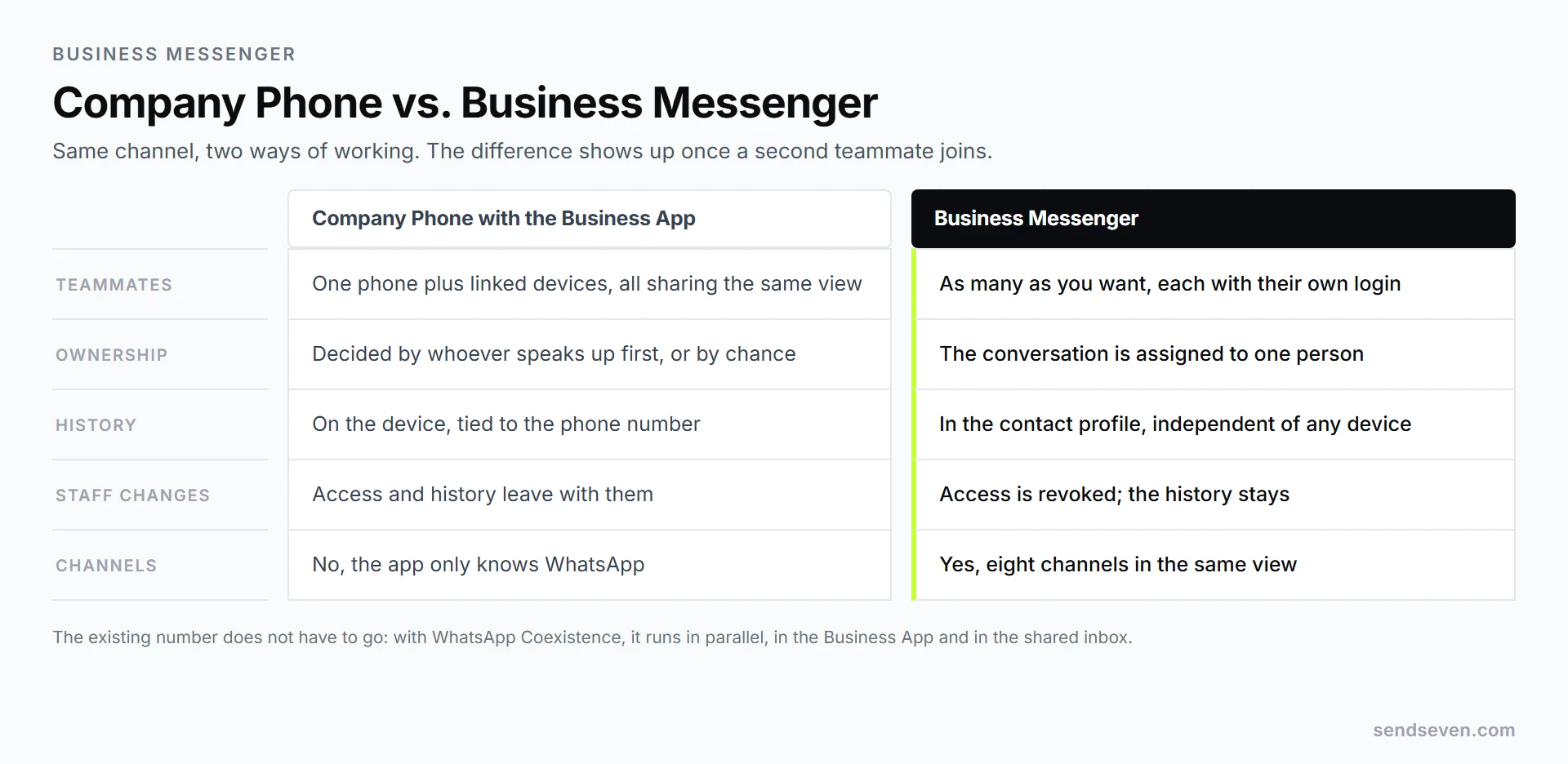
One question causes a lot of hesitation: does the old number have to go? No. With WhatsApp Coexistence, your existing number runs in parallel: the Business App stays on the phone, and the shared inbox comes in alongside it. Which of the three routes fits you is covered in our comparison of the Business App, the API, and Coexistence.
Which Channels Belong to a Business Messenger?
The word says “messenger,” but what it really covers is every written way a customer can reach you. At SendSeven that means eight channels. You do not have to switch all of them on, and most businesses start with two.
| Channel | What it is good for day to day | Specific trait |
|---|---|---|
| Inquiries, appointment confirmations, follow-up questions | Needs opt-in consent; outbound messages need an approved template | |
| SMS | Short reminders when you cannot assume a customer has an app | Reaches any phone, priced per message |
| Quotes, invoices, anything with an attachment | Cheapest channel, slowest reply time | |
| First contact, questions about products and posts | Runs through direct messages; no Facebook Page required as of August 2026 | |
| Facebook Messenger | Inquiries coming from your Facebook Page | Requires a Facebook Page |
| Live Chat | Visitors who are on your website right now | No contact details needed; the history is still saved |
| Telegram | Tech-savvy audiences, clubs, online communities | A niche channel in the US and UK |
| Browser Push | Alerts to website visitors who opted in | One-way; there is no reply channel back |
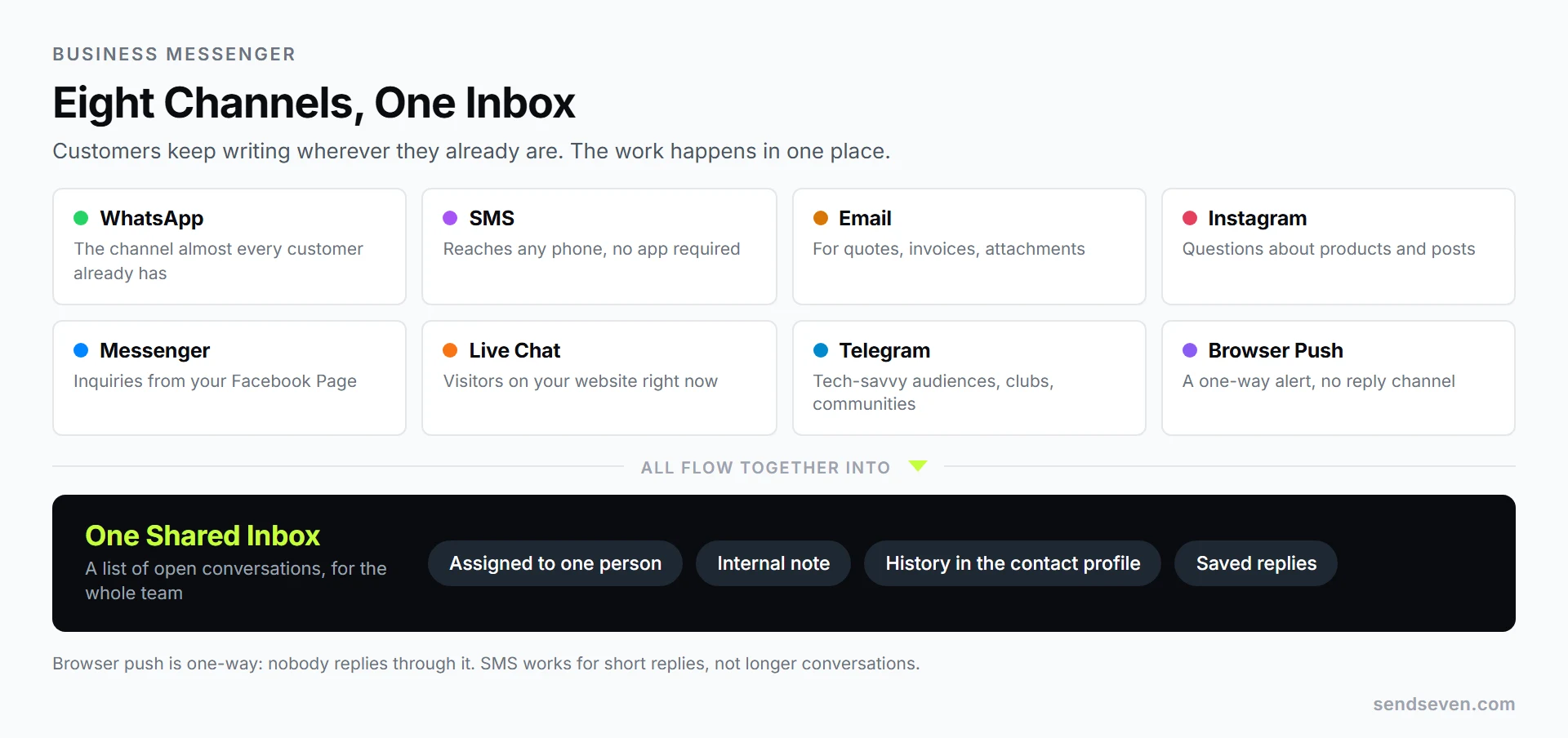
One limit matters for planning: browser push is one-way. You can use it to notify, but nobody replies back through it. SMS accepts short replies, such as confirming an appointment, but is not a place for longer conversations. The other six channels are built for a real back-and-forth.
Which Channel Fits Which Job?
The short rule of thumb: WhatsApp for anything that needs to move fast and where you already have the phone number. Email for anything with an attachment or that needs a paper trail. Live chat for visitors who are still anonymous on your website. Instagram for first contact that starts from a photo or a post.
Those four cover almost every business before it even considers a fifth channel. The most common mistake is not picking the wrong channel, it is switching on too many at once. One channel that nobody reads does more damage than one you never offered.
If you want to go deeper, two articles pick up right here. Our comparison of WhatsApp, SMS, and email lines up delivery, reply times, and cost across the three channels. The guide to multi-channel messaging strategy walks through all eight channels and shows what a channel strategy looks like over several years. What multichannel actually means is in the glossary.
What Belongs in the Core Feature Set?
Feature sets differ between vendors, but six things should be in any business messenger. Check this in a trial, not in a brochure.
- Shared inbox with assignment. Every conversation can be handed to one person, so it is visible who is answering.
- Internal notes. A note that only the team sees, so the next teammate knows where things stand.
- Contact profile with history. Every past message from a person in one place, across every channel. How several records of the same person become one profile is covered in the article on contact management across channels.
- Saved replies. Write common answers once and drop them in with a shortcut, instead of retyping them every day.
- Templates for WhatsApp. Anyone messaging customers first needs a template approved by Meta for it. Details are in the glossary entry for message template.
- Reporting. How many inquiries come in, how long the first reply takes, which channel is growing.
Beyond that starts what you will not need on day one: automated flows, AI assistants, and dedicated inboxes per team. At SendSeven, those sit in the Professional plan. Connecting other software through the API, webhooks, Zapier, and Make is already included on Basic. They usually make sense only once you have watched a few weeks of which questions keep coming back. How an AI chatbot works in practice is explained in the linked article without the jargon.
What Does a Business Messenger Cost?
At SendSeven, you pay a fixed monthly amount that includes a message allowance. The entry point is the Basic plan at 49 € a month, with 2,500 messages included. Every additional message costs 0.02 €, or 0.01 € for email. The number of teammates is not capped, so there is no per-head charge.
The Professional plan, at 79 €, includes the same allowance and additionally unlocks the AI assistants, the knowledge base, the Flow Builder, and dedicated inboxes. For higher volume there is Scale at 199 € with 10,000 messages, and Enterprise at 499 € with 40,000 messages. The full breakdown is on the pricing page.
Two points get missed when businesses do the math.
Incoming messages are always free. Whatever your customers write to you is never billed and never counts against your included allowance. You only pay for what you send out.
Meta bills its own WhatsApp rate directly. When your team messages a customer first over WhatsApp, Meta charges for that template message; the rate depends on the recipient’s country and the message category, and current pricing sits on Meta’s WhatsApp Platform Pricing page. Replies within 24 hours of a customer’s message were free at Meta until September 30, 2026. Since October 1, 2026, Meta charges them at the utility rate of the recipient’s market, with the first 1,000 per business phone number and month free. Once your plan’s included allowance runs out, our per-message rate applies on top: a fixed amount per message, not a percentage of Meta’s price list. A full worked example is in our article on WhatsApp Business API pricing.
For a business with a handful of teammates and a few hundred inquiries a month, that typically works out to the base plan plus a small variable amount on Meta’s side of the bill. The included allowance stretches further in practice than the number 2,500 sounds at first, because incoming messages never count against it.
What to Settle Before You Start
Five questions save work later. None of them are technical.
Which number will you use? Use a business phone number, not a teammate’s personal number. A number already running in the Business App can carry over through Coexistence. A landline number works too, confirmed once by phone call, so it needs to accept an international call.
Do you have consent? Before messaging customers over WhatsApp, you need their opt-in. This is not a formality: Meta requires consent for marketing messages, and complaints or blocks pull down your number’s quality rating. What clean opt-in looks like is in the glossary entry for opt-in.
Who answers, and when? Decide who owns which hours, and what happens outside them. An honest answer on when a reply is coming beats silence. Sending it automatically is available from Professional up; doing it by hand works on any plan.
How fast do you want to reply? WhatsApp runs on a 24-hour window. Inside that window after a customer’s last message, you can reply freely; once it closes, only an approved template goes through. That is the practical reason to answer inquiries the same day.
Is compliance handled? In the US, unsolicited marketing texts fall under the TCPA and outbound marketing email under CAN-SPAM: get consent before sending marketing messages, honor opt-outs right away, and keep a consent record. If you also serve customers in the EU, GDPR adds a data processing agreement with your vendor, an entry in your record of processing activities, and a privacy notice covering messaging channels. SendSeven hosts the platform within the EU; check the data processing agreement for which subprocessors are involved and where.
How a Small Business Launches in One Week
Setup is rarely the problem. The real work is making replying a habit. This order has proven itself.
- Day 1: Access and number. Create the account, invite teammates, connect your WhatsApp number. If you are keeping an existing number, choose Coexistence. The detailed steps are in our guide to setting up a WhatsApp business account.
- Day 1: Add a second channel. Usually email, since the inbox already exists. That shows you right away what the shared inbox actually does.
- Day 2: Set ownership. Who handles what, who checks the inbox first each morning, how conversations get assigned.
- Day 2: Write five saved replies. Hours, directions, pricing, scheduling a call, and asking for an order number. You do not need more than that at the start.
- Day 3: Announce your availability. Put your reply times in the WhatsApp profile and on your website, with a real answer to when a reply is coming. Automated away messages sit in the automation set and are available from the Professional plan.
- Day 3 through 7: Keep a running list. Write down every question that comes up twice. That list becomes the basis for templates and, later, an assistant.
- End of the week: Make the channel visible. Add the WhatsApp link to your email signature, your website, and your Google Business Profile. Our WhatsApp link generator builds a ready-made link.
After that week, the setup will not be perfect, but you will have the two things everything else builds on: one place where every inquiry arrives, and a list of the questions that keep repeating.
Frequently Asked Questions (FAQ)
What is the difference between a business messenger and the WhatsApp Business App?
The Business App is a free phone app for one channel, with one shared view across every linked device. A business messenger is software for the whole team: several channels, a separate login per teammate, conversation assignment, and a history that is not tied to any one device.
Is a business messenger the same as Slack or Microsoft Teams?
No, the direction is different. Slack and Microsoft Teams are built for communication within the team, between coworkers. A business messenger, in the sense used in this article, takes in messages from your customers, arriving from outside. You can run both at once; neither replaces the other.
Do my customers need an app for this?
No. Your customers keep writing over WhatsApp, Instagram, or email, exactly as before. The business messenger sits only on your side.
Can I keep using my existing WhatsApp number?
Yes. With WhatsApp Coexistence, your number runs in the Business App and in the shared inbox at the same time. At SendSeven, that is included on every plan from Basic up.
How many teammates can work in it?
At SendSeven, every plan allows an unlimited number of users. You pay for the plan, not for headcount.
Isn’t this overkill for a three-person business?
Three people is exactly the point where a company phone starts creating work. When two people answer the same message, or a request sits untouched because everyone assumed someone else had it, a shared inbox is the simpler fix.
Do I have to use all eight channels?
No, and you should not try to at the start. Two channels that get answered reliably beat eight that are half-covered. You can turn on more later without switching tools.
Conclusion
A business messenger does not solve a technical problem. It solves an organizational one. The messages arrive either way, spread across WhatsApp, email, Instagram, and your website. The only question is whether they land in one place or sit scattered across several devices and several people’s heads.
Three decisions matter for getting started: which number you use, which two channels you can genuinely stay on top of, and who checks the inbox first each morning. Everything else, from templates to automated flows to an assistant, follows from the questions you write down in that first week.
If you want to try it: the shared inbox with every channel is available at SendSeven on the Basic plan, and you get to keep your existing WhatsApp number.